






Windows 10 Azure AD Join Automatic Intune Enrollment
Let’s discuss the Windows 10 Azure AD Join Automatic Intune Enrollment. In this post, I will provide you with the experience of Windows 10 1703 (RS2) Azure AD join and automatic MDM (Intune) enrollment.
As you can see in the above video tutorial, this is a real-time experience of Windows 10 1703 Azure AD join and Intune auto-enrollment.
Windows 10 1703 is the latest version of the Windows 10 production build, also known as the Red Stone 2(RS2) release. The Windows team has done great work to improve the Out-of-Box Experience(OOBE) of Windows 10 1703. A previous post explains the in-depth process of AADJ and MDM auto-enrollment: “How to Join Windows 10 1607 Machines to Domain or Azure AD.”
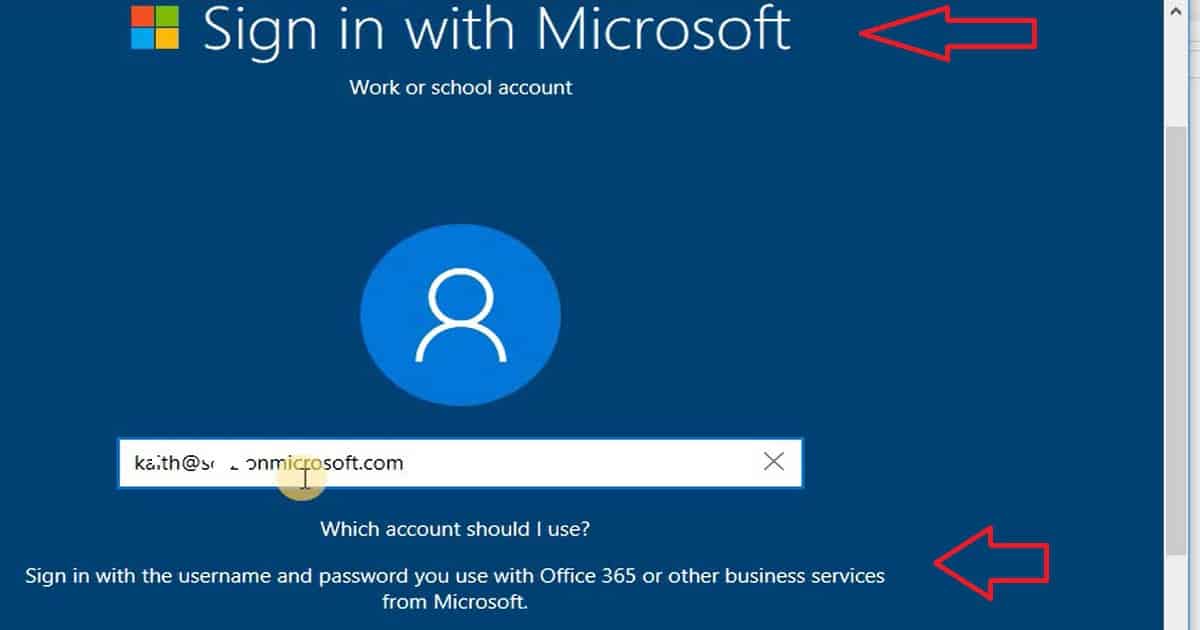
Signing in with a Microsoft School or Work account is the first screen in the Windows 10 1703 Azure AD join OOBE. A note on the same screen helps users select the account they want to use “Sign in with the username and password you use with Office 365 or business services from Microsoft”.

Yes, this is a generic kind of message. It would be more helpful if Microsoft could explain to the user how to use their corporate account rather than using technical terms like Office 365 and Business Services from Microsoft.
- Windows 10 Intune Enrollment Manual Process AAD Registration
- Intune Company Portal Setup for Personal Windows 10 Device Intune Enrollment Options
- How to Join Windows 10 1607 Machines to Domain or Azure AD
Table of Contents
How to Perform Windows 10 1703 AAD Join and Intune Enrollment
The video below offers a comprehensive, step-by-step guide on performing a Windows 10 1703 Azure Active Directory (AAD) join and enroll your device in Microsoft Intune. It covers all the necessary steps, from initiating the AAD join process to successfully completing the Intune enrollment, ensuring that your device is properly managed and secured within your organization’s network.
Windows 10 Azure AD Join Automatic Intune Enrollment
This is the sign-in screen. Please sign in using the username and password associated with your Office 365 account or any other Microsoft business services.
The Windows 10 1703 OOBE screen allows the user to choose a traditional domain join option. It also allows the user to create a local user account and log in with that account. The Windows 10 1703 OOBE experience has been greatly improved.
It will ask to connect to a Wi-Fi network and allow the user to connect to web-based authenticated Wi-Fi routers (not all? I need to test this further). Once connected to the internet, it will check for the latest software updates available and install them.
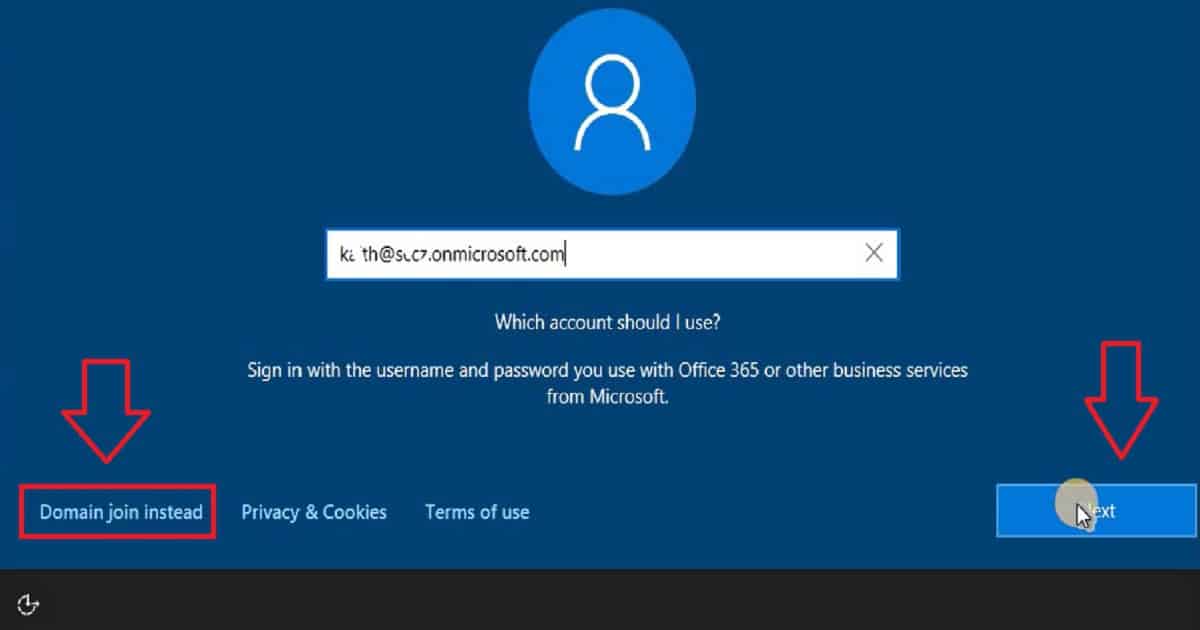
Windows 10 Azure AD Join Experience?
Windows 10 1703 Azure AD join is almost fully automated once users enter their user name and password in the OOBE mentioned above screen. However, user input is required on one particular screen: the screen for privacy settings.
Once the user has Windows 10 1703 privacy settings, the device will automatically log in with the user name and password. Is this a new SSO for Windows 10 1703 Azure AD join? You can confirm the AAD Join from the Settings—Accounts section in Windows 10 1703.
| Your Informations |
|---|
| Email and App Accounts |
| Sign in Options |
| Access work or school |
| Other people |
| Sync your Settings |
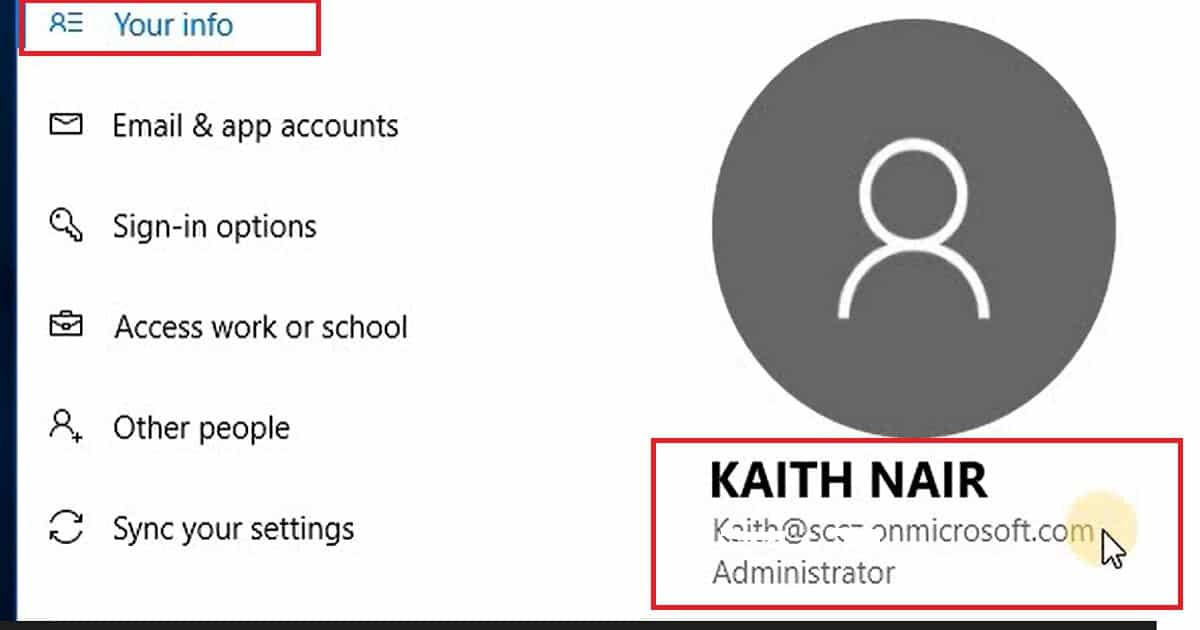
Windows 10 MDM Intune Auto Enrollment Experience
Once the Windows device is joined to Azure AD, it should automatically enroll in Intune management. To get this experience, you should have enabled the MDM auto-enrollment option in your Azure AD. In my experience with Windows 10 1703, I got the encryption policy popup from the Intune compliance policy within a few minutes of the first login to the device.
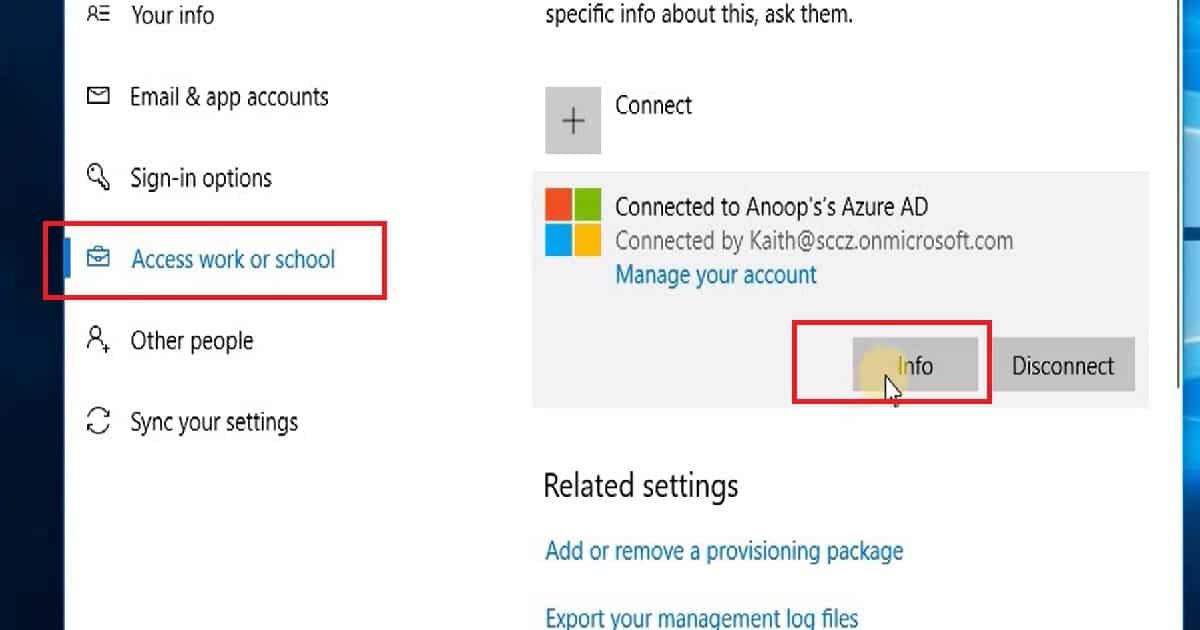
The user can also check the Intune enrollment from the School or Work Account section in the Windows 10 settings menu. The Windows 10 MDM stack’s GUI has changed regarding School or Work account settings. The Windows 10 work account added to the device does not have a manage tab. Don’t worry about that because that is a new design for Windows 10 1703. The Windows 10 work/school account setting has only two tabs: Info and Disconnect.
How do you manually sync or check for the new Intune policies in a Windows 10 1703 device? The option is to click on Settings—Accounts—Access Work or School Account—Info—Sync. This will initiate an immediate policy sync with Intune services in the cloud. Afterwards, the user’s Windows 10 device will receive the latest policies from Intune.
We are on WhatsApp now. To get the latest step-by-step guides, news, and updates, Join our Channel. Click here. HTMD WhatsApp.
Author
Anoop C Nair is Microsoft MVP! He is a Device Management Admin with more than 20 years of experience (calculation done in 2021) in IT. He is a Blogger, Speaker, and Local User Group HTMD Community leader. His main focus is on Device Management technologies like SCCM 2012, Current Branch, and Intune. He writes about ConfigMgr, Windows 11, Windows 10, Azure AD, Microsoft Intune, Windows 365, AVD, etc.


Discussion