






SCCM SQL InComingMessagesInQueue Backlog Issue
Let’s check how to troubleshoot SCCM SQL IncomingMessagesInQueue Backlog Issues. This post discusses SCCM SQL-Based Replication IncomingMessagesInQueue Backlog Issue ConfigMgr SQL Troubleshooting.
My SCCM CB upgrade experience is explained in the following post, “SCCM CB Upgrade of CAS and Primary Sites A Real-world Experience“. During the SCCM/ConfigMgr CB upgrade process, we noticed a backlog of files in SQL DB.
Millions of messages are stuck in the transmission queue. This post will share my experience with the “SCCM SQL Based Replication IncomingMessagesInQueue Backlog Issue.”
This post will provide comprehensive details regarding the SCCM SQL InComingMessagesInQueue backlog issue. We will delve into the causes of this problem, its potential impacts on SCCM operations, and practical strategies to address and mitigate the backlog issue.

Table of Contents
- Troubleshoot and FIX SCCM SQL Backlog Issues using SSMS
- FIX SCCM SQL-Based Database Replication Failure Between CAS Primary
- SCCM SQL-Based Replication Guide
- FIX SCCM SQL Replication Issues Using Replication Link Analyzer
- FIX: SCCM Site Database Has A Backlog Of SQL Change Tracking Data
- Troubleshoot and FIX SCCM SQL Backlog Issues
How to Solve the InComingMessagesInQueue Backlog Issue?
SQL-based replication links between CAS and Primary servers entered the “Link Degraded” state. We checked the RCM.log and RCMCTRL.log to contain the replication links between SCCM CB CAS and Primary servers. We didn’t find anything specific in the log files.

My blog post explains “SCCM SQL-based Replication Monitoring and Troubleshooting“. More details SCCM Site to Site replication and SQL Based Replication Guide. The table below helps you to show quick tips on SCCM CB SQL-based replication troubleshooting.
| Quick Tips on SCCM CB SQL-based Replication Troubleshooting |
|---|
| SCCM Console Monitoring Status Gives an idea of where to look |
| SCCM Console Replication Link Checker |
| Status Messages for RCM and Human. Also, HMAN.log and RCM.log |
| RcmCtrl.log is the next place to look for prerequisite errors of replication |
| SQL Management Studio – spDiagDrs store procedure to check the backlog |
| vLogs – BCP and SQL errors – to get more errors |
Use the spDiagDrs store procedure to Check the Backlog
We opened SQL Management Studio to run the stored procedure “spDiagDrs” to check the replication status between SCCM CB CAS and Primary servers.
Even though the site status shows ACTIVE in spDiagDrs, the replication status changed/flickered around from Active to Link Degraded and back. We could also see that the processing of messages was prolonged.
| IncomingMessagesInQueue |
|---|
| 119704 |
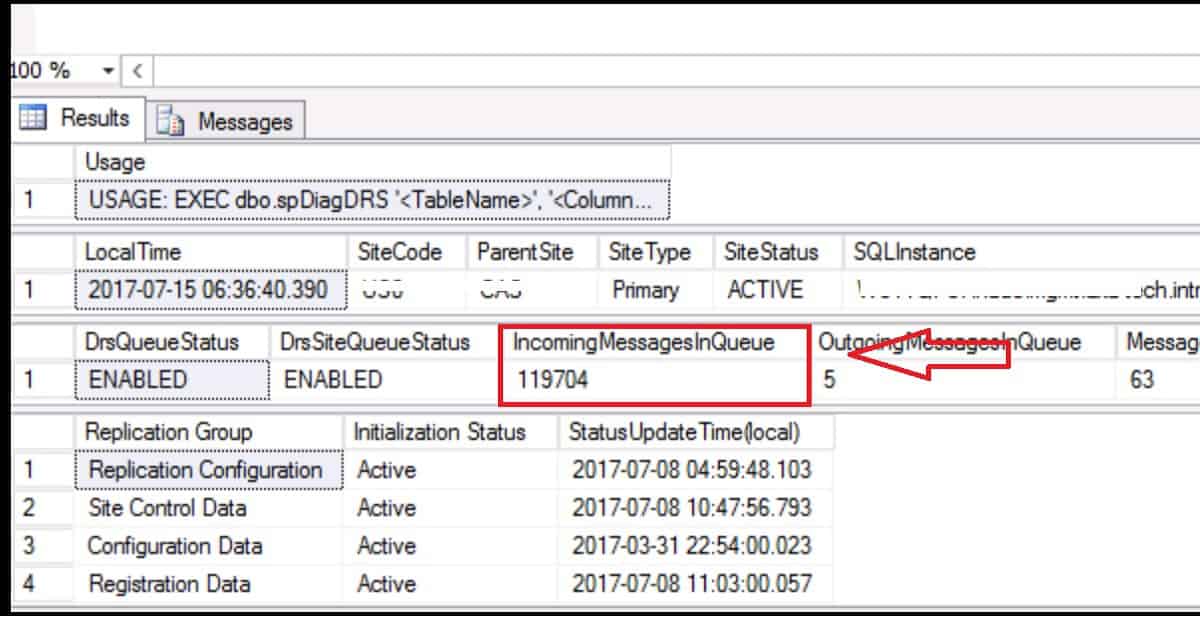
Resolution to InComingMessagesInQueue Backlog Issue
Microsoft recommended installing the KB4013098 patch on SQL 2014 on all the SQL boxes in the hierarchy. We have tested this with the CAS server and one of the primary servers. The results were good, and the link status became stable after applying SQL 2014 CU KB4013098.
The cumulative update package 5 (build number: 12.0.5546.0) for Microsoft SQL Server 2014 Service Pack 2 (SP2). This update contains fixes released after the release of SQL Server 2014 SP2.
I recommend installing this CU on all SQL servers on your SCCM CB hierarchy.
We are on WhatsApp now. To get the latest step-by-step guides, news, and updates, Join our Channel. Click here. HTMD WhatsApp.
Author
Anoop C Nair is Microsoft MVP! He is a Device Management Admin with more than 20 years of experience (calculation done in 2021) in IT. He is a Blogger, Speaker, and Local User Group HTMD Community leader. His main focus is on Device Management technologies like SCCM 2012, Current Branch, and Intune. He writes about ConfigMgr, Windows 11, Windows 10, Azure AD, Microsoft Intune, Windows 365, AVD, etc.




Thanks
I am having similar issues. Was there a fix in SQL 2012?
StaffWhat is the exact issue? Can you please share more details? Backlog is quiet normal in replication