






Intune Android Work SCEP Certificate Deployment Issue
Let’s discuss the Intune Android Work SCEP Certificate Deployment Issue. SCEP certificate deployment for Intune-managed Android for Work devices is tricky. This process is similar to that of iOS. However, because of “Android for Work” containerization, confirming whether the SCEP certificate is successfully delivered to the device is a bit tricky.
This post details the “Intune Android Work SCEP Certificate Deployment Issue.” It also includes some Android apps to help you obtain more details on device certificate availability.
SCEP Certificate Deployments Posts—The following are two posts and video tutorials to give you more details about SCEP certificates. I explained the prerequisites of SCEP cert deployment, creation, and deployment process of SCEP certificates: How to Create and Deploy SCEP Certificate to iOS Devices and How to Create and Deploy SCEP Certificate to Windows Devices.
Why do we need to deploy SCEP certificates to Devices? To provide corporate resource access to the users through VPN, WiFi, or email profiles, you can authenticate these connections using certificates. This gives more security and removes the need to enter usernames and passwords to establish connections.

Table of Contents
- Windows and Android Support for 4096-bit Key Size for Intune SCEP and PFX Certificate Profiles
- Learn The Basic Concepts Of PKI – Intune PKI Made Easy With Joy
- Knowing SCEP – The General Workflow – Intune PKI
- Fix SCCM SCEP Related Issues
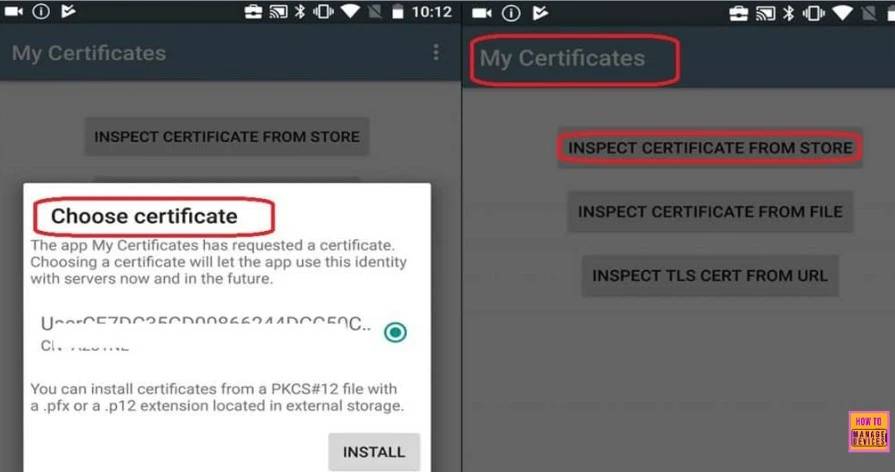
Intune Android Work SCEP Certificate Deployment Issue
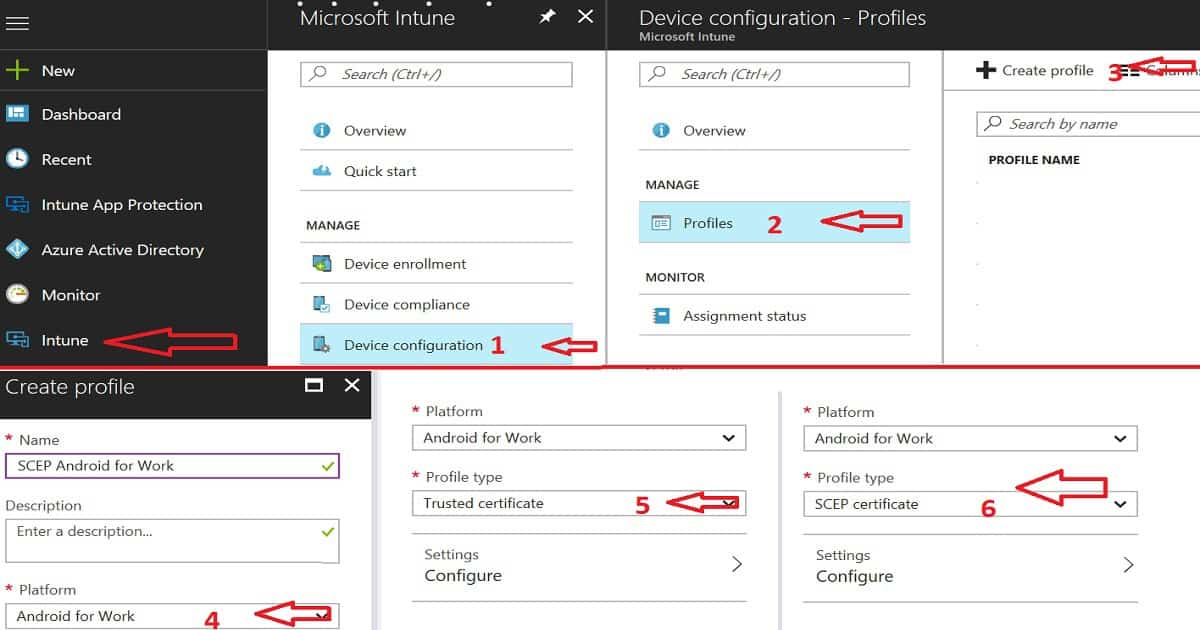
We can use Intune to deploy the SCEP certificates to Android for work-enrolled devices. Android for Work SCEP certificate deployment using Intune is similar to iOS. You need to follow the below details.
| Intune Android Work SCEP Certificate Deployment Issue |
|---|
| Make sure the SCEP certificate infrastructure is in place |
| Create and Deploy a Root or Intermediate certificate with a trusted certificate as the profile type. Select Android for Work as a platform |
| Create and Deploy SCEP certificate with SCEP cert as profile type. Select Android for Work as a platform |
HTMD Learning Intune SCEP Certificate Deployment Session by Joy Hrs User Group Event Session
In this video, you will get all the details about the following. Learn The Basic Concepts of PKI – Intune PKI Made Easy With Joy Part-1 Knowing SCEP – The General Workflow Intune PKI Made Easy With Joy – Part 2 Intune SCEP Deep Dive – Intune PKI Made Easy With Joy – Part 3 Intune SCEP Certificate Workflow Analysis – Intune PKI Made Easy With Joy – Part 4.
Android Work – SCEP Certificate Deployment Issue? – Intune Android Work SCEP Certificate Deployment Issue
The Android device has been successfully enrolled in Intune for management. The user was able to access the email and other company resources. Also, the device received the ROOT certificates deployed via Intune.
I could see the ROOT certificate on an Android device with the certificate application. However, I could not trace the SCEP certificate on an Android device.
Intune A4W SCEP Certificate Deployment Troubleshooting Steps?
We have checked the CA and NDES servers to see if everything works fine. We also confirmed that there are no errors in the NDES and Event logs. We collected the following logs.
IIS logs:
C:\inetpub\logs\LogFiles\W3SVC1\u_ex<YYMMDD>.log
NDESPlugin:
<C:\Program Files\Microsoft Intune\NDESPolicyModule\Logs\NDESPlugin.log>
NDES Connector Service:
 <C:\Program Files\Microsoft Intune\NDESConnectorSvc\Logs\Logs\NDESConnector_<YYYY-MM-DD_xxxxxxxx>.svclog>
 <C:\Program Files\Microsoft Intune\NDESConnectorSvc\Logs\Logs\CertificateRegistrationPoint_<YYYY-MM-DD>.svclog>
Also, check the Company Portal logs from the Android for Work device. The log shows the object ID (OID) for the SCEP client certificate.
926 2017-10-30T13:29:47.8500000 VERB Event com.microsoft.omadm.providerhive.ProviderHiveVerbose 11575 508
ADD ./Vendor/MSFT/NodeCache/SCConfigMgr/Nodes/47/ExpectedValue unknown:<ConfigurationParameters xmlns=
"http://schemas.microsoft.com/SystemCenterConfigurationManager/2012/03/07/CertificateEnrollment/ConfigurationParameters">
<ExpirationThreshold>20</ExpirationThreshold><RetryCount>3</RetryCount><RetryDelay>1</RetryDelay><TemplateName />
<SubjectNameFormat>1041824</SubjectNameFormat><SubjectAlternativeNameFormat>33432</SubjectAlternativeNameFormat>
<KeyStorageProviderSetting>0</KeyStorageProviderSetting><KeyUsage>160</KeyUsa
ge><KeyLength>2048</KeyLength><HashAlgorithms><HashAlgorithm>SHA-2</HashAlgorithm></HashAlgorithms><NDESUrls><NDESUrl>https://ACNPRS.msappproxy.net/certsrv/mscep/mscep.dll</NDESUrl></NDESUrls><CAThumbprint></CAThumbprint><ValidityPeriod>1</ValidityPeriod><ValidityPeriodUnit>Years</ValidityPeriodUnit><EKUMapping><EKUMap><EKUName>Client Authentication</EKUName><EKUOID></EKUOID></EKUMap></EKUMapping></ConfigurationParameters>
The following log trace confirms that the Android device is getting the SCEP cert. However, the SCEP certificate is not visible on Android devices.
2017-10-30T14:16:08.1030000 VERB Event com.microsoft.omadm.providerhive.ProviderHiveVerbose 25939 3582 GET ./Vendor/MSFT/CertificateStore/SCEP/ModelName=AC_0;Hash=-11293741923/EncodedCertificate returned chr:
Why is the SCEP Certificate Not Visible on the Android Device?
The real issue seems to be related to access to the SCEP certificate. SCEP certificate is stored within the “Android for Work” container. However, the root certificate is stored in the Android device’s default certificate store. Hence, we could see the root certificate on the Android devices but not the SCEP certificate.
The SCEP certificate is received, but the Android default certificate application cannot access the Android for Work container. The app needs to check the certificates installed in the device container, and it does not have the right to access the A4W container so that I couldn’t see it.
How Do We Make Sure the SCEP Certificate is Deployed to Android Devices?
A Microsoft support engineer told me to add a new “My Certificate” application to the Google Play for Work store. I sent the application to the store, and they deployed it to the device using Intune. The following blog posts will give you more ideas about the Android for Work setup for the Intune environment.
- Beginners Guide Intune Android for Work and Google Play for Work Setup
- Step by Step Video Guide Intune Azure Portal How to Setup Android Work Support
- How to Enrol Android for Work Supported Devices to Intune Management
- Intune Entry Level Low-Cost Device Support for Android for Work Enrollment
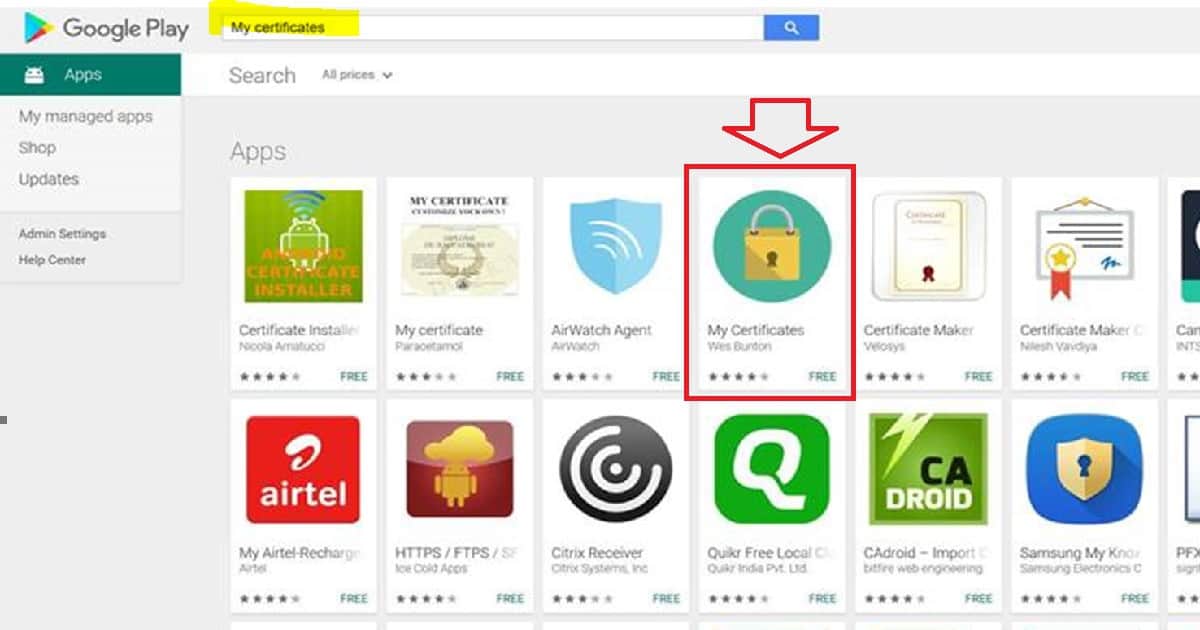
The “My Certificate” application was installed on my Android device through the Android for Work channel. I validated and verified the SCEP certificate on the Android for Work container with My Certificate Application. We could use similar logic to check the WiFi Profile deployment testing on Android for Work devices.
- Alternate app – Credit to one of the comments below X509 Certificate Viewer Tool – Apps on Google Play
We are on WhatsApp now. To get the latest step-by-step guides, news, and updates, Join our Channel. Click here. HTMD WhatsApp.
Author
Anoop C Nair is Microsoft MVP! He is a Device Management Admin with more than 20 years of experience (calculation done in 2021) in IT. He is a Blogger, Speaker, and Local User Group HTMD Community leader. His main focus is on Device Management technologies like SCCM 2012, Current Branch, and Intune. He writes about ConfigMgr, Windows 11, Windows 10, Azure AD, Microsoft Intune, Windows 365, AVD, etc.




Hi Anoop, great post.
Having difficulty accessing WiFi using profile and cert authentication for AfW. Works OK on Windows Phone. SCEP certs have been deployed successfully. Checked using the My Certificates app as you mentioned. Root cert deployed successfully as well. If the root cert is deployed to the personal profile and the SCEP cert is deployed to the Work profile, how will this work? Do we need to allow communication between the work profile and personal profile in the device policy?
Thanks
Steve
Steve, Did you ever get a reply? Having the same issue!
StaffIt worked like a champ for me. I recently deployed Enterprise class WiFi to Android devices. I have deployed – Root, Intermediate Issuing CA cert – SCEP profile – then WiFi profile … I followed the same process as mentioned in the following post https://www.anoopcnair.com/learn-create-deploy-scep-profile-ios-devices-via-intune/
The “My Certificates” app was not working for me to deploy in a Work Profile.
Here’s a nice alternative.
https://play.google.com/work/apps/details?id=com.rdupletlabs.certificateviewer
Cheers,