






Azure Files Goes Cloud-Native with Entra-Only Identities and Managed Identities
Key Takeaways
- Azure Files SMB now supports Entra-Only identities with General Availability (GA), enabling cloud-native identity-based access using Microsoft Entra ID.
- Organizations no longer need on-premises Active Directory, hybrid sync, or managed domain controllers for Azure Files authentication.
- The feature helps simplify infrastructure, reduce management overhead, and lower maintenance costs while supporting Zero Trust security principles.
- Azure Virtual Desktop (AVD) environments can use Entra-Only identities for FSLogix profiles, including B2B access for external partners without duplicate accounts.
- Users can securely access Azure Files from anywhere without VPNs, domain setup, or complex networking, making cloud migration easier for Windows-based workloads.
Managed Identity and Entra-Only identities for Azure Files help organizations build a fully cloud-native and secure storage environment by removing the need for passwords, storage account keys, on-premises Active Directory, or hybrid identity infrastructure. With native Microsoft Entra ID authentication, applications, virtual machines, and users can securely access Azure Files using identity-based authentication aligned with Zero Trust principles, while also reducing operational complexity, management overhead, and security risks.
Table of Content
Azure Files Goes Cloud-Native with Entra-Only Identities and Managed Identities
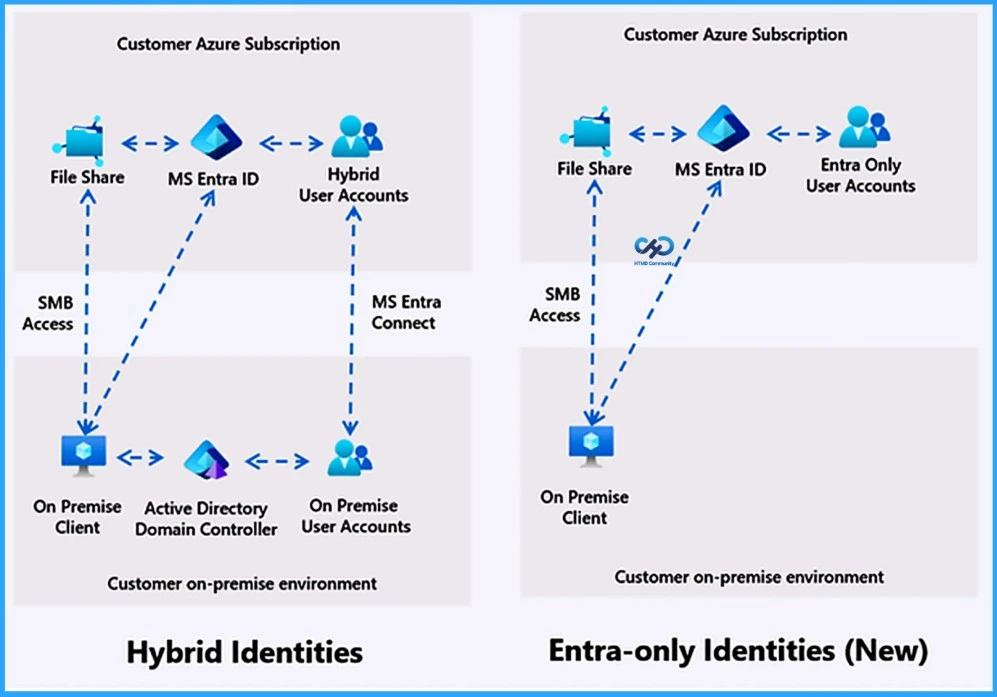
Microsoft Azure Files SMB now supports Entra-Only identities with General Availability (GA), enabling organizations to use native Microsoft Entra ID authentication for secure, cloud-native access to file shares. This removes the need for on-premises Active Directory, hybrid synchronization, or managed domain controllers, helping simplify infrastructure, reduce operational overhead, and strengthen Zero Trust security.
The feature also improves Azure Virtual Desktop (AVD) and Windows workload modernization by allowing secure remote access without VPNs or complex networking, while supporting B2B collaboration using existing external identities with FSLogix profiles.
- What’s New with Entra-Only Identities
- Manage NTFS permissions directly from the Azure portal without using domain-joined devices or legacy tools.
- Configure granular file and folder access (ACLs) for both Entra-Only and hybrid users/groups.
- Portal-based NTFS permissions management is now available globally across all regions.
- Expanded RBAC support now allows share-level access control for specific Entra users and groups.
- Share-level RBAC support for Entra-Only identities is currently available in limited regions.
| Feature | Explanation |
|---|---|
| Cloud-Native Identity | Use native Microsoft Entra ID authentication without Active Directory or hybrid sync. |
| Simplified Management | Reduces maintenance, VPN dependency, and identity management overhead. |
| Hybrid and Cloud Co-Existence | Supports both hybrid identities and cloud-native identities during migration. |
| Secure Remote Access | Users can securely access Azure Files from anywhere using Entra-joined devices. |
| MacOS Support | Modern macOS devices with Platform SSO can securely access Azure Files using Entra identity. |
- Microsoft Enables Entra Writeback For Cloud-Managed Remote Mailboxes To Help Remove Last Exchange Server
- Setup Risk-Based Conditional Access for Entra Agents to Automatically Protect against Compromised Agents
- How to Manage Agents through Microsoft Entra Agent ID Interface for Security and Zero Trust Enforcement
- Best Guide to Invite B2B Guest Users to Entra ID using Intune
Azure Virtual Desktop and FSLogix Modernized with Entra-Only Identities
Microsoft Entra-Only identities help modernize Azure Virtual Desktop (AVD) deployments by enabling a fully cloud-native identity, compute, and storage environment with Azure Files. FSLogix profile containers can now be securely stored on Azure Files Premium and accessed using Microsoft Entra ID authentication with Kerberos, providing seamless SMB access without relying on on-premises infrastructure.

This simplifies deployments, reduces operational overhead, and supports secure remote work scenarios. Users can sign in to virtual desktops and access their profiles using cloud-native identities with end-to-end single sign-on, without requiring connectivity to on-premises systems.
Need Further Assistance or Have Technical Questions?
Join the LinkedIn Page and Telegram group to get the latest step-by-step guides and news updates. Join our Meetup Page to participate in User group meetings. Also, join the WhatsApp Community and the Whatsapp channel to get the latest news on Microsoft Technologies. We are there on Reddit as well
Resources
Author
Anoop C Nair has been Microsoft MVP for 10 consecutive years from 2015 onwards. He is a Workplace Solution Architect with more than 22+ years of experience in Workplace technologies. He is a Blogger, Speaker, and Local User Group Community leader. His primary focus is on Device Management technologies like SCCM and Intune. He writes about technologies like Intune, SCCM, Windows, Cloud PC, Windows, Entra, Microsoft Security, Career, etc.

Discussion