






Exciting News! New Copilot Feature in Windows 11 to Connect Plugin. Copilot is growing their features day by day. These new features can make a big difference in technology. Now, new features are rolling out to the Windows Insider Program (WIP) Canary channel for Copilot.
Copilot is the best AI assistant that can do all your work perfectly. We all know that Copilot always assists users with tasks like finding information, creating content, and learning new skills.
Copilot can also make users’ lives easier, more productive, and more fun by using artificial intelligence to understand natural language and generate valuable responses. Copilot can help users customize their experience using plugins and GPTs that suit their needs and preferences.
Microsoft announced new Copilot features and improvements for Windows 11 Insiders on the Canary Channel. These improvements will increase user performance to the next level. Copilot is a feature that adds AI to your Windows 11 experience to help you with various tasks.

New Copilot Feature in Windows 11 to Connect Plugin
The new 2 features of Copilot are now rolling out in the Windows Insider Program (WIP) Canary channel. Copilot is a browser assistant that helps users with various tasks. These improvements are available for some users now.
| New Features of Copilot |
|---|
| Live captions |
| New (WinUI 3) Plugin Permissions |
Live Captions through Copilot
One of the features is the ability to start live captions for any audio or video content on the web, which can help users who are deaf, hard of hearing, or in a noisy environment. The new live caption feature lets you see subtitles for the speech in any audio or video content on your Windows 11 device.
- Sign in with a Microsoft account
- Install an Edge Insider channel
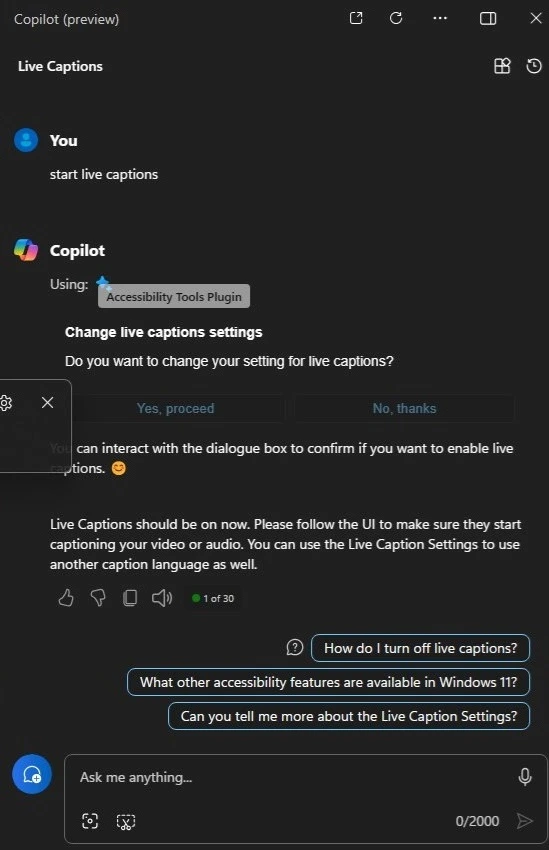
- Type ”Start live captions” in the Copilot window
- The Copilot will give you the live caption setting options
- Use Microsoft Copilot with any App on Android and iOS Devices
- Microsoft Integrates Notepad with Copilot on Windows 11
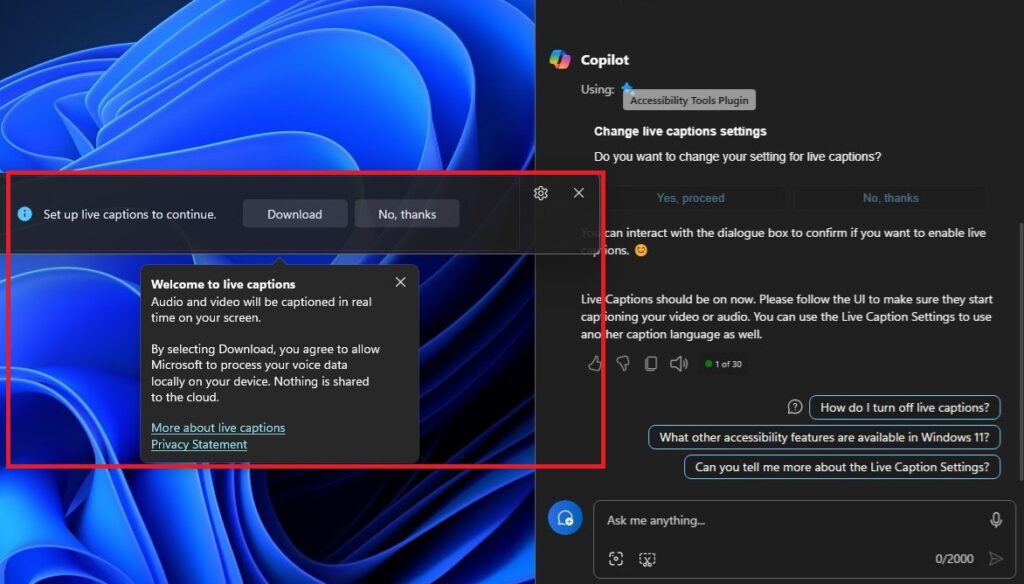
After getting the live caption setting, you may see the live caption settings dialogue box with 2 options: Download and No Thanks. There is a message like” Audio and video will be companions in real-time on your screen. You agree to allow Microsoft to process your voice data locally on your device by selecting a download. Nothing is shared to the cloud”.
- Windows 11 Issue with Copilot and Desktop icons might move unexpectedly between monitors
- Microsoft is a Copilot Company says Satya Nadella
New Plugin Permission in Copilot
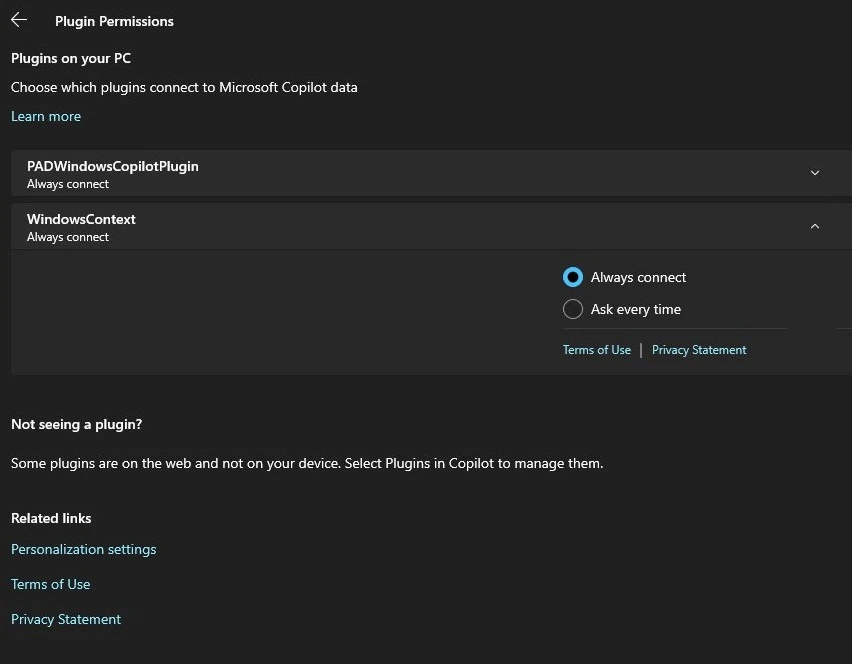
Another new feature is a redesigned Plugin permissions page; which uses WinUI 3, a modern UI framework for Windows apps. In this option, permissions are granted to different plugins installed on the browser, such as camera, microphone, location, etc.
This can help users manage their privacy and security settings more easily. Plugins are available in Copilot for some users. You can turn on plugins to help you find restaurant reservations, flights, and more from your favourite brands.
- This new feature allows you to choose which plugins connect to Copilot data in Windows 11
- You can also choose to always connect or ask every time for each plugin
We are on WhatsApp now. To get the latest step-by-step guides, news, and updates, Join our Channel. Click here. HTMD WhatsApp.
Author
Krishna. R is a computer enthusiast. She loves writing about Windows 11 and Intune-related technologies and sharing her knowledge, quick tips, and tricks about Windows 11 or 10 with the community.

Discussion