






SCCM 1810 Rollup Hotfix Installation Guide
Let’s discuss the SCCM 1810 Rollup Hotfix Installation Guide. Are you new to SCCM and looking to learn it? This post contains the SCCM rollup update installation details. The latest rollup update for SCCM 1810 is KB 4486457.
Most SCCM Rollup Update KB articles provide details about whether the Rollup update or SCCM hotfix is required for your environment. This information is in the section “Update information for System Center Configuration Manager, version 1810” of the KB article.
If you can’t see the SCCM Rollup Update in your console, there is no need to panic. It might be because Microsoft hasn’t yet released the Update for your installed SCCM 1810 Update package.
It is important to note that there are different SCCM 1810 update packages (Update and Servicing package Guide details) available based on the time you downloaded and updated the package.

| Index |
|---|
| Find the SCCM Update Package GUID Number |
| How to Install SCCM Rollup Update on SCCM CAS and Primary Servers? |
| Install SCCM Rollup Update on SCCM Secondary Site Server? |
| Resource |
Related Posts – SCCM 1810 Upgrade Step-by-Step Walkthrough Guide,
SCCM 1810 Improvements and Features, and SCCM 1810 Known Issues and FIXES.
Find the SCCM Update Package GUID Number
To determine whether the SCCM Rollup Update is required for your environment, look at Package GUID for the SCCM Updates and Servicing package.
By default, this GUID value is NOT visible in the SCCM console. You can add the Package GUID column to the details pane of the Updates and Servicing node in the SCCM console.
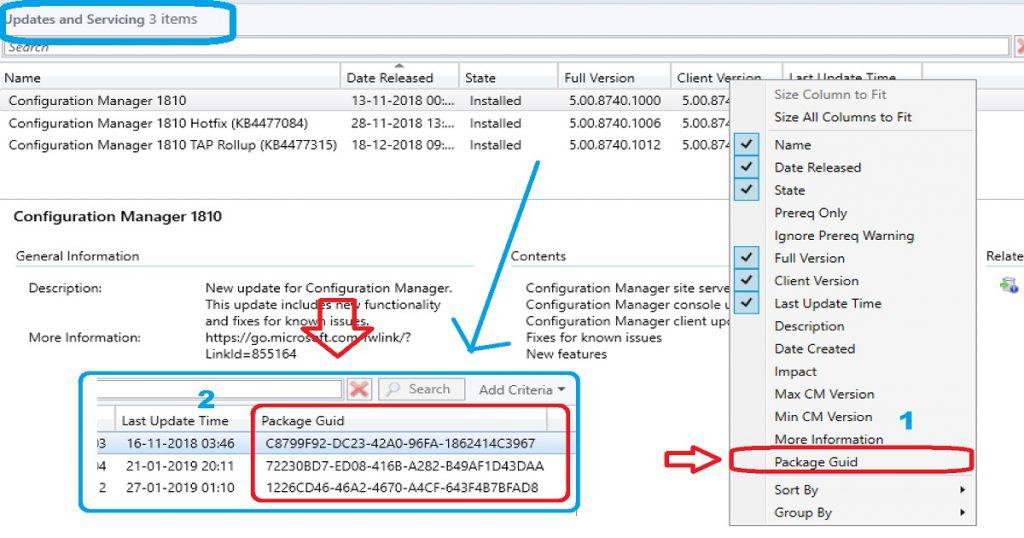
For example, SCCM Rollup update KB 4486457 applies to installations of version 1810 from packages that have the following GUIDs. If you are not getting the updates, you need to perform SCCM Update-related troubleshooting.
- 699975FE-B5BA-43EB-8BE9-E2399F2F309A
- 85475BAD-8669-4D36-8D64-C625BFE7DEDB
- ACF6EECC-1C94-44E3-887E-D3349775816D
- C8799F92-DC23-42A0-96FA-1862414C3967
How to Install SCCM Rollup Update on SCCM CAS and Primary Servers?
If you have SCCM CAS and primary servers in your environment, you need to start or initiate the SCCM Rollup Update from the CAS server.
- Launch SCCM Console – Navigate to SCCM console Administration workspace.
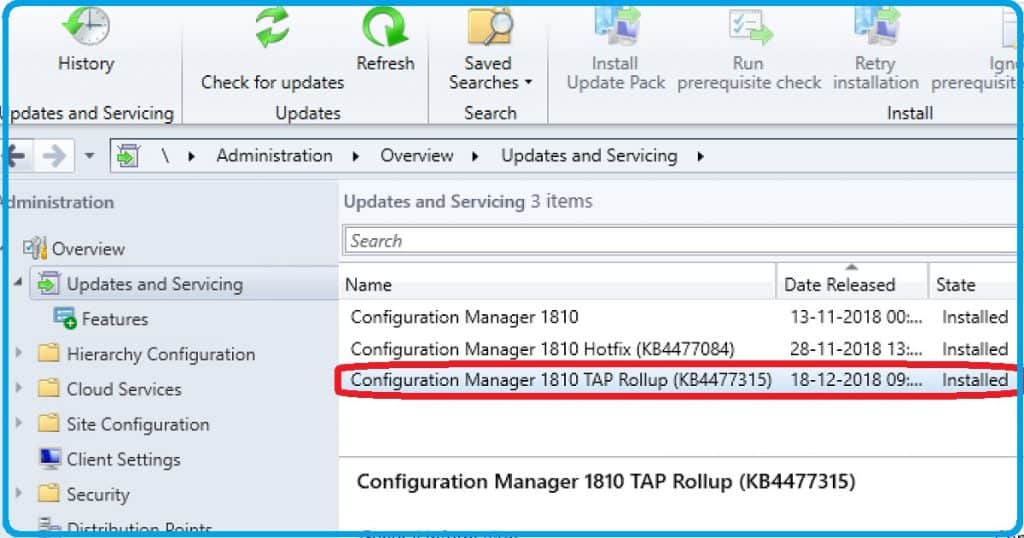
- Check for the latest SCCM Rollup from the following console path \Administration\Overview\Updates and Servicing.
- Select the latest Rollup update and click on “Install Update Pack” from the ribbon (or better, to perform prerequisite checks before updating the production environment).
- Complete the SCCM Update Wizard and monitor the upgrade process per my following video post.
Install SCCM Rollup Update on SCCM Secondary Site Server?
After installing the SCCM Rollup Hotfix update on a CAS, you must manually update the primary and preexisting secondary sites.
To update a secondary site in the SCCM console, click Administration, Site Configuration, Sites, Recover Secondary Site, and select the secondary location.
The primary site then reinstalls the secondary site using the updated files. This reinstallation does not affect the secondary site’s configurations and settings. The new, upgraded, and reinstalled secondary sites located under that primary site automatically receive this update.
Run the following SQL Server command on the site database to check whether the updated version of a secondary site matches that of its primary parent site:
select dbo.fnGetSecondarySiteCMUpdateStatus (‘SiteCode_of_secondary_site’)
Resource
- SCCM 1810 KB 4486457 – https://support.microsoft.com/en-gb/help/4486457/system-center-configuration-manager-version-1810-update-rollup
- SCCM 1810 Upgrade Step-by-Step Walkthrough Guide
- SCCM 1810 Improvements and Features
- SCCM 1810 Known Issues and FIXES
We are on WhatsApp. To get the latest step-by-step guides and news updates, Join our Channel. Click here –HTMD WhatsApp.
Author
Anoop C Nair is Microsoft MVP! He is a Device Management Admin with more than 20 years of experience (calculation done in 2021) in IT. He is Blogger, Speaker, and Local User Group HTMD Community leader. His main focus is on Device Management technologies like SCCM 2012, Current Branch, and Intune. He writes about ConfigMgr, Windows 11, Windows 10, Azure AD, Microsoft Intune, Windows 365, AVD, etc.




Hello,
Do you know when the hot fix will be available to all ?
Cause the list of fixes is quite long (https://support.microsoft.com/en-in/help/4486457/system-center-configuration-manager-version-1810-update-rollup)
StaffAlso, read that https://www.anoopcnair.com/sccm-1810-known-issues-and-fixes-tips/
StaffNo idea about the release for other environments Package GUIDs
What happens and how to fix, if above KB does not show up in the console. I am currently running 1810. Console version 5.1810.1075.1700 and Client version 5.0.0.8740.1012.
Ram
Today the roll up update showed up in the console. I was able to complete the install without any issue.
Staffwhat is the client and console version?