






Latest Version MDT 8456 – SCCM 1810 – Server 2019 Support – UDI Wizard
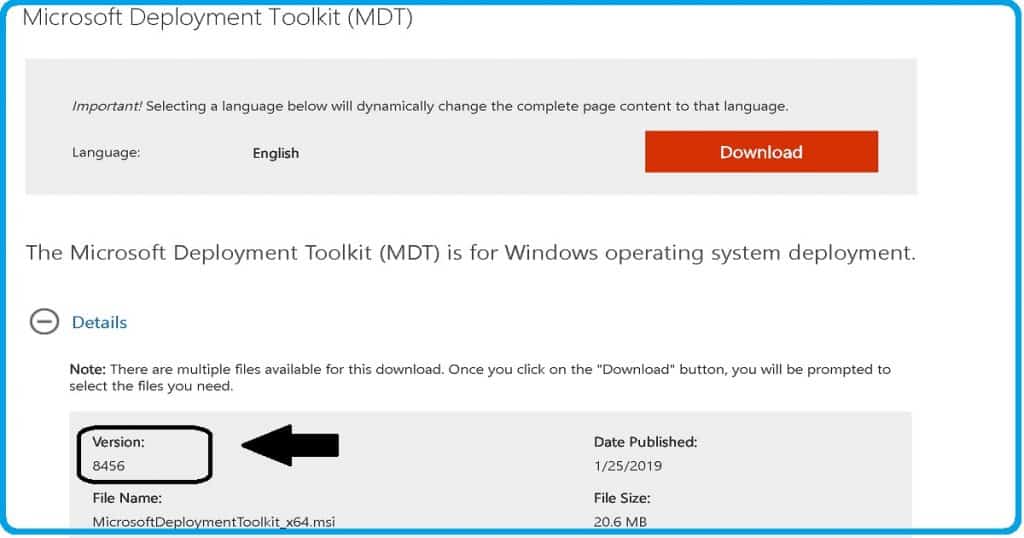
Hi, Today, we will discuss the Latest Version, MDT 8456 – SCCM 1810—Server 2019 Support—UDI Wizard. Microsoft recently released the latest version of MDT 8456.
You can download latest version of MDT 8456 and build Server 2019 with it. This version comes with support for Windows 10 1809, Server 2019, and SCCM 1810.
The MDT is Microsoft Deployment Toolkit, formerly known as Business Desktop Deployment (BDD). It is an application that provides network deployment of Microsoft Windows Operating Systems.
The MDT is a free tool for automating Windows and Windows Server operating system deployment. If you have an SCCM environment, you can integrate SCCM with MDT to provide enhanced features (UDI and ZTI) to your OS deployment process.

- Video Guide Download Install and Configure MDT 8450
- SCCM OSD Front-End Tools And User-Driven Installation
What are the New Features of the Latest Version of MDT 8456?
> Nested task sequence support for LTI scenario
> Modern language pack support
> Support for Configuration Manager version 1810
> IsVM evaluates to False on Parallels VMs
> IsVM = False when VMware VM is configured with EFI boot firmware
> Gather doesn’t recognize the All-in-One chassis type
> MDT doesn’t automatically install BitLocker on Windows Server 2016
> BDEDisablePreProvisioning typo in ZTIGather.xml
Latest Version MDT 8456 – SCCM 1810 – Server 2019 Support – UDI Wizard
If you need to deploy Windows or Windows Server operating systems, you’ll be happy to know that the MDT is here to help. This free tool automates the deployment process, making it faster and more efficient.
MDT Prerequisites
MDT has some prerequisites. I recommend that you ensure that all those prerequisites are in place before installing or upgrading.
- Microsoft .NET Framework 4.0
- Windows PowerShell version 3.0
- Latest Windows ADK
- The latest SCCM instance if you want to use ZTI or UDI
The Video below guides you on how to install the MDT and where you can download the MDT and other features of the Latest Version, MDT 8456, step-by-step.
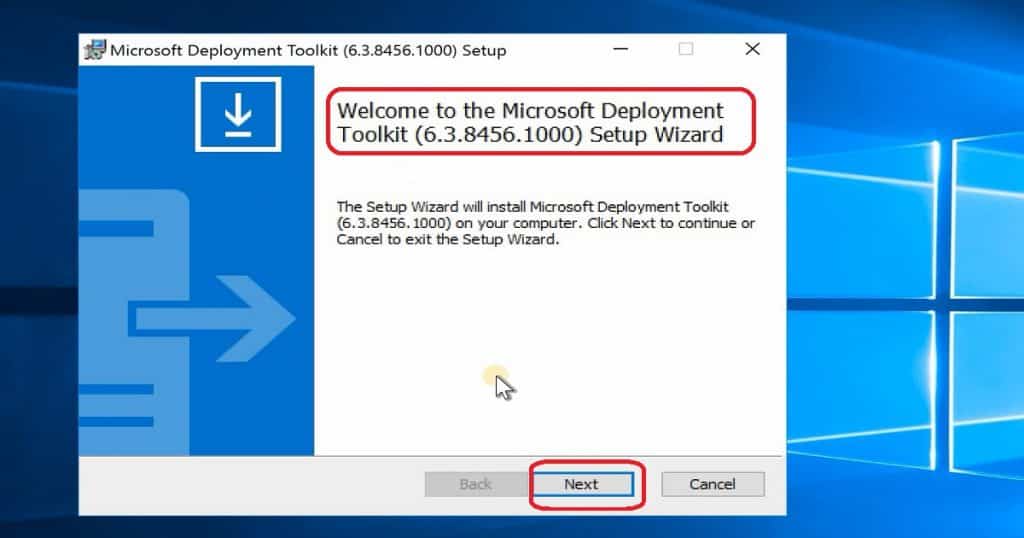
The MDT installation and upgrade process is straightforward. If the existing machine already had an MDT instance, then it removes previous instances of MDT installed.
Existing deployment shares, distribution points, and databases are preserved during the latest version MDT 8456 upgrade process. However, when the installation is complete, those deployment shares, DPs, and DBs must be upgraded.
Integrate SCCM 1810 with the Latest Version MDT 8456
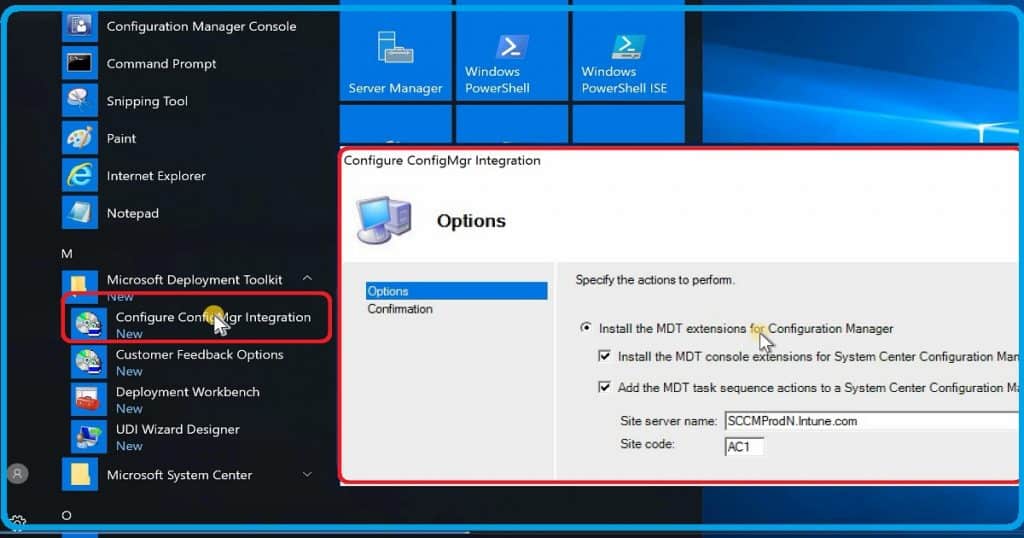
The integration of SCCM 1810 is a straightforward process in both MDT fresh install and upgrade scenarios. After the latest version of MDT 8456 installation:
- From the start menu – Navigate to the Microsoft Deployment Toolkit group
- Expand MDT group of programs – Click on Configure ConfigMgr Integration
- Click on the Next button once you populate all the SCCM server details, as I have shown below; the information below will automatically fill out if you install MDT on the SCCM server. You should also have SCCM RBAC access to complete the integration process.
- Select – Install the MDT extensions for Configuration Manager
- Install the MDT console Extensions for SCCM
- Add the MDT task sequence actions to an SCCM server
- Site Server name – SCCMProdN.Intune.com
- Site Code – AC1
- Select – Install the MDT extensions for Configuration Manager
- Click on Finish to close the SCCM MDT integration process wizard
User-Driven Installation (UDI) Wizard – MDT 8456
I didn’t analyze much about user-driven installation pages and configuration available with the newest version, MDT 8456 (MDT 8456).
But, I would recommend going through it in detail, and this UDI will help get better IT admin or end-user experience in many scenarios of SCCM OSD.
Latest Version MDT 8456 – SCCM 1810 – Server 2019 Support – UDI Wizard – Fig.4
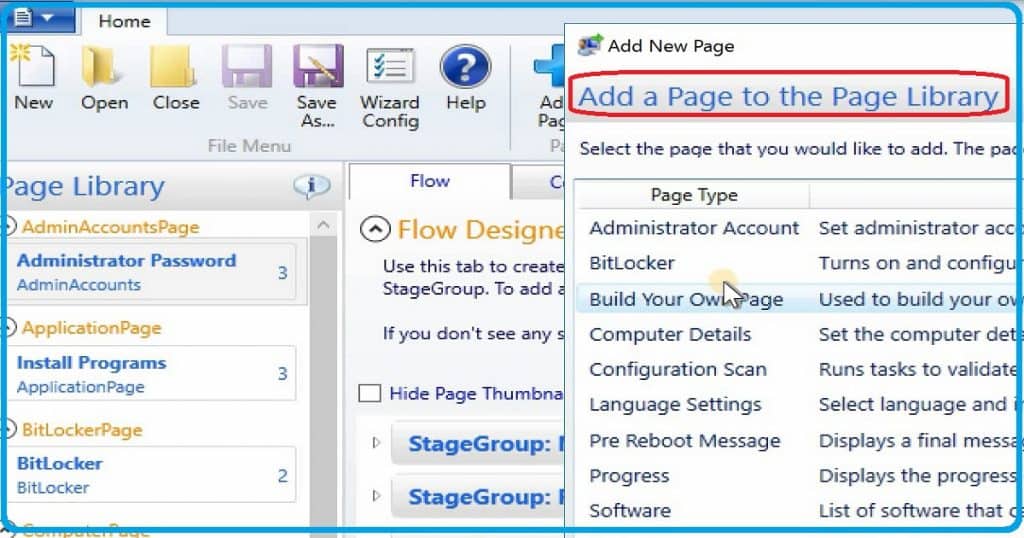
- From the start menu – Navigate to the Microsoft Deployment Toolkit group
- Expand MDT group of programs – Click on the UDI Wizard Designer shortcut to launch the UDI designer.
Resources
We are on WhatsApp. To get the latest step-by-step guides and news updates, Join our Channel. Click here –HTMD WhatsApp.
Author
Anoop C Nair is Microsoft MVP! He is a Device Management Admin with more than 20 years of experience (calculation done in 2021) in IT. He is a Blogger, Speaker, and Local User Group HTMD Community leader. His main focus is on Device Management technologies like SCCM 2012, Current Branch, and Intune. He writes about ConfigMgr, Windows 11, Windows 10, Azure AD, Microsoft Intune, Windows 365, AVD, etc.




Discussion