






Azure Classic Administrators will be Deprecated on 31st August 2024 Crucial to Convert to Azure RBAC Roles
Azure Classic Administrators will be Deprecated on August 31, 2024! On that date, Microsoft will officially deprecate classic administrators in Azure. This administrative role will no longer be supported.
If you currently rely on classic administrator roles, you must take action to prevent losing access to your Azure subscriptions. Classic administrator roles in Azure include the Co-Administrator and Service Administrator.
It is crucial to convert these roles to Azure Role-Based Access Control (RBAC) roles as soon as possible to ensure continued access to your Azure resources and subscriptions. Azure Role-Based Access Control (RBAC) in Microsoft Azure is a robust access management system that enables you to control who has access to Azure resources with precise permissions.
With Azure RBAC, you can assign roles to users, groups, and applications, ensuring they have the appropriate access to perform only the tasks required for their specific role or function. This post comprehensively explains the retirement of classic administrator roles in Azure.

Table of Contents
What Happens to Azure Classic Administrator Roles after August 31, 2024?
After August 31, 2024, the Co-Administrator and Service Administrator roles will be retired and no longer supported in Azure. These roles will no longer function, and users assigned to them will lose access.
What Should We Do to Prepare for this Change?
To maintain proper access control, it would help if you immediately converted any Co-Administrator or Service Administrator role assignments to Azure Role-Based Access Control (RBAC) roles.
Azure Classic Administrators will be Deprecated on 31st August 2024 Instead, Use Azure RBAC
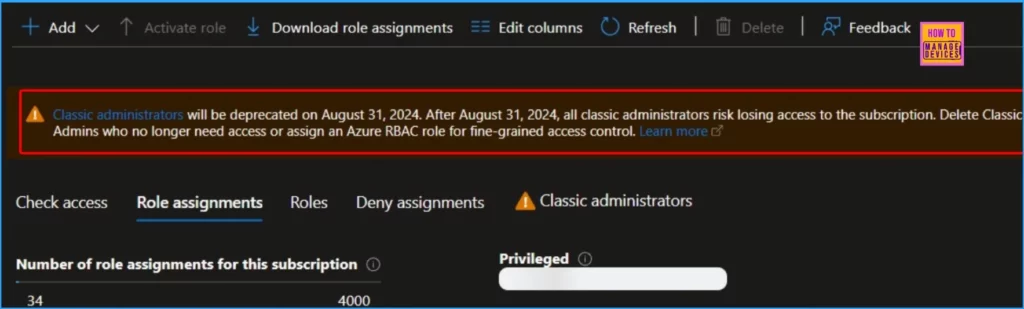
When you open the Azure portal, you may see a notification stating, “Classic administrators will be deprecated on August 31, 2024. After this date, all classic administrators risk losing access to the subscription. Delete classic admins without access or assign an Azure RBAC role for fine-grained access control.” The screenshot below provides more details.
- Microsoft MFA is Mandatory for Accessing Azure from July 2024
- Restrict Drivers Installation for Non-Administrators Users with Intune Policies
- Azure AD SSPR Self Service Password Reset Guide
- Top 83 Windows 11 Desktop Admin Interview Questions
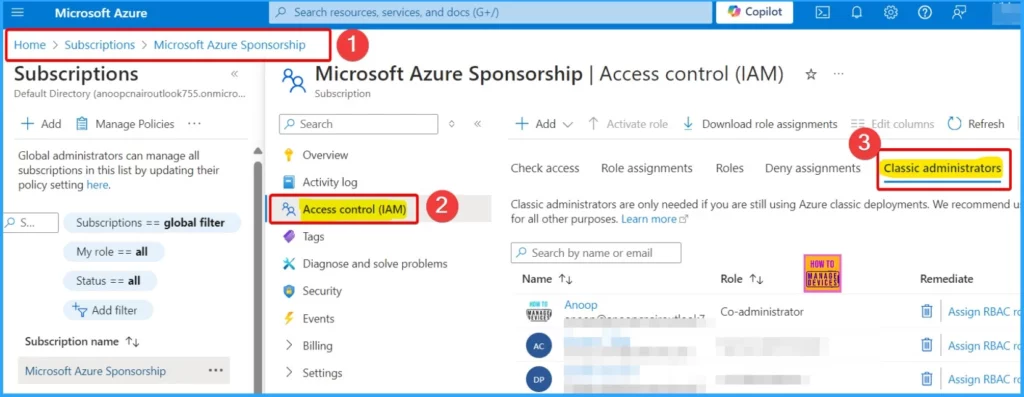
You can easily list the Service Administrator for a subscription in the Azure portal. To list the Service Administrator and Co-Administrators for a subscription in the Azure portal, follow these steps:
- Sign in to the Azure portal as the Owner of the subscription.
- Go to Subscriptions and choose the subscription you want to check.
- Select Access Control (IAM) from the menu.
- Click on the Classic Administrators tab to see the list of Co-Administrators.
How to Remove an Azure Classic Administrator
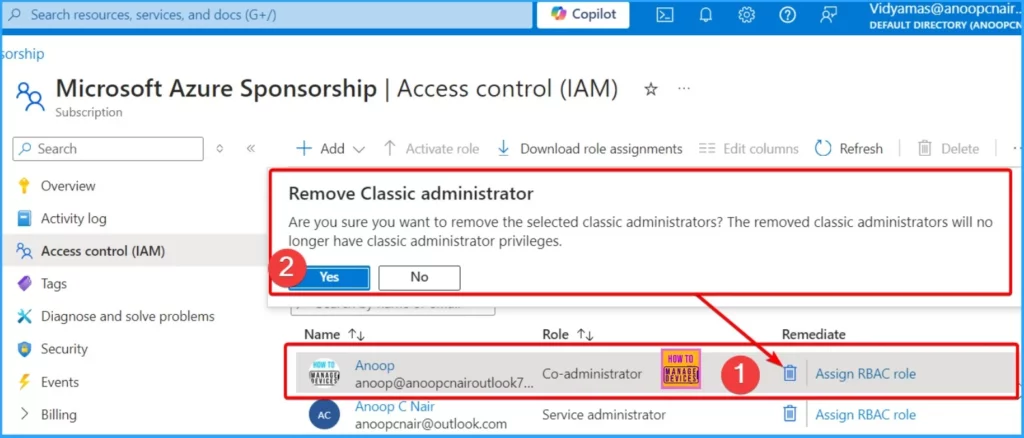
If the user is no longer part of your organization, remove their Co-Administrator access. Delete their access if the user was deleted but their Co-Administrator role wasn’t removed. Deleted users usually appear with the message “(User was not found in this directory).”
- Select the Delete icon from the below window.
- From the pop-up window, click Yes.
Convert a Co-Administrator to the Owner Role in Azure
Following these steps, you can easily convert a Co-Administrator to an Owner role in Azure, ensuring they have the appropriate permissions under the Azure RBAC system.
- Log in to the Azure portal.
- Go to the Subscriptions section. You can find this by typing “Subscriptions” into the search bar.
- Click on the subscription where you want to convert a Co-Administrator to an Owner.
- In the subscription menu, select Access Control (IAM). This section allows you to manage the subscription’s roles and permissions.
- Click on the Classic Administrators tab. This tab lists all Co-Administrators and Service Administrators assigned to the subscription.
- Find the Co-Administrator you want to convert to the Owner role. Click on the Assign RBAC role link in the Remediate column next to their name. This action initiates converting the classic role to an Azure RBAC role.
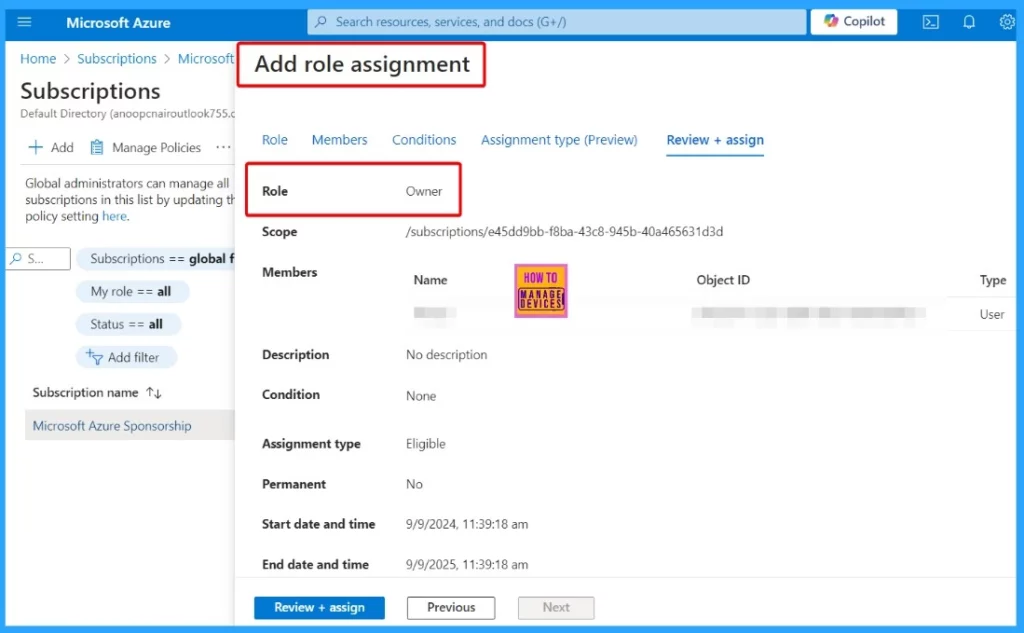
- A new pane called Add role assignment will open. Here, you can review the details of the role assignment.
- Once you have verified the details, click Review + Assign to apply for the new role.
| Add Role Assignment Details |
|---|
| Role |
| Scope |
| Members |
| Description |
| Condition |
| Assignment Type |
| Permanent |
| Start Date and Time |
| End Date and Time |
We are on WhatsApp now. To get the latest step-by-step guides, news, and updates, Join our Channel. Click here. HTMD WhatsApp.
Author
Anoop C Nair has been Microsoft MVP from 2015 onwards for 10 consecutive years! He is a Workplace Solution Architect with more than 22+ years of experience in Workplace technologies. He is also a Blogger, Speaker, and Local User Group Community leader. His primary focus is on Device Management technologies like SCCM and Intune. He writes about technologies like Intune, SCCM, Windows, Cloud PC, Windows, Entra, Microsoft Security, Career, etc.



Discussion