






Integrating Dell Management Portal in Intune Admin Center Coming Soon
Let’s discuss the Integrating Dell Management Portal in the Intune Admin Center, which is Coming Soon. From October 2024, a link from the Intune admin center to the Dell Management Portal will provide streamlined access to Dell-specific Windows device management features.
Do you know what the Dell Management Portal? It is an innovative solution designed to streamline the management of Dell client devices in conjunction with Microsoft Intune. It cloud-based application aims to save time, reduce complexity, and optimize resources for IT administrators.
Microsoft has always introduced innovative features to Intune based on user feedback. This time, they will integrate the Dell Management Portal into the Intune Admin Center. With this update, users can explore the capabilities of Dell-specific Windows device management features.
In this blog post, I will explain more about the details of this update on Intune Admin Center and discuss the features of Dell Management that will be accessed from Microsoft Intune.


What are the Benefits of the Dell Management Portal?
1. It helps simplify access to key information for IT administrators
2. It provides a centralized view of all Dell devices managed within Microsoft Intune
3. It enhances the security and compliance
4. It provides the tools and capabilities needed to ensure optimal device performance and efficiency
Integrating Dell Management Portal in Intune Admin Center Coming
Dell Management is a powerful tool that amplifies the management capabilities of Dell PCs and Microsoft Intune. It provides comprehensive device management and seamless application management. It addresses the key challenges IT administrators face and provides a platform for continuous improvement within a familiar ecosystem used worldwide.
- Dell SupportAssist Deployment Using SCCM | MSI Installation Guide
- Top 83 Windows 11 Desktop Admin Interview Questions
- Most Asked 54 Windows 365 Cloud PC Interview Questions and Answers
Features Provided by Dell Management Portal
Dell Management provides many features; users can access this feature starting in October. This portal helps simplify Dell PC management by enabling a seamless link to Microsoft Intune. The following are the features.
- Secure device management. Recover unique, per-device credentials, including current and previous BIOS passwords as well as BitLocker recovery keys.
- Fleet management. Access device hardware, OS, storage information and information about each device’s assigned user, including name and contact.
- Application management. Securely access the latest version of select Dell enterprise applications to upload to Intune for deployment and get the updated status of those apps. Available at launch.
- Dell Command | Monitor
- Dell Command | End Point Configure for Microsoft Intune
- Dell Command | Update
- Dell Support Assist for Business PCs
- Dell Trusted Device
- Device reporting. Review updates, which are provided every 30 minutes.
How to Access the Dell Management Portal
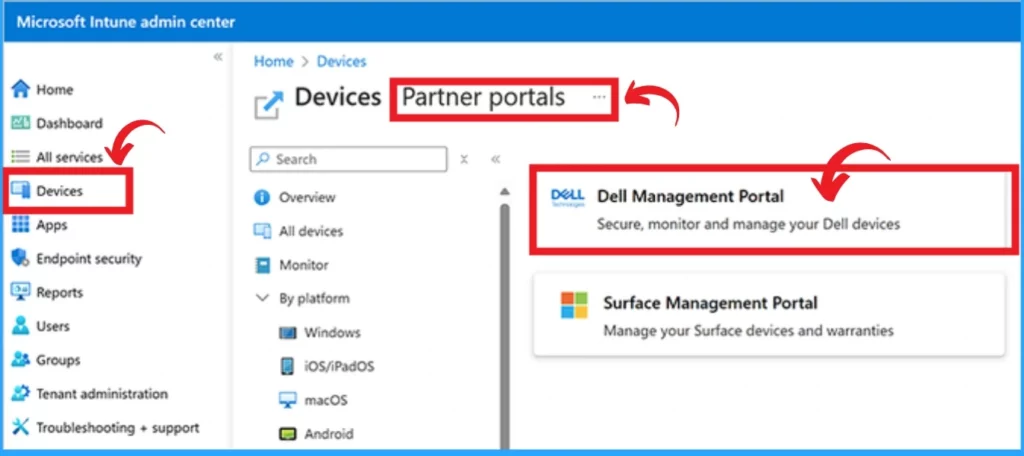
From the Intune admin center, you can easily access the Dell Management Portal. On the Device blade, you can find the Partner portals tab and the Dell Management Portal.
After Selecting this Portal, you will receive a connection wizard that requests permissions for this Portal to access your tenant. This window shows different permissions. The following table shows the permissions.
| Different Permissions |
|---|
| Read all users’ full profiles |
| Read directory data |
| Read your BitLocker keys |
| Read Microsoft Intune Device Configuration and Policies |
| Perform user-impacting remote actions on Microsoft Intune devices |
| Read devices Microsoft Intune devices |
| Read and write Microsoft Intune apps |
| Maintain access to data you have given it access to |
You can only continue on the Dell Management Portal by accepting the above-mentioned permission. After reading these carefully, click on the Accept button.
- New Working Time Settings for App Protection Policies in Intune Limit Access and Mute Notifications
- MacOS Certificates can now be Stored in User Keychain using Intune
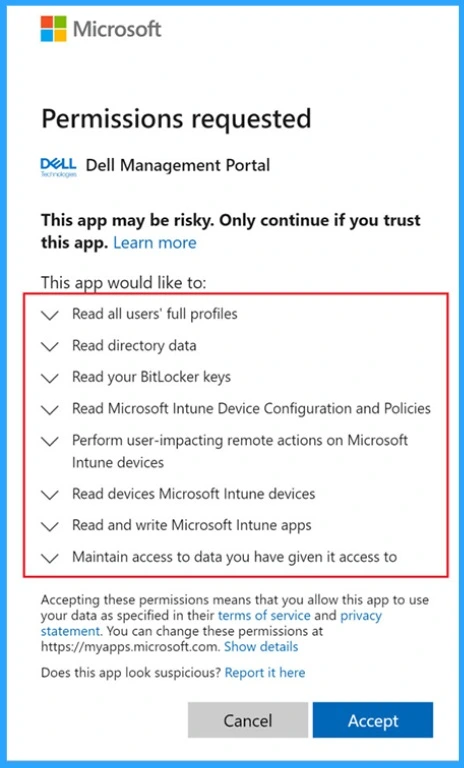
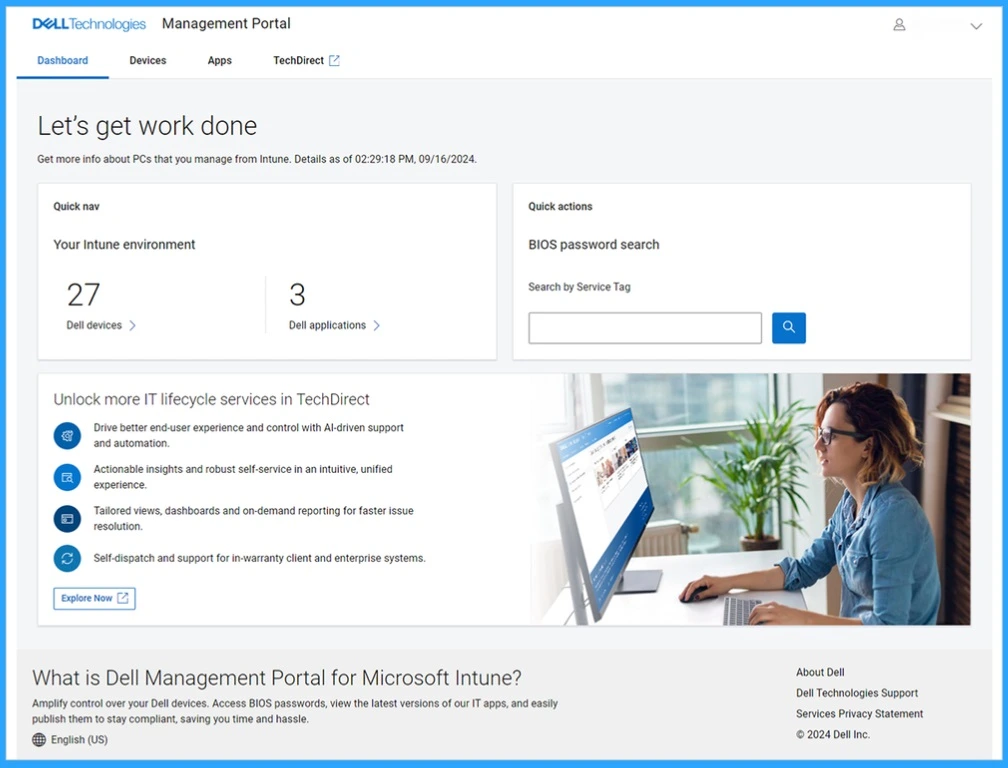
Granting those permissions enables the new integrated Dell app deployment, reporting, and more. Once connected, IT administrators can manage Dell PCs with access to detailed end-user client device information. They can view current and previous BIOS passwords and BitLocker recovery keys for Dell-managed PCs.
Join the LinkedIn Page and Telegram group to get the latest step-by-step guides and news updates. Join our Meetup Page to participate in User group meetings. Also, Join the WhatsApp Community to get the latest news on Microsoft Technologies. We are there on Reddit as well.
Author
Anoop C Nair has been Microsoft MVP from 2015 onwards for 10 consecutive years! He is a Workplace Solution Architect with more than 22+ years of experience in Workplace technologies. He is also a Blogger, Speaker, and Local User Group Community leader. His primary focus is on Device Management technologies like SCCM and Intune. He writes about technologies like Intune, SCCM, Windows, Cloud PC, Windows, Entra, Microsoft Security, Career, etc.


is there any latest update available on this article, as we have now this partner portals available