






Teams New Policies Use Background Image from My Organization Policy and Allow Organizer to Control Meeting Theme
Hi, Today, we are discussing Teams New Policies Use Background Image from My Organization Policy and Allow Organizer to Control Meeting Theme. As you all know, Microsoft Teams gets new features every month. In October 2024, Microsoft released some exciting features that promote the organization’s brand identity through MS Teams meetings.
We all know that every organization has its brand identity, an essential element. So, every person who works in that organization has to maintain the image towards the brand. In this case, Microsoft recently introduced some significant enhancements to the background.
A new feature is the frosted glass background effect. This allows you to show the brand identity of your meetings and calls. This will enhance the entire look of team meetings and get the best professional way of meeting. With this feature, everyone working for the company can upload their frosted glass backgrounds.
These new changes also improve the working experience. Customizing the background of your company’s brand makes it more productive. The best advantage of this feature is that we can customize the brand with any colour. So, in this post, let’s briefly overview what is new with this feature.

How Can You Get started with frosted glass backgrounds in Microsoft Teams?
Use Background Image from My Organization Policy and Allow Organizer to Control Meeting Theme
Above, we discussed an overview of Brand Identity through Microsoft Teams With Frosted Glass Effects, its new feature introduced to MS Teams Recently. The significant impact of this feature is that transparent PNGs can be transformed into frosted glass backgrounds, which is a great way to enhance your team’s calls.
- It converts any transparent PNG image into a frosted glass background.
- It allows users to add an organization’s brand anywhere on a transparent background.
- So this feature allows the freedom to align the log anywhere in the background,
- This will Improve the Visibility.
| Info | Tips & Tricks for Preparing PNG Images |
|---|---|
| Resolution | To use 1920×1080 pixels for a high-quality background. |
| Avoid Full Opacity | Logos and coloured content look better with some transparency, and this aims for 75% opacity. |
| Gaussian Blur | Apply a Gaussian blur with a radius of 2 to create a sense of depth in the scene. |
| Standardize Backgrounds | For grayscale PNGs with transparency, use mid-grey (value 128) to ensure the transparency pattern is visible on both light and dark backgrounds. |
- Shared Tab in Chat Microsoft Teams Introducing the Best Way to Access Files and Links in a Chat
- Microsoft 365 Copilot in Teams for Chat Meeting Calls Generally Available
- Unified Teams App Launches on All Platforms Windows and Mac
Providing Professional and Clean Video Appearance
This feature is the best way to provide a Professional and clean video appearance to MS Teams. If the lighting doesn’t match, non-transparent backgrounds can look unnatural. Frosted glass effects create a more unified appearance by matching the lighting of the background.
- This feature allows for enhanced capabilities that match perfectly with the lighting conditions.
- This feature provides the best video quality and enhances the lighting experience across all platforms, including Windows, Mac, iOS, Android, and the web.
Note: Teams “Adjust brightness” filter can improve video quality.

Different Frosted Glass Backgrounds for Different Teams
You can select different frosted glass backgrounds for various teams in your organization. You know that organizations have different sections; if the Sales team uses one logo, the Service and Legal teams can have their own unique designs. So what can we do?
This is possible only through a Teams admin center. It is managed through various policies set in the Teams Admin Center. This customization helps each team create its identity while maintaining a unified brand.
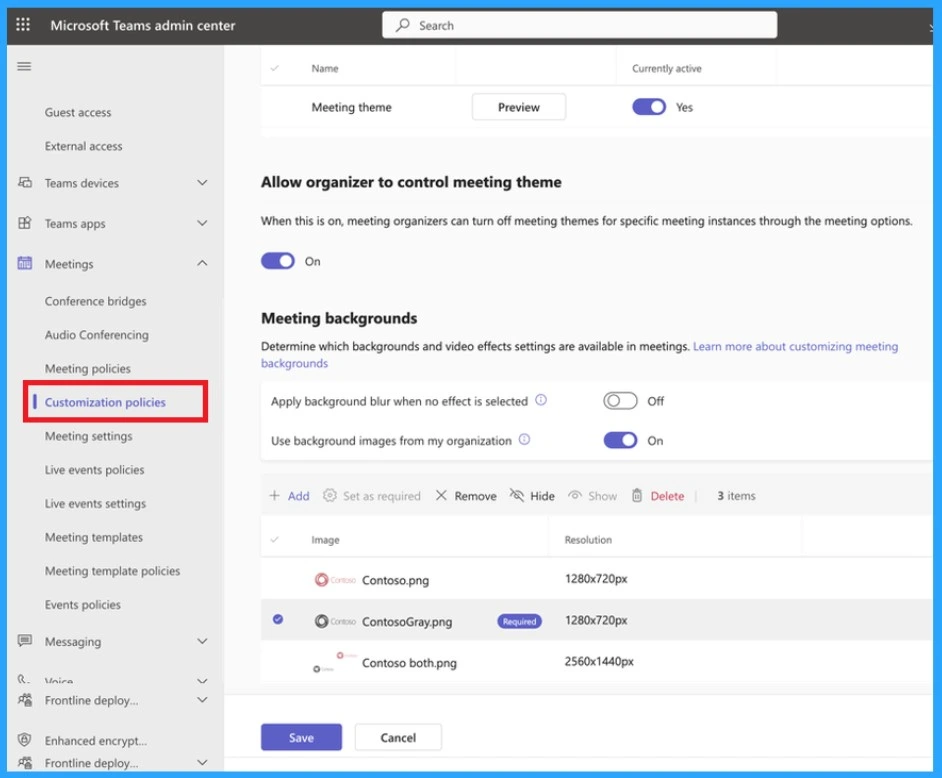
- Go to the Microsoft Teams Admin Center
- Under Meeting, Select the Option Customization Policies
- Enable the option for ”Allow Organizer to control meeting theme.”
- In the ”Meeting Background” section, enable the option to use background images from my organization.
- Then select the Png Image for the team.
- Save the Changes
Join the LinkedIn Page and Telegram group to get the latest step-by-step guides and news updates. Join our Meetup Page to participate in User group meetings. Also, Join the WhatsApp Community to get the latest news on Microsoft Technologies. We are there on Reddit as well.
Author
Anoop C Nair has been Microsoft MVP for 10 consecutive years from 2015 onwards. He is a Workplace Solution Architect with more than 22+ years of experience in Workplace technologies. He is a Blogger, Speaker, and Local User Group Community leader. His primary focus is on Device Management technologies like SCCM and Intune. He writes about technologies like Intune, SCCM, Windows, Cloud PC, Windows, Entra, Microsoft Security, Career, etc.




Discussion