






Host Connected Cache on Windows Linux VMs without SCCM DP | Intune Peer to Peer Story is Super Powered
Now, you can host Connected Cache on Windows Linux VMs without SCCM DP, and Intune Peer-to-Peer Story is Super-Powered. As you all know, Microsoft Connected Cache is a powerful caching solution in a network setup. Microsoft Connected Cache (MCC) for Enterprise and Education is a strong tool for improving content delivery and saving organisations’ bandwidth.
This tool entered preview mode in October 2024, and Microsoft also officially announced it through their Document. MCC’s speciality is that it works smoothly with Microsoft’s Delivery Optimization to make content distribution more efficient.
Microsoft Connected Cache is released for Enterprise and Education, also known as standalone editions. Its important aspect is that it minimizes internet bandwidth usage, which helps speed up content delivery.
Using these tools will help to save 98% of tasks, such as Windows 11 upgrades and Intune application installations. Microsoft Connected Cache is only available in Microsoft Configuration Manager, but now it’s a standalone solution.

What is Delivery Optimization?
Host Connected Cache on Windows Linux VMs without SCCM DP
Above, we discussed an overview of Microsoft Connected Cache for Enterprise and Education, which is now in a Preview. I have already mentioned that MCC was used in the Microsoft Configuration Manager, but now it can be deployed through Windows servers, Linux(Ubuntu and RHEL), and Windows clients.

- Install SCCM Hotfix KB14978429 Microsoft Connected Cache Update
- Fix Microsoft Connected Cache MCC Server Component Installation Fails Issue | SCCM | ConfigMgr
- SCCM and Microsoft Connected Cache Integration to Help with Bandwidth Issues
How It is Important to the Enterprise
Delivery Optimization is known for peer-to-peer content sharing, but it also downloads updates from the cloud and helps manage bandwidth and throttling for enterprise and education users. You know Connected Caches are well-worked with software caching solutions useful in networks.
- When it is installed on network machines, Connected Cache nodes store Microsoft content locally.
- It allows devices to get updates from the local cache instead of the internet, making delivery faster and more bandwidth-efficient.
- Microsoft also collects data about bandwidth management needs from education organizations and enterprises.
- This feedback and information are to help develop Connected Cache.
| No. | Important Scenario of Configuration Manager in Enterprises and Educational Institutions |
|---|---|
| 1 | It Manage all or part of their device tenant with Intune or other mobile device management (MDM). |
| 2 | They are tasked with decommissioning their Configuration Manager distribution points. |
| 3 | It is still faced with the challenge of managing content delivery bandwidth. |
Command-Line Interface Management
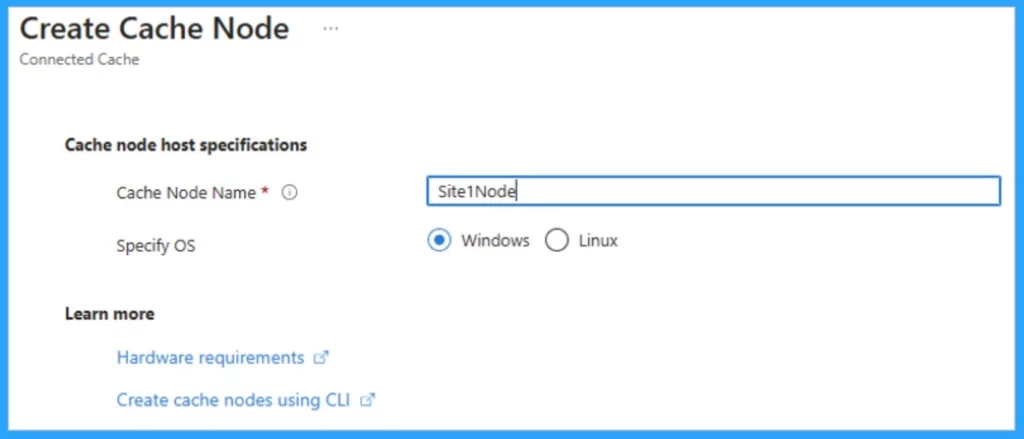
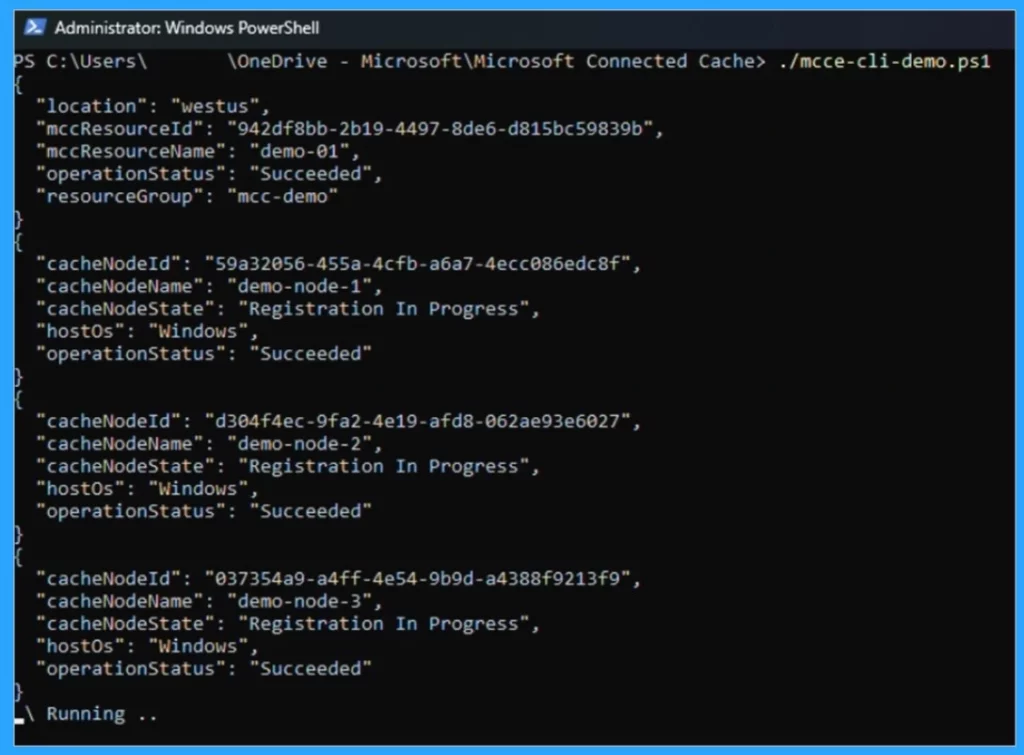
The Microsoft Azure portal is the best way to manage the Connected Cache Azure resources. However, you can also use the Command-Line Interface (CLI). You can deploy Connected Cache nodes remotely using PowerShell or Linux shell scripts.
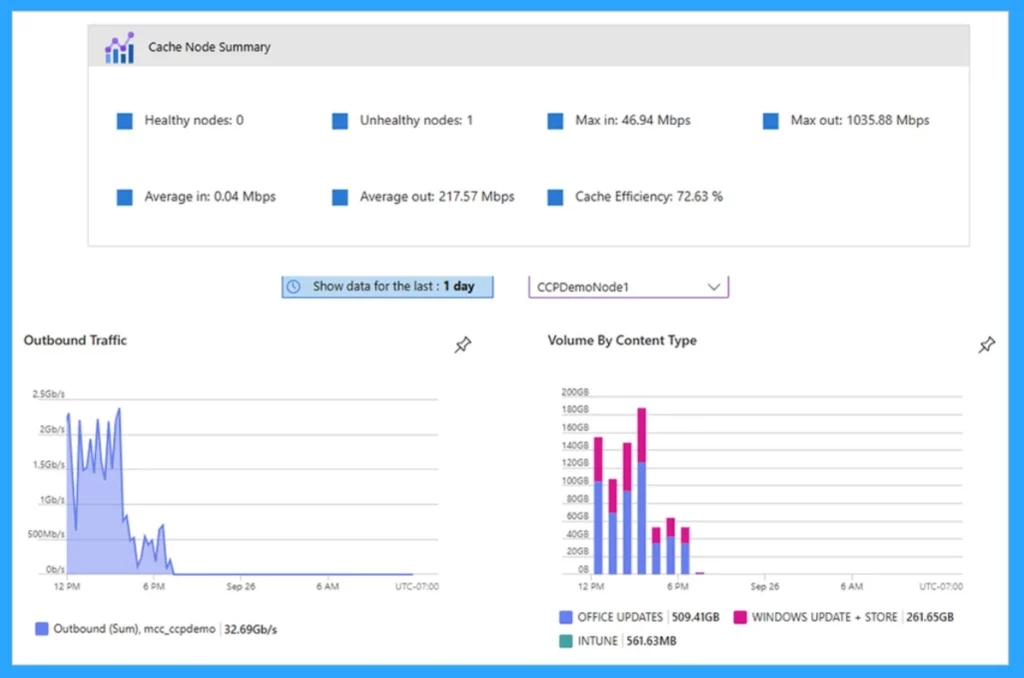
Data Tracking by Content Type
Monitoring the health of cache nodes and the device’s content delivery is essential. Connected Cache Azure portal shows a real-time and historical view of the outbound traffic in Mbps and by content type. This will help to confirm that the cache is set up correctly and that devices are getting content.
| No. | Traditional Enterprise or Educational Site |
|---|---|
| 1 | Hundreds to thousands of Windows workstations, Windows servers, or virtual machines are present. |
| 2 | Reusing existing hardware is important (decommissioned Configuration Manager distribution point, file server, cloud print server) or dedicated server hardware is available on-site. |
| 3 | Internet bandwidth may range from excellent to limited (T1), and/or internet connectivity may be intermittent. |
| 4 | The top priority is Preserving bandwidth for office or educational operations, especially during peak times. |
| 5 | Performant downloads are necessary to support mass update, upgrade, or Autopilot provisioning operations. |
Connect with the HTMD Team
Join the LinkedIn Page and Telegram group to get the latest step-by-step guides and news updates. Join our Meetup Page to participate in User group meetings. Also, Join the WhatsApp Community to get the latest news on Microsoft Technologies. We are there on Reddit as well.
Author
Anoop C Nair has been Microsoft MVP from 2015 onwards for 10 consecutive years! He is a Workplace Solution Architect with more than 22+ years of experience in Workplace technologies. He is also a Blogger, Speaker, and Local User Group Community leader. His primary focus is on Device Management technologies like SCCM and Intune. He writes about technologies like Intune, SCCM, Windows, Cloud PC, Windows, Entra, Microsoft Security, Career, etc.


Discussion