






Passkey Deletion in the Microsoft Authenticator App Now Syncs with Entra ID
Hey there, Let’s Discuss the topic Passkey Deletion in the Microsoft Authenticator App Now Syncs with Entra ID. A passkey is an authentication method that allows users to access applications and websites without a username and password.
A passkey utilises cryptographic technology to create a unique key that securely verifies the user’s identity. This approach not only simplifies the login process, but it also enhances security. Passwords can be easily guessed, hacked, or stolen.
In contrast, passkeys are designed to be phish-resistant, meaning they cannot be guessed, stolen, or reused. Passkeys serve as a replacement for traditional passwords. With passkeys, you can sign into your Microsoft personal account or your work/school account using your face, fingerprint, or PIN.
Samuel Eng, Trusted Security Advisor at Onevinn, shared some exciting news: deleting a passkey in the Microsoft Authenticator App will now also be removed from Entra ID. This feature is helpful for troubleshooting, and you may be asked to sign in again after deleting the passkey.

Table of Contents

Advantages of Hosting Passkeys on a User Device
Certain organizations, particularly those subject to strict regulations, are required to use device-bound passkeys for signing in to Microsoft Entra. These passkeys remain on the device and cannot be transferred or backed up, ensuring a high level of security.
Signing in with a passkey that is securely stored on a user’s device is a straightforward process that enhances both convenience and security. Users always maintain awareness and never lose track of their daily computing device.
- Users never loss track of their daily computing device.
| Benefits of Passkey | Drawbacks of PassKey |
|---|---|
| High security | Low user awareness |
| Smooth user experience | Device dependent |
- Sign-in to Microsoft Apps with Passkey on Android using Authentication Broker Intune Company Portal
- Cloud PC Support for FIDO Devices and Passkeys on macOS and iOS
- How to Enable Passkeys in Microsoft Authenticator
Passkey Deletion in the Microsoft Authenticator App Now Syncs with Entra ID
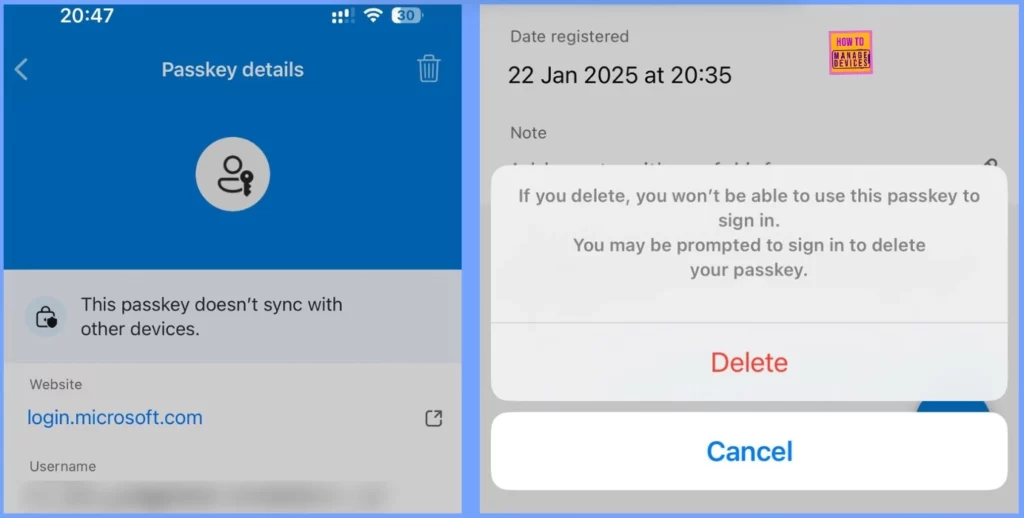
Microsoft Entra ID is a cloud-based identity and access management service that enables employees to access external resources that adopt a zero-trust security strategy. If you delete a passkey in the Microsoft Authenticator App, it will also be removed from Entra ID.
Note: If you delete, you won’t be able to use this passkey to sign in. You may be prompted to sign in to delete
your passkey.
Resource
Linked in post of Samuel EngSamuel Eng
Need Further Assistance or Have Technical Questions?
Join the LinkedIn Page and Telegram group to get the latest step-by-step guides and news updates. Join our Meetup Page to participate in User group meetings. Also, Join the WhatsApp Community to get the latest news on Microsoft Technologies. We are there on Reddit as well.
Author
Anoop C Nair has been Microsoft MVP for 10 consecutive years from 2015 onwards. He is a Workplace Solution Architect with more than 22+ years of experience in Workplace technologies. He is a Blogger, Speaker, and Local User Group Community leader. His primary focus is on Device Management technologies like SCCM and Intune. He writes about technologies like Intune, SCCM, Windows, Cloud PC, Windows, Entra, Microsoft Security, Career, etc.




Discussion