






MDM Lifecycle Management with Microsoft Intune From Enrollment to Retirement
Hi there, Let’s discuss about MDM Lifecycle Management with Microsoft Intune From Enrollment to Retirement Every device that our organization manages follows a specific lifecycle, and Microsoft Intune plays a vital role in effectively overseeing this process.
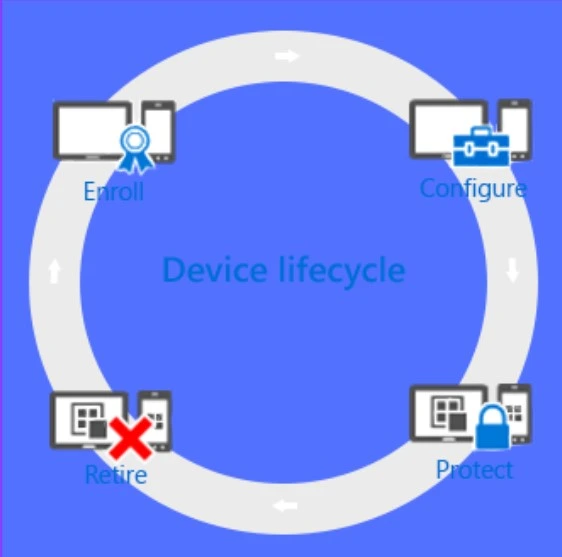
This lifecycle begins with enrollment and continues through various stages, including configuration, protection, and, ultimately, retiring the device when it is no longer necessary. Mobile Device Management (MDM) refers to the administration of mobile devices, including smartphones, tablets, and laptops.
MDM enables organisations to streamline management, enforce security protocols, regulate access, and manage configurations remotely across their mobile device fleets. It focuses on several key aspects, including the effective segregation of corporate data to ensure sensitive information remains secure and well-defined.
MDM also plays a crucial role in protecting email communications, safeguarding corporate documents stored on various devices, and enforcing established corporate policies to maintain compliance and security. Many organizations manage their devices and applications using Mobile Device Management (MDM) products and services.

Table of Contents

MDM Lifecycle Management with Microsoft Intune
If we bring an iPhone, first we need to be enrolled with our Microsoft Intune account to allow our company to manage it; then, it needs to be configured to our company’s liking; then, the data that’s stored on it by a user needs to be protected; and finally, when that iPad is no longer needed, we must retire or wipe all sensitive data on it.
- Enroll > Configure>Protect > Retire
- Fix MDM Profile Installation Failed with 401 Error during Intune Enrollment for Apple Devices
- Troubleshoot Windows Autopilot Issues with MDM Diagnostics Tool
- Intune MDM Enrollment Error Code 80180005
Enroll to Device Lifecycle
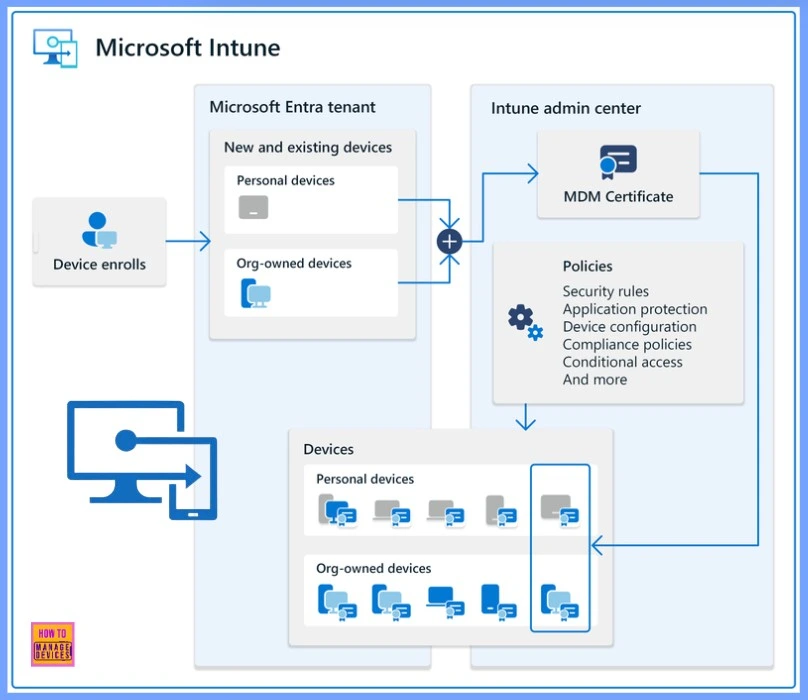
Mobile device management (MDM) strategies deal with a variety of phones, tablets, and PCs (iOS/iPadOS, Android, Windows, and macOS). The first step in managing a device, especially for corporate-owned devices, is to set up device enrollment.
Device Configuration
To fully benefit from what Intune provides and ensure that our devices are secure and compliant with company standards, we can select from a variety of policies. We can configure nearly every aspect of how managed devices function using these settings.
- The table below help us With the types of configuration options that are available
| Device Configuration Profiles | Company Resource Access | Windows PC Management Policies (With the Intune Client Software) |
|---|---|---|
| These policies let us configure the features and capabilities of the devices that we manage. | When we let our users access their work on their personal devices, this can present challenges. | While enrolling Windows PCs with Intune gives us the most device management capabilities, Intune continues to support managing Windows PCs with the Intune client software. |
Protect the Device
In today’s IT landscape, safeguarding devices from unauthorised access is among your most critical responsibilities. Beyond the items included in the Configure step of the device lifecycle, Intune offers various features that help protect the devices you manage from unauthorised access and malicious attacks.
| Windows Hello for Business Settings | Multi Factor Authentication | Policies to Protect Windows PCs (With Intune Client Software) |
|---|---|---|
| Allows users to sign in using gestures like fingerprints, eliminating the need for passwords. | Adding an extra layer of authentication to user sign-ins can help make devices even more secure. | Using Intune client software, we can manage Windows PCs by controlling settings for Endpoint Protection, software updates, and Windows Firewall. |
Retiring of Device
When a device is lost or stolen, needs replacement, or when users change positions, it’s often necessary to retire or wipe it. Several methods are available to do this, including resetting the device, removing it from management, and wiping the corporate data stored on it.
Need Further Assistance or Have Technical Questions?
Join the LinkedIn Page and Telegram group to get the latest step-by-step guides and news updates. Join our Meetup Page to participate in User group meetings. Also, Join the WhatsApp Community to get the latest news on Microsoft Technologies. We are there on Reddit as well.
Resources
Overview of the Microsoft Intune mobile device management (MDM) lifecycle
Author
Anoop C Nair has been Microsoft MVP for 10 consecutive years from 2015 onwards. He is a Workplace Solution Architect with more than 22+ years of experience in Workplace technologies. He is a Blogger, Speaker, and Local User Group Community leader. His primary focus is on Device Management technologies like SCCM and Intune. He writes about technologies like Intune, SCCM, Windows, Cloud PC, Windows, Entra, Microsoft Security, Career, etc.


Discussion