






How to Block Deepseek App usage MS Defender for Cloud Apps
Let’s discuss how to Block Deepseek App usage with MS Defender for Cloud Apps. Today, I am going to reveal exciting news related to the DeepSeek AI tool. Australia has recently banned DeepSeek from all federal government devices due to national security concerns.
The main reason for Deepseek’s banning is potential risks related to data security, privacy, and the possibility of the app being used for surveillance or manipulation. National Security is the main concern of Countries that led to Deepseek’s banning.
Due to this issue, if you are a Microsoft Customer, you can block Deepseek app usage from Defender for Cloud Apps by Unsanctioning the app. Unsanctioning means officially prohibiting its use within an organization or network.
Deepseek App usages can be block to enhance the security and compliance posture of your organization. In this blog post i will help you to know more about Block Deepseek App usage MS Defender for Cloud Apps.

Table of Contents
What is Deepseek?
Hangzhou, Zhejiang. It specializes in developing large language
models and other Al technologies.
How to Block Deepseek App usage MS Defender for Cloud Apps
From Microsoft Defender Portal you can easily block Deepseek App usage. By blocking the Deepseek App usage you have many benefits. The following table shows the benefits.
| Benefits | Details |
|---|---|
| Prevent Unauthorized Access | Unauthorized Access can be prevented by blocking unsanctioned apps. |
| Minimize Security Risks | It helps to minimize security Risks |
| Data Protection | Helps to protect sensitive and confidential information |
- Secure AI Applications using Microsoft Defender for Cloud Apps
- New Cloud Based Microsoft Defender App for Home Users | Step by Step User Guide
- SaaS Security Initiative Your New Homepage for SaaS Security Management in the Defender Portal
Steps to Block Deepseek App usage MS Defender Console
You can easily block Deepseek App usage MS Defender Console. To log into the Defender Portal, you must have an authorized Microsoft Entra ID or Personal Microsoft Account. For accessing premium features, a Defender Threat Intelligence (TI) premium license is required.
- Login Microsoft Defender for Cloud admin center
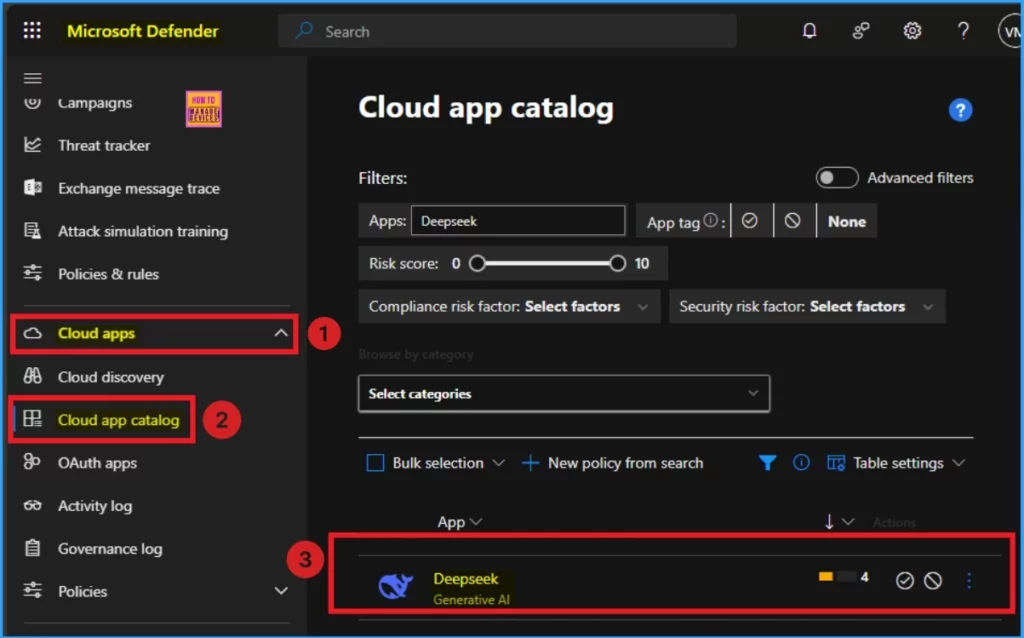
- Go to Cloud App > Cloud App Catalog
- You can search Deepseek on the Search box
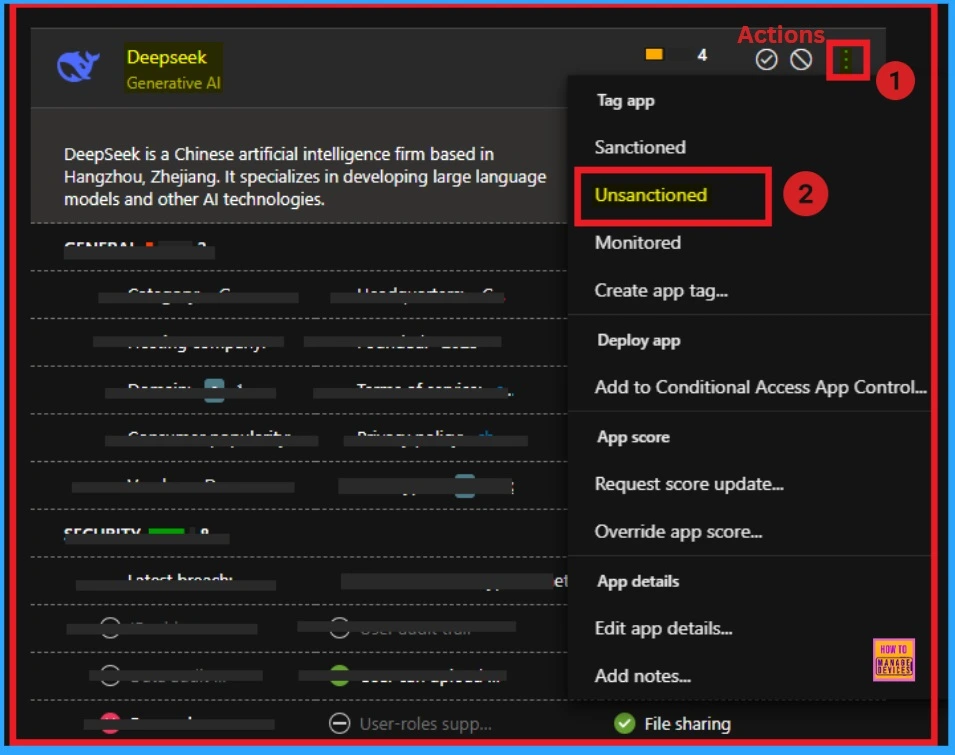
After that, clcik on the 3 dot (Actions) button on the Defender Portal. Click on the Unsactioned button from the window. After that Deepseek app will unsactioned. After that you can generate block script. Look at the below window.
Need Further Assistance or Have Technical Questions?
Join the LinkedIn Page and Telegram group to get the latest step-by-step guides and news updates. Join our Meetup Page to participate in User group meetings. Also, Join the WhatsApp Community to get the latest news on Microsoft Technologies. We are there on Reddit as well.
Author
Anoop C Nair has been Microsoft MVP for 10 consecutive years from 2015 onwards. He is a Workplace Solution Architect with more than 22+ years of experience in Workplace technologies. He is a Blogger, Speaker, and Local User Group Community leader. His primary focus is on Device Management technologies like SCCM and Intune. He writes about technologies like Intune, SCCM, Windows, Cloud PC, Windows, Entra, Microsoft Security, Career, etc.


Discussion