






How to Access Claude 3.7 in GitHub Copilot for Faster Coding
Let’s discuss the How to Access Claude 3.7 in GitHub Copilot for Faster Coding. Artificial intelligence significantly impacts technology today, especially for developers and those in technical fields. Anthropic’s latest version, Claude 3.7, is now accessible in GitHub Copilot for Visual Studio 2022, version 17.13.
Recently, Anthropic announced through their blog that the release for the Claude 3.7 Sonnet1 is now available. This is the most advanced model, and it works efficiently. It will help the user get quick results, whether it is a detailed or complicated one.
It is essential for coding and front-end web development. Along with this model, Anthropic introduced Claude Code, a command-line tool for coding tasks. I believe this will have a significant impact on users. Now Claude is available for a limited Preview.
This will enable developers to assign tasks to Claude directly from their terminal. This new version is now available to all Claude plans, including Free, Pro, Team, and Enterprise. It can also be accessed through the Anthropic API, Amazon Bedrock, and Google Cloud’s Vertex AI.

Table of Contents
How to Access Claude 3.7 in GitHub Copilot for Faster Coding
We discussed many things about Claude 3.7, which is now available in GitHub Copilot for Visual Studio. These new functions are both a regular language model and a reasoning model. You can choose whether you want it to respond quickly or take more time to think.
- When using the Claude 3.7 Sonnet API, you can limit the thinking time by controlling the number of tokens used.
Note: In standard mode, it is an upgrade from Claude 3.5.
| No | Where to Access Claude Sonnet 3.7 |
|---|---|
| 1 | Copilot Chat in Visual Studio Code |
| 2 | Copilot Chat in Visual Studio 2022 version 17.13 or later |
| 3 | The immersive mode in Copilot Chat on GitHub |

- Add the ChatGPT App to Intune using Microsoft Graph API
- SCCM Task Sequences with UI++Now Open Source on GitHub
- M365 Copilot Now Available for All Introducing the Free Copilot Chat License and Consumption Offering
How to Access Claude 3.7
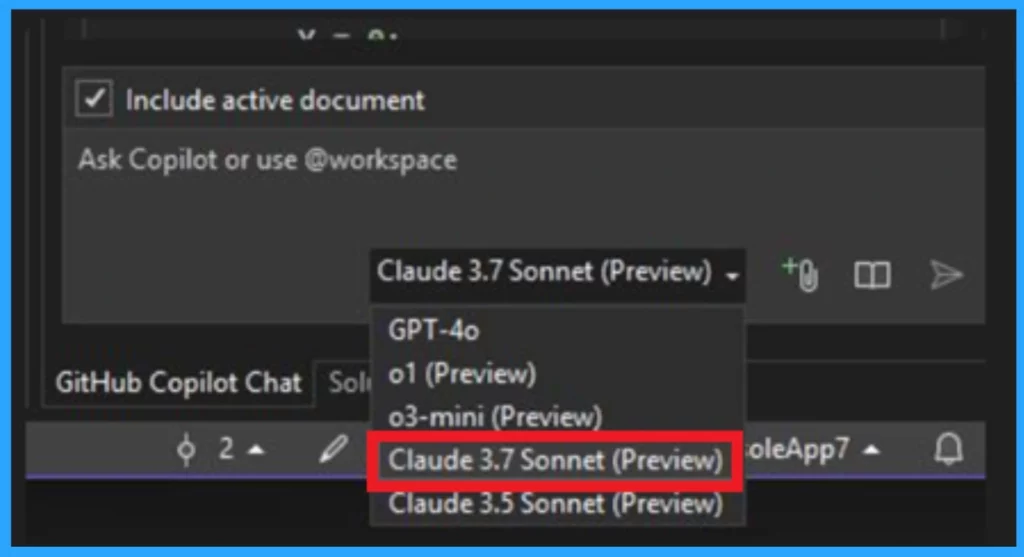
You can start with Claude 3.7 by opening the chat window and clicking on the Copilot badge at the top right corner of your Visual Studio interface. Then, launch Copilot Edit to begin an editing session. Use the model picker in the prompt box to select your desired model.
- By default, ChatGPT 4 is selected, but you can switch to Claude 3.7 Sonnet for its advanced features.
- If you don’t see Claude 3.7 as an option, it might be because it’s only available for paid Copilot users and not for free users.
- Additionally, you might need to enable the 3.7 Sonnet policy in your GitHub profile settings to gain access to Claude.
Reference
Claude 3.7 Now Available in GitHub Copilot for Visual Studio
Need Further Assistance or Have Technical Questions?
Join the LinkedIn Page and Telegram group to get the latest step-by-step guides and news updates. Join our Meetup Page to participate in User group meetings. Also, Join the WhatsApp Community to get the latest news on Microsoft Technologies. We are there on Reddit as well.
Author
Anoop C Nair has been Microsoft MVP from 2015 onwards for 10 consecutive years! He is a Workplace Solution Architect with more than 22+ years of experience in Workplace technologies. He is also a Blogger, Speaker, and Local User Group Community leader. His primary focus is on Device Management technologies like SCCM and Intune. He writes about technologies like Intune, SCCM, Windows, Cloud PC, Windows, Entra, Microsoft Security, Career, etc.



Discussion