






Windows 10 Rollback Uninstall Updates Enhanced Diag Options
In this post, Learn How to reduce the Windows 10 rollback rate, Diagnose install failures, and Uninstall Updates. This is the information shared by Suma Sagane Gowda & Steve Diacetis in the MS Ignite session. More details about the session are below.
We will see more details about Windows Rollback, Diagnosing install failures, and uninstall updates. Microsoft has invested much effort in improving the rollback experience and reducing the rollback numbers.
ROLLBACK is a command in SQL that is used for transaction control. It allows a user to undo any changes or alterations made since the execution of the last COMMIT, effectively reverting the database to its previous state. This command is handy for reversing transactions that are not saved in the database.
When upgrading a computer from Windows 7 SP1 or Windows 8.1 to Windows 10, the previous version of Windows is retained on the hard drive for approximately 28 days. This helpful feature enables users to revert back to the earlier version of Windows if necessary.

- Windows 10 Roll Back Option Is Missing From The Upgraded Windows 8.1 Machines
- How To Roll Back Device Driver To Previous Version In Windows 11
- Windows Upgrade Troubleshooting Logs Issues
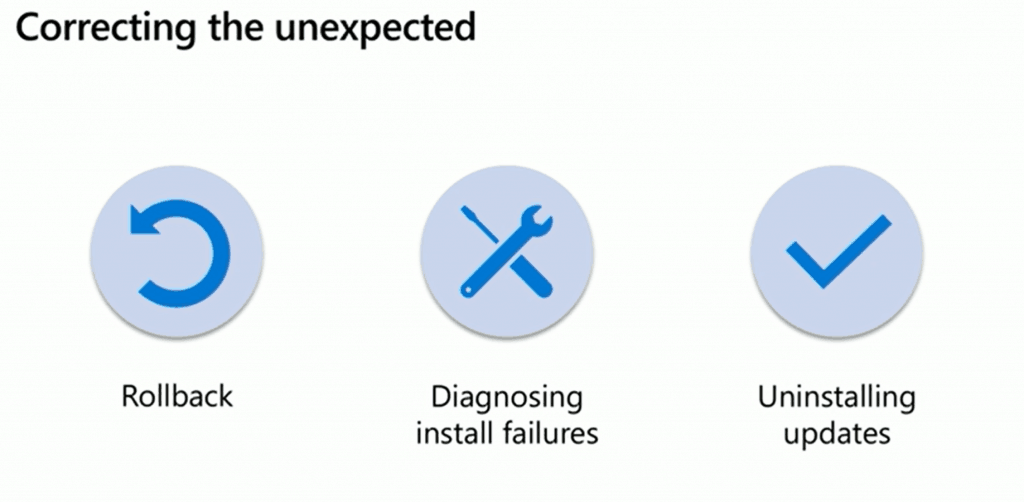
- Rollback
- Diagnostic install failures
- Uninstalling updates
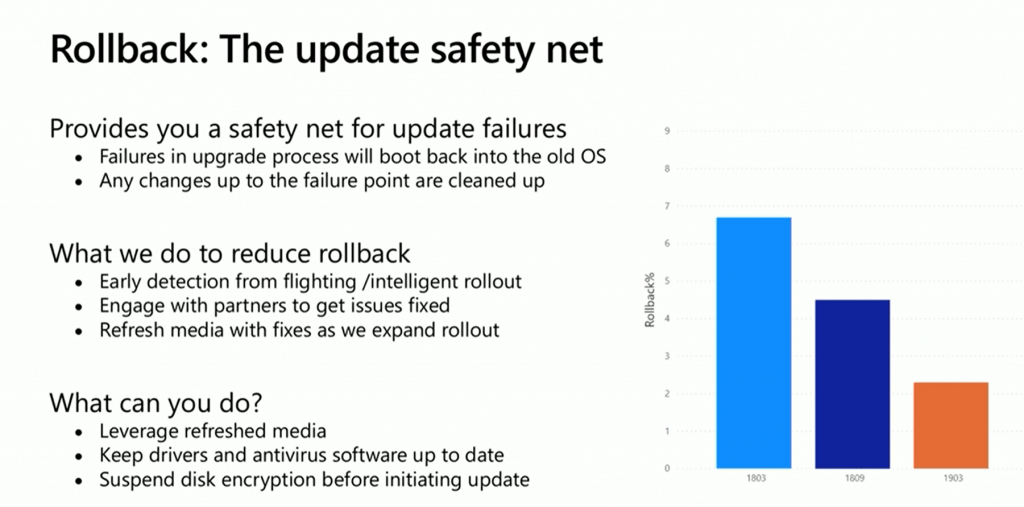
Windows 10 Reduction of Rollback Rate (Windows 10 Rollback)
- It provides you a safety net for update failures
- Failures in the upgrade process will boot back into the old OS
- Any changes up to the failure point are cleaned up
- What does Microsoft do to reduce rollback?
- Early detection from flighting/intelligent rollout
- Engage with partners to get issues fixed
- Refresh media with fixes as we expand the rollout
- What can you do to reduce the Rollback Rate?
- Leverage refreshed media (use the latest media)
- Keep drivers and antivirus software up to date (ensure the latest versions of drivers and antivirus software)
- Suspend disk encryption before initiating the update
How to Diagnose Install Failures (Windows 10 Rollback)
Microsoft integrated Setupdiag Integrated with Setup (20H1). The following log files are created when an upgrade fails and the installation rollback is initiated:
C:\$Windows.~BT\Sources\Rollback\setupact.log
C:\$Windows.~BT\Sources\Rollback\setupact.err
Setupdiag Enhancement
Setupdiag has been enhanced to seamlessly integrate with Setup (20H1), offering registry/log output that can be leveraged for reporting purposes. Additionally, SCCM (MEM CM) integration is currently in development and will be available soon.
- Setupdiag Integrated with Setup (20H1)
- Registry/Log output that you can leverage for reporting
- Setupdiag SCCM (MEM CM) integration (Coming Soon)
Additional Support Added
The following updates have been made: additional support has been added, processing is now three times faster, other rules have been revised based on feedback, and recovery support is now available.
- 3x faster processing
- Other rules based on feedback
- Support for recovery
Uninstall Windows 10 Updates (Windows 10 Rollback)
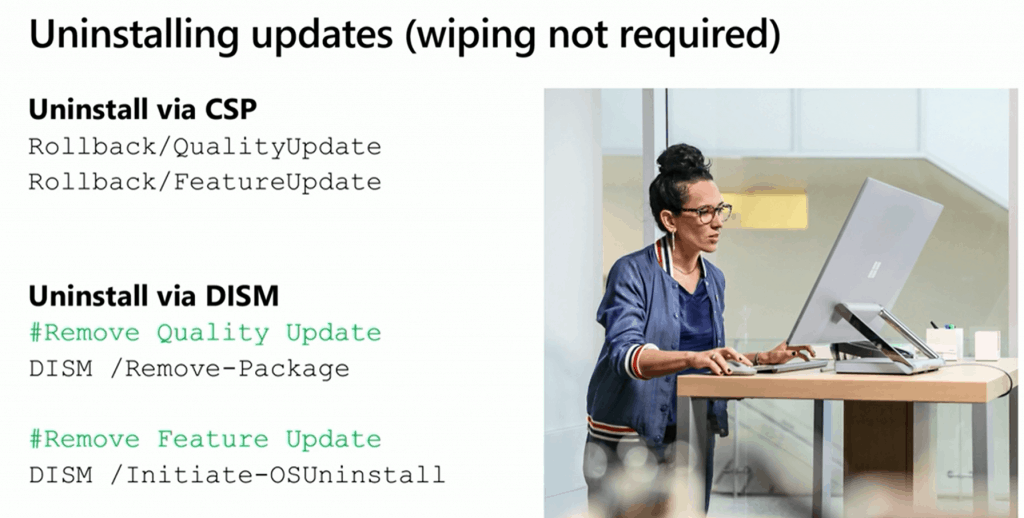
You have seen this with the Windows 10 1809 update. If you have compatibility issues with some applications after the Windows 10 Cumulative Update and Feature update, you can uninstall the updates using CSP or DISM.
Uninstall via CSP for Microsoft Intune (MEM MI)
To uninstall via CSP for Microsoft Intune (MEM MI), you can remove the Windows 10 1809 or later Quality Update and initiate a rollback using /QualityUpdate. Additionally, you can remove the Windows 10 1809 or later Feature Update and perform a rollback using /FeatureUpdate.
- Remove Windows 10 1809 or later. Quality Update
- Rollback /QualityUpdate
- Remove Windows 10 1809 or later Feature Update
- Rollback /FeatureUpdate
Uninstall via DISM for SCCM (MEM CM)?
To uninstall via DISM for SCCM (MEM CM), the following commands can be used: To remove the Windows 10 1809 or later Quality Update, utilize DISM /Remove-Package. To remove the Windows 10 1809 or later Feature Update, use DISM /Initiate-OSUninstall.
- Remove Windows 10 1809 or later. Quality Update
- DISM /Remove-Package
- Remove Windows 10 1809 or later Feature Update
- DISM /Initiate-OSUninstall
Session – Windows 10 Rollback
Make the Windows update experience smooth and seamless for your IT team and end-users.
Resources
- Windows 10 Bandwidth Management DO Delivery Optimization with LEDBAT in LAN?
- SCCM and Microsoft Connected Cache Integration to Help with Bandwidth Issues
- Microsoft Connected Cache Container Instances in Azure
- Basics of Windows Dynamic Update Explained Update Management
We are on WhatsApp. To get the latest step-by-step guides and news updates, Join our Channel. Click here –HTMD WhatsApp.
Author
Anoop C Nair is Microsoft MVP! He is a Device Management Admin with more than 20 years of experience (calculation done in 2021) in IT. He is a Blogger, Speaker, and Local User Group HTMD Community leader. His primary focus is Device Management technologies like SCCM 2012, Current Branch, and Intune. He writes about ConfigMgr, Windows 11, Windows 10, Azure AD, Microsoft Intune, Windows 365, AVD, etc.




Discussion