






Microsoft Copilot App Gains File Search and Vision Features in Latest Windows Update
Hi all, today we are coming with an exciting news that Microsoft Copilot App Gains File Search and Vision Features in Latest Windows Update. As you all know that Copilot is one of the AI tools for users to Reduce the workload effortlessly. Nowadays Artificial intelligence takes place in the world that must be very helpful for the organizations and users.
Now, the recent news comes across that vision and file search options are now available on to the Copilot on Windows and it is now rolling out to the Windows Insiders, version 1.25034.133.0 and higher is rolling out via the Microsoft Store across all Insider Channels. Microsoft has introduced new features to Copilot on Windows, enhancing user experience for Insiders.
The updates include Vision, allowing Copilot to analyze and interact with content from shared browser windows or apps, and file search, enabling users to locate and query files using natural language. This feature is to be going to be the best for multitasking and productivity.
With this new feature users can be more aware of each content that shared. Microsoft’s Copilot Vision on Windows allows users to share browser or app windows with Copilot for real-time analysis, insights, or assistance. In this post we can look into a quick overview of Vision and File Search in Copilot.

Table of Contents
Microsoft Copilot App Gains File Search and Vision Features in Latest Windows Update – File Search Feature
Above, we discussed an overall view of vision and file search in Copilot for Windows Insiders. The File Search feature in Copilot on Windows allows you to locate, open, and interact with files stored on your device using the app. This feature can be customised the permissions for what Copilot can access, retrieve, or read by navigating to the Permission settings in Copilot Settings.
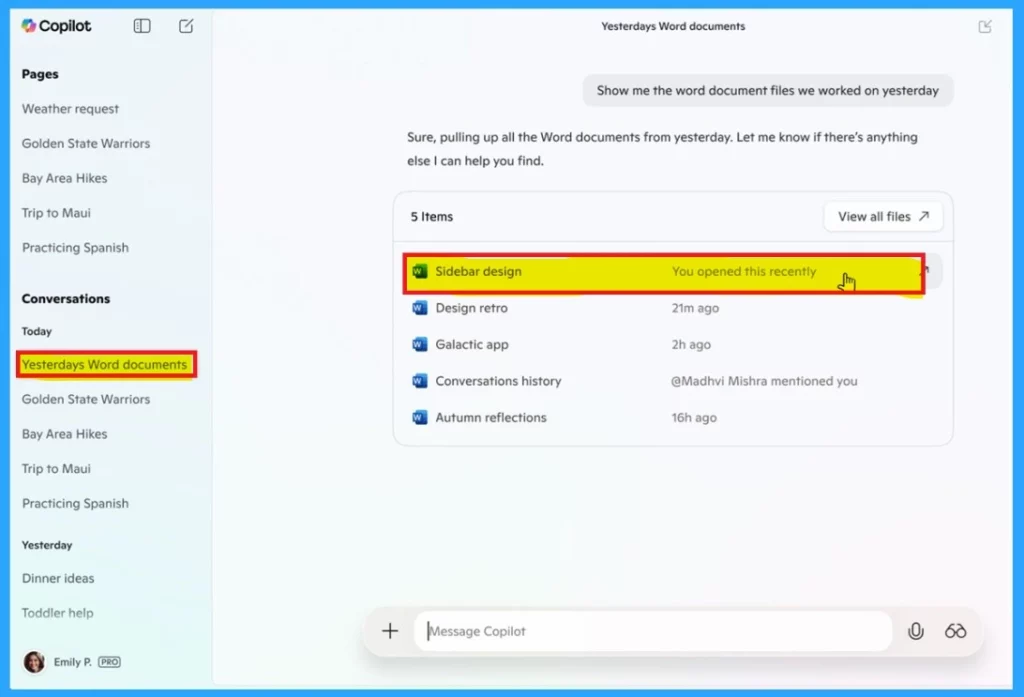
- In the below image you can see that the File search.
- You can ask Copilot that Show me the word document files we worked on yesterday as a prompt.
- The Copilot give you the file you worked on yesterday (also the information containing that you opened that recently).
| Supporting File Types |
|---|
| .docx |
| .xlsx |
| .pptx |
| .txt |
| .json. |
- Key Differences between Copilot Chat in Microsoft 365 and Paid Copilot License
- Copilot with Endpoint Privilege Manager to Identify Potential Elevation Risks using Intune
- New Copilot Excel Table Feature Simplify and Transform Data Analysi
Copilot Vision
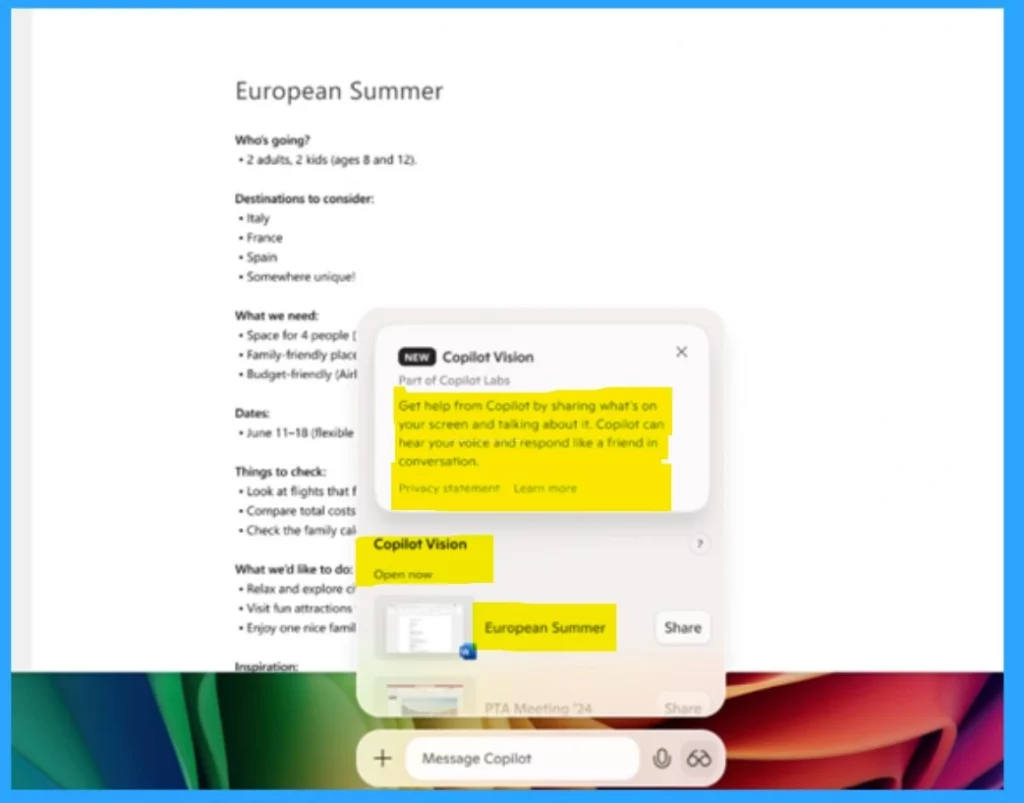
With Copilot Vision, you can share a browser or application window directly with Copilot. This enables the AI to view and process the information visible on your screen, offering analysis, insights, or answers to your questions. To use Copilot Vision on Windows, click the glasses icon to start and pick the browser or app window you want to share.
- Copilot will analyze the content and help by giving insights or answering questions.
- You can ask for things like chart explanations or text summaries. To stop, just click Stop or the ”X”.
Need Further Assistance or Have Technical Questions?
Join the LinkedIn Page and Telegram group to get the latest step-by-step guides and news updates. Join our Meetup Page to participate in User group meetings. Also, Join the WhatsApp Community to get the latest news on Microsoft Technologies. We are there on Reddit as well.
Resource: Vision and file search begin rolling out to Windows Insiders
Author
Anoop C Nair has been Microsoft MVP for 10 consecutive years from 2015 onwards. He is a Workplace Solution Architect with more than 22+ years of experience in Workplace technologies. He is a Blogger, Speaker, and Local User Group Community leader. His primary focus is on Device Management technologies like SCCM and Intune. He writes about technologies like Intune, SCCM, Windows, Cloud PC, Windows, Entra, Microsoft Security, Career, etc.




Discussion