






What is New in MECM SCCM 1910 Features a Walkthrough
Let’s discuss and walk through the new features of the SCCM 1910 (SCCM 1910 Features) production version. I have explained and shown most of these new features in the video tutorial.
Microsoft Endpoint Configuration Manager (MECM) is a versatile and powerful management solution designed to simplify the deployment, management, and security of devices and applications across your organization. MECM empowers IT administrators to configure, monitor, and maintain computer health and ensure compliance with organizational policies and security standards.
SCCM 1910 has many new features and improvements across multiple areas, including site infrastructure, content and client management, co-management, application management, OS deployment, software updates, reporting, and configuration manager console. This release is packed with intriguing features to explore.
SCCM 1910 brings several fixes and feature improvements. It’s important to note that the Issues that are Fixed section doesn’t list all the changes but highlights those that the product development team considers most significant for Configuration Manager’s extensive customer base.

- SCCM 1910 Rollup Update KB 4537079| Reboot Issues
- ConfigMgr 1910 Known Issues Bugs Fixes|SCCM
- How to Upgrade SCCM 1910 Update Step by Step Guide – New Features Microsoft Endpoint ConfigMgr #MECM (youtube.com)
SCCM 1910 = MECM 1910 (to know more, read article ) Microsoft Endpoint Configuration Manager (MECM)
NOTE! – SCCM or MECM 1910 production version is NOT the baseline version! The latest SCCM CB baseline version is 1902.
Why Upgrade Configuration Manager ConfigMgr
Wow! Stay up to date! Stay Current! What?
Do you wantfull support (OSD?) for Windows 10 1909? Support Windows 10 as a client with the SCCM 1910 version.- Do you want to have issues with SCCM 1906 (Refer to SCCM 1906 known issues list)? All these issues are fixed with ConfigMgr 1910
Prerequisite SCCM 1910 Production Version?
The SCCM 1910 production version released is in the Slow Ring. The MEMCM 1910 won’t be available automatically in your SCCM console. I shall update here once Microsoft releases the 1910 version broadly.
So, the 1910 production version will be available within the SCCM console after you run the PowerShell command and your SCCM site meet the following conditions:
If you want to get into SCCM 1910 FAST ring NOW – Run the PowerShell command(SCCM 1910 is Generally Available)- If your SCCM CB version is SCCM 1810, SCCM 1902, or SCCM 1906 (Read More details about the SCCM Life Cycle)
- If your SCCM CB version has an online Service Connection Point
Note – You don’t need to run the PowerShell script when Microsoft releases a SLOW ring version of SCCM 1906 at a later stage.
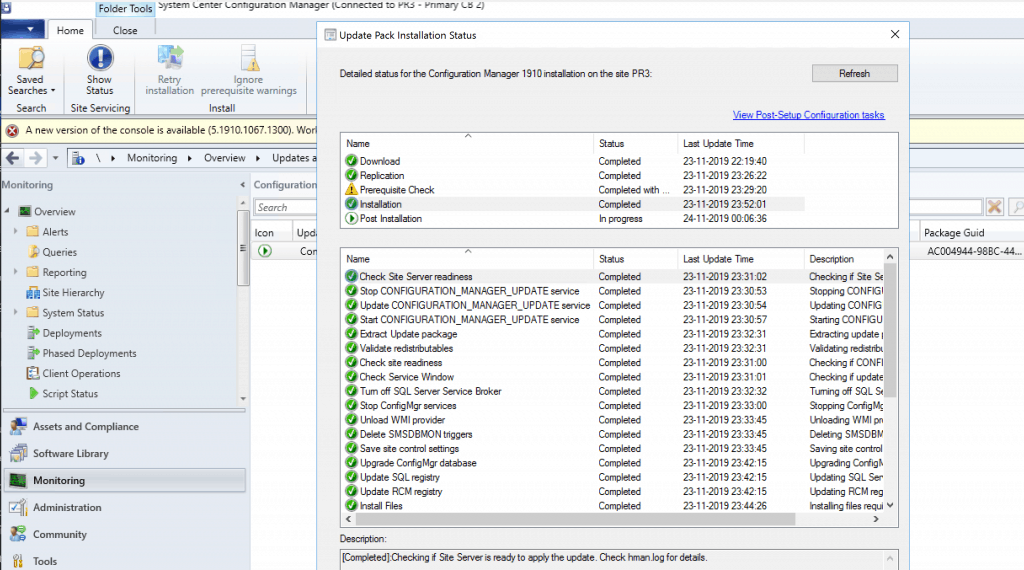
Time to Upgrade to SCCM 1910 (meh MECM 1910)?
Every organization might have its own SCCM CB infra-update strategy. I have seen organizations decide to update SCCM after three (3) months of release, while some might wait for the first rollup update. It’s better to stick with your organizational practice for SCCM upgrades.
I have written a post to help build the SCCM infra-update strategy. I recommend reading the post and commenting on whether you agree with this approach. More Details SCCM Infra Upgrade strategy.
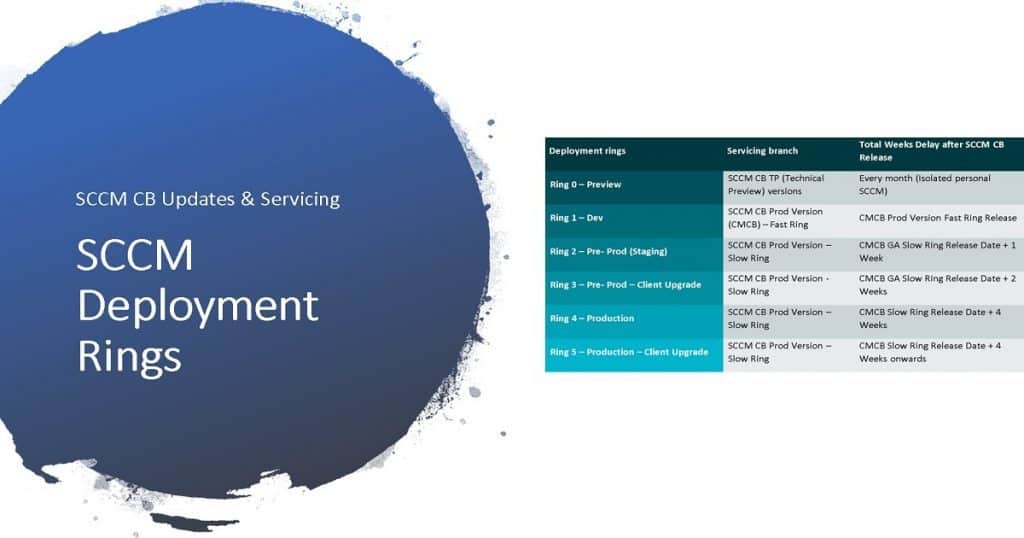
SCCM 1910 Upgrade Guide
I have already published a more detailed guide on MECM (Microsoft Endpoint Configuration Manager) or ConfigMgr 1910.
More details are available in “SCCM 1910 Update Step by Step Guide.”
Once the 1910 upgrade is completed successfully, the following features are enabled for the device management scenarios.
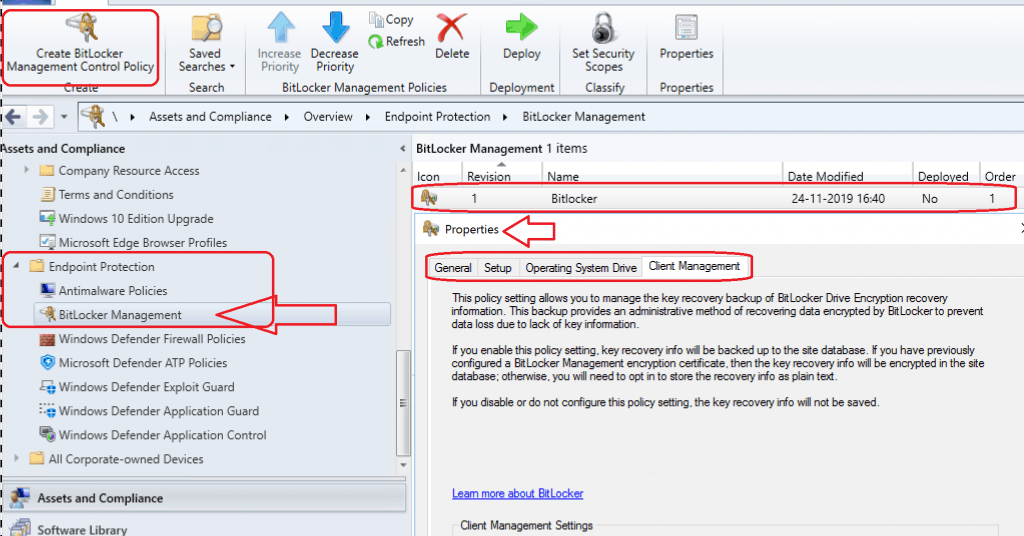
BitLocker Management SCCM MBAM
Finally, MBAM is part of the SCCM 1910 production version. MBAM shall help you perform Bitlocker Management. The following are the high-level options available in the 1910 version—more details on Improvements to BitLocker management.
Setup
- BitLocker Drive Encryption Settings
- Choose the Encryption and Cipher Strength – Enabled
- Select the Encryption method – AES 128-bit (default)
- Choose drive encryption and cypher strength (Windows 10) – Enabled
- Operating System Drives – AES-CBC 128-bit/265-bit
- Fixed Data Drives – XTS-AES 128-bit/256-bit
- Removable Drives – XTS-AES 128-bit/265-bit
- Choose the Encryption and Cipher Strength – Enabled
Operating System Drive
- OS Drive Management Settings
- Operating System Drive Encryption Settings – Enabled
- Allow BitLocker without a compatible TPM (Requires a Password) – Allow
- Select Protector for Operating System Drive
- TPM Only
- TPM and PIN
- Configure minimum PIN length for startup – 4
Client Management
- Client Management Settings
- Configure BitLocker Management Services – Enabled
- Select Bitlocker Recovery Information to store
- Recovery Password only
- Recovery Password and key package
- Enter client checking status frequency in (minutes) – 90
- Select Bitlocker Recovery Information to store
\Assets and Compliance\Overview\Endpoint Protection\BitLocker Management
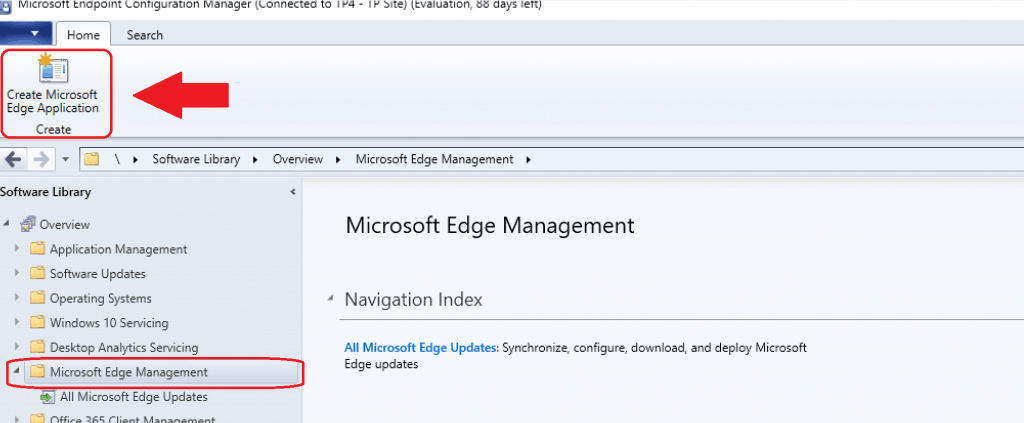
Deploy Microsoft Edge Browser
With the 1910 version, you can deploy the New Microsoft Edge browser using Endpoint Manager SCCM.
The SCCM team created an out-of-the-box experience for creating an SCCM application for a new edge browser (Chrome-based) deployment (Deploy Microsoft Edge Browser).
I have a separate post explaining the end-to-end Microsoft Edge update process with MECM. For more details, see “Deploy Microsoft Edge Browser with SCCM Endpoint Manager.”
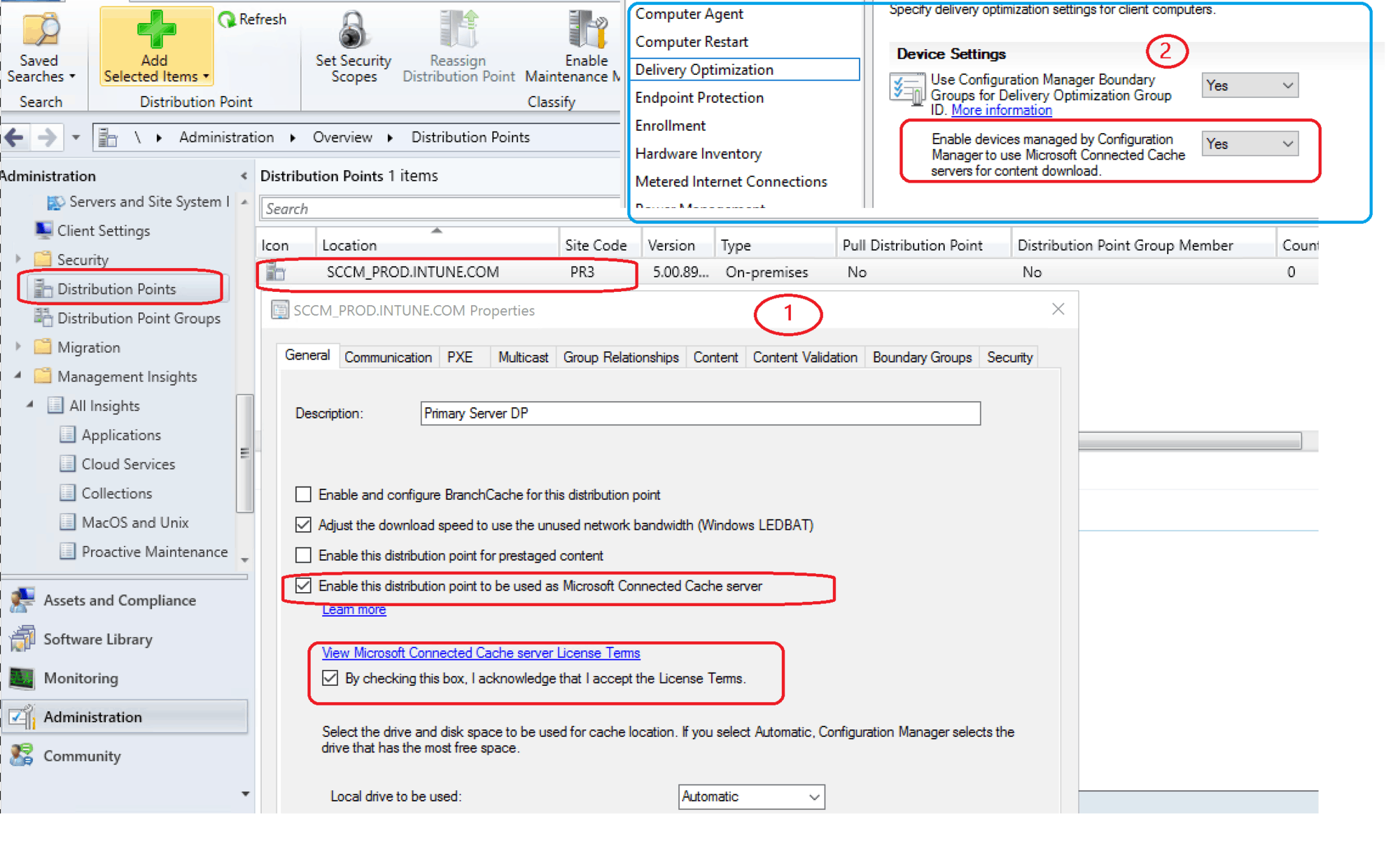
Microsoft Connected Cache Options
Microsoft Connected Cache (MCC) service is an on-prem delivery optimization solution announced in Ignite 2019. You can use SCCM or MECM DP, which are connected to the cache content location. More details are available in “SCCM and Microsoft Connected Cache Integration to Help with Bandwidth Issues.”
- Server Side Config from – \Administration\Overview\Distribution Points
- Client Side MCC configuration from > \Administration\Overview\Client Settings
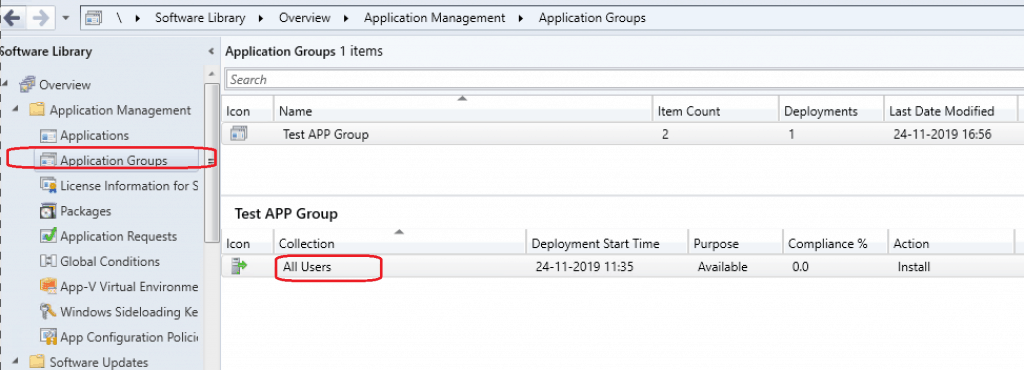
Application Groups – User Deployment
With the latest MECM (SCCM) version, you can create a group of applications and send that to a user or device collection as a single deployment.
You can also sequence the apps in the group so that the SCCM client can install them in a specific order.
In 1910, you had the following improvements:
- Users can Uninstall the app group in the Software Center.
- You can deploy an app group to a user collection.
Try this out : \Software Library\Overview\Application Management\Application Groups.
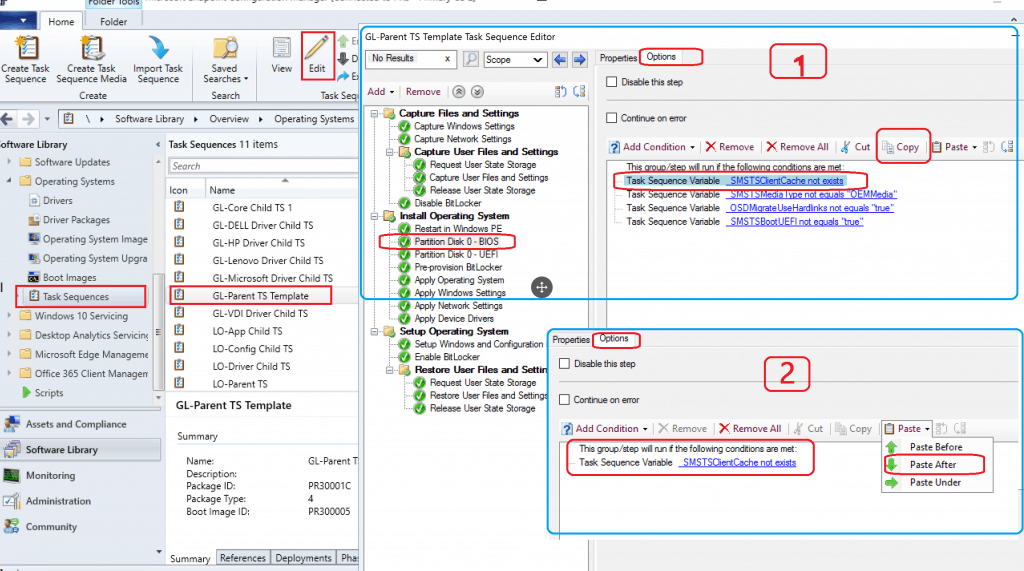
Copy Paste TS Condition
With the 1910 version of SCCM, you will get a new option to Copy and paste task sequence conditions. This option would help reuse the requirements from one task sequence step to another.
You can now copy and paste conditions in the task sequence editor.
Try this out \Software Library\Overview\Operating Systems\Task Sequences
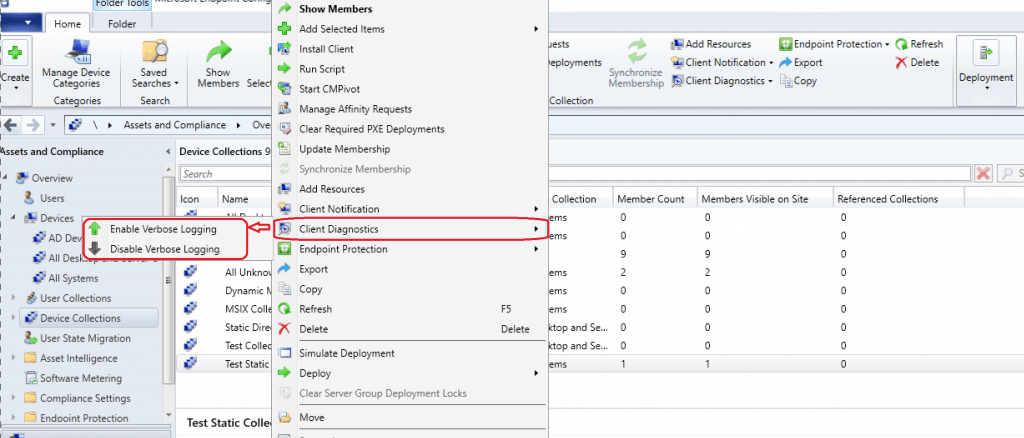
1910 New Right Click Option Client Diagnostics
1910 version of SCCM introduced a new device action called Client Diagnostics. You can include the following steps:
- Enable verbose logging: Change the global log level for the CCM component to verbose and enable debug logging.
- Disable verbose logging: Change the international log level to default and disable debug logging.
- In the SCCM console, go to the Assets and Compliance workspace, select the Devices node, and choose a target device.
- In the ribbon, on the Home tab, in the Device group, select Client Diagnostics. Choose one of the available actions.
- Enable verbose logging
- Disable verbose logging
Track the status of the task client’s diagnostic task in the diagnostics.log on the client.
Try this out \Assets and Compliance\Overview\Device Collections
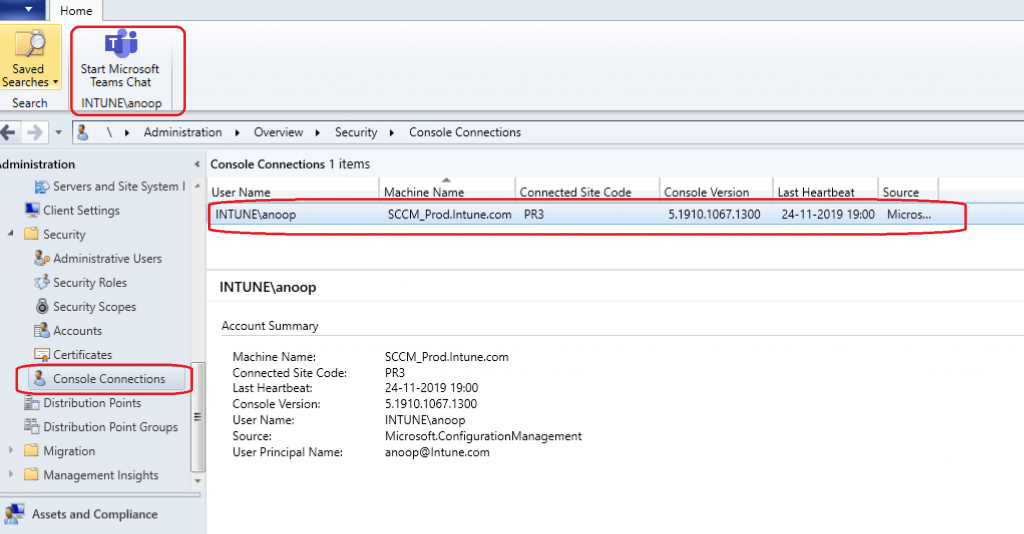
Teams Chat Option MECM 1910 Console Connections
With the Teams chat option, you can instantly chat with console users connected to the SCCM site. Let me know how useful this feature is for SCCM admins. I don’t recommend installing Teams on the SCCM primary server to use this feature.
I think Teams chat options will be helpful for a scenario where all your admins use Windows 10 remote console. View active consoles and message administrators through Console Connections.
Try this out from \Administration\Overview\Security\Console Connections.
Management Insights Health Checks
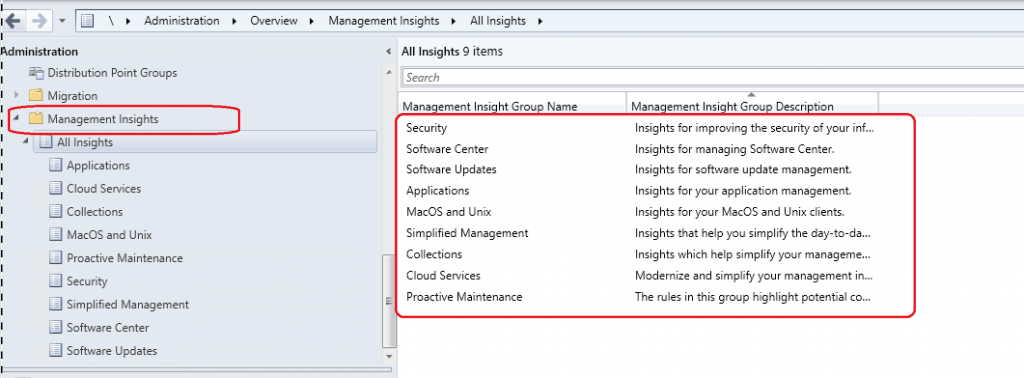
I don’t see many enhancements in the 1910 version of SCCM/MECM! For more details, “SCCM Management Insights – Healthy SCCM Infra.”
SCCM Management Insights will help you gain valuable insights into the current state of the SCCM environment. The Management insights are based on analyzing data in the site database.
Try this out from \Administration\Overview\Management Insights\All Insights.
WVD Support Enhancements
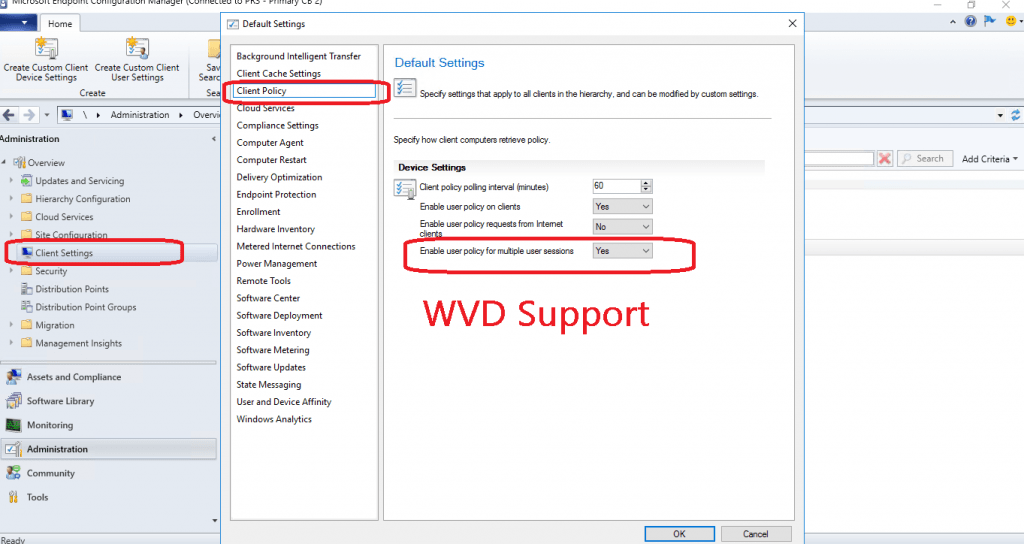
With the 1910 version, you can see options to enable the user policy for Windows 10 multi-session concurrent users. Intune support for this scenario is not announced.
I have a detailed post about SCCM support for WVD and Intune support for WVD. More details are available in “WVD Windows 10 Multi-Session Intune Hybrid Azure AD Support.”
- Client Settings
- Client Policy
- Enable user policy for multiple user sessions –> YES
- Client Policy
Custom Compliance Policies – SCCM 1910 Features
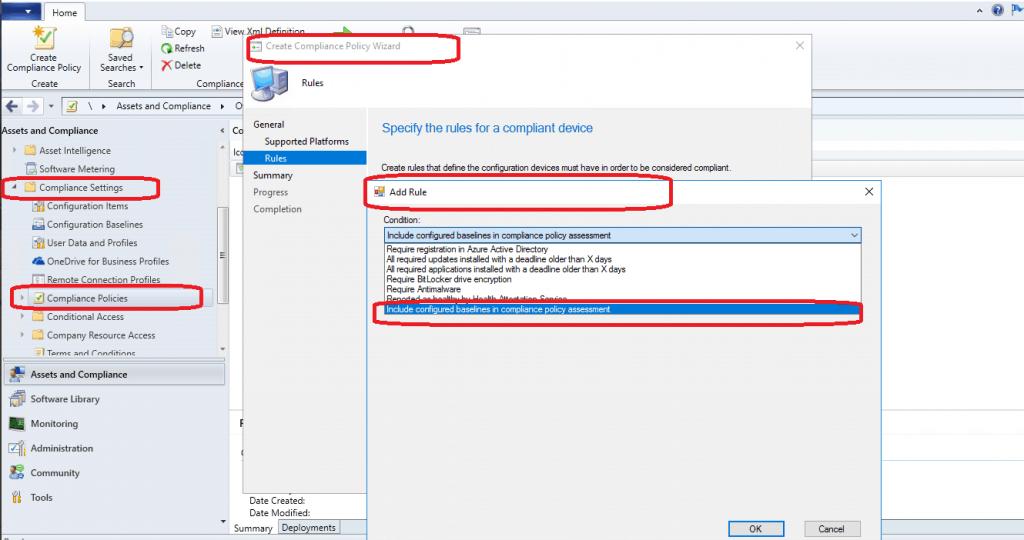
SCCM is a bit ahead of Intune here. SCCM offers the option to create custom compliance policies. Does your organization need to check a unique condition on the device before providing access to corporate resources?
Having a custom compliance policy will help you. You can try this out from:
- \Assets and Compliance\Overview\Compliance Settings\Compliance Policies
- Add Rules
- New Condition
- Include Configured baseline in compliance policy assessment ==> TRUE
- New Condition
- Add Rules
SCCM Real-Time Management?
CMPivot is the latest version of SCCM’s real-time management solution! I explained the architecture of CMPivot in my previous blog post. For more details, see “CMPivot Fast Channel Making SCCM Fast.”
With the 1910 version, Microsoft improved the performance of CMPivot without significantly impacting CPU workload. With these optimizations, Microsoft claims you can collect gigabytes of client data in real-time.
For more details – https://docs.microsoft.com/en-us/sccm/core/servers/manage/cmpivot#bkmk_optimization
Other improvements with the CMPivot 1910 version are:
- Windows event logs (WinEvent)
- File content (FileContent)
- DLLs loaded by processes (ProcessModule)
- Azure Active Directory information (AADStatus)
- Endpoint protection status (EPStatus)
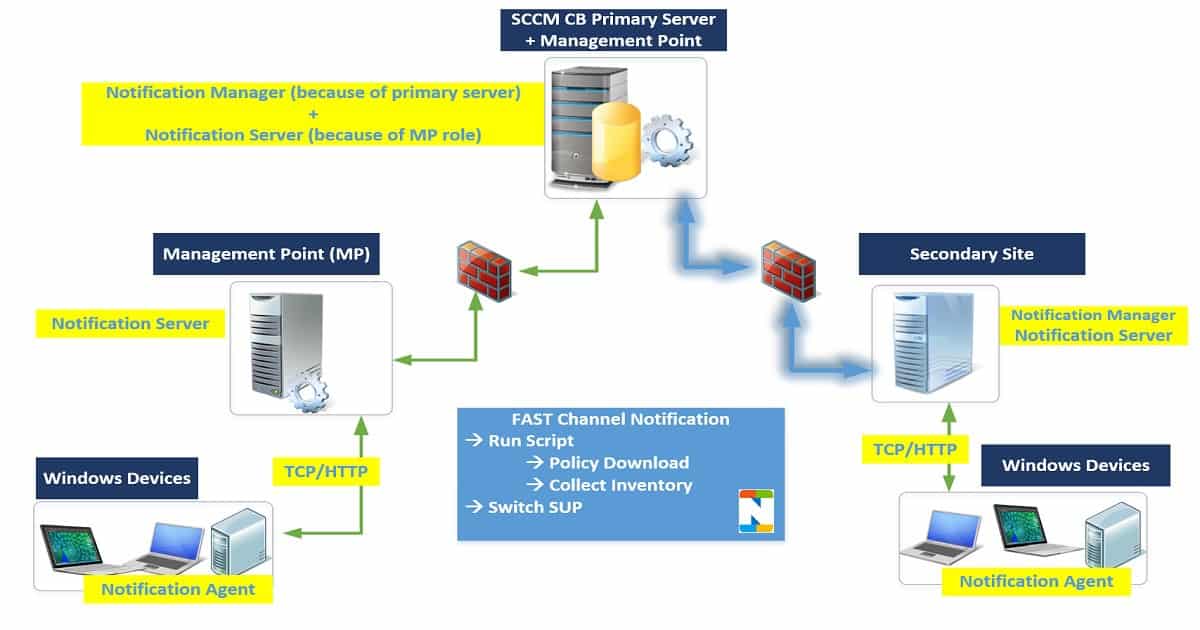
Features didn’t make it to MECM 1910
- Orchestration Groups – A New Server patching option was introduced in 1907. The technical preview version didn’t make it to 1910. More details available in “SCCM Orchestration Group Setup Step by Step Guide for Server Patching.”
- The tenant Attach/Cloud Console feature, announced in Microsoft Ignite 2019, is not included in SCCM’s latest preview and production versions 1910.
- Extend Migrate SCCM To Azure—The ExtendMigrateToAzure.exe tool Extends or Migrates SCCM infra to Azure. This tool didn’t make it to the MECM 1910 production version.
- Community Hub Updates are minimal in the production version. We will await Microsoft’s plans and priorities for Community Hub. More information about ConfigMgr Community Hub is in “SCCM Community Hub—Scripts Reports and Documentation.”

Resources – SCCM 1910 Features
- For known or significant issues of the SCCM 1910 production version, see https://docs.microsoft.com/en-us/configmgr/core/servers/deploy/install/release-notes
- What is New in SCCM 1910 – https://docs.microsoft.com/en-us/configmgr/core/plan-design/changes/whats-new-in-version-1910?
We are on WhatsApp. To get the latest step-by-step guides and news updates, Join our Channel. Click here –HTMD WhatsApp.
Author
Anoop C Nair is Microsoft MVP! He is a Device Management Admin with more than 20 years of experience (calculation done in 2021) in IT. He is a Blogger, Speaker, and Local User Group HTMD Community leader. His primary focus is Device Management technologies like SCCM 2012, Current Branch, and Intune. He writes about ConfigMgr, Windows 11, Windows 10, Azure AD, Microsoft Intune, Windows 365, AVD, etc.




Hello Anoop
Why do you say if we would like to have full support (OSD?) for Windows 10 1909, upgrade to CB1910.
CB1906 is not full compliant with windows 10 1909 ?
Thanks for your feedback
I think I will provide more clarification or remove that line ..because Windows 10 1909 release is different from other Windows 10 releases. The statement in the post is not valid for 1909.
Microsoft has done a great job with 1910 CM. Thank you for writing this up ! Endpoint management is going to be easy Now.
I have some issues with the teams chat part. What if you actually adopt the tiering model that (Microsoft also recommends) really should be followed if you have a infrastructure that requires MECM in the first place. What it implies is that you administer clients PCs with a client that is secure, preferably with a separate account and with secured access to internet. Is this really a good idea? It’s leading customers into a operational model which really isn’t recommended…
Can 1910 CM manage bitlocker to-go?