






Does Intune Track a Users Web Browsing History?
Let’s discuss the topic that does Intune Track a Users Web Browsing History? Web browsing history is a list of web pages a user has visited, along with details like page titles and visit times, typically stored locally by browsers to help users revisit sites.
To protect privacy, all major browsers offer a private browsing mode that prevents the history from being saved, helping users avoid third-party tracking and targeted advertising. Microsoft Intune is a Unified Endpoint Management (UEM) solution designed to help organizations securely manage devices, applications, and user access.
Intune plays a critical role in protecting corporate data across a wide range of endpoints, including laptops, desktops, and mobile devices. It is a cloud-based solution that helps organizations manage and secure devices, apps, and user access.
In this post, you will find a detailed explanation about whether Microsoft Intune tracks a user’s web browsing history. We’ll address common concerns around privacy, clarify what data Intune can and cannot access, and explain how Intune functions in both corporate-owned and personal device scenarios.

Table of Contents
Can Microsoft Intune Track My Web Browsing History?
No, Intune does not track or collect your web browsing history. This includes visited websites, page titles, or time spent on pages. Microsoft clearly states that personal user data such as browsing history is not accessible to Intune or your organization’s IT team.
Does Intune Track a Users Web Browsing History?
Microsoft has made it very clear that it respects user privacy. Intune is designed to secure corporate data and manage organizational resources, not to monitor or collect personal user information. when a device is enrolled in Intune, the platform does not access or collect any of your private data.
| What Intune Does not Collect or Monitor |
|---|
| Web browsing history |
| Call history |
| Personal emails or SMS messages |
| Contacts stored on your phone |
| Photos or media in your photo gallery |
| Passwords to your personal accounts |
| Calendar events from personal calendars |
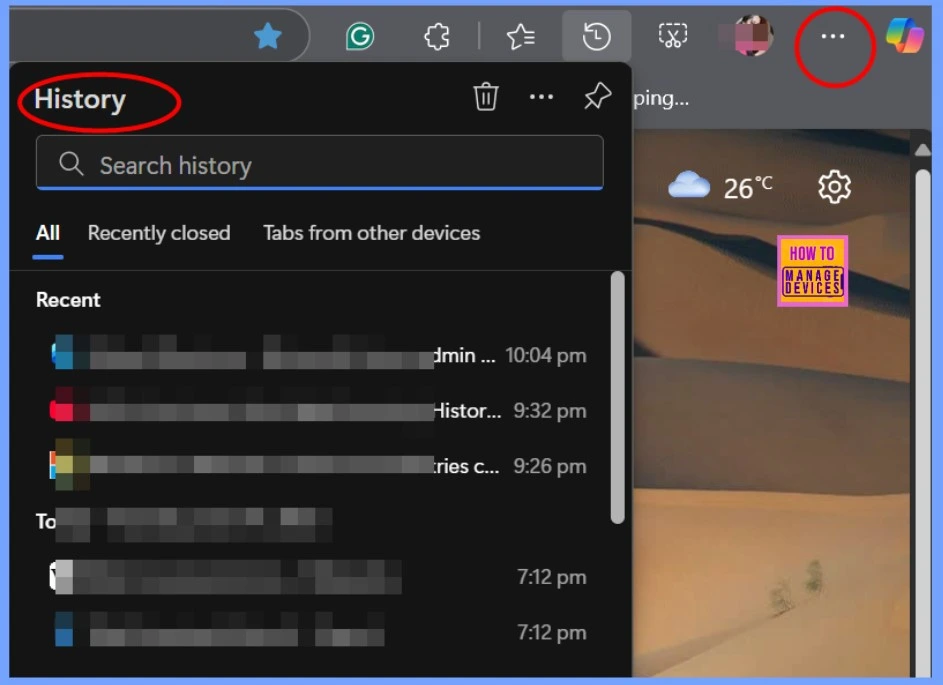
- You can Manually Check Edge Browser History. To do so open the Microsoft Edge browser from Start menu
- Click the three dots (⋯) in the upper-right corner
- Select History or press Ctrl + H
- You’ll see a list of recently visited websites
- Intune Training Course 2023
- Top 75 Latest Intune Interview Questions and Answers
- Intune Supported Device Platforms and Custom Baselines Options
- Enable Disable Deleting Browser History in Edge using the Microsoft 365 Admin Center Policy
Can Intune Track Web Browsing History of a User?
This short video answers a common question: Can Intune track a user’s web browsing history? It walks through the facts about Intune’s browser history tracking capabilities, the Web Browser History policy, and highlights what kind of personal content Intune never collects.
Need Further Assistance or Have Technical Questions?
Join the LinkedIn Page and Telegram group to get the latest step-by-step guides and news updates. Join our Meetup Page to participate in User group meetings. Also, join the WhatsApp Community to get the latest news on Microsoft Technologies. We are there on Reddit as well.
Author
Anoop C Nair has been Microsoft MVP for 10 consecutive years from 2015 onwards. He is a Workplace Solution Architect with more than 22+ years of experience in Workplace technologies. He is a Blogger, Speaker, and Local User Group Community leader. His primary focus is on Device Management technologies like SCCM and Intune. He writes about technologies like Intune, SCCM, Windows, Cloud PC, Windows, Entra, Microsoft Security, Career, etc.


Discussion