





Microsoft Entra Global Secure Access Blocks Sensitive File Uploads to ChatGPT and Gmail
Key Takeaways
- Blocks sensitive file uploads to ChatGPT, Gmail, and other unapproved platforms.
- Helps reduce Shadow AI and data leakage risks.
- Works for both personal and corporate accounts.
- Requires TLS inspection setup, which needs planning and configuration.
- Sensitivity Labels and encryption still provide the strongest file protection.
Microsoft has introduced new file type control capabilities in Entra Global Secure Access, helping organizations reduce Shadow AI and data leakage risks. The feature allows administrators to block users from uploading sensitive file types to unapproved AI platforms such as ChatGPT and unapproved email communication services like Gmail at the network layer. The protection applies to both personal and corporate accounts and can be configured through the Entra admin center using Content Policies, Security Profiles, and Conditional Access integration.
Table of Content
Microsoft Entra Global Secure Access Blocks Sensitive File Uploads to ChatGPT and Gmail
TLS inspection is needed for this feature, and setting it up can take time and planning. It is not something you can enable quickly. You may need certificates, configuration work, and proper testing before rolling it out. Even with this network protection, Sensitivity Labels with encryption are still very important. If a file is encrypted using labels, it stays protected even if someone shares it outside the company.
- To use this feature, organizations must have a Microsoft Entra Internet Access or Microsoft Entra Suite licence.
| Steps |
|---|
| Go to Microsoft Entra admin center |
| Navigate to Global Secure Access |
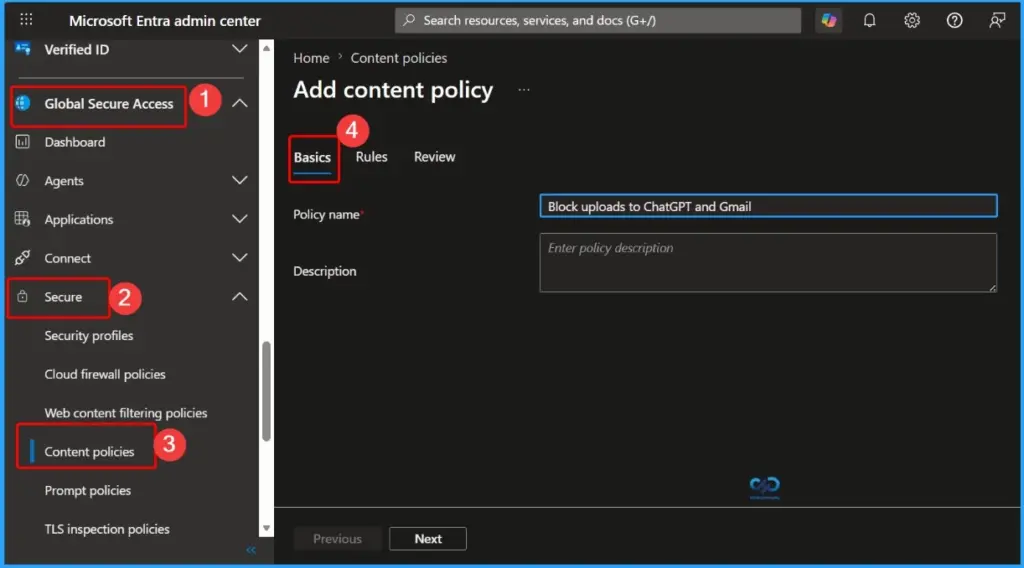
| Open Secure > Content policies |
| Select Create policy |
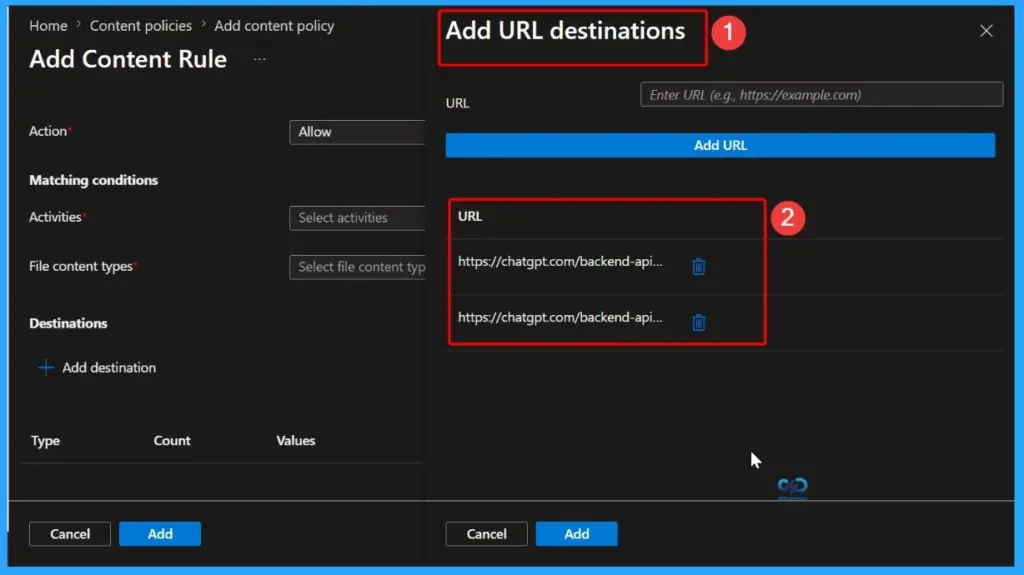
| Add file type rules |
| Link the policy to a Security Profile |
| Apply it through Conditional Access policy |
- Microsoft Enables Entra Writeback For Cloud-Managed Remote Mailboxes To Help Remove Last Exchange Server
- Microsoft Entra Global Secure Access Adds BYOD Support Using Entra Registered Devices
- Expansion of Entra Global Secure Access Advanced Threat Protection
- Entra Source IP Anchoring with Global Secure Access to Improve the Security Management of SaaS Apps
- Microsoft Entra Enhances Security with New AI face Check Feature
Microsoft Entra Global Secure Access – File Type Policy Configuration Steps
You can configure file type blocking for Shadow AI and data protection using the Microsoft Entra admin center. This setup helps control sensitive file uploads to unapproved AI and communication platforms.
Note: You need a Microsoft Entra Internet Access or Microsoft Entra Suite licence to use this feature.

- AI Agent Tool that Brings the Power of Microsoft Graph and MS Entra
- Best Guide to Invite B2B Guest Users to Entra ID using Intune
- Key Scenarios of MS Entra External Identity Deployment Architectures
Need Further Assistance or Have Technical Questions?
Join the LinkedIn Page and Telegram group to get the latest step-by-step guides and news updates. Join our Meetup Page to participate in User group meetings. Also, join the WhatsApp Community and the Whatsapp channel to get the latest news on Microsoft Technologies. We are there on Reddit as well
Resources
Tutorial: Configure Content Policies – Global Secure Access | Microsoft Learn
Author
Anoop C Nair has been Microsoft MVP for 10 consecutive years from 2015 onwards. He is a Workplace Solution Architect with more than 22+ years of experience in Workplace technologies. He is a Blogger, Speaker, and Local User Group Community leader. His primary focus is on Device Management technologies like SCCM and Intune. He writes about technologies like Intune, SCCM, Windows, Cloud PC, Windows, Entra, Microsoft Security, Career, etc.




Discussion