






SCCM CMPivot Query to find Windows 10 English Language Devices
Let’s Find devices with Windows 10 English Language(US) installed using ConfigMgr CMPivot Query. I have seen many questions in HTMDForum that we want the SCCM CMPivot pending reboot.
In this post, you will learn how to use the SCCM CMPivot query to discover Windows 10 English Language Devices. You can customize the CMPivot query according to your needs and requirements.
The primary CMPivot entity used is the Operating System. The CMPivot entity helps to find devices with Windows 10 English language versions and the 2004 version.
entity | operator1 | operator2 | ...
The following is the sample CMPivot query that will help you understand the OperatingSystem entity and the views required to get the report from the SCCM CMPivot report for Windows 10 English Language devices. Hence, we have done a formidable job for you.

- SCCM CMPivot Architecture and Sample Queries
- Dot Net Version Details using SCCM CMPivot Query
- CMPivot Query to Find Windows 10 Devices
- Run CMPivot Queries from Intune Portal
- Analyze SCCM Client Logs Using CMPivot
| Index |
|---|
| Launch CMPivot |
| CMPivot Tool – Run Query |
| CMPivot Query – Windows 10 English language |
Launch CMPivot
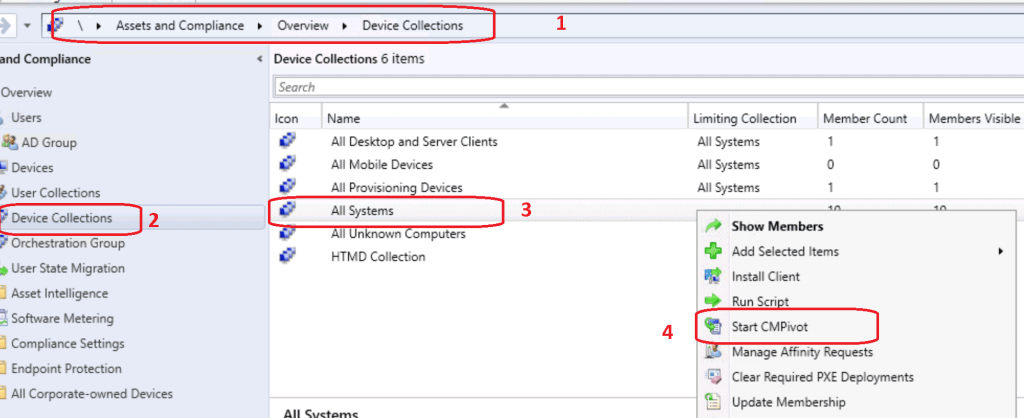
To execute CMPivot, launch the tool, navigate to the specific device collection where you intend to run the CMPivot query and select the All Systems device collection.
NOTE! – I don’t recommend using the All System collection in a production environment with more than a few devices. Instead, use the collection with fewer devices to try out the query.
Right-click on the All Systems collection.
- Select Start CMPivot.
- How to Collect Intune Error Details using CMPivot
- How to Collect Windows Update Logs using CMPivot
- ConfigMgr CMPivot Favorite Query
- CMPivot Query to Fetch WSUS Server Details
- CMPivot Query to Find Clients not Part of Any Boundary Groups
CMPivot Tool – Run Query
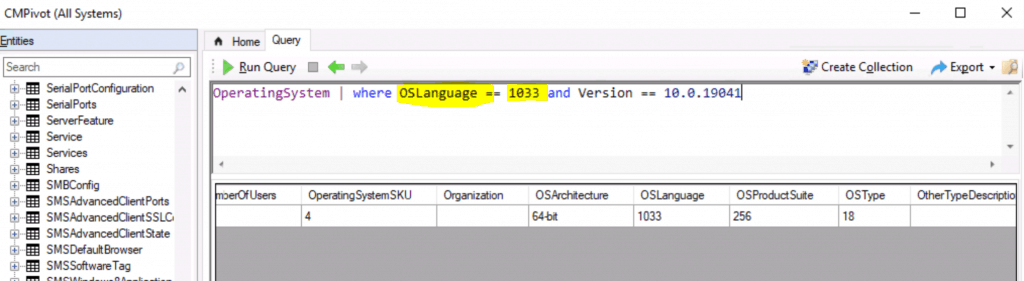
The CMPivot Query tool has been launched, allowing you to familiarize yourself with the new query language and tool functionality. Below, you can copy the queries and try out the Run Query button in the ConfigMgr CMPivot tool.
- Check out the Run Query button from the ConfigMgr CMPivot tool.
CMPivot Query – Windows 10 English language
Here are the settings included in the following tables:
1. Language/region: This is the name of the language in the user interface (UI), and all Windows language packs are available on the Windows Server.
2. Language/region tag: This language identifier is used with the DISM tool or in an unattended answer file. It is based on the language tagging conventions of RFC 3066.
3. Language/region ID: This ID is the language identifier in hexadecimal, used with the keyboard identifier for input methods in DISM.
4. Language/region decimal identifier: This number shows the language, and it’s used in Oobe.xml.
You can find the CMPivot values below:
| Language/region | Language/region tag | Language/region ID | Language/region decimal ID |
|---|---|---|---|
| English (United States) | en-US | 0x0409 | 1033 |
| English (United Kingdom) | en-GB | 0x0809 | 2057 |
CMPivot Query is used to find Windows 10 US English Language devices.
OperatingSystem | where OSLanguage == 1033
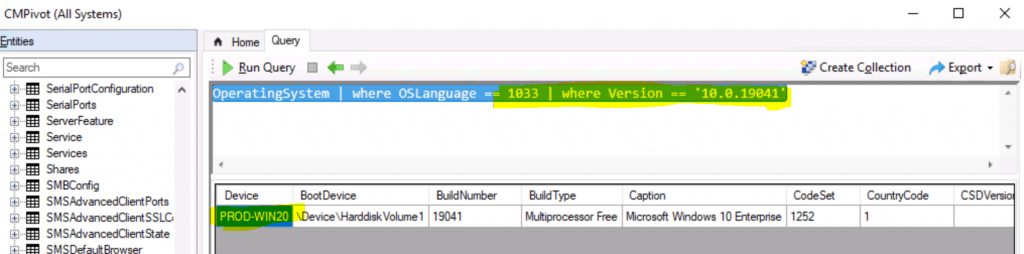
CMPivot Query to discover Windows 10 English Language Device with Windows 10 2004.
OperatingSystem | where OSLanguage == 1033 | where Version == '10.0.19041'
Resources
- CMPivot overview
- ConfigMgr CMPivot Example scenarios
- SCCM CMPivot Query Devices with Greater than 15 GB Free Disk Space
We are on WhatsApp. To get the latest step-by-step guides and news updates, Join our Channel. Click here –HTMD WhatsApp.
Author
Anoop C Nair is Microsoft MVP! He is a Device Management Admin with more than 20 years of experience (calculation done in 2021) in IT. He is a Blogger, Speaker, and Local User Group HTMD Community leader. His primary focus is Device Management technologies like SCCM 2012, Current Branch, and Intune. He writes about ConfigMgr, Windows 11, Windows 10, Azure AD, Microsoft Intune, Windows 365, AVD, etc.




Discussion