Skip to content
Shortcut for Access Work or School Accounts | Windows 10 Settings Apps

Shortcut for Access Work or School Accounts | Windows 10 Settings Apps

Written By Anoop C Nair
Last Updated June 27, 2024
Posted In Windows 10
SHARE

Create a Shortcut for Access Work or School Accounts section in Windows 10 settings apps. Let’s learn how to create a shortcut for Windows 10 settings apps. In this particular example, we will see something useful for Intune admins.

Windows allows you to easily add multiple user accounts to a single device, ensuring that each user can maintain their settings, documents, and applications. If you utilize the same Windows device for personal and work or school-related tasks, it is highly beneficial to connect the accounts. This streamlines accessing files, emails, apps, and information associated with each account.

Connecting your work or school account will establish a direct link to your organization, granting you access to its valuable resources. For you to connect a work or school account, your organization must support personal devices or BYOD scenarios.

You must undergo a slightly different Windows 11 Bring Your Device enrollment process. More details on Windows 11 Intune Enrollment Process.

Patch My PC
Index
Access Work or School Accounts
Create Shortcut for Access Work or School
Results – Create Shortcut for Access Work or School
Shortcut for Access Work or School Accounts | Windows 10 Settings Apps -Table 1

Access Work or School Accounts

Sometimes, creating a shortcut to access work or school accounts is helpful. Alternatively, you can run the following command from RUN to open Access work or school Accounts.

ms-settings:workplace

This is the Shortcut we will create using this blog post. This might help in many scenarios if you want users to enrol their devices in the Microsoft Intune MDM solution.
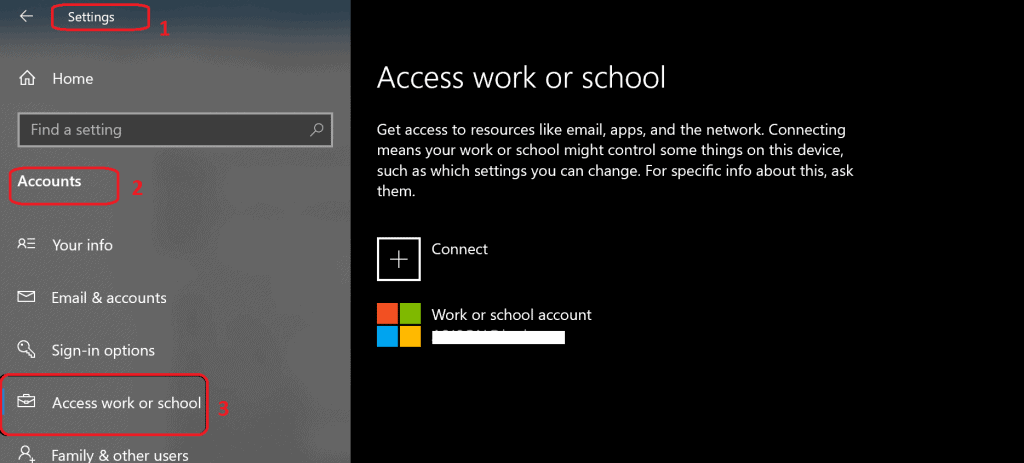
Shortcut for Access Work or School Accounts | Windows 10 Settings Apps - Fig.1
Shortcut for Access Work or School Accounts | Windows 10 Settings Apps – Fig.1

Create Shortcut for Access Work or School

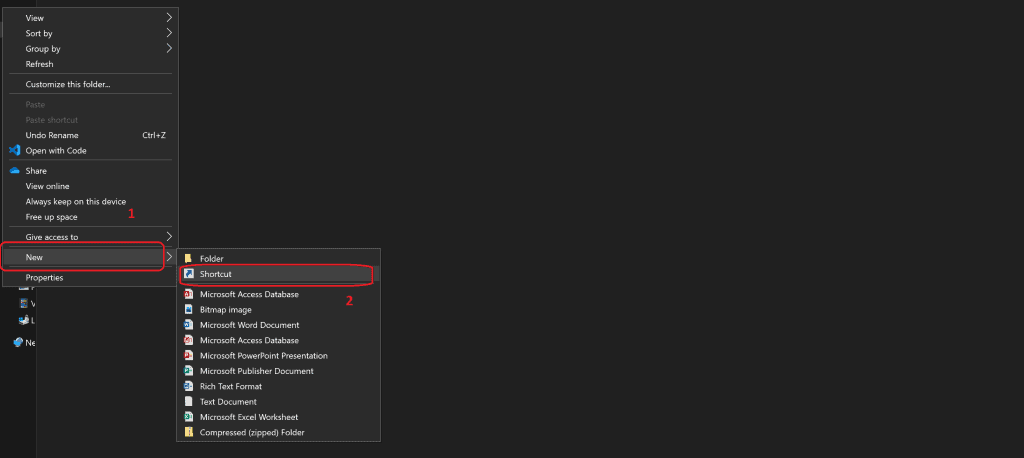
To create a shortcut for accessing work or school, please follow these steps:

  • Right-click on the User desktop.
  • Click on “New” to open the context menu.
  • Select “Shortcut” from the options.
Shortcut for Access Work or School Accounts | Windows 10 Settings Apps - Fig.2
Shortcut for Access Work or School Accounts | Windows 10 Settings Apps – Fig.2

Enter the following details in the location of the shortcut item.

ms-settings:workplace

Click on the NEXT button to continue
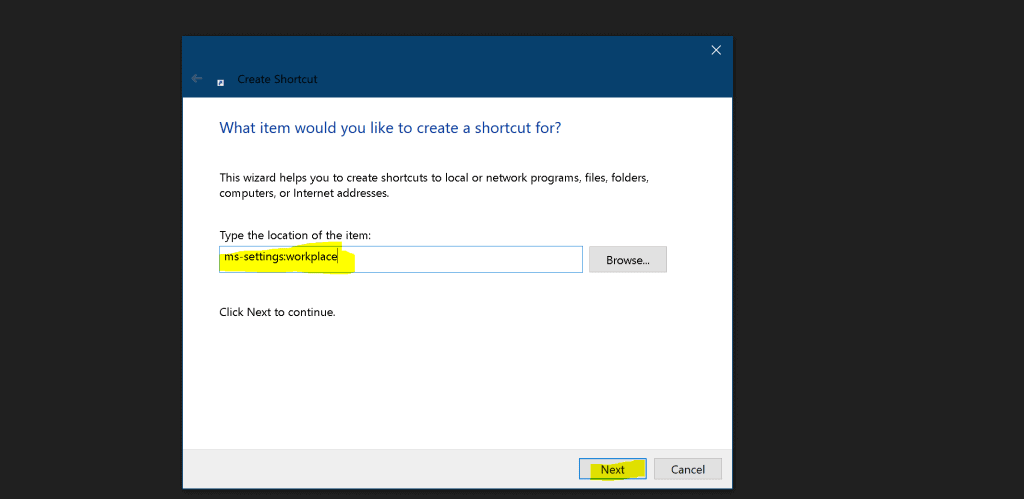
Shortcut for Access Work or School Accounts | Windows 10 Settings Apps - Fig.3
Shortcut for Access Work or School Accounts | Windows 10 Settings Apps – Fig.3

Enter the name of the Shortcut. Click on Finish to complete the process.
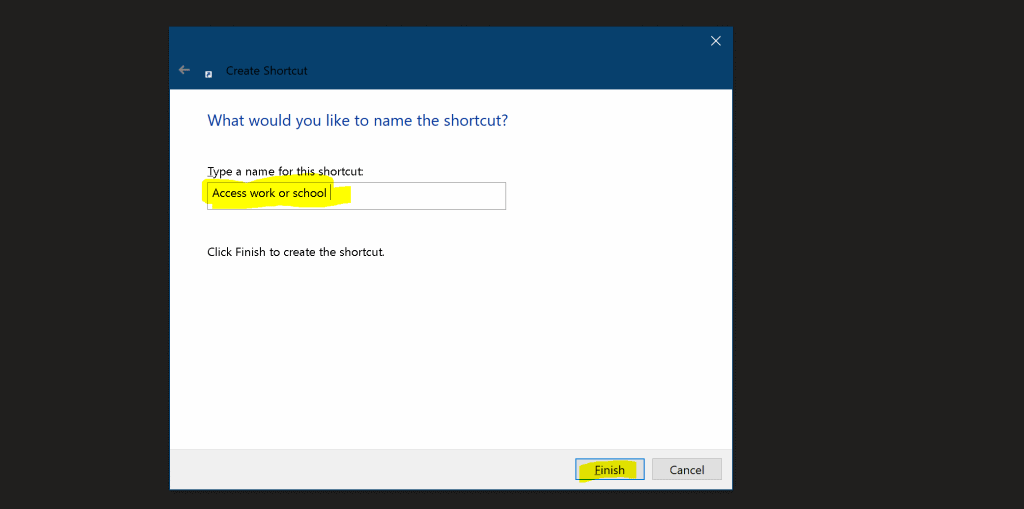
Shortcut for Access Work or School Accounts | Windows 10 Settings Apps - Fig.4
Shortcut for Access Work or School Accounts | Windows 10 Settings Apps – Fig.4

ResultsCreate Shortcut for Access Work or School

Now, you have created a shortcut for accessing work or school!
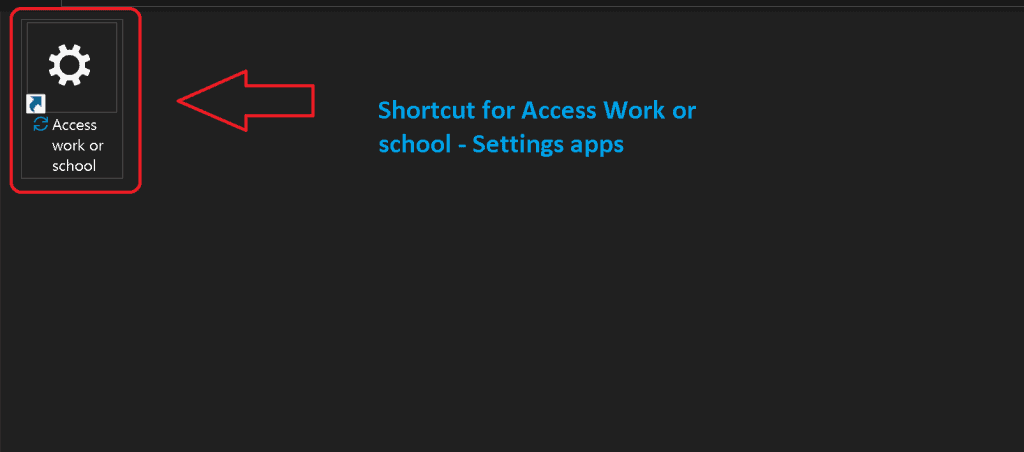
Shortcut for Access Work or School Accounts | Windows 10 Settings Apps - Fig.5
Shortcut for Access Work or School Accounts | Windows 10 Settings Apps – Fig.5

Double-click on the Shortcut to launch work or school workload.
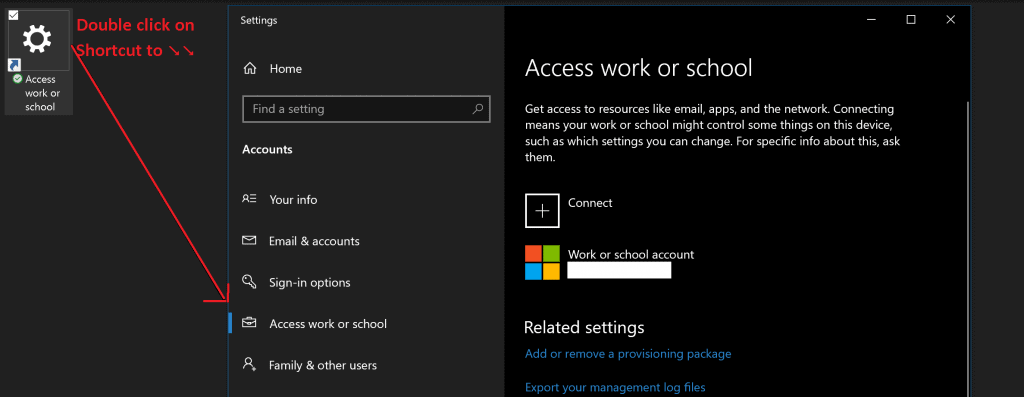
Shortcut for Access Work or School Accounts | Windows 10 Settings Apps - Fig.6
Shortcut for Access Work or School Accounts | Windows 10 Settings Apps – Fig.6

Resources

We are on WhatsApp. To get the latest step-by-step guides and news updates, Join our Channel. Click here –HTMD WhatsApp.

Author

Anoop C Nair is Microsoft MVP! He is a Device Management Admin with more than 20 years of experience (calculation done in 2021) in IT. He is a Blogger, Speaker, and Local User Group HTMD Community leader. His primary focus is Device Management technologies like SCCM 2012, Current Branch, and Intune. He writes about ConfigMgr, Windows 11, Windows 10, Azure AD, Microsoft Intune, Windows 365, AVD, etc.

Written by

Anoop C Nair is Workplace Technology solution architect with 25+ years of experience in global enterprise organizations such as JP Morgan, Capgemini, etc. Microsoft Certified Trainer. Microsoft MVP from 2015 onwards for consecutive 11+ years! He also conducts Intune and modern workplace tech training for enterprise organizations. He is Blogger, Speaker, and Founder of HTMD Community and HTMD Conference. His main focus is on Device Management technologies like Intune, Windows, Cloud PC. He writes about technologies like Intune, SCCM, Windows, Cloud PC, Windows, Entra, Microsoft Security.

Discussion · 1 comment

Join the discussion

Your email address will not be published. Required fields are marked *

Related guides

Windows 10

New Snipping Tool Vulnerability in Windows can Leak NTLMv2 Hashes over Network

Key Takeaways Hey, let’s discuss about New Snipping Tool Vulnerability in Windows can Leak NTLMv2 Hashes over Network. Microsoft Windows Snipping Tool has a newly disclosed spoofing vulnerability, tracked as CVE-2026-33829, which could allow an unauthenticated attacker to capture a user’s NTLMv2 hash over a network. The issue was made public on April 14, 2026, […]

AC Anoop C Nair 4 min read
Windows 10

Unsupported Windows 10 Devices in Intune may Experience Limited or Unreliable Functionality

Let’s discuss Unsupported Windows 10 Devices in Intune may Experience Limited or Unreliable Functionality. Microsoft Announce the Official end of support announcement of Windows 10 free support on October 14, 2025. There is no more free security updates or non-security fixes via Windows Update for Windows 10 Home and Pro editions. Microsoft announced that, Windows 10 […]

AC Anoop C Nair 4 min read
Intune

Last Patch for Windows 10 with KB5066791 and 5 Zero Day Vulnerabilities and 118 Flaws

Let’s discuss Last Patch for Windows 10 with KB5066791 and 5 Zero Day Vulnerabilities and 118 Flaws. Microsoft Released last Patch Tuesday Updates for Windows 10 on October 2025. After October 14 2025, Microsoft will no longer provide free software updates from Windows Update, technical assistance, or security fixes for Windows 10. As you know […]

AC Anoop C Nair 6 min read
Intune

2025 September KB5065429 Windows 10 Patch | 2 Zero Day Vulnerabilities and 81 Flaws

Let’s discuss 2025 September KB5065429 Windows 10 Patch | 2 Zero Day Vulnerability and 81 Flaws. Microsoft addressed various security fixes and improvements on September 2025 Patch Tuesday of Windows 10 KB5065429. There are many security benefits can be accessed with parch tuesday update. Microsoft dedicated to provides patch Tuesday updates on Windows 11. Mainly […]

AC Anoop C Nair 7 min read