






SCCM Secondary Server Hotfix Installation Guide | ConfigMgr
Let’s find out the method SCCM Secondary Server Hotfix Installation details. The SCCM hotfixes won’t automatically install on ConfigMgr secondary servers.
A hotfix is a fast solution that addresses a bug or defect and usually bypasses the regular software development process. It is generally used for high-priority or severe bugs needing immediate correction, such as bugs compromising the software’s functionality or security.
Hotfixes are essential for the latest protections and user experience. Understanding update types reduces confusion and keeps tech running well. This guide provides crucial knowledge for software patches.
In this post, I will provide a step-by-step guide on effectively installing hotfixes on Configuration Manager secondary servers. It’s important to note that a secondary site hotfix must be installed from within the SCCM console, as the secondary sites do not support a scripted command-line installation process.

| Index |
|---|
| Is Secondary Server Hotfix Installed? |
| Install Hotfix on ConfigMgr Secondary Server |
| Monitor Hotfix Installation |
| Logs |
| Results – SCCM Secondary Server Hotfix Installation is Completed Successfully |
Is Secondary Server Hotfix Installed?
Before getting there, let’s check whether the hotfix or patch is installed on the secondary server using the following method. Change the HS0 to your secondary server site code.
select dbo.fnGetSecondarySiteCMUpdateStatus ('HS0')
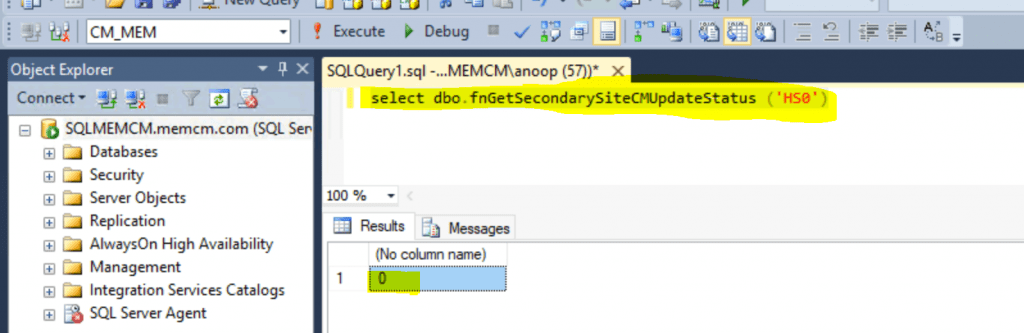
As you can see, the query result is zero (0). If this query result shows 0, the hotfix is not installed on the SCCM secondary server. To get more details about installing the secondary server, follow the steps explained in the next section of this post.
Install Hotfix on ConfigMgr Secondary Server
Follow the steps to complete the hotfix installation on the secondary server:
- Launch SCCM console
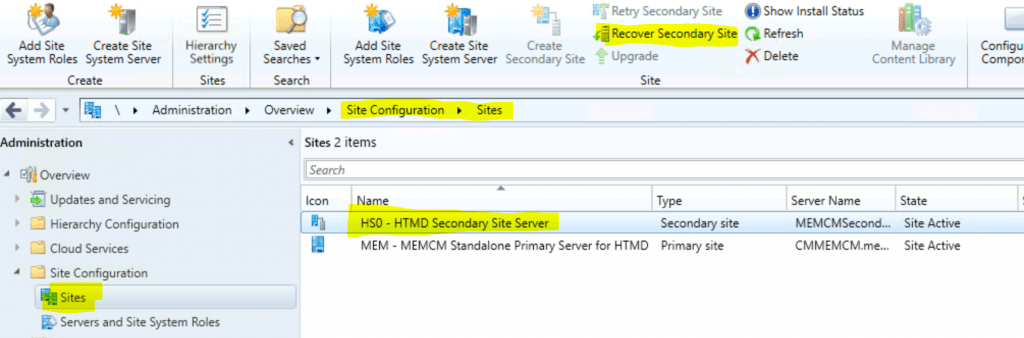
- Navigate to \Administration\Overview\Site Configuration\Sites
- Click the secondary server and click on Recover Secondary Site from the ribbon menu.
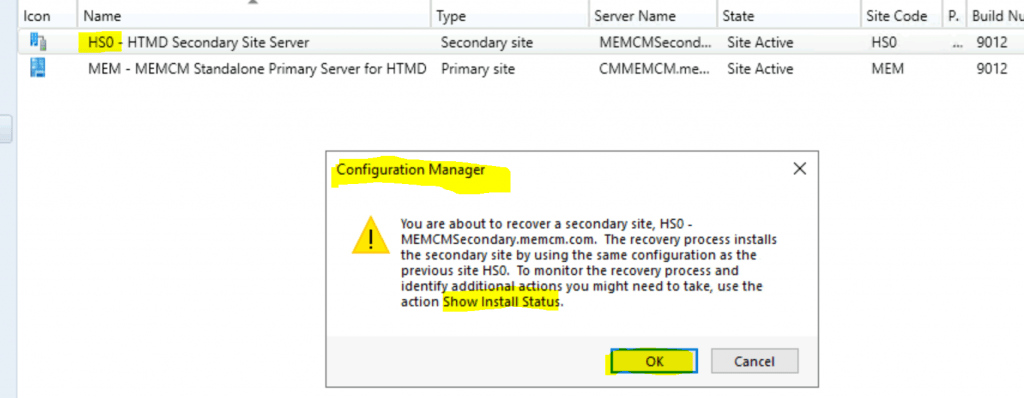
NOTE: – You are about to recover a secondary site, HSO – Secondary site FQDN. The recovery process installs the secondary site using the same configuration as the previous site, HS0. To monitor the recovery process and identify additional actions you might need to take, use the action Show Install Status.
Click OK to continue SCCM Secondary Server Hotfix Installation.
Monitor Hotfix Installation
Right-click on the secondary site and click Show Install Status to learn more about the installation status.
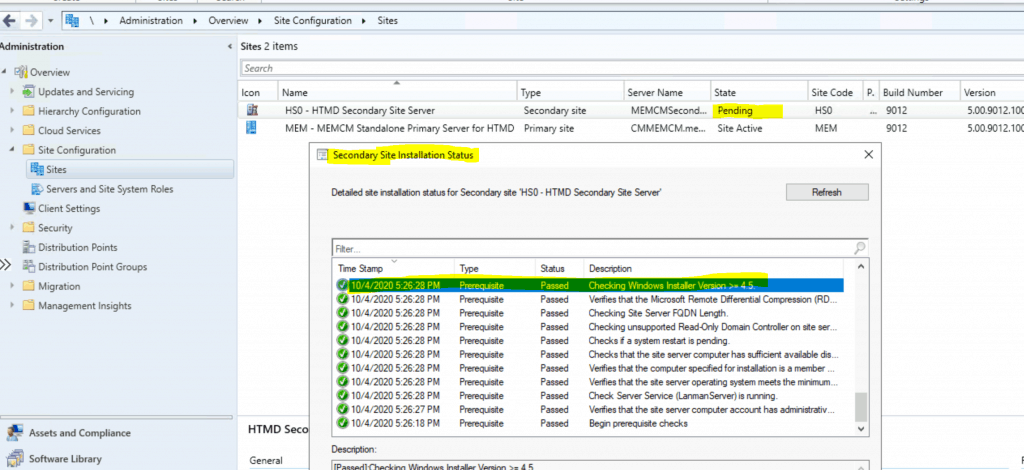
After the successful prerequisite check, the secondary server state changed from pending to recovering.

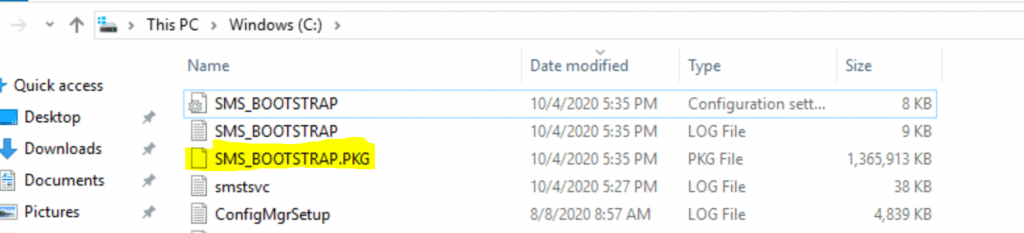
The hotfix installation files are copied to the secondary server as part of the recovery process.
- SMS_Bootstrap.pkg
Logs
The following log files might help you understand and troubleshoot the secondary server hotfix installation issues. All these files are located on the secondary site server.
- SMS_BOOTSTRAP.log
- smstsvc.log
- ConfigMgrSetup.log
NOTE! The troubleshooting details for the SCCM secondary site are in the previous blog post: SCCM Secondary Server Installation Failed Error | ConfigMgr | Fix.
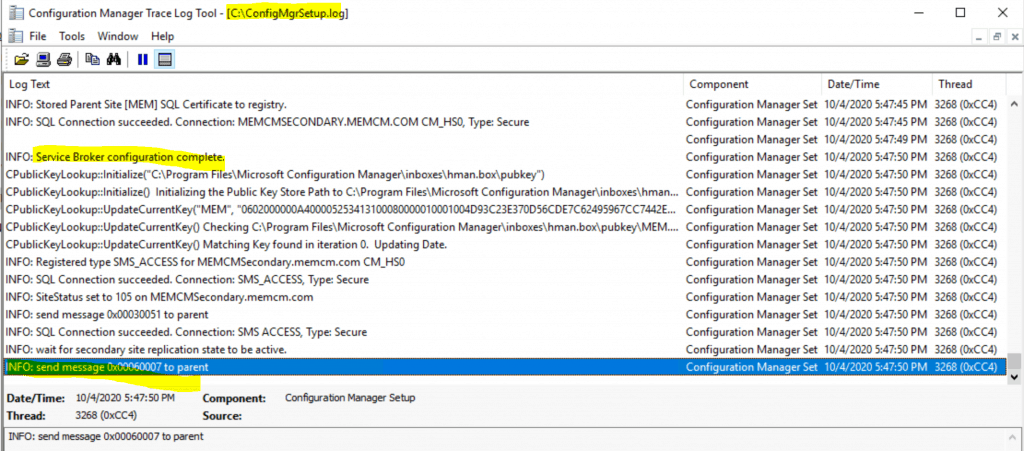
The following entries from smstsvc.log are essential to understand how the upgrade or hotfix installation of the secondary server is progressing.
try to open file \\MEMCMSecondary.memcm.com\admin$\smstsvc_test_2.ini
Enforced using sql native client to talk to SQL server.
INFO: Retrieved collation <SQL_Latin1_General_CP1_CI_AS>
Successfully write the result file \\MEMCMSecondary.memcm.com\admin$\smstsvc_test_6.rst (1)
Results – SCCM Secondary Server Hotfix Installation is Completed Successfully
Let’s check whether you got the following status message: [Passed]: ConfigMgr Setup – Recovered ConfigMgr secondary site successfully to confirm the successful hotfix installation on the secondary server.
[Passed]:Secondary site server bootstrap installation service succeeded
[Passed]:ConfigMgr Setup - Upgrading ConfigMgr secondary site successfully.
[Passed]:Installation of secondary site server component manager service succeeded
[Passed]: Secondary site server bootstrap installation service succeeded
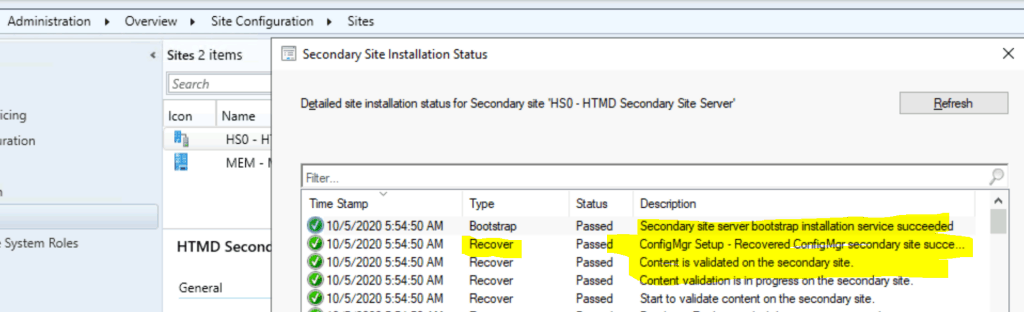
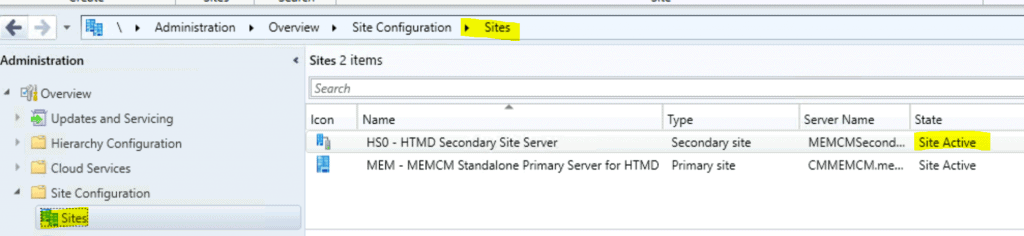
Run the following SQL query to confirm whether the secondary site hotfix installation is completed. For more details, check the SCCM Secondary Server Hotfix Installation Status.
select dbo.fnGetSecondarySiteCMUpdateStatus ('HS0')
Resources
- SCCM Secondary Server Installation Failed Error | ConfigMgr | Fix
- List of prerequisite checks for Configuration Manager
- Install a secondary site
- Add SCCM Server Computer Account to SQL Login Sys Admin Access
We are on WhatsApp. To get the latest step-by-step guides and news updates, Join our Channel. Click here –HTMD WhatsApp.
Author
Anoop C Nair is Microsoft MVP! He is a Device Management Admin with more than 20 years of experience (calculation done in 2021) in IT. He is a Blogger, Speaker, and Local User Group HTMD Community leader. His primary focus is Device Management technologies like SCCM 2012, Current Branch, and Intune. He writes about ConfigMgr, Windows 11, Windows 10, Azure AD, Microsoft Intune, Windows 365, AVD, etc.




Discussion