






ConfigMgr Software Updates Deployment Evaluation Cycle | Client Action | SCCM | Configuration Manager
Let’s explore the ConfigMgr Client Action called Software Updates Deployment Evaluation Cycle in more detail.
Users and admins can initiate the Software Update (a.k.a. patching) deployment evaluation cycle to speed up troubleshooting of patching-related scenarios.
I explained the machine policy request and evaluation cycle in the previous post. However, it’s also essential to understand ConfigMgr Client Component Status details for troubleshooting. Each client component has three different status details: installed, disabled, and enabled.
Many admins are confused between the ConfigMgr Client App and the SCCM Software Center. Both are different, and client actions are available with ConfigMgr Client App (a.k.a Configuration Manager Application) in the control panel.

Table of Contents
Software Updates Deployment Evaluation Cycle
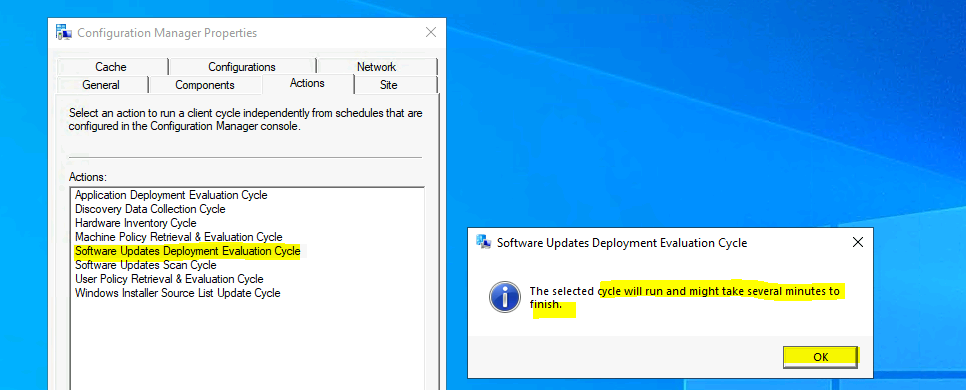
As of the ConfigMgr 2010 version, 8 (eight) client actions are available in Configuration Manager client application properties. The Software Update Deployment Evaluation Cycle client action is the Fifth (5th) from the top.
Navigate to:
- You can install the client app from any computer with an SCCM client.
- Open Command Prompt
- Run the following command – Control smscfgrc
- Click on the Actions tab
- Select Software Update Evaluation Cycle
- Click on OK from the Software Update Deployment Evaluation Cycle popup window.
- ConfigMgr Software Updates Scan Cycle Client Action | SCCM | Configuration Manager | Endpoint Manager
- ConfigMgr SCCM Client Action Application Deployment Evaluation Cycle | Configuration Manager
Background Processes
Let’s understand the Software Update Deployment Evaluation Cycle via log files. The Updates deployment agent is triggered when you initiate this action from the ConfigMgr client app. The default software update deployment evaluation cycle can be configured in the client settings.
This SCCM client action, Software Update Deployment Evaluation Cycle, “immediately” triggers the patching process from the Windows 10 client.
As per my quick analysis, both the components (Update Deployment Agent and Scan Agent) processed the evaluation and scan around the same time for all the patch deployments assigned to a particular Windows 10 client. This is shown in the following log snippets. The update store component stores the details about the compliance status for the software updates (a.k.a. patches).
- ScanAgent.log
- –Processing Scan Job TTL invalidity request
- *ScanByUpdates request received with ForceReScan=0, ScanOptions=0x00000008, WSUSLocationTimeout = 604800
- – –Evaluating Update Status…
- Found CategoryID of b3c75dc1-155f-4be4-b015-3f1a91758e52 for Update:19274002-295b-414b-9bf1-200a223f865f
- CScanAgent::ScanByUpdates – Found UpdateClassification 0fa1201d-4330-4fa8-8ae9-b877473b6441 for Update:19274002-295b-414b-9bf1-200a223f865f
- Sources are current and valid. TTLs are, however, invalid.
- Sources are valid, so I am converting to Offline Scan.
- ScanJob({825C0BD2-334B-4170-847A-37336EA3F2CD}): CScanJob::Scan- Requesting Offline Scan with last known location.
- ScanJob({825C0BD2-334B-4170-847A-37336EA3F2CD}): Scan Succeeded, setting a flag that performed scan was a cat scan
- ScanJob({825C0BD2-334B-4170-847A-37336EA3F2CD}): CScanJob::OnScanComplete – Scan completed successfully, ScanType=2
- ScanJob({825C0BD2-334B-4170-847A-37336EA3F2CD}): CScanJobManager::OnScanComplete -ScanJob is completed.
- ScanJob({825C0BD2-334B-4170-847A-37336EA3F2CD}): CScanJobManager::OnScanComplete – Reporting Scan request complete to clients…
- – Calling back to the client on Scan request complete…

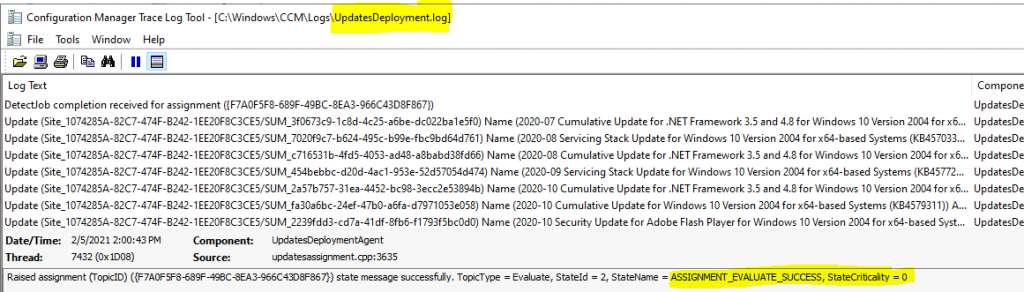
UpdatesDeployment.log – SoftwareUpdatesMessage MessageType=’EvaluateAssignments‘. Assignment {0f8e25be-6c3f-472c-98bd-49d31732ba73} has total CI = 18
- Detection job ({CF2CF3DF-285F-404D-BAF7-9EA15374A2D8}) started for assignment ({0f8e25be-6c3f-472c-98bd-49d31732ba73})
- Started evaluation for assignment ({0f8e25be-6c3f-472c-98bd-49d31732ba73})
- Evaluation initiated for (7) assignments.
- DetectJob completion received for assignment ({acc9a01a-1389-4d40-8a9c-7fcdba241795})
- Update (Site_1074285A-82C7-474F-B242-1EE20F8C3CE5/SUM_8088355e-3873-4912-a85e-32d67df681af) Name (2020-11 Cumulative Update for Windows 10 Version 2004 for x64-based Systems (KB4586781)) ArticleID (4586781) added to the targeted list of deployment ({acc9a01a-1389-4d40-8a9c-7fcdba241795})
- Raised assignment (TopicID) ({F4B1BDA6-AF5E-47E2-9EA1-005BBD8B910C}) state message successfully. TopicType = Evaluate, StateId = 2, StateName = ASSIGNMENT_EVALUATE_SUCCESS, StateCriticality = 0
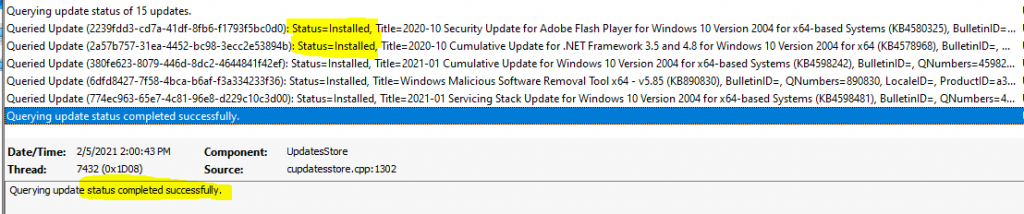
UpdatesStore.log – Querying update status of 18 updates. Queried Update (2239fdd3-cd7a-41df-8fb6-f1793f5bc0d0): Status=Installed, Title=2020-10 Security Update for Adobe Flash Player for Windows 10 Version 2004 for x64-based Systems (KB4580325), BulletinID=, QNumbers=4580325, LocaleID= ProductID=b3c75dc1-155f-4be4-b015-3f1a91758e52, UpdateClassification = 0fa1201d-4330-4fa8-8ae9-b877473b6441, ExcludeForStateReporting=FALSE.
- I am querying the update status, which was completed successfully.
- The update status from update (075e46dd-7c09-4263-93d1-20f851ca76dd) already exists, so we will modify the existing instance.
- It was successfully done with the SetStatus() operation.
- I am querying the status of 1 update.
- I am querying the update status, which was completed successfully.
Logs
The following log files recorded a few entries when I triggered the Software Update Deployment Evaluation Cycle. More details about SCCM clients logs are available here.
| Logs |
|---|
| ScanAgent.log |
| UpdatesDeployment.log |
| UpdatesStore.log |
Resources
- ConfigMgr Client Action Discovery Data Collection Cycle | SCCM
- Discovery Data Collection action
- Hardware Inventory Collection Cycle
- ConfigMgr Client App Vs SCCM Software Center
We are on WhatsApp now. To get the latest step-by-step guides, news, and updates, Join our Channel. Click here – HTMD WhatsApp.
Author
Anoop C Nair is Microsoft MVP! He is a Device Management Admin with more than 20 years of experience (calculation done in 2021) in IT. He is a Blogger, Speaker, and Local User Group HTMD Community leader. His primary focus is Device Management technologies like SCCM 2012, Current Branch, and Intune. He writes about ConfigMgr, Windows 11, Windows 10, Azure AD, Microsoft Intune, Windows 365, AVD, etc.




Hi anoop we deployed windows 10 21h2 feature update through SCCM Via Windows Servicing Option And Most of the devices getting failed with the error code X87D00664 (Updates handler job was cancelled) can u please suggest how to trouble shoot this error step by step process