






ConfigMgr Software Updates Scan Cycle Client Action | SCCM | Configuration Manager
Let’s explore the ConfigMgr Client Action called Software Updates Scan Cycle in more detail. Users and admins can initiate the Software Update (a.k.a. patching) scan cycle to speed up troubleshooting of patching-related scenarios.
I explained the software update deployment and evaluation cycle in the previous post. However, it’s also essential to understand ConfigMgr Client Component Status details for troubleshooting. Each client component has three different status details: installed, disabled, and enabled.
Many admins are confused between the ConfigMgr Client App and the SCCM Software Center. Both are different, and client actions are available with ConfigMgr Client App (a.k.a Configuration Manager Application) in the control panel.
In this post, you will find all the details about the ConfigMgr Software Updates Scan Cycle Client Action in SCCM (Configuration Manager). This information will help you understand how the scan cycle works and how to manage software updates effectively in your Configuration Manager environment.

Table of Contents
Software Updates Scan Cycle
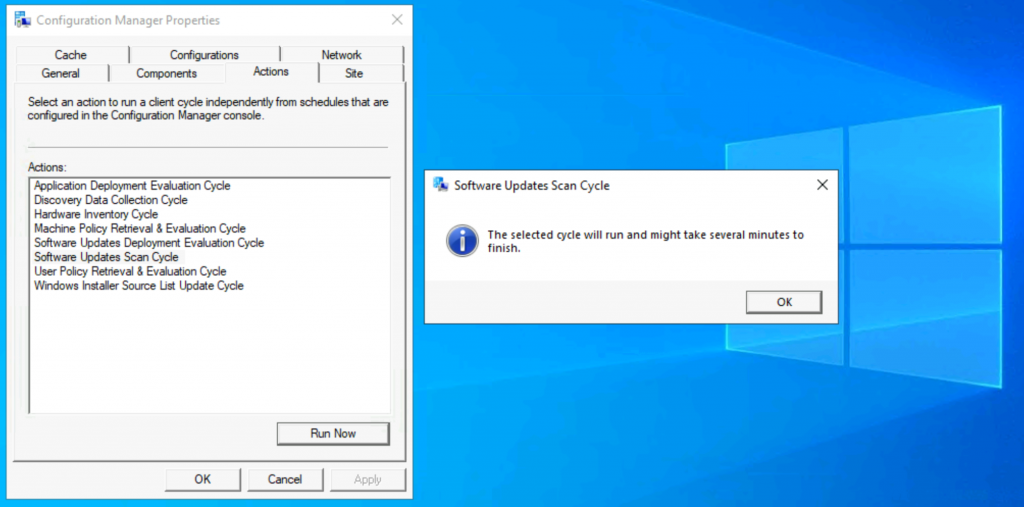
As of the ConfigMgr 2010 version, 8 (eight) client actions are available in Configuration Manager client application properties. The Software Updates Scan Cycle client action is the Sixth (6th) one from the top.
- ConfigMgr SCCM Software Updates Patching WMI Troubleshooting Tips Endpoint Manager
- Fix SCCM Client-Side Patching or Software Updates Issues Troubleshooting Tips
- Fix ConfigMgr Client Notifications Issue | SCCM 2010 Hotfix | Configuration Manager
- FIX SCCM Client Issues Using Automation Client Health
- ConfigMgr Software Updates Deployment Evaluation Cycle | Client Action | SCCM | Configuration Manager
Navigate to:
- You can install the client app from any computer with an SCCM client.
- Open Command Prompt
- Run the following command – Control smscfgrc
- Click on the Actions tab
- Select Software Updates Scan Cycle
- Click on OK from the Software Updates Scan Cycle popup window
Background Processes
Let’s understand the Software Update scan cycle via log files. The Scan agent and other components are triggered by initiating this action from the ConfigMgr client app. The default Software update deployment evaluation cycle can be configured in Client settings.
This SCCM client action Software Update scan cycle “immediately” triggers the patching process from the Windows 10 client. As per my quick analysis of three components:
- Scan agent
- Location Services Agent
- Status Agent
- Update Store Agent
These components help process the software updates scanning cycle and perform a full scan, as shown below. This scan is performed against all the patch deployments assigned to a Windows 10 client. The processes are shown in the following log snippets.
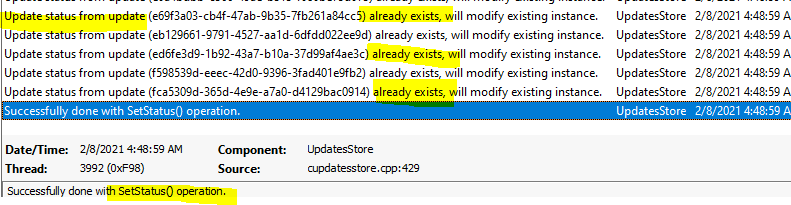
The update store component stores the compliance status details for each software update (a.k.a. patches) assigned to a Windows 10 computer.
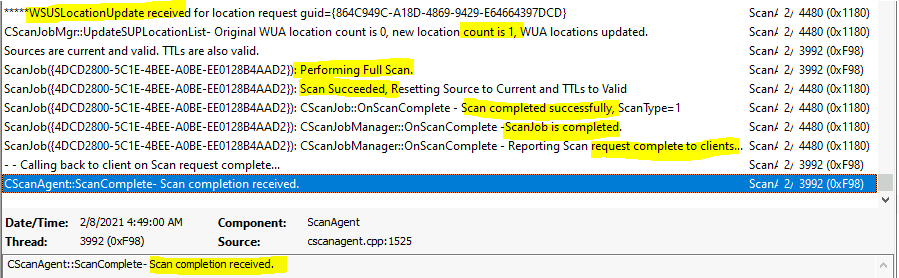
ScanAgent.log (Full Scan is performed) – UpdateSourceMessage MessageType=’ScanByUpdateSource‘. *ScanByUpdateSource request received with ForceReScan=2, ScanOptions=0x0000000a, WSUSLocationTimeout = 604800.
- Sources are current and valid. TTLs are also valid.
- ScanJob({4DCD2800-5C1E-4BEE-A0BE-EE0128B4AAD2}): – – – – – -Locations requested for ScanJobID={4DCD2800-5C1E-4BEE-A0BE-EE0128B4AAD2} (LocationRequestID={864C949C-A18D-4869-9429-E64664397DCD}), will process the scan request once locations are available.
- WSUSLocationUpdate received for location request guid={864C949C-A18D-4869-9429-E64664397DCD}
- CScanJobMgr::UpdateSUPLocationList– The original WUA location count is 0, the new location count is 1, and the WUA locations have been updated.
- ScanJob({4DCD2800-5C1E-4BEE-A0BE-EE0128B4AAD2}): Performing Full Scan.
- ScanJob({4DCD2800-5C1E-4BEE-A0BE-EE0128B4AAD2}): Scan Succeeded, Resetting Source to Current and TTLs to Valid
- ScanJob({4DCD2800-5C1E-4BEE-A0BE-EE0128B4AAD2}): CScanJob::OnScanComplete – Scan completed successfully, ScanType=1
- ScanJob({4DCD2800-5C1E-4BEE-A0BE-EE0128B4AAD2}): CScanJobManager::OnScanComplete –ScanJob is completed.
- ScanJob({4DCD2800-5C1E-4BEE-A0BE-EE0128B4AAD2}): CScanJobManager::OnScanComplete – Reporting Scan request complete to clients…
- Calling back to the client on Scan request complete…
- CScanAgent::ScanComplete- Scan completion received.
LocationServices.log (Helps to find the WSUS servers)—Executing Task LSRefreshLocationsTask. The machine’s current AD site is Default-First-Site-Name.
- WSUSLocationRequest: WSUSLocationRequest SchemaVersion
- Created and Sent Location Request ‘{864C949C-A18D-4869-9429-E64664397DCD}’ for package {1074285A-82C7-474F-B242-1EE20F8C3CE5}
- ConfigMgr is no longer managing WindowsDO GPO. Set to default values. Mode = LAN. GroupID = empty
- Calling back with the following WSUS locations
- WSUS Path=’http://CMMEMCM.MEMCM.COM:8530′, Server=’CMMEMCM.MEMCM.COM’, Version=’24’, LocalityEx=’BOUNDARYGROUP’, SUPFallbackIn=’0′

StatusAgent.log (The scan event is probably raised through this component). Raising event (#1 of 1): an instance of CCM_CcmHttp_Status.
- Successfully raised 1 event(s)
- Event forwarder SmsClientEventForwarder: Instance0 received 1 event
- [8E42E0F0] Handling 1 event
- [8E42E0F0] Handling event class CCM_CcmHttp_Status
- Updating MDM_ConfigSetting.ClientHealthStatus with value 7
- Event forwarder SmsClientEventForwarder: Instance0 successfully handled 1 event

UpdatesStore.log (Check each Software update deployment assigned to a Windows 10 device). The update status from update (075e46dd-7c09-4263-93d1-20f851ca76dd) already exists, so we will modify the existing instance.
- The update status from update (fca5309d-365d-4e9e-a7a0-d4129bac0914) already exists, so we will modify the existing instance.
- Successfully done with SetStatus() operation.
Logs
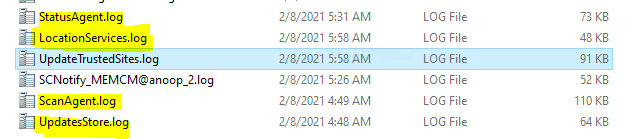
The following log files recorded a few entries when I triggered the Software Updates Scan Cycle. More details about SCCM clients logs are available here.
| Logs |
|---|
| ScanAgent.log |
| LocationServices.log |
| StatusAgent.log |
| UpdatesStore.log |
Resources
- Software Updates Deployment Evaluation Cycle
- ConfigMgr Client Action Discovery Data Collection Cycle | SCCM
- Discovery Data Collection action
- Hardware Inventory Collection Cycle
- ConfigMgr Client App Vs SCCM Software Center
We are on WhatsApp now. To get the latest step-by-step guides, news, and updates, Join our Channel. Click here – HTMD WhatsApp.
Author
Anoop C Nair is Microsoft MVP! He is a Device Management Admin with more than 20 years of experience (calculation done in 2021) in IT. He is a Blogger, Speaker, and Local User Group HTMD Community leader. His primary focus is Device Management technologies like SCCM 2012, Current Branch, and Intune. He writes about ConfigMgr, Windows 11, Windows 10, Azure AD, Microsoft Intune, Windows 365, AVD, etc.




Hi Anoop,
When we perform full software update scan, that scan gets performed only against deployments for that client or against all updates in WSUS?
StaffI think it’s only assigned ones. But when the client downloads the CAB file from WSUS it contains all the updates meta ..isn’t it? what is the exact requirement here?
Hi Anoop,
how are you doing?
Recently the “Software Updates Deployment Evaluation Cycle” and “Software Updates Scan Cycle” actions went missing from Configuration manager panel, not sure what happened, any thoughts on this?
Thanks!
Q–>If a machine is staged long time ago with the Pro version ISO was used, then this information is hardcoded to it. Then When machines upgraded to Enterprise, the SQL report state it as PRO. ? & not enterprise?
Is this correct understanding?
Q–>How SCCM Understand by any scan cycle or how that OS version upgraded & store in SQL data?
Where it checked in anyregistry or how?