






ConfigMgr Collection Full Incremental Evaluation Status Summary from Console | SCCM
Let’s check the ConfigMgr Collection Full Incremental Evaluation Status Summary from the Console. The Configuration Manager (a.k.a. SCCM) console has two (2) evaluation summaries.
The full and incremental evaluation summaries help troubleshoot SCCM deployment and performance-related issues. Microsoft recently released the 2103 version of Configuration Manager (a.k.a SCCM).
Microsoft improved the experience of the console Collection Evaluation tool with the latest version of Configuration Manager. The newest version includes a Full evaluation and an Incremental evaluation summary.
I have published a blog post about the best way to find the collection ID from the SCCM console. You can use the collection evaluation node from the monitoring workspace to get the ID details. The 2103 version of SCCM is the best way to find the ID.

Table of Contents
Full vs Incremental Collection Updates
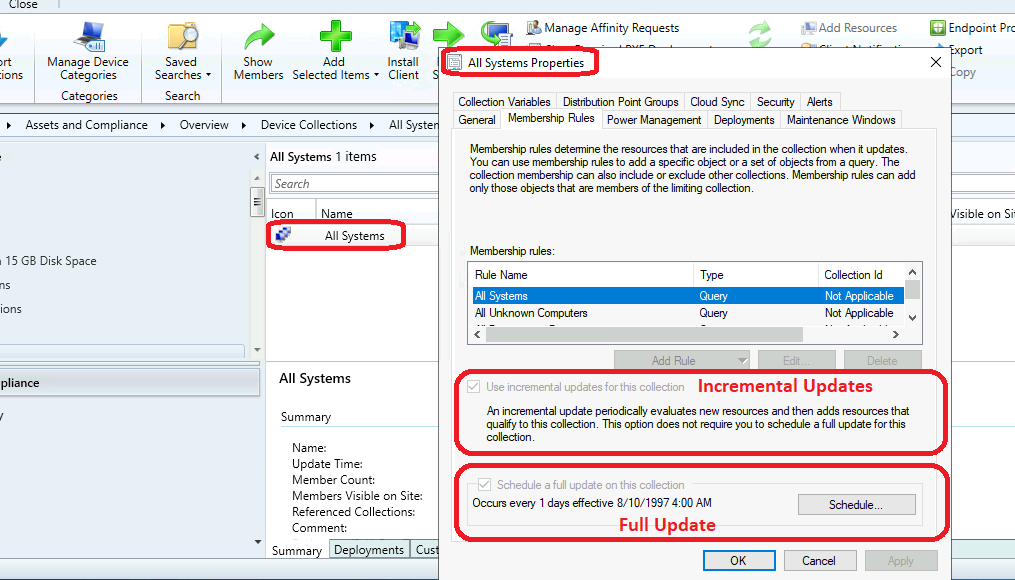
Let’s understand the details of Full vs. incremental collection updates. The schedule for Full and Incremental collection updates is available here.
You can right-click on any collections and go to properties to view the Full and Incremental updates schedule options.
Full Evaluation Status
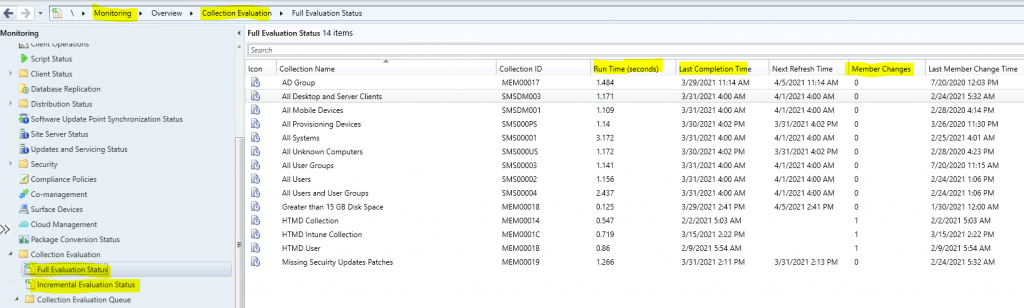
Let’s check how to evaluate collections’ performance in the SCCM environment. Some collections might take more time to complete the full evaluation, which could be because of unoptimized dynamic collection queries.
You can go through the dynamic collection creation and maintenance process to get more details on the best practices subject. Also, you can refer to Microsoft docs – Best practices for collections in Configuration Manager.
You can get the details about all the following items from the Full Evaluation Status node:
| Icon | Collection Name | Collection ID | Run Time (seconds) | Last Completion Time | Next Refresh Time | Member Changes | Last Member Change Time |
|---|---|---|---|---|---|---|---|
| All Systems | SMS00001 | 3.297 | 04-05-2021 04:00 | 04-06-2021 04:00 | 0 | 04-05-2021 04:00 | |
| HTMD Collection | MEM00014 | 0.547 | 02-02-2021 05:03 | NA | 1 | 02-02-2021 05:03 |
NOTE: Is the next Refresh Time column blank? This indicates that the schedule update is disabled for that particular collection. So you can reduce the overall performance impact for SCCM infra.
Now, let’s navigate through the console and find out how to get the Full Evaluation Collection Status details.
Collection Full Evaluation Details are available –> \Monitoring\Overview\Collection Evaluation
- \Monitoring\Overview\Collection Evaluation\Full Evaluation Status
Incremental Evaluation Status
Let’s look at each collection’s incremental update evaluation performance in your environment. Frequent incremental updates are not a best practice. You should avoid adding incremental updates to all the collections in your environment.
One example is why you need incremental and full collection updates for static collections. I normally avoid those types of updates from static collections. Whenever you add a new member, it will automatically update or do it during the addition process.
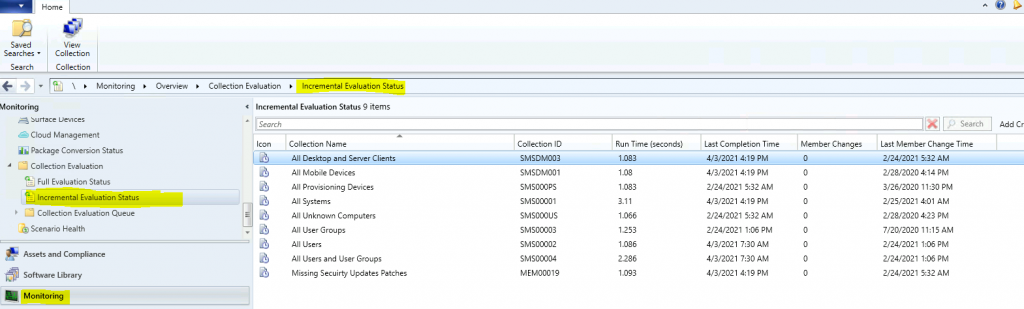
I have not enabled incremental collection updates for any of the custom collections in my lab environment except one I created to test incremental update evaluation status. The following are the details you get from the Incremental Evaluation Status node.
| Icon | Collection Name | Collection ID | Run Time (seconds) | Last Completion Time | Member Changes | Last Member Change Time |
|---|---|---|---|---|---|---|
| All Systems | SMS00001 | 3.297 | 04-05-2021 04:00 | 0 | 04-05-2021 04:00 | |
| HTMD Collection | MEM00014 | 0.547 | 02-02-2021 05:03 | 1 | 02-02-2021 05:03 |
NOTE! – You can view the collections with incremental updates scheduled from the Incremental Evaluation Status node. If one of the collections is missing from the list, the incremental update is not enabled for that collection.
Now, let’s navigate through the console and find out how you can get the details of Incremental Evaluation Status.
- Collection Incremental Evaluation Details are available –> \Monitoring\Overview\Collection Evaluation
- \Monitoring\Overview\Collection Evaluation\Incremental Evaluation Status
Resources
- SCCM Dynamic Collection – Part 2 | WQL Query | ConfigMgr | Create
- AD Group Based SCCM Collection Query Direct Rule – Anoopcnair.com
We are on WhatsApp. To get the latest step-by-step guides and news updates, Join our Channel. Click here –HTMD WhatsApp.
Author
Anoop C Nair has been Microsoft MVP for 10 consecutive years from 2015 onwards. He is a Workplace Solution Architect with more than 22+ years of experience in Workplace technologies. He is a Blogger, Speaker, and Local User Group Community leader. His primary focus is on Device Management technologies like SCCM and Intune. He writes about technologies like Intune, SCCM, Windows, Cloud PC, Windows, Entra, Microsoft Security, Career, etc.




Discussion