






ConfigMgr Secondary Server Upgrade Step by Best Step Guide | SCCM
Let’s learn ConfigMgr Secondary Server Upgrade Step by Best Step Guide | SCCM. In this post, I will cover the step-by-step process of upgrading the ConfigMgr Secondary Server.
I have already explained how to upgrade the primary server to the 2103 version. Make sure you have all the prerequisites in place.
This step-by-step guide provides all the details required to perform SCCM secondary Server Upgrade to the 2103 production version. If you have a secondary site that uses SQL Server Express Edition, this checks warnings if it is earlier than SQL Server 2016 with service pack 2 (13.0.5026.0).
More detailed information about the ConfigMgr 2103 installation checklist is given below https://docs.microsoft.com/en.

Table of Contents
SCCM Secondary Server Upgrade Guide FAQ?
In this section, you can see more details about secondary server upgrade-related frequently asked questions.
How to Upgrade the SCCM Secondary Server?
How to Check the status of the SCCM Secondary server upgrades?
Which are the log files associated with Secondary Server Upgrade?
Did you get SCCM Secondary Server SQL-related error/Warning?
Video Guide Secondary Server Upgrade to 2103
Now, I have recorded and posted a video on YouTube.
SCCM 2103 Secondary Server Upgrade Step-by-Step Guide | Configuration Manager – YouTube
Start ConfigMgr Secondary Server Upgrade
Once the parent primary server is upgraded to the latest version of ConfigMgr, let’s start upgrading the secondary server.
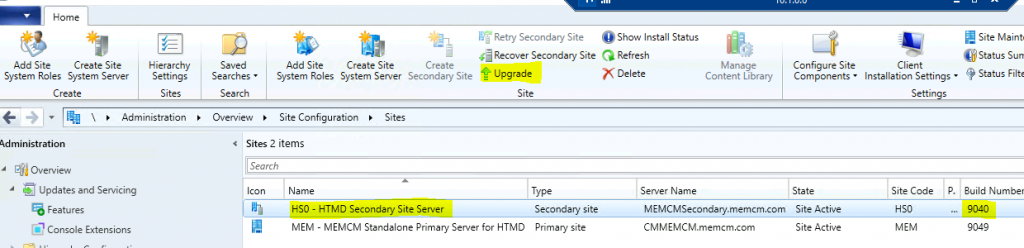
- Navigate to \Administration\Overview\Site Configuration\Sites.
- Select the Secondary server (Build number 9040, the 2010 version).
- Select the Upgrade option from the Ribbon menu.
Related Posts – How to Install Secondary server & How to FIX SCCM secondary server installation failure.
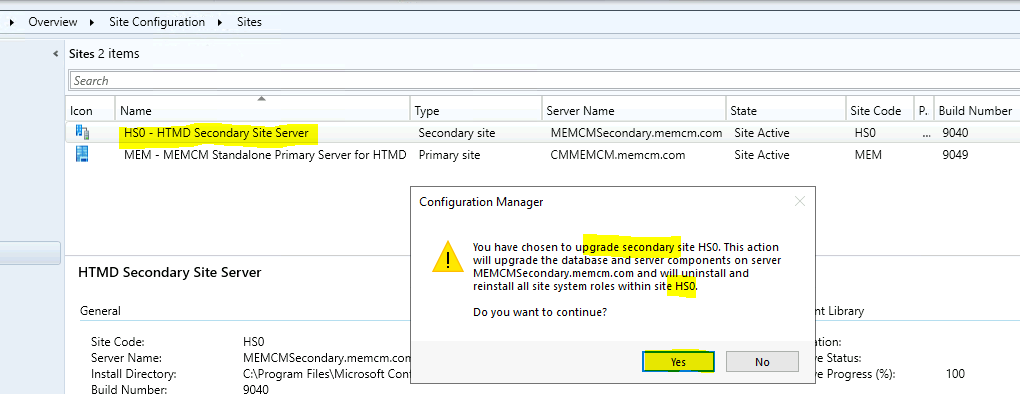
You have chosen to upgrade the secondary site HS0. This action will:
- Upgrade the database
- Upgrade server components on secondary server MEMCMSecondary.memcm.com
- Uninstall and reinstall all site system roles within site HS0.
Click on Yes from the popup window.
How to Check Secondary Server Upgrade Status
You can check this from the following places. The first thing that you will notice is the status change.
- Now, the state of the secondary server has been changed to Upgrade from Active.

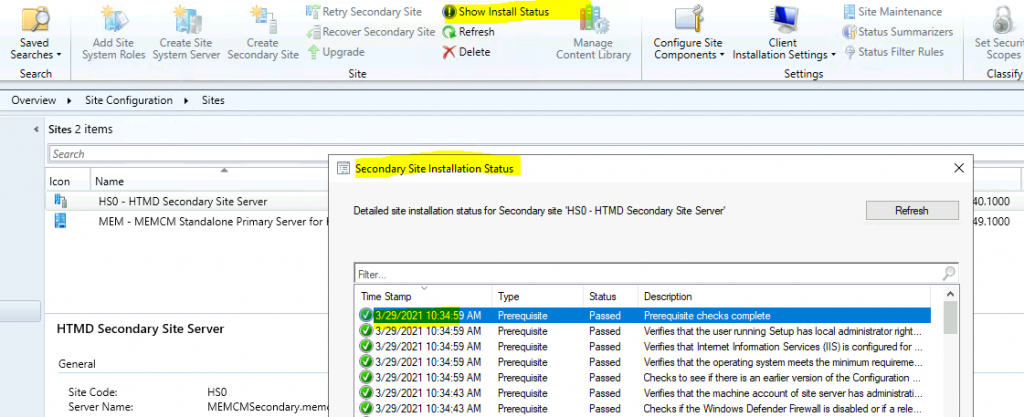
You can check the Configuration Manager secondary site server upgrade progress from the 2010 to 2103 version from the primary server console.
- Navigate to \Administration\Overview\Site Configuration\Sites.
- Select the Secondary server.
- Click on Show Install Status from the ribbon menu.
Secondary Server Upgrade Logs
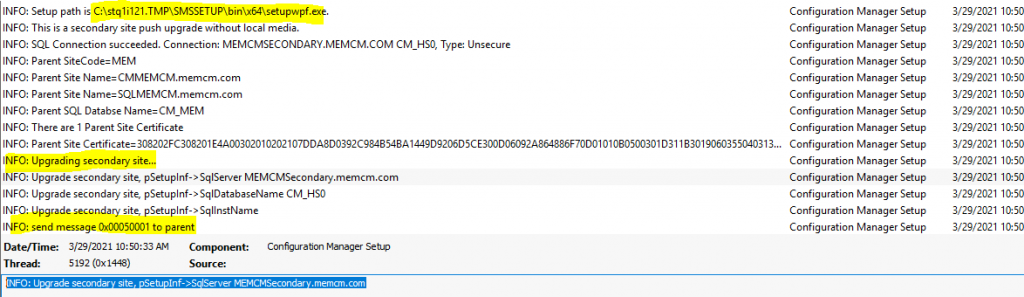
You can check the limited status of the secondary site upgrade from the ConfigMgr console. The rest of the information is stored in the following SCCM log files.
- SMStsvc.log @ Secondary Server
- SMS_Bootstrap.log @ Secondary Server
- ConfigMgrSetup.Log @ Secondary Server
- INFO: ConfigMgr Setup was started by NT AUTHORITY\SYSTEM.
- Setup Command Line is “SETUPWPF.EXE” /UPGRADE /NOUSERINPUT /PUSH
- INFO: The setup path is C:\stq1i121.TMP\SMSSETUP\bin\x64\setupwpf.exe.
- INFO: Upgrade secondary site, pSetupInf->SqlServer MEMCMSecondary.memcm.com
How to Confirm Successful Upgrade of Secondary Server
You can confirm the successful upgrade secondary to the 2103 version with the three methods explained below.
- You can check the Console and Confirm the status by checking the build number and version of the secondary server.
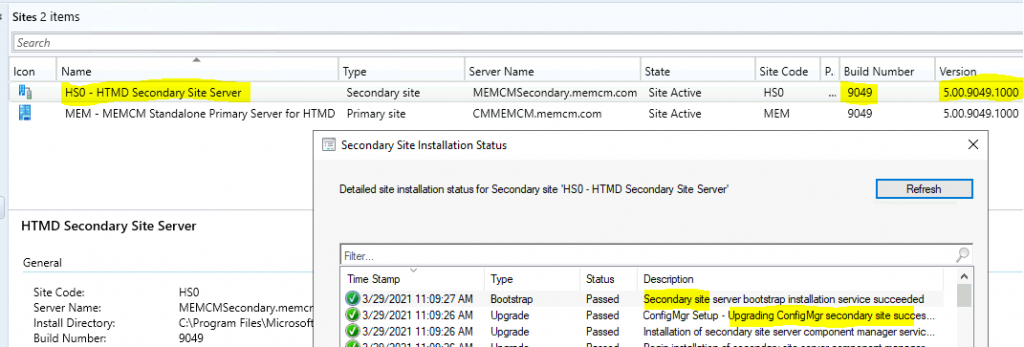
You can check the ConfigMgrSetup.log at secondary server c:\ to confirm the successful upgrade to the 2103 version.
- Successfully update secondary site update package status from file C:\Program Files\Microsoft Configuration Manager\bin\X64\secondarysiteupdatepackage.XML
- INFO: Configuration Manager Setup – The secondary site upgrade is completed.
- INFO: send message 0x00050002 to parent
- Exiting ConfigMgr Setup Bootstrapper
- You can confirm the successful upgrade using the method explained in the previous blog post – Check SCCM Secondary Server Hotfix Installation Status.
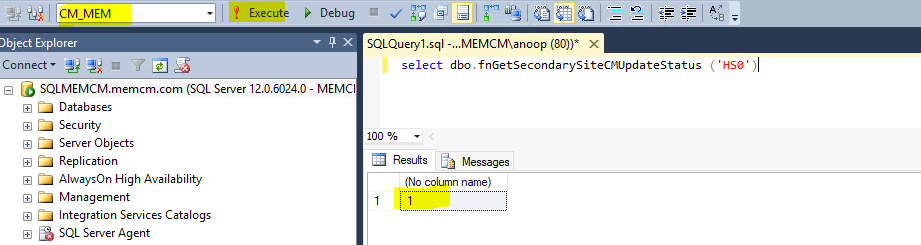
SQL Query:- If the return value is 1, an upgrade is completed successfully.
select dbo.fnGetSecondarySiteCMUpdateStatus ('HS0')
Resources
- Microsoft Docs – Version 2103 of Configuration Manager Installation
- Install a secondary site
- Add SCCM Server Computer Account to SQL Login Sys Admin Access
We are on WhatsApp. To get the latest step-by-step guides and news updates, Join our Channel. Click here –HTMD WhatsApp.
Author
Anoop C Nair has been Microsoft MVP for 10 consecutive years from 2015 onwards. He is a Workplace Solution Architect with more than 22+ years of experience in Workplace technologies. He is a Blogger, Speaker, and Local User Group Community leader. His primary focus is on Device Management technologies like SCCM and Intune. He writes about technologies like Intune, SCCM, Windows, Cloud PC, Windows, Entra, Microsoft Security, Career, etc.




Discussion