






SCCM Report for DotNet Framework Versions
Let’s check the options to find the SCCM report for DotNet Framework version. The >net version is important for the latest SCCM versions. The SCCM servers should have DotNet 4.8, which is the recommended version for SCCM 2107.
You have a list of SCCM default reports that are ready to use. However, you must build custom reports specific to your organizational needs. The requirement of DotNet framework reports from SCCM is special because of Microsoft’s latest recommendations.
It’s not easy to get the DotNet framework report from a Windows 10 device! This is because the .NET Framework entries are not visible in Add Remove Programs for Windows 10 PCs. So, how can you get the .NET Framework reports for Windows 10?
The best way is to use the SCCM Configuration Item (CI) to collect the DotNet framework version details from Windows 10 and Windows 11 PCs. You can probably check the registry entry verification or script method to get these details. Another option is to use a custom MOF file to get DOTNET framework details.

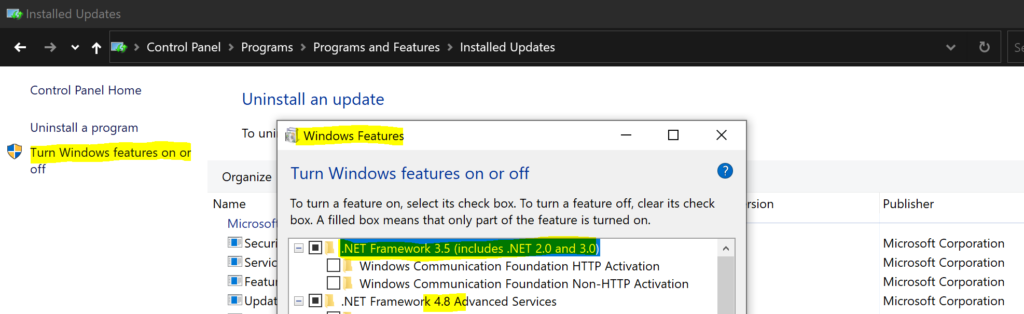
Table of Contents
DotNet Framework Version Report for Server Operating System -SCCM Report for DotNet Framework
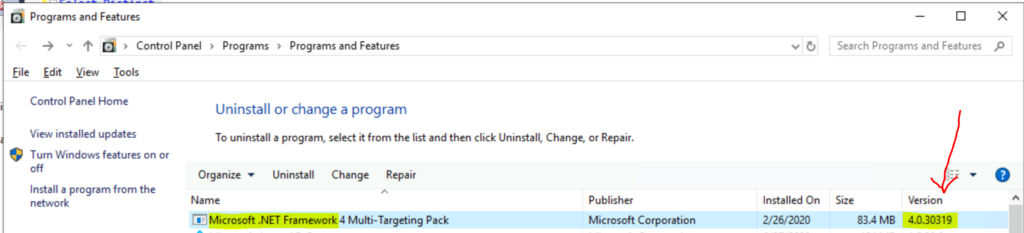
The option to create a DotNet Framework report for server operating systems like Server 2012, Server 2016, etc.. is more straightforward. You can use add remove programs view from the SQL database to collect these details using SCCM.
Using the following query, you can easily create a Custom SCCM Report for the .Net Framework version. You can refer to Create Custom Report Using Report Builder. Let’s check how to use SQL Management Studio to get this report.
- Open the SQL Management Studio.
- Connect your Database Engine.
- Right Click on your database CM_XXX and click on ‘New Query.’
- Copy the following SQL query to find the DotNet details of the report.
- Click on the Execute button.
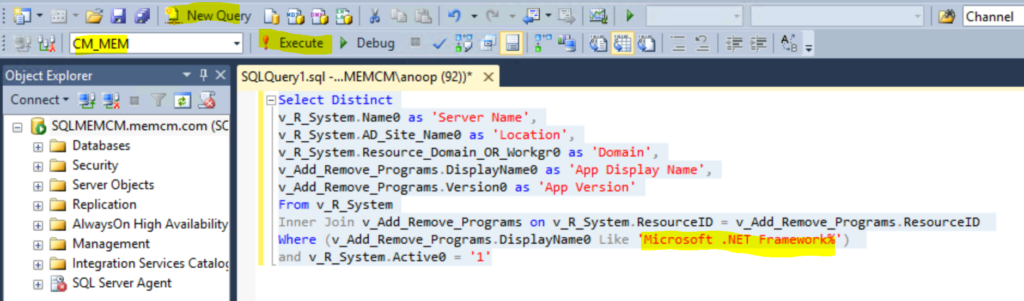
It would help if you used SQL Management studio to run the following SQL query to find DotNet Framework versions installed on the servers. The following SQL query provides the details like Server Name, Location pf the server based on AD Site, AD Domain details, etc.…
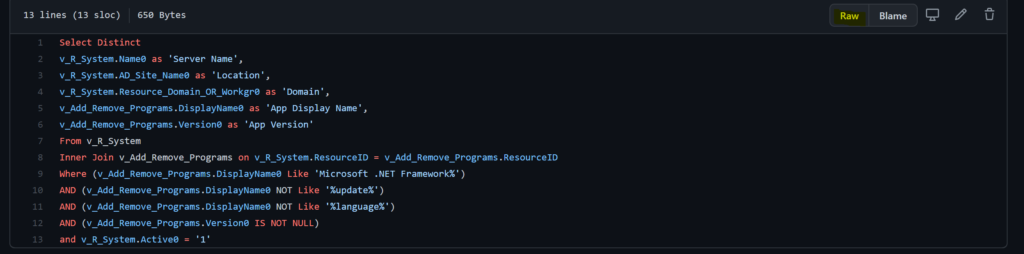
NOTE: I have a weird issue with WordPress that it’s not allowing me to post SQL queries into code format. Hence I ended up sharing the query in the GitHub repository.
We are on WhatsApp. To get the latest step-by-step guides and news updates, Join our Channel. Click here –HTMD WhatsApp.
Author
Anoop C Nair has been Microsoft MVP for 10 consecutive years from 2015 onwards. He is a Workplace Solution Architect with more than 22+ years of experience in Workplace technologies. He is a Blogger, Speaker, and Local User Group Community leader. His primary focus is on Device Management technologies like SCCM and Intune. He writes about technologies like Intune, SCCM, Windows, Cloud PC, Windows, Entra, Microsoft Security, Career, etc.




Hello,
I have Microsoft .Net 4.7 installed on a Windows Server 2019 (seen in Add Features as installed) but I do not see it in Add Remove Programs. Any idea?
Thanks,
Dom
Hello,
I found the PowerShell commands for this now looking how to integrate it in a query or report within SCCM.
(Get-ItemProperty “HKLM:\SOFTWARE\Microsoft\NET Framework Setup\NDP\v4\Full”).Release
(Get-ItemProperty “HKLM:\SOFTWARE\Microsoft\NET Framework Setup\NDP\v4\Full”).Version
Thanks,
Dom
I have built the following query:
select distinct SMS_R_System.Name, SMS_R_System.FullDomainName, SMS_R_System.OperatingSystemNameandVersion, SMS_R_System.IPAddresses, SMS_G_System_DotNETFrameworks.BuildNumber, SMS_R_System.Build, SMS_R_System.BuildExt from SMS_R_System inner join SMS_G_System_DotNETFrameworks on SMS_G_System_DotNETFrameworks.ResourceID = SMS_R_System.ResourceId where SMS_G_System_DotNETFrameworks.BuildNumber like “4.%” order by SMS_R_System.Name