






FIX: SCCM Application Installation Failed Unmatched Exit Code 1603
In this post, You will learn to FIX SCCM Application Installation Failed Unmatched exit code 1603. The error code 1603 prompts when you attempt to install an application from the SCCM software center.
The error code 1603 is a generic Windows Installer error that translates SCCM Error Codes to Error Messages “Fatal error during installation.“
Application Model is used these days extensively for Software Distribution from SCCM. However, troubleshooting Application deployment using this model is not easy due to the number of components involved.
The client-side flow for the application deployment post will help you to perform troubleshooting for failed deployment.

Installation error 1603 is one of the more common errors we see for application installations. Here you can check details for major components involved in SCCM application model troubleshooting.
This post will help get more information about why the installation failed and learn the Deep Dive SCCM Application Model Troubleshooting.
Issue Summary – Application Installation Failed Unmatched Exit Code 1603
The error application installation failed was received while installing an application from Software Center. It indicates there was a problem applying changes to the software from SCCM.
You can try starting the installation again, or if the problem continues, the information shown in the section below can assist your helpdesk in troubleshooting. The software center showed a failed error message –

Checked AppEnforce.log log file from C:\Windows\CCM\Logs to understand what is the issue with the deployment.
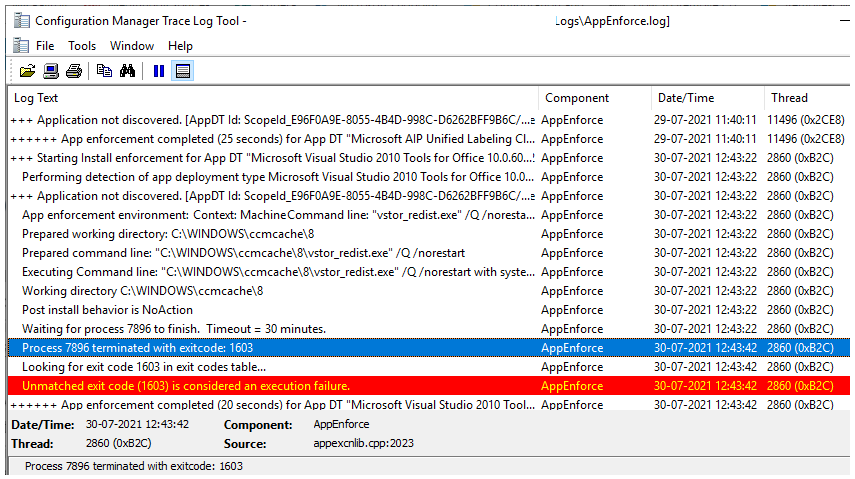
After reviewing the AppEnforce.log for this application, you will see the below highlights –
)
Prepared command line: "C:\WINDOWS\ccmcache\8\vstor_redist.exe" /Q /norestart	AppEnforce	30-07-2021 12:43:22	2860 (0x0B2C)
    Executing Command line: "C:\WINDOWS\ccmcache\8\vstor_redist.exe" /Q /norestart with system context	AppEnforce	30-07-2021 12:43:22	2860 (0x0B2C)
    Working directory C:\WINDOWS\ccmcache\8	AppEnforce	30-07-2021 12:43:22	2860 (0x0B2C)
    Post install behavior is NoAction	AppEnforce	30-07-2021 12:43:22	2860 (0x0B2C)
    Waiting for process 7896 to finish.  Timeout = 30 minutes.	AppEnforce	30-07-2021 12:43:22	2860 (0x0B2C)
    Process 7896 terminated with exitcode: 1603	AppEnforce	30-07-2021 12:43:42	2860 (0x0B2C)
    Looking for exit code 1603 in exit codes table...	AppEnforce	30-07-2021 12:43:42	2860 (0x0B2C)
    Unmatched exit code (1603) is considered an execution failure.	AppEnforce	30-07-2021 12:43:42	2860 (0x0B2C)
FIX – Application Installation Failed Unmatched Exit Code 1603
Let’s check the possible solutions to FIX SCCM Application Installation Failed Unmatched Exit Code 1603. It could be different based on the details you get into logs –
Ensure the application file downloaded in a client device is manually installed without any issue, As sometimes it has been seen the application is invalid or corrupt. In such cases, you must download the installer again.
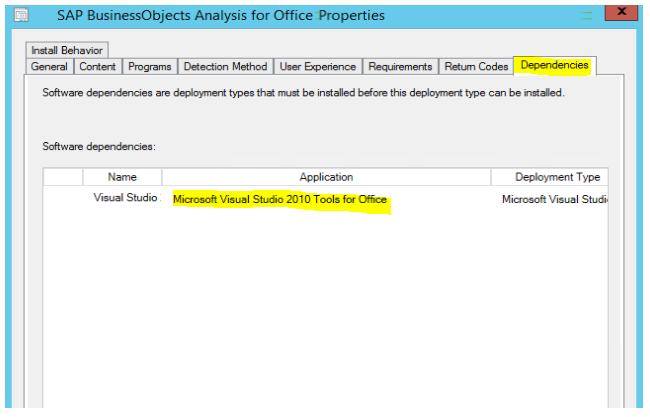
In the scenario, I found the installation is not completing properly as the application has dependencies. Dependencies define one or more deployment types from another application that the client must install before it installs this deployment type.
- In the SCCM console, go to the Software Library workspace, expand Application Management, and select the Applications node.
- Select an existing application in the Applications node and select Deployment Types tab. Right-click on the deployment type and select Properties.
- Switch to the Dependencies tab, Here you can see the Visual Studio 2010 Tools for Office Runtime added as dependencies for the application.
- SCCM was attempting to install dependencies app in the device, hence SCCM cannot install the application.
Since there is no issue with the installation command line as the application was installed successfully on all devices, Cleaning the SCCM Cache and reinitiating the download application content helps to install without any issues.
Let us know your experience to resolve this issue in the comments section.
Resources
- Fix the SCCM Software Center cannot be loaded Issue with ConfigMgr
- FIX Software Center Crash Error SCNotification Has Stopped Working | SCCM | ConfigMgr
- HTMD Blog #2 Archive Posts
Author
About Author -> Jitesh has over 5 years of working experience in the IT Industry. He writes and shares his experiences related to Microsoft device management technologies and IT Infrastructure management. His primary focus area is Windows 10 Deployment solution with Configuration Manager, Microsoft Deployment Toolkit (MDT), and Microsoft Intune.




HI there,
I have deployed the M 365 application to st of devices, some devices ended with this error, no dependencies are needed for this application, but can’t find the reason. Cleared the cache and deployed then the error code changed to another. What is the cause of behavior?
Hi
I also also faced a similar problem, with my devices. I have deployed an application and somehow its is installation on few devices nut failing on most of the devices with the error ” fatal error during installation” when checked the log I got this “Installation Failed Unmatched Exit Code 1603”.
So, could you help me here.