






Intune Issue with iOS 16 Upgrade new MDM payload does not match the old payload
Microsoft notified that an Intune Issue with iOS 16 Upgrade new MDM payload does not match the old payload. This issue does not impact all the Intune managed iOS or iPadOS devices but rather a subset of devices meeting specific criteria.
We think Microsoft did an excellent job of notifying all the customers who could impact by this issue a bit earlier than the release date of iOS 16 so that organizations can communicate with end users. It’s reported that Phone 8 and later devices will receive the iOS 16 as a free upgrade on September 12.
A similar Intune issue was reported during the Android 12 upgrade – Intune Company Portal Issue with OPPO, OnePlus, and Realme Android Devices. This issue still impacts some Android devices because OEMs are late to include the FIX in their release cycle.
When management profiles are not updated as part of the iOS 16 upgrade, the device could lose compliance and get blocked from accessing company resources such as Outlook, MS Teams, etc. This issue impacts only the user enrolled iOS/iPadOS devices as per Microsoft.

- Unable to successfully update to iOS 16
- Intune Company Portal Issue With OPPO OnePlus Realme Android Devices
- How To Collect Intune Logs From IOS Device Company Portal
ISSUE: New MDM Payload does not Match the old Payload
iOS devices that are managed by Intune get the following error after the iOS 16 upgrade. Erro – New MDM Payload does not Match the old Payload. This issue doesn’t impact Apple Business Manager (ABM) or DEP enrolled iOS devices.
As per Microsoft, If the device updates from iOS/iPadOS 15 to iOS/iPadOS 16, the user will be presented with a “new MDM payload does not match the old payload” error.
This error is because the Intune enrolled iOS devices cannot update their management profile at the device level. This impacts accessing company resources such as email, Chat, and SharePoint and all the applications that are protected with Conditional Access policies + Intune Compliance Policies.
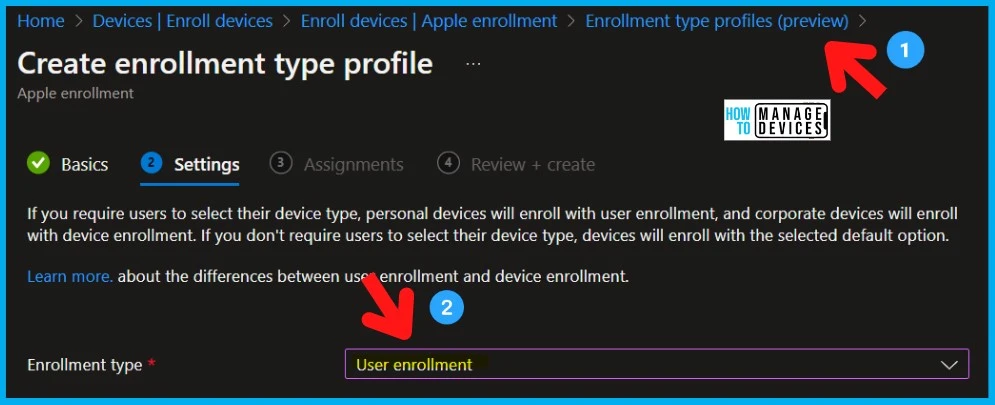
Impacted Scenarios for iOS iPadOS Devices with iOS 16 Upgrade Issue
Let’s now look into the Impacted scenarios for iOS iPadOS Devices with the iOS 16 upgrade issue. As mentioned before, all the iOS/iPadOS devices are not impacted. Only a subset of devices that are enrolled to Intune using the user enrollment method is affected.
The following table gives you a better and quick understanding of the impacted scenarios for iOS and iPadOS devices.
| iOS 16 Upgrade Issue | Enrollment Date | OS Version | Impacted Platform | Device Identity Certificate expires are impacted | Intune Advisory | NOT Impacted Scenarios |
|---|---|---|---|---|---|---|
| User Enrolled (BYOD) iOS/iPadOS devices | Between 16th September 16, 2021 (Intune 2207), and August (Intune 2208) | iOS 15 or iPadOS 15 | 1. iOS 2. iPadOS | September 2022 and September 2023 | Service Health Dashboard post IT428176 | ABM/DEP Enrolled devices to Intune |
How to Check Enrollment Date for iOS or iPadOS devices
You can check the enrollment date from the Management Name of iOS or iPadOS devices as seen in the picture below. You can navigate to Devices > iOS/iPadOS, select the iOS or iPadOS device and go to the Overview page to check the enrollment date.
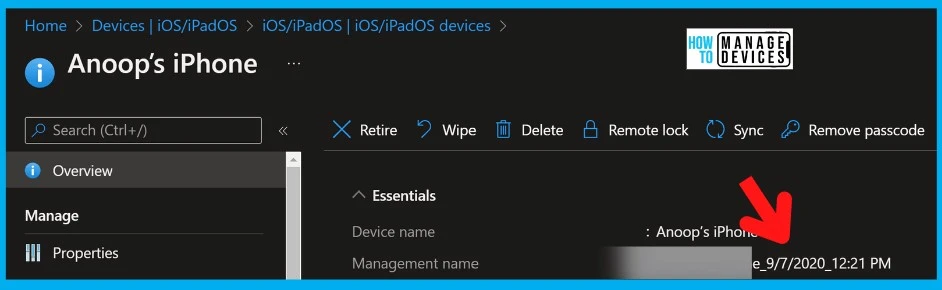
How to Check the Intune Management Certificate Validity on iOS or iPad OS devices
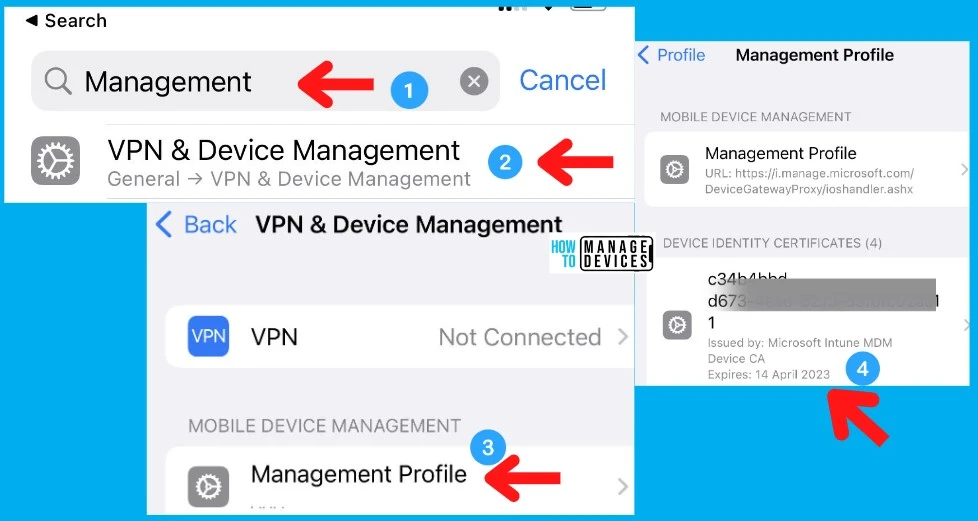
Let’s check the Intune Management Certificate validity on iOS or iPad OS devices. You need to follow the steps listed below to check and confirm the Intune management certificate validity from iOS or iPad OS devices.
- From iOS or iPad OS device – Navigate to Settings -> General > VPN & Device management -> Management Profile.
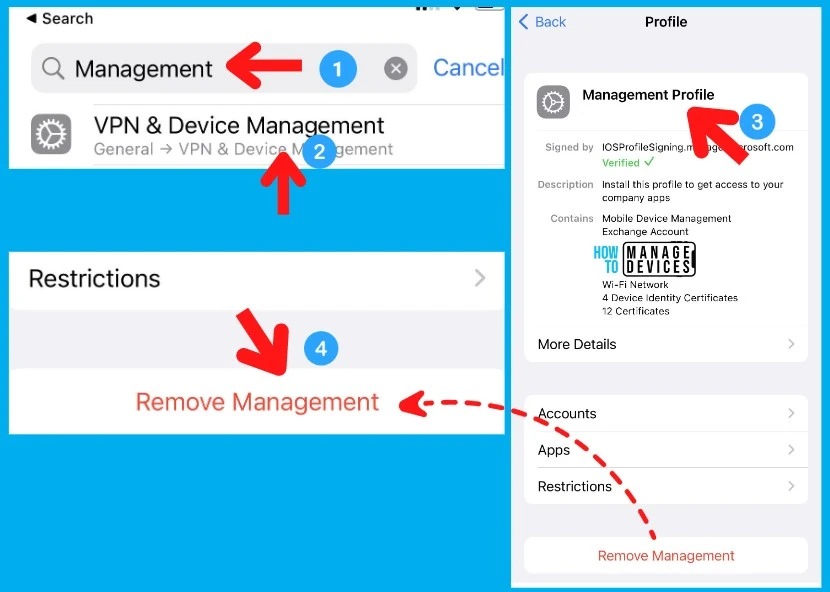
- Or Search with the “Management” keyword from the Settings app and tap on VPN & Device management -> Management Profile.
- Check the Device Identity Certificate validity and whether it expires around September 2023.
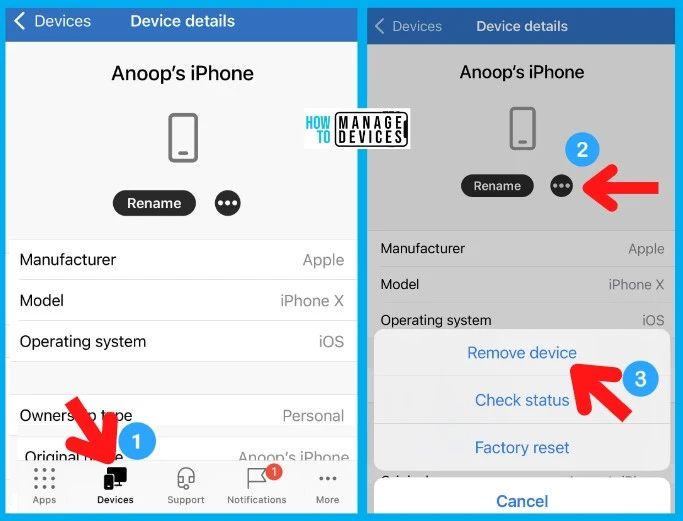
Remove iOS or iPad Devices from Intune – Workaround to Intune Issue after iOS 16 Upgrade
The workaround to the Intune issue after the iOS 16 upgrade is to request users to unenroll and re-enroll their iOS/iPad OS devices. Removing iOS or iPad Devices from Intune is only the workaround and enrolling it again.
There are two methods to remove or unenroll iOS or iPad devices. The first and easiest method is using Intune Company Portal. The second method is to use the iOS/iPad device Settings app.
The FIX this Intune Issue, Microsoft is working with Apple. There are two parts to the fix, as per the Microsoft Intune support team. One fix comes from Intune’s side, and the other must come from Apple’s side.
As per Microsoft’s note in the post, Once both fixes are complete, users will not receive the update error and can easily update to iOS 16/iPadOS 16.
OPTION 1: Intune Company Portal – UnEnrollment or Removal Process
OPTION 1: Intune Company Portal method is the preferred and best method. You can follow the below steps to unenroll and re-enroll iOS or iPad devices to Intune management.
- Open Intune Company Portal Application from iOS or iPad devices.
- Tap on the Devices section at the bottom.
- Tap on the 3 dots (…) near Rename button.
- Tap on Remove Device as shown in the below screenshot to unenroll the device from Intune.
NOTE! – To Enroll the device, go through the standard process of installing Intune Company Portal app from the Apple play store.
OPTION 2: Settings App – iOS iPad UnEnrollment or Removal Process
OPTION 2: There is another option to unenroll and delete the management profile from iOS or iPad devices. This is explained in the below steps. To re-enroll the device into Intune, follow the process described in the above section using the company portal application.
These are the steps to help you with the removal of your Intune MDM management profile. The clearer removal (unenrollment) process is the company portal one explained above.
- Search with the “Management” keyword from the Settings app and tap on VPN & Device management -> Management Profile.
- Scroll down until you see the Remove Management option.
- Tab on the Remove Management option to initiate the deletion of Intune MDM management profile process.
Author
Anoop C Nair is Microsoft MVP! He is a Device Management Admin with more than 20 years of experience (calculation done in 2021) in IT. He is Blogger, Speaker, and Local User Group HTMD Community leader. His main focus is on Device Management technologies like SCCM 2012, Current Branch, and Intune. He writes about ConfigMgr, Windows 11, Windows 10, Azure AD, Microsoft Intune, Windows 365, AVD, etc.


Discussion