






Free Tool How to Take Backup Windows 10 Laptop
Free Tool How to Take Backup Windows 10 Laptop. Veeam Endpoint Backup is the first “FREE” enterprise-class Endpoint backup solution.
Recently, Veeam announced the general availability of the production version of the Endpoint backup solution.
I’ve posted the detailed step-by-step guide to configure the beta version of the Veeam Endpoint backup solution, “How to Take Backup of Desktop Laptop Machines and Protect Data Using Veeam Endpoint.”
Also, there is a post with a video tutorial about “How to Recover a Laptop OS plus Data with Veeam Endpoint Backup.”
| Index |
|---|
| Free Tool How to Take Backup Windows 10 Laptop |
| How to Take Backup Windows 10 Laptop |
- Backup Restore Windows 10 Machines Using Veeam Endpoint Backup Free
- How to Join Windows 10 Machines to Domain or Azure AD
- What is Windows 10 PIN? How to Set PIN for Windows 10 Devices Machines
Free Tool How to Take Backup Windows 10 Laptop
Veeam Endpoint Backup is the product you want to use to protect your physical computer. This solution can back up your computer when working on a system with many open websites and applications.
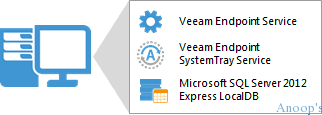
How to Take Backup Windows 10 Laptop
Veeam Endpoint Backup creates a Microsoft VSS snapshot of the volume whose data you want to back up. Microsoft VSS helps Veeam Endpoint take a snapshot of the volume and start taking your laptop/desktop backup.
Veeam endpoint backup is effortless to do and restore. When your system crashes, the hard drive fails, or a file gets corrupted or accidentally deleted, you can recover what you need in minutes, as shown in the following video (for the beta version of the endpoint backup).
If you have any questions about Veeam Endpoint Backup, you may use the following resources:-
- Product web page: http://www.veeam.com/endpoint-backup-free.html
- User guides: helpcenter.veeam.com/endpoint/10/
- Community forums: forums.veeam.com/veeam-endpoint-backup-f33/
Resources
Windows 10 Latest Version Of Client Operating System From Microsoft (anoopcnair.com)
We are on WhatsApp now. To get the latest step-by-step guides, news, and updates, Join our Channel. Click here. HTMD WhatsApp.
Author
Anoop C Nair is Microsoft MVP! He is a Device Management Admin with more than 20 years of experience (calculation done in 2021) in IT. He is a Blogger, Speaker, and Local User Group HTMD Community leader. His main focus is on Device Management technologies like SCCM 2012, Current Branch, and Intune. He writes about ConfigMgr, Windows 11, Windows 10, Azure AD, Microsoft Intune, Windows 365, AVD, etc.


Nice post! but links to user guides and community forums are dead(
StaffThank you. I’ve corrected the links.
Thank you again
Anoop