


Skip to content
Monitor Cisco Routers Switches with SCOM and Xian Network Manager

Monitor Cisco Routers Switches with SCOM and Xian Network Manager

Written By Anoop C Nair
Last Updated July 8, 2024
Posted In SCOM
SHARE

Monitor Cisco Routers Switches with SCOM and Xian Network Manager. Xian Network Manager‘s flow monitoring feature gives you a heads-up whenever traffic behaves out of the ordinary, so you can be on top of the issue before a priority issue is raised. 

Xian NM helps us by notifying you of every configuration change made on Cisco Routers, Switches, etc.  This helps to improve the IT infrastructure experience for all organizations.

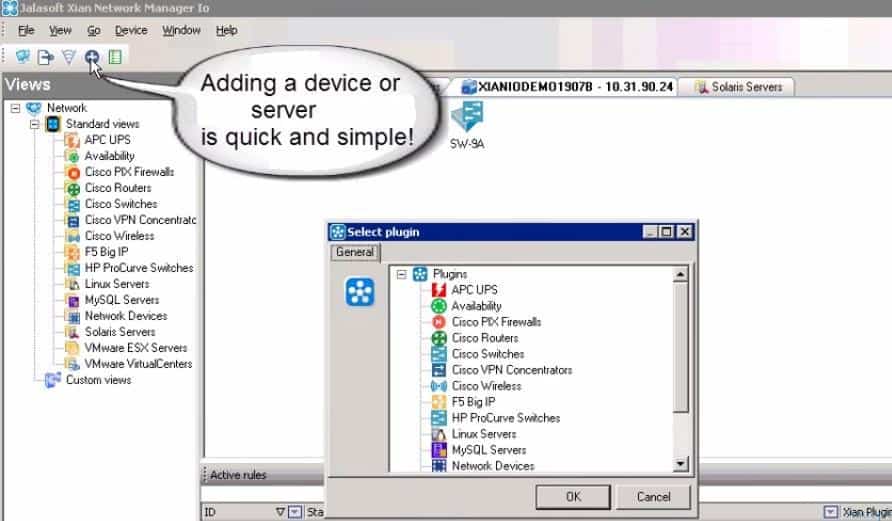
The Netflow feature of Xian NM will help us see more clearly what traffic is passing through. Adding a device or server is quick and straightforward, as shown in the screen capture below. We can also easily add plugins like Cisco PIX Firewalls and Cisco VPN Concentrators.

In this post, you will discover comprehensive details on effectively monitoring Cisco routers and switches using SCOM and Xian Network Manager. We will explain the setup process, including configuring monitoring rules, defining alert thresholds, and integrating with SCOM for centralized management.

Index
Monitor Cisco Routers Switches with SCOM and Xian Network Manager
Monitor Cisco Routers Switches with SCOM and Xian Network Manager – Table 1

Monitor Cisco Routers Switches with SCOM and Xian Network Manager

Adding a device or server is quick and straightforward. The screenshot below will help you provide more details.
Monitor Cisco Routers Switches with SCOM and Xian Network Manager - Fig.1
Monitor Cisco Routers Switches with SCOM and Xian Network Manager – Fig.1

SCOM 2025 is here with the Latest System Center. Recently, Microsoft introduced the latest System Center 2025. Microsoft System center in 2025 is th newest release coming into the fall of 2024.
Monitor Cisco Routers Switches with SCOM and Xian Network Manager - Fig.2
Monitor Cisco Routers Switches with SCOM and Xian Network Manager – Fig.2

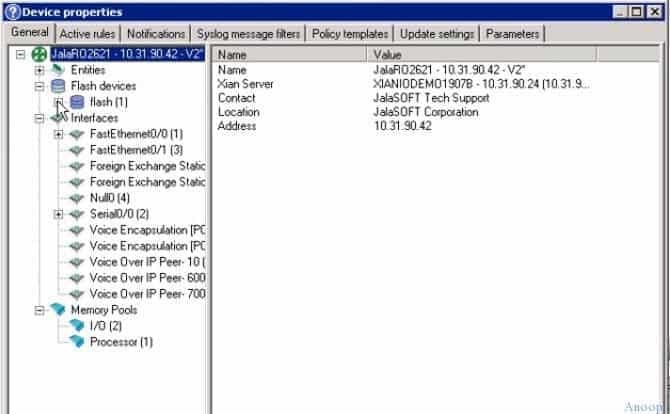
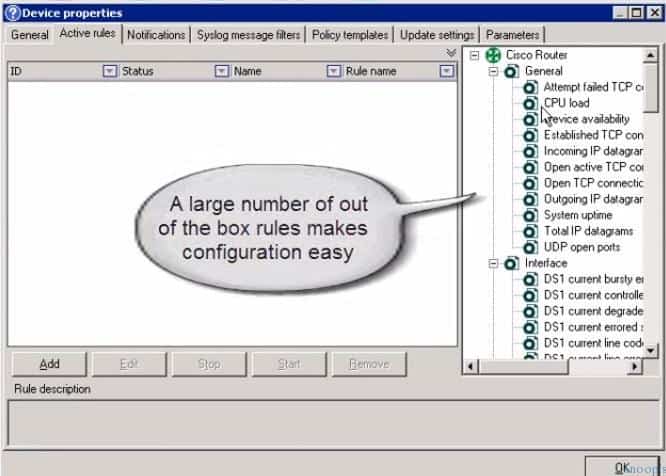
Xian Network Monitor provides rich capabilities with pre-defined rules, notification features, Syslog message filters, policy templates, etc…
Monitor Cisco Routers Switches with SCOM and Xian Network Manager - Fig.3
Monitor Cisco Routers Switches with SCOM and Xian Network Manager – Fig.3

Xian Network Manager has many pre-defined rules, such as CPU load, UDP ports open, end-to-end traffic analyzer, Established TCP connections, Open Active TCP connections, etc. These rules make configuration easy.

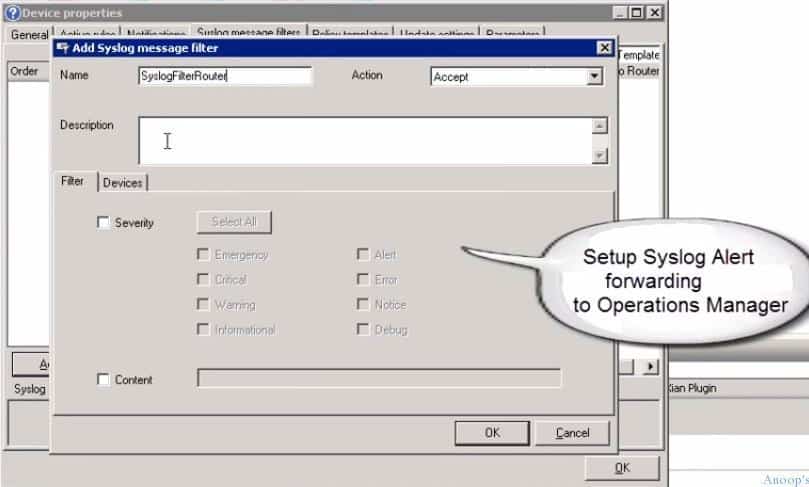
Using Xian Network Monitor, we can easily set up Syslog alerts and forward them to SCOM/OpsMgr.
Monitor Cisco Routers Switches with SCOM and Xian Network Manager - Fig.4
Monitor Cisco Routers Switches with SCOM and Xian Network Manager – Fig.4

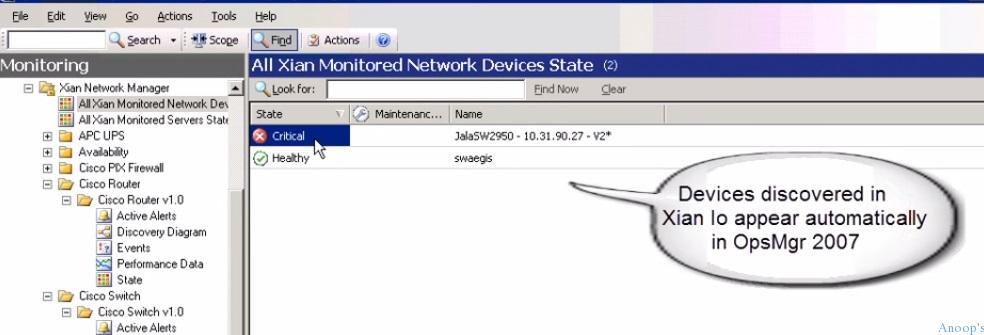
The configuration of Xian Network Manager with SCOM is very straightforward. Devices discovered in Xian NM will automatically appear in SCOM.
Monitor Cisco Routers Switches with SCOM and Xian Network Manager - Fig.5
Monitor Cisco Routers Switches with SCOM and Xian Network Manager – Fig.5

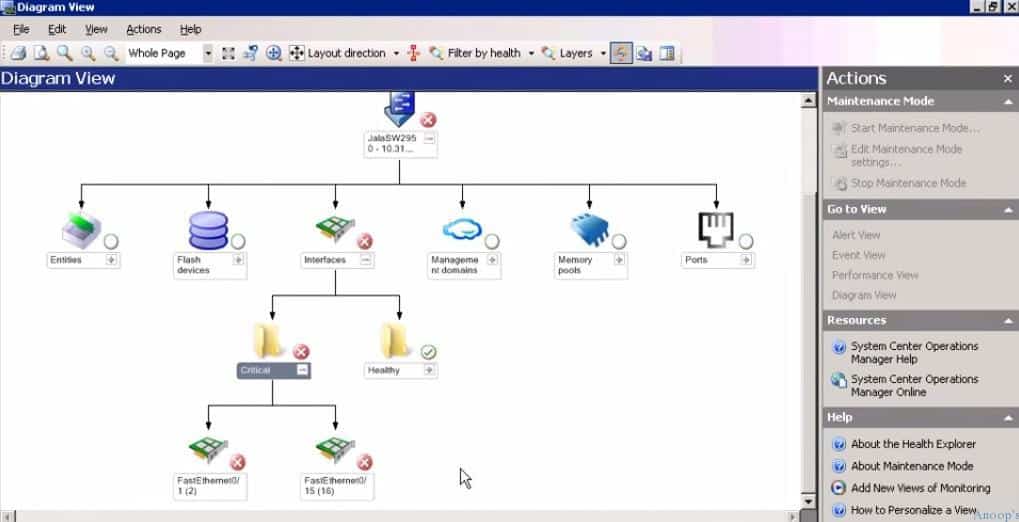
Xian Network Manager helps us to get a diagrammatic view of the device. It’s straightforward to filter the network path by health, etc.
Monitor Cisco Routers Switches with SCOM and Xian Network Manager - Fig.6
Monitor Cisco Routers Switches with SCOM and Xian Network Manager – Fig.6

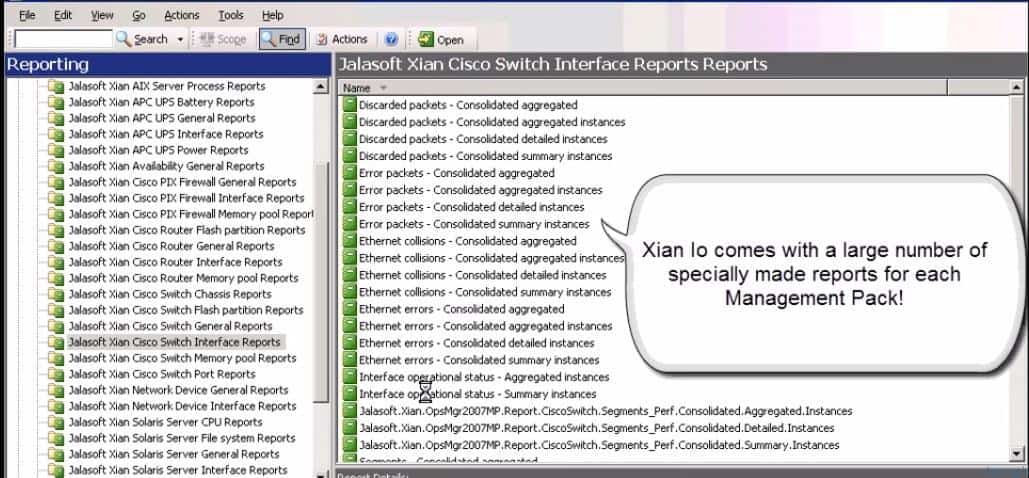
Xian lo comes with many specially made reports for each Management pack. The screenshot below helps you show more details.
Monitor Cisco Routers Switches with SCOM and Xian Network Manager - Fig.7
Monitor Cisco Routers Switches with SCOM and Xian Network Manager – Fig.7

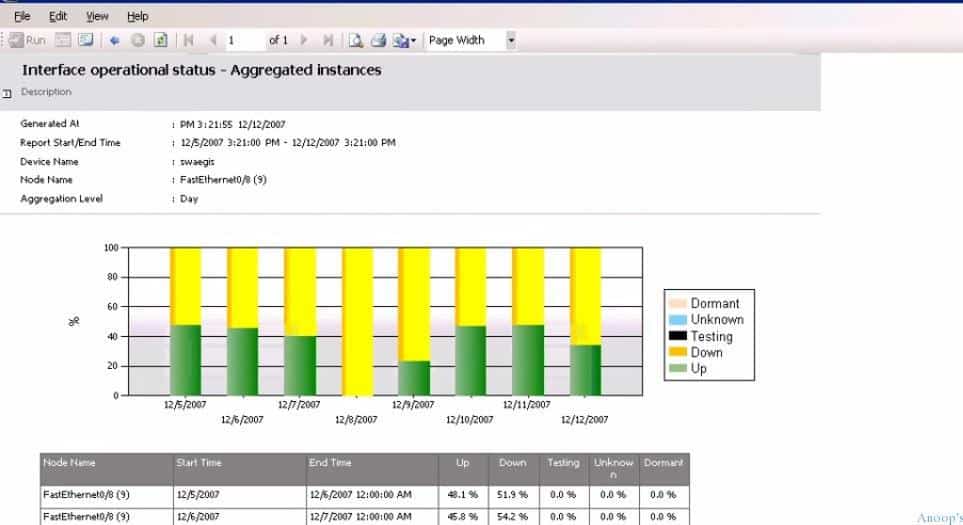
Xian comes with many specially made custom reports for each Management Pack.
Monitor Cisco Routers Switches with SCOM and Xian Network Manager - Fig.8
Monitor Cisco Routers Switches with SCOM and Xian Network Manager – Fig.8

We are on WhatsApp now. To get the latest step-by-step guides, news, and updates, Join our Channel. Click here. HTMD WhatsApp.

Author

Anoop C Nair is Microsoft MVP! He is a Device Management Admin with more than 20 years of experience (calculation done in 2021) in IT. He is a Blogger, Speaker, and Local User Group HTMD Community leader. His main focus is on Device Management technologies like SCCM 2012, Current Branch, and Intune. He writes about ConfigMgr, Windows 11, Windows 10, Azure AD, Microsoft Intune, Windows 365, AVD, etc.

Written by

Anoop C Nair is Workplace Technology solution architect with 25+ years of experience in global enterprise organizations such as JP Morgan, Capgemini, etc. Microsoft Certified Trainer. Microsoft MVP from 2015 onwards for consecutive 11+ years! He also conducts Intune and modern workplace tech training for enterprise organizations. He is Blogger, Speaker, and Founder of HTMD Community and HTMD Conference. His main focus is on Device Management technologies like Intune, Windows, Cloud PC. He writes about technologies like Intune, SCCM, Windows, Cloud PC, Windows, Entra, Microsoft Security.

Discussion

Join the discussion

Your email address will not be published. Required fields are marked *

Related guides

SCOM

SCOM 2025 is here with the Latest System Center

Exciting News! SCOM 2025 is here with the Latest System Center. Recently, Microsoft introduced the latest System Center 2025. Microsoft System center in 2025 is th newest release coming into the fall of 2024. You know, Data centres are significant and complex, too. In this case, System Center 2025 will make massive changes. Microsoft system […]

KR Krishna R 4 min read
SCOM

Monitor Office 365 with SCOM NiCE Management Pack

Are you interested in learning more about Monitor Office 365 using the SCOM NiCE Management Pack? This management pack provides a comprehensive solution for monitoring and analyzing your Office 365 environment, helping you identify issues and take proactive steps to ensure smooth operations. Are you monitoring Office 365 services with SCOM infrastructure? With the SCOM […]

AC Anoop C Nair 4 min read
Savision

Monitoring Folders Files with SCOM OpsMgr

Let us learn about Monitoring Folders Files with SCOM OpsMgr. As an SCCM admin, I would love to monitor the Inbox folders of SCCM servers. SCCM CB inbox folders are not as critical as SCCM 2007. However, those folders are significant in identifying issues. Monitoring Folders and Files is also essential for other applications. I […]

VM Vidya M A 3 min read
SCCM

System Center Products Moved to Semi-Annual Channel But NOT SCCM

System Center Products moved to the semi-annual channel but not the SCCM configuration manager configuration manager configuration. Microsoft also moved another suite of products into the semi-annual release channel. A few months back, Windows 10 also moved to Semi-Annual channel releases. It seems that Microsoft is trying to streamline the release management channel for all […]

AC Anoop C Nair 4 min read