






Intune to Introduce Account Driven User Enrollment for iOS/iPadOS
Let’s explore the updates on Account Driven User Enrollment on iOS/iPadOS from Intune. Starting with Intune May update 2305, Intune supports account driven user enrollment, a new and improved variation of Apple User Enrollment for iOS/iPadOS 15+ devices
The Account Driven User Enrollment on iOS/iPadOS makes it easier for administrators to manage devices and enhance the user experience. By utilizing this feature, administrators are able to enroll devices into Intune with greater speed and ease.
Apple’s User Enrollment is created to simplify the enrollment and management process for Bring Your Own Devices (BYOD). This process requires the use of Managed Apple IDs, which serve as a secondary user identity on the device and can coexist with personal Apple IDs.
This feature is part of Microsoft ongoing development for improving the management of mobile devices and making the enrollment process more efficient for both administrators and users.

- Enroll MacOS In Intune With Step By Step Guide
- Get Intune Environment Ready for iOS / Mac Devices Microsoft Endpoint Manager
Account Driven User Enrollment on iOS/iPadOS from Intune
Microsoft has announced the integration of Account Driven User Enrollment for iOS/iPadOS with Intune in the roadmap year 2021, which is expected to be available in public preview starting February 2023. The final release, or General Availability (GA), of this feature, is planned for June 2023.
Now available for public preview, the new option utilizes just-in-time registration, which eliminates the need for the Company Portal app during enrollment.
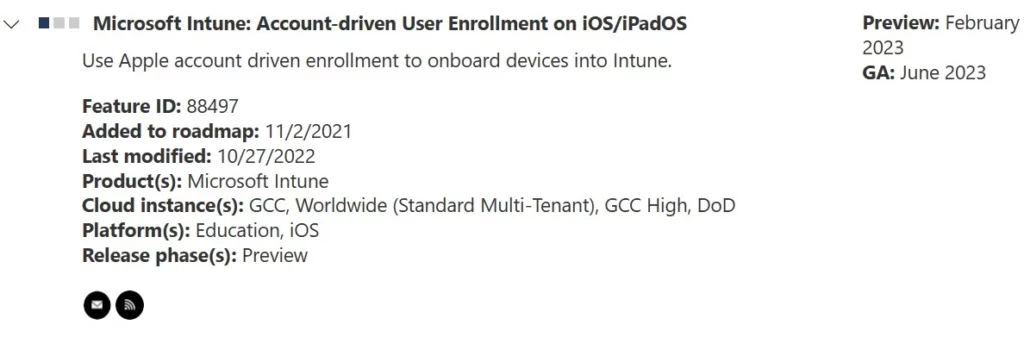
| Feature | Release phase | Preview Expected (Year) |
|---|---|---|
| Microsoft Intune: Account-driven User Enrollment on iOS/iPadOS | Preview | 2023 |
Apple Enrollment Type Profile
By using Apple Enrollment Type Profile in Intune, organizations can automate the enrollment process for Apple devices and ensure that they are configured with the correct settings and restrictions. This feature provides organizations with the ability to manage Apple devices from one central location, making it easier to keep track of all devices and ensure that they are secure.
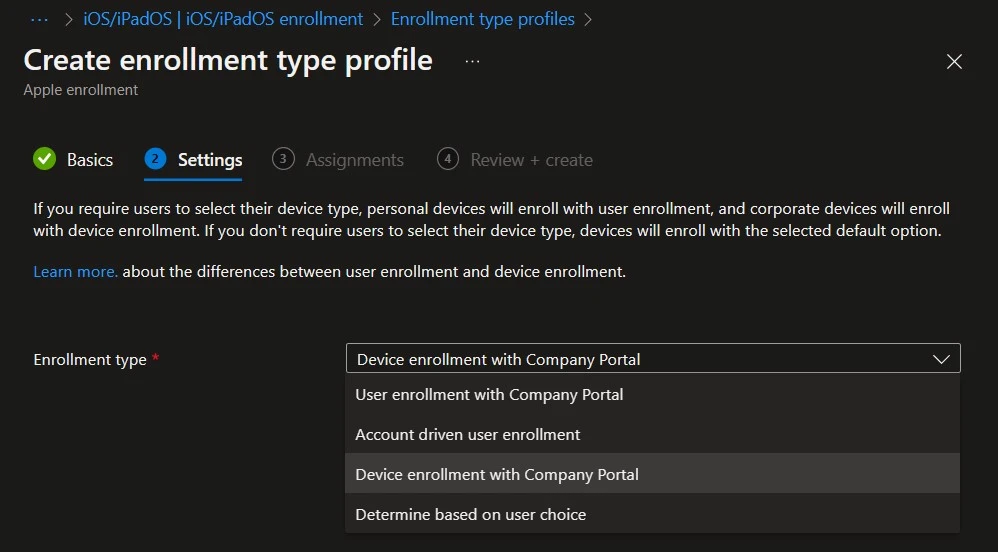
In the Microsoft Intune admin center. When you create the enrollment profile for iOS/iPadOS, you have the following options:
- Device enrollment: This option is a typical enrollment for personal devices. The device is managed, not just specific apps or features. With this option, consider the following information:
- You can deploy certificates that apply to the whole device.
- Users must install updates. Only devices enrolled using Automated Device Enrollment (ADE) can receive updates using MDM policies or profiles.
- A user must be associated with the device. This user can be a device enrollment manager (DEM) account.
- Determine based on user choice: Gives end users a choice when they enroll. Depending on their selection, User enrollment or Device enrollment is used.
- User enrollment: Starting with iOS 13 and newer. This option configures a specific set of features and organization apps, such as password, per-app VPN, Wi-Fi, and Siri. If you use User enrollment, and to help secure apps and their data, then we recommend also using app protection policies.
Author
About Author – Jitesh, Microsoft MVP, has over six years of working experience in the IT Industry. He writes and shares his experiences related to Microsoft device management technologies and IT Infrastructure management. His primary focus is Windows 10/11 Deployment solution with Configuration Manager, Microsoft Deployment Toolkit (MDT), and Microsoft Intune.


Hi,
In my environment we are not using DEP or ADE method. So can we still use this enrollment method or we have to first configure ADE?