






Fix SCCM SCEP Related Client Side Issues Part 2 | ConfigMgr | Defender | Endpoint Protection
Let’s analyze the options to Fix SCCM SCEP Related Issues. In this post, I will try to cover the knowledge acquired from the field to fix different issues of Windows Defender or Endpoint Protection client (a.k.a SCEP?).
Don’t get confused between SCEP and Windows Defender or Endpoint Protection clients, as they are essentially the same from an IT professional’s viewpoint. Microsoft changed the name of SCEP to Windows Defender or Endpoint Protection client.
If you are encountering issues with Configuration Manager (SCCM) and Microsoft System Center Endpoint Protection (SCEP), there are several steps you can take to try to resolve the issue. Start by checking the SCCM and SCEP logs for any error messages or information that can help you determine the cause of the issue.
Before this post, I wrote another article that covers in-depth troubleshooting of SCEP related issues. Read here https://www.anoopcnair.com/fix-sccm-scep-related-issues-client-side-configmgr-defender/

In this post, I’m sharing the information for Endpoint protection (defender) clients managed through Configuration Manager (a.k.a SCCM). Let me know in the comments section if you have any queries/concerns.
- SCCM Automation Using Azure Runbook Hybrid Worker
- SCCM SQL Reports With Approvers Email Address And Require Approval Details Of Application Deployments
Issue Description – SCCM SCEP Related Client Side Issues
Endpoints showing old date and time for “Endpoint Protection Definition Release Time”. The below screenshot will help us understand the meaning.

So I logged in to that endpoint to validate the root cause. Found something else. Guess what. The server was updating the definitions regularly. Screenshot below:
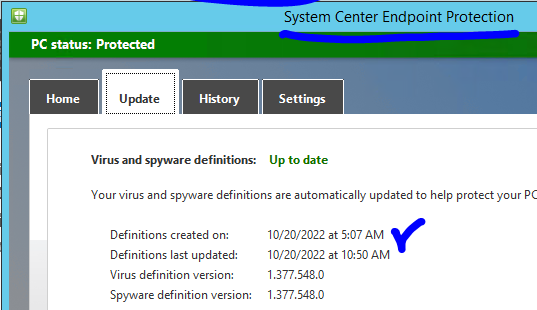
Logs are your best friend in Troubleshooting issues, you will see the client-side and server-side logs. If you encounter any of these issues, it’s recommended to check the SCCM and SCEP logs for more information and perform basic troubleshooting steps such as restarting the SCEP service and verifying the SCCM and SCEP configurations.
Important – Read more about the logs in depth. Written by Anoop Nair and getting updated frequently. https://www.anoopcnair.com/sccm-logs-files-list-of-configmgr-log-files/
My earlier article already covers the SCEP log files and locations. https://www.anoopcnair.com/fix-sccm-scep-related-issues-client-side-configmgr-defender/ So I will start by explaining my findings.
Most of the log files are looking green and not giving any information about my issue. I reached the file ExternalEventAgent.log. Here I could notice below.

Root Cause
This issue occurs because the instance of the MSFT_MpComputerStatus class doesn’t exist in the root\Microsoft\ProtectionManagement namespace. The client queries this instance to populate the related registry keys.
Solution
To fix the issue, run the following command on the affected client computers to re-register the ProtectionManagement provider:
Register-CimProvider -ProviderName ProtectionManagement -Namespace root\Microsoft\protectionmanagement -Path <path of ProtectionManagement.dll> -Impersonation True -HostingModel LocalServiceHost -SupportWQL -ForceUpdate
Remember that the path of “ProtectionManagement.dll” is different in Server 2012 R2 and Server 2016 because till Server 2012 R2, it was “System Center Endpoint Protection” and post that it’s known as “Windows Defender”.
Once the command execution is successful, refresh the policy and state the message to the client. Come back to check after a few minutes, and this is what we have now in the console.

Happy Learning. Reach us if you have any questions related to this article, any other article, or, in general for SCCM, Intune related questions https://forum.howtomanagedevices.com/login/
Author
My name is Deepak Rai, and I am a Technical Lead on SCCM and Intune with more than 14 years of experience in IT. My main domain is SCCM (AKA ConfigMgr, CB, MECM, etc.), Intune, and Azure (Runbooks). I have worked on several platforms (Active Directory, Exchange, Veritas NETBACKUP, Symantec Backup Exec, NDMP devices Like Netapp, EMC Data Domain, Quantum using Backup Exec 2010 and 2012, HP storage works 4048 MSL G3, Data Deduplication related troubleshooting.) in these 13 years but at last ended up to the technology from which I started as IT Engineer (SCCM).




Discussion