






Seamless Account Recovery for Passwordless Users in Microsoft Entra Agent
Let’s discuss Seamless Account Recovery for Passwordless Users in Microsoft Entra Agent. On the Microsoft Ignite Event, Microsoft introduced the Account Recovery in Microsoft Entra. This new capability is a security feature is a part of Entra Agent.
Account Recovery helps users regain access to their accounts when they lose all their authentication methods (like phone, hardware token, or backup codes). It’s designed to provide a safe fallback when traditional self‑service password reset (SSPR) isn’t possible, especially for passwordless users.
Account Recovery in Microsoft Entra Agent is relevant for several reasons. As organizations move to passkeys, FIDO2 keys, and other passwordless methods, users often don’t have a fallback password. Account Recovery ensures they aren’t permanently locked out.
It uses third‑party identity verification providers to securely validate the user’s identity and let them re‑enroll MFA method. In this blog post I would like to explain how to set up Account Recovery for Passwordless Users in Entra Portal and its end user Experience.

Table of Contents
Seamless Account Recovery for Passwordless Users in Microsoft Entra Agent
Microsoft Entra Agent’s Account recovery feature Provides a seamless, self‑service way for end users to regain access without waiting for IT helpdesk intervention. Uses trusted identity verification providers to validate the user before restoring access, reducing the risk of fraudulent recovery.
| Practical Impact | Details |
|---|---|
| End Users | Peace of mind knowing they can recover accounts even if they lose their |
| Admins | Easier rollout of passwordless |
- Non-Human Identities and Agent Identities Gain Access Package Support with Entra Identity Governance for AI Agents
- Understanding Entra Agentic AI in Security From Manual Work to Fully Autonomous Agents
- AI Agent Tool that Brings the Power of Microsoft Graph and MS Entra
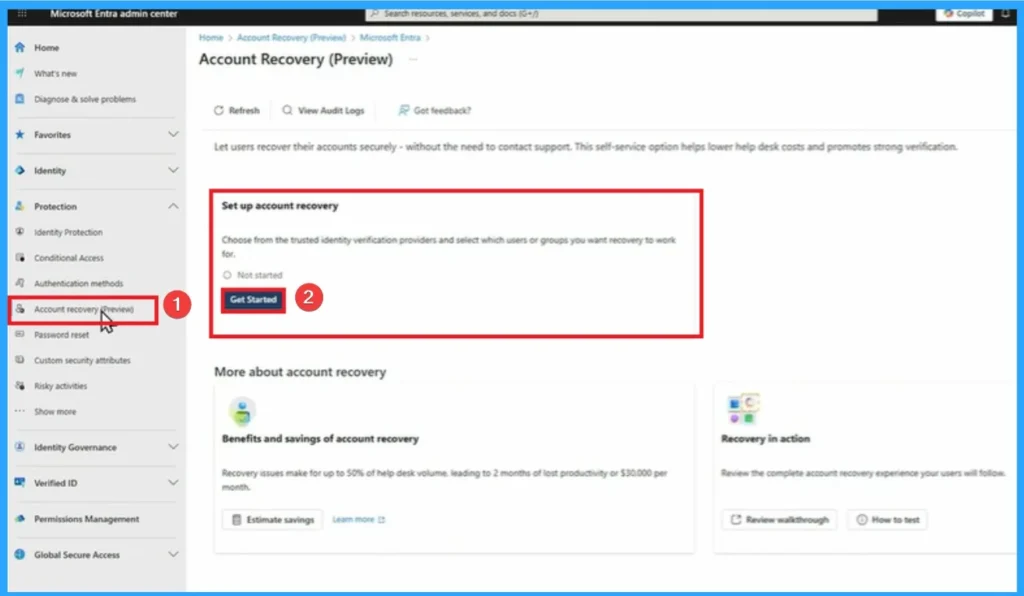
How to Set Account Recovery in Entra Portal
Here I am going to show the demonstration of Account Recovery feature, which is showed on Ignite 2025 Event. Before enabling the feature, ensure users have complete and accurate profile data (name, email, phone, etc.) because identity verification relies on this information. Your tenant is licensed for Microsoft Entra ID features that support Account Recovery.
- Sign in to the Microsoft Entra Admin Center
- Go to: https://entra.microsoft.com
- Navigate to Authentication Methods
- Identity > Protection > Authentication Methods > Account Recovery (Preview)
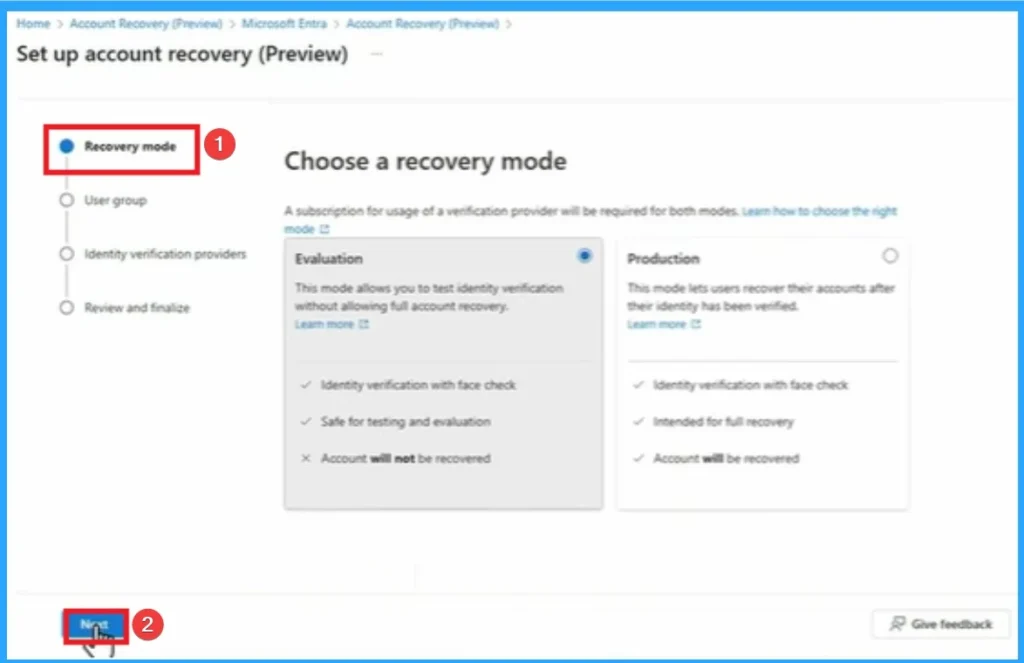
Recovery Mode Tab
Recovery Mode Tab in Account Recovery which is the first tab that shows Evaluation and production. The Evalution Mode Evaluation allows you to test identity verfication without allowing full account recovery.
- Identity verification with face check
- Safe for testing and evaluation
- X Account will not be recovered
- Click on the Next Button
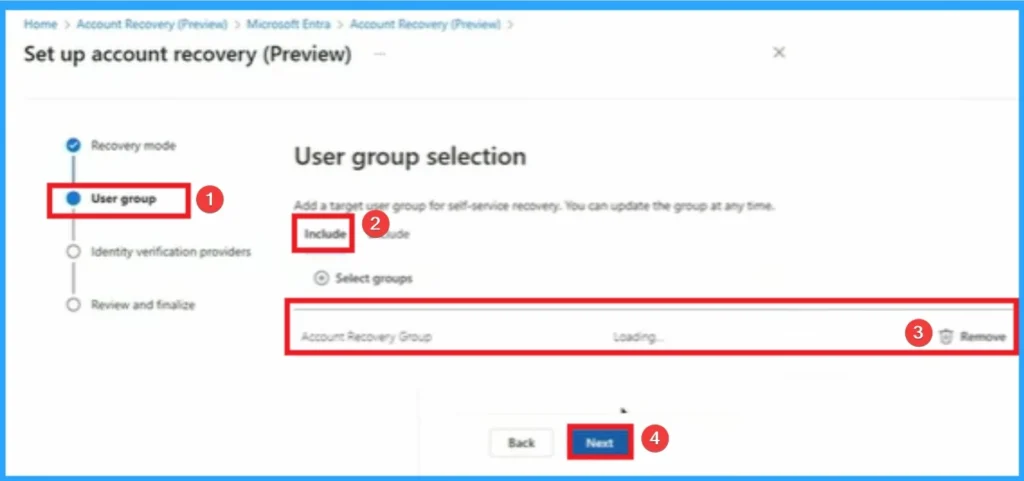
User Group Selection
User Group selection is the next step on Account Recovery. To select the group click on the Include section and select necesary group. Click on the Remove button if needed. Click on the Next button
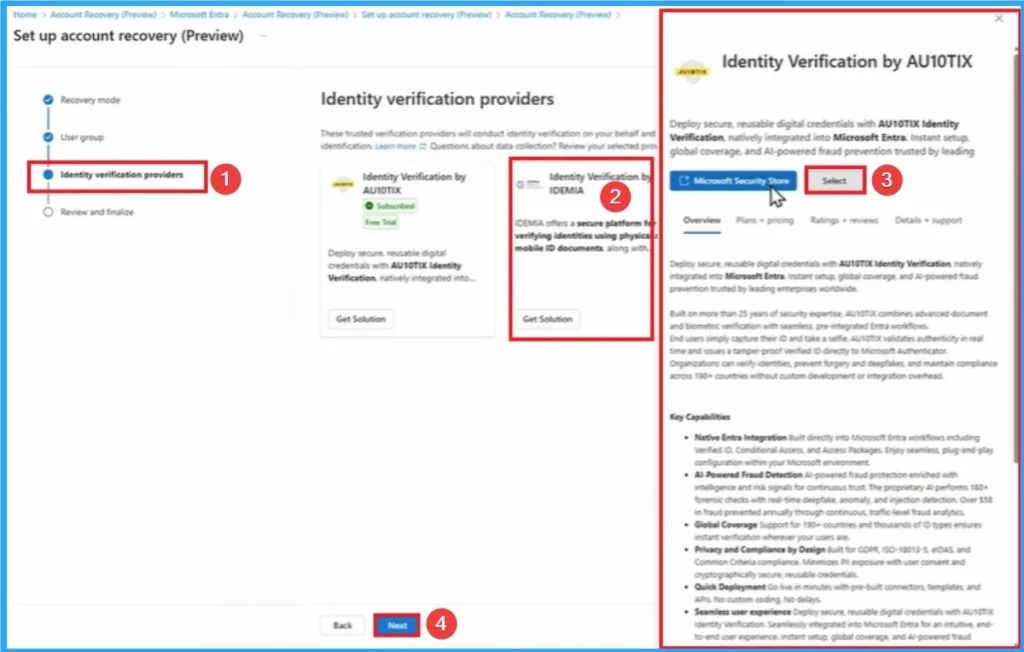
Identity Verification Providers
Deploy secure reusable digital credentials with AU10TIX Identity Verification Natively integrated into Microsoft Entra instant setup global Coverage and AI-powered fraud prevention trusted. Click on the Microsoft Secure Store option and clcik on the Next button.
Review and Finalize
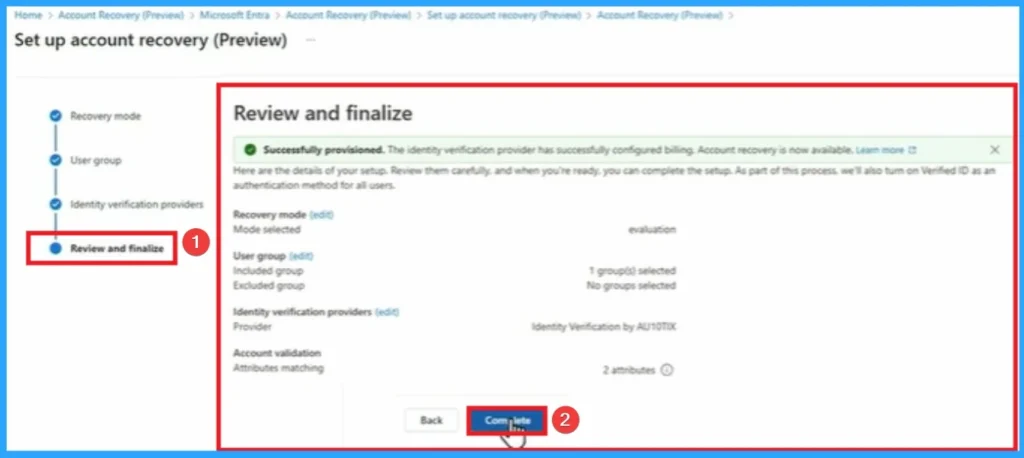
After that you can review and Finalize the Account Recovery. Here Evalution mode is selected Here Evalution is reviewesd and finalized. Click on the Complete button to create the Recovery Account.
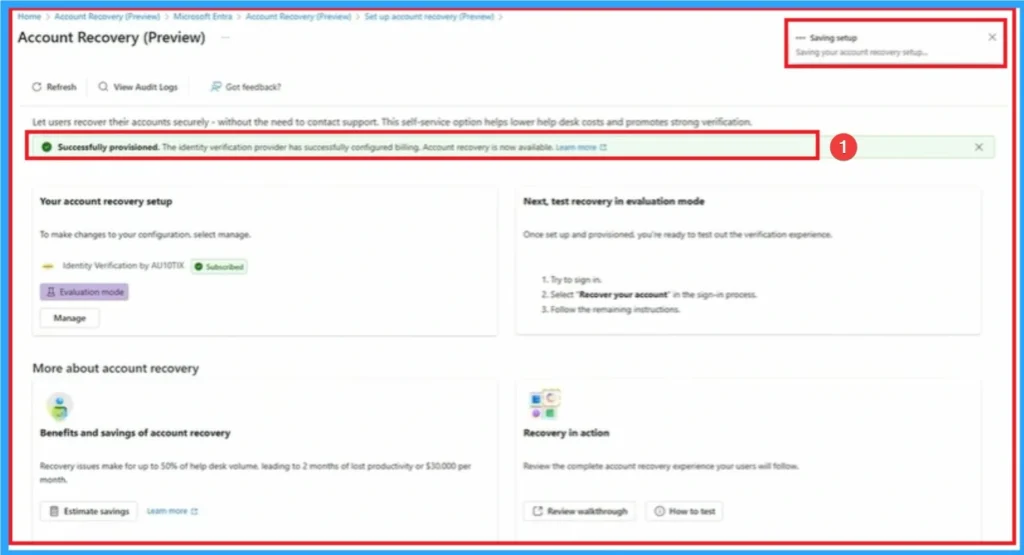
After clicking on the complete button, setup is saved and its notification can be seen on the Entra Portal. Here you can see Account Recovery Provisioned.
End User Experience of Account Recovery for Passwordless Users
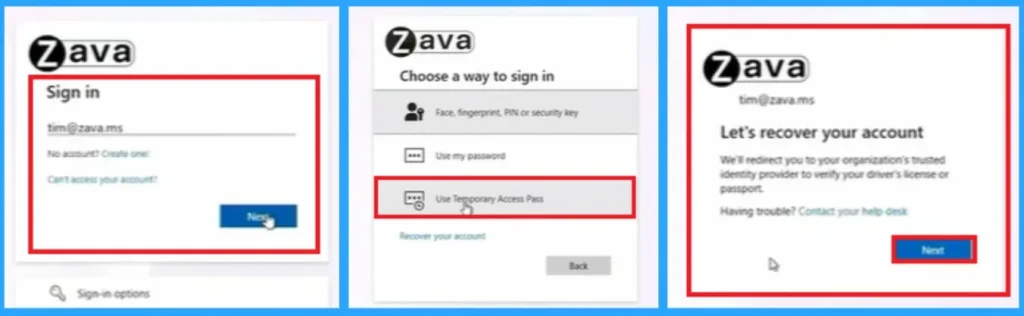
Let’s go through the Account Recovery End user Scenario. If a user lost his phone, and it had device-bound passkeys on it. Here going to recover with your account. Click on the Use Temporary Access Pass. Then click on the Next button on the next window.
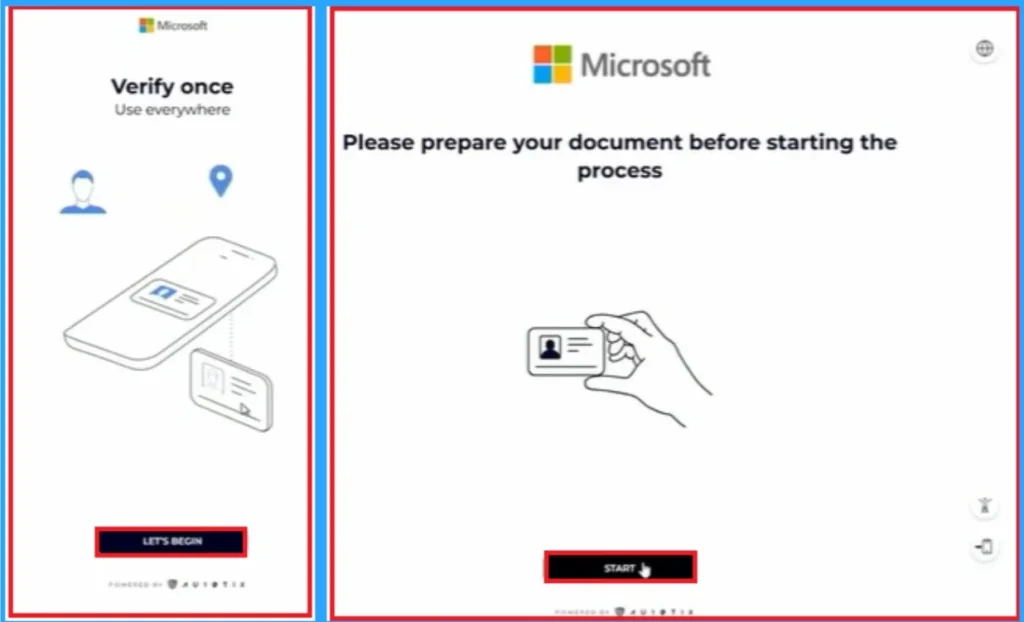
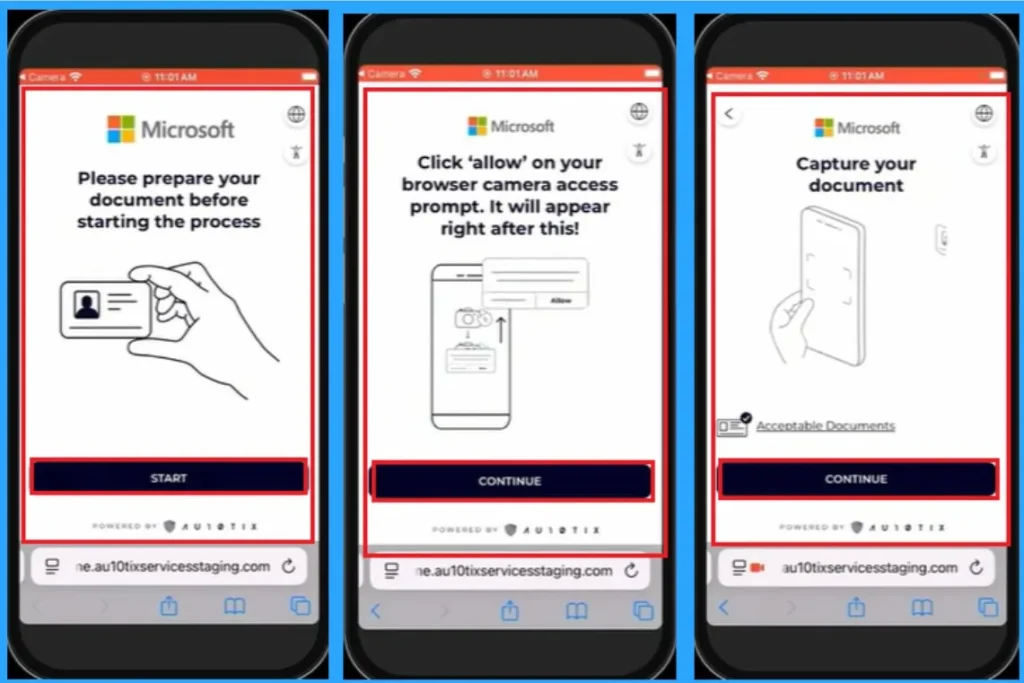
Then here going to redirect the account and over to the partner. Click on the Let’s begin button. Then you can that preparing of documents before the process. Click on the Start button.
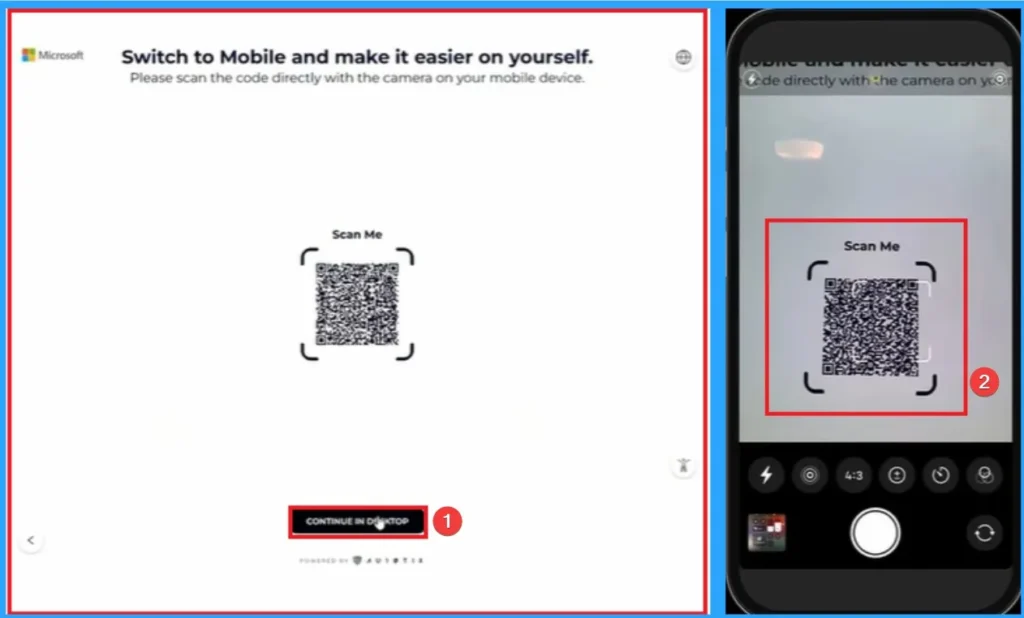
Then you can Scan the QR code directly with the camera on your Mobile Device. The seconf image shows the QR code is scanned.
Need Further Assistance or Have Technical Questions?
Join the LinkedIn Page and Telegram group to get the latest step-by-step guides and news updates. Join our Meetup Page to participate in User group meetings. Also, Join the WhatsApp Community to get the latest news on Microsoft Technologies. We are there on Reddit as well.
Author
Anoop C Nair has been Microsoft MVP from 2015 onwards for 10 consecutive years! He is a Workplace Solution Architect with more than 22+ years of experience in Workplace technologies. He is also a Blogger, Speaker, and Local User Group Community leader. His primary focus is on Device Management technologies like SCCM and Intune. He writes about technologies like Intune, SCCM, Windows, Cloud PC, Windows, Entra, Microsoft Security, Career, etc.




Discussion