






Windows 11 Group Policy to Allow Administrator Account Lockout
Let’s get more details on Windows 11 group policy to allow administrator account lockout. This security setting determines whether the builtin Administrator account is subject to the account lockout policy.
Microsoft introduced the new group policy into Windows 11 insider build. The next question everyone is going to ask is whether this is going to get backported to Windows 10 and 11 versions in production or not?
Microsoft’s David Weston, Vice President, OS Security and Enterprise, confirmed on Twitter that this policy is already being backported to Windows Server and Windows Client operating systems.
David Weston mentioned in his Tweet that this Group Policy is going to help mitigate RDP and other brute force password vectors. He also added that this technique is very commonly used in Human Operated Ransomware and other attacks.

Read More on New Azure AD and On-Prem AD LAPs Group Policies – Azure AD LAPs Group Policy Settings for Windows 11 | Intune Policy For LAPs.
CIS Benchmark for Windows Client and Server Operating Systems
The local administrator accounts are either renamed or disabled in most organizations. This is one of the most commonly implemented policies. I think the majority of global organizations follow the CIS benchmark as the baseline security policy.
CIS Benchmark policies are available for Windows Client operating systems such as Windows 10 and Windows 11. Also available for Windows Server operating systems. These CIS benchmarks are available for 26+ vendors in the market.
Read More -> Download Intune CIS Benchmark for Windows 10 Or Windows 11
Existing Policies part of the Production Windows Releases
Following are the existing Account lockout policies that are part of the production Windows releases. These lockout policies describe the local accounts’ best practices, location, values, and security considerations.
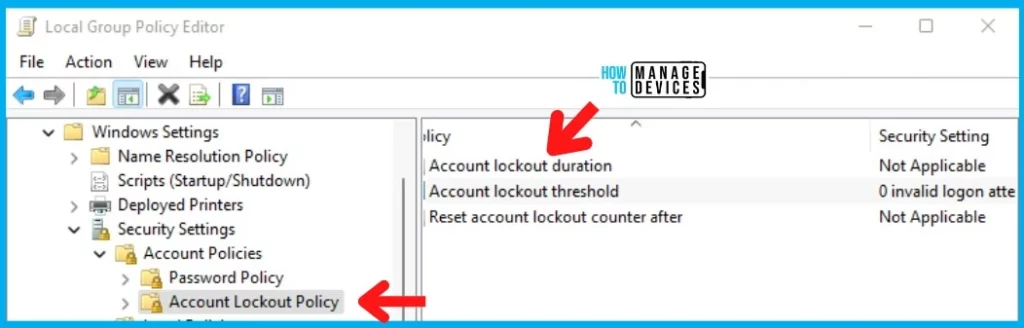
Microsoft thinks the new Group Policy Settings to Allow Administrator Account Lockout will make brute forcing much harder. The following are 3 existing group policies:
1. Account lockout duration – The Account lockout duration policy setting determines the number of minutes that a locked-out account remains locked out before automatically becoming unlocked.
2. Account lockout threshold – The Account lockout threshold policy setting determines the number of failed sign-in attempts that will cause a user account to be locked.
3. Reset account lockout counter after – The Reset account lockout counter after the policy setting determines the number of minutes that must elapse from the time a user fails to log on before the failed logon attempt counter is reset to 0.
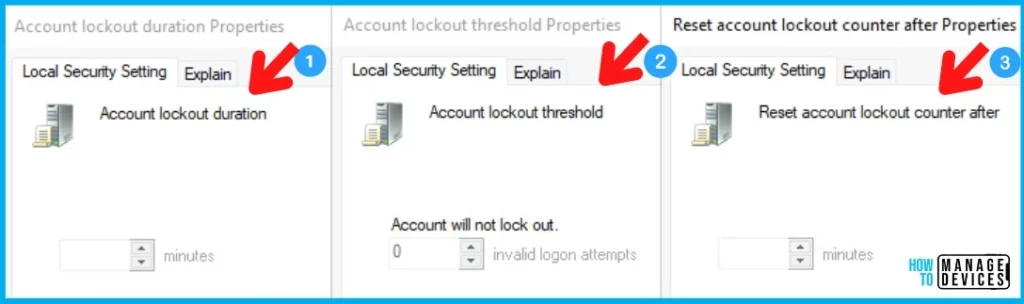
NOTE! – Somehow, the account lockout settings are NOT enabled on local Windows 10 or Windows 11 but enabled on Group Policy Management Editor on Domain Controller.
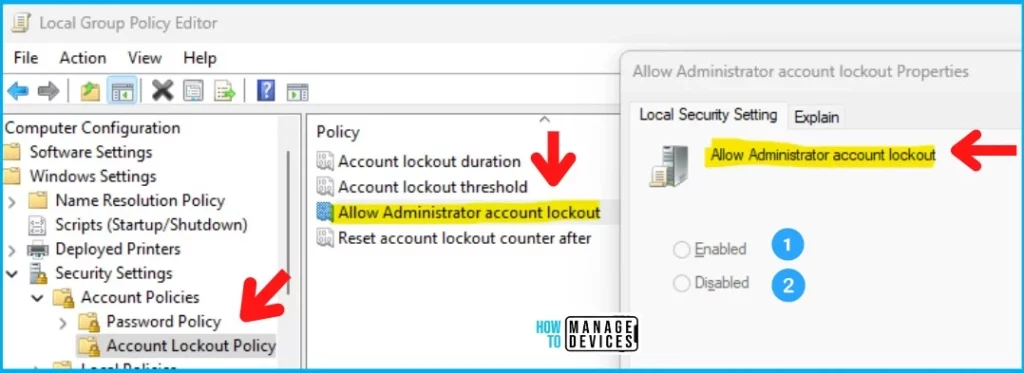
Allow Administrator account lockout Policy Settings
The new account lockout group policy setting “Allow Administrator account lockout” helps to ensure that local admin accounts are protected well from security threats, especially human operated ransomware and other attacks.
The attackers target built-in local administrator accounts or a list of common account names. The new security setting determines whether the builtin Administrator account is subject to the account lockout policy. There are two configuration options available with Allow Administrator account lockout Policy settings.
- Enable -> Recommended settings?
- Disable
You can configure the new local administrator account lockout security policy from the following location in the Group Policy Management Console: Computer Configuration\Policies\Windows Settings\Security Settings\Account Policies\Account Lockout Policy.
Windows CSP – Intune | Account Lockout Policies
I don’t see any Windows CSP policies to configure the following Computer Configuration\Policies\Windows Settings\Security Settings\Account Policies\Account Lockout Policies.
I have also checked Intune Settings Catalog policies and Endpoint Security Baseline policies without any success. I couldn’t find any of the policies related to local Account Lockout policies.
Author
Anoop C Nair is Microsoft MVP! He is a Device Management Admin with more than 20 years of experience (calculation done in 2021) in IT. He is Blogger, Speaker, and Local User Group HTMD Community leader. His main focus is on Device Management technologies like SCCM 2012, Current Branch, and Intune. He writes about ConfigMgr, Windows 11, Windows 10, Azure AD, Microsoft Intune, Windows 365, AVD, etc.




Is there equivalent registry key for the “Allow Administrator Account Lockout” policy?
Hi! I also looked for this setting through Intune, but to no avail. Please let me know if you find anything.
PS: I’ve been reading your posts for a long time already, great content!