






ConfigMgr Collection View Relationships Graph | SCCM | Configuration Manager
Let’s discuss the ConfigMgr Collection View Relationships Graph. You can better understand the ConfigMgr collection dependency relationships with the view relationships graph.
Microsoft introduced a new feature to represent collection relationships in a graphical format with version 2010. You can view dependency relationships between collections in a relationship graph.
This new feature makes impact analysis of SCCM collections easy. SCCM admins can now easily understand the include and exclude dependencies of collections, which might also help reduce accidental deletions and deployments.
This post provides all the details of the ConfigMgr Collection View Relationships Graph | SCCM | Configuration Manager.

Table of Contents
ConfigMgr Collection View Relationships Graph | SCCM | Configuration Manager – Prerequisite
Accessing the collection relationship feature from the console does not require a specific prerequisite. However, the relationship graph might be incomplete if you don’t have permission to access all those related collections.
- Walkthrough of SCCM Console
- What is Collection, How to Create SCCM Static Collections Part 1
- How to create dynamic collections? Create Collection Folders Part 2
- Create AD Group Based SCCM Collection
- ConfigMgr 2010 version or later.
- The admin should have appropriate permissions to access all related collections.
- You can only see relationships between collections to which you have permission:
- You’ll see all relationships if you have permission for All Systems or All Users and User Groups.
- If you don’t have permission for a specific collection, you don’t see it in the graph and can’t view its relationships.

Dependency Lines
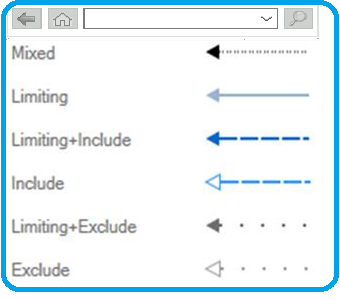
The graph represents SIX types of dependencies with different lines, as shown in the picture. This is key to better understanding collection dependencies.
| SIX Types of Dependency Lines |
|---|
| Mixed – When the collection has more than one type of dependency. |
| Exclude – When there are some excluded collections. |
| Limiting – Limiting collections are shown using this type of dependency. |
| Include – The included collections are shown with this type of dependency. |
| Limiting + Include – When the limiting collection is included. |
| Limiting + Exclude – When the limiting collection is excluded. |
Launch Options
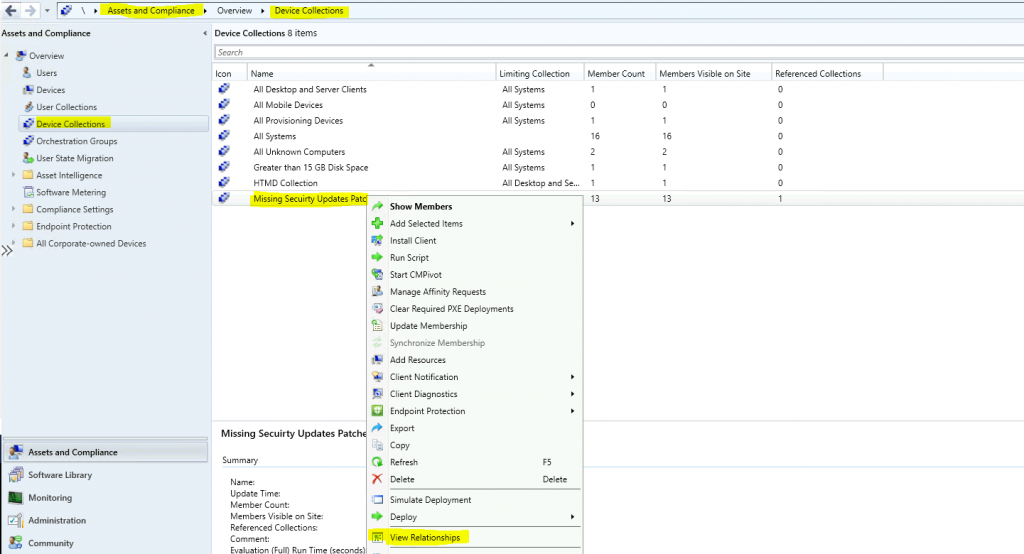
You can launch the collection dependency relationships graphical view from the Configuration Manager console. You don’t have to use an additional tool to view this graph. It opens up a new pop-up window within the console to give you a proper view of all the dependent collections.
- Navigate to \Assets and Compliance\Overview\Device Collections or \Assets and Compliance\Overview\User Collections
- Right-click on the collection
- Select the View Relationships option
Actions
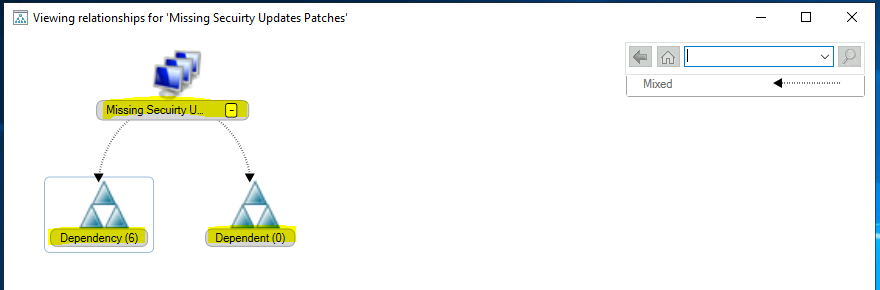
The view relationships graph for each collection offers different options. As explained in the prerequisite section of this blog, you must ensure you have appropriate permissions.
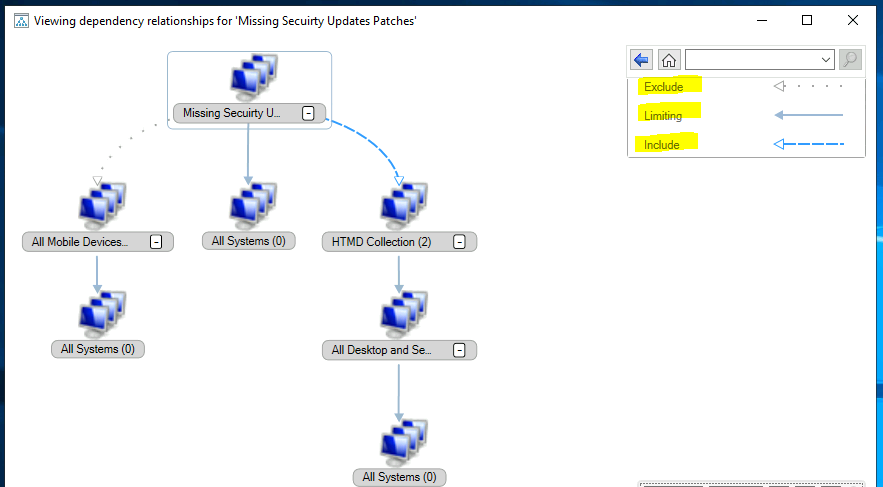
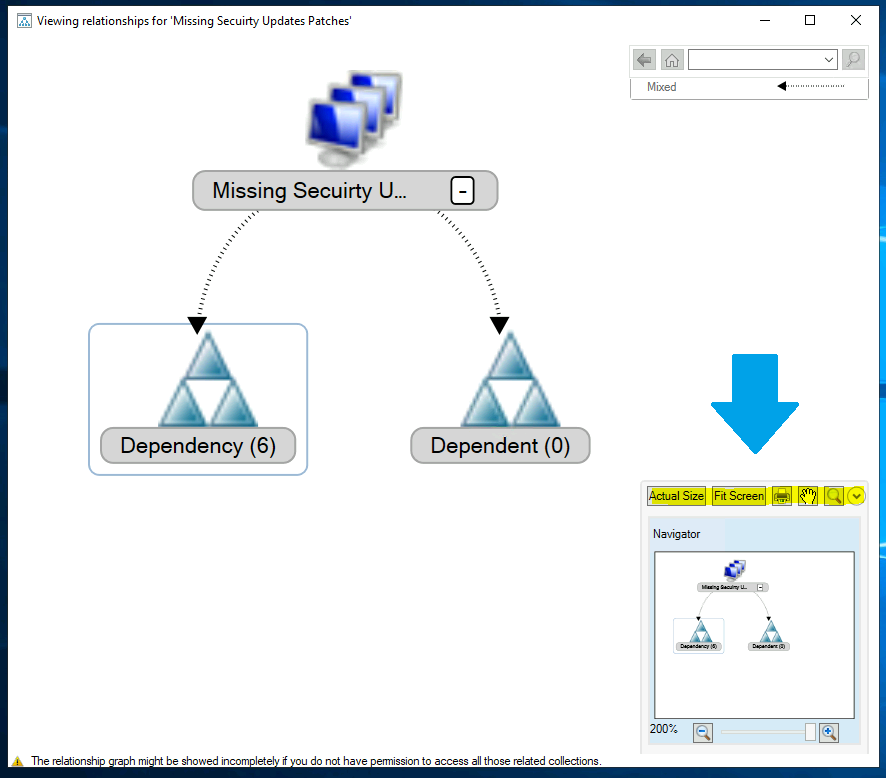
- You can expand the dependency graph using the + symbol to get a full view of relationships.
- Click on Dependency or Dependent Tree to view the holistic relationship.
The relationship lines are visible on the right of the top corner.
On the right side bottom corner, you have further actions:
- Actual Size – The actual size of the graph.
- Fit Screen – The full-screen view of the graph.
- Print – Printing options are available at the bottom.
- Drag – This button gives drags the graphs.
- Zoom in & Zoom out – There are two options to enlarge and reduce the graphical representation.
Resources
- View collection relationships – here
- SCCM Collections How to Create Direct Membership Collection
- Introduction to collections in SCCM – here
- Create SCCM Static Collections (Programmatically or using a script) – here
- Best Practices of Collection by Roger – here
We are on WhatsApp now. To get the latest step-by-step guides, news, and updates, Join our Channel. Click here – HTMD WhatsApp.
Author
Anoop C Nair is Microsoft MVP! He is a Device Management Admin with more than 20 years of experience (calculation done in 2021) in IT. He is a Blogger, Speaker, and Local User Group HTMD Community leader. His primary focus is Device Management technologies like SCCM 2012, Current Branch, and Intune. He writes about ConfigMgr, Windows 11, Windows 10, Azure AD, Microsoft Intune, Windows 365, AVD, etc.




Discussion