






How to Get Android Work Profile Device Configuration Policies with Intune Explorer and Security Copilot
Let’s discuss how to Get Android Work Profile Device Configuration Policies with Intune Explorer and Security Copilot. What is Android Work Profile? It is a feature in Android that allows organisations to securely manage the work-related apps and data on an employee’s device.
When we create a work profile, it makes a separate, secure space just for work apps, emails, and data. IT admins can manage and control only this work area, not the personal side of the phone. The company’s rules, security settings, and app restrictions apply only to the work profile, while personal apps and data remain private and unaffected.
If you are using the Intune Explorer and Security Copilot, IT admins can quickly query and retrieve all Android Work Profile device configuration policies in their environment. Intune Explorer makes it easier to browse and understand policy details, while Security Copilot helps generate queries, making the process faster and more accurate.
This result helps IT admins by giving them quick visibility into all Android Work Profile policies without having to search through the Intune portal. It also makes troubleshooting easier by showing clear details of each policy, so issues can be fixed faster.

Table of Contents
How to Get Android Work Profile Device Configuration Policies with Intune Explorer and Security Copilot
With Intune explorer, you can simply type what you want to know, and Intune will give you the results. You can also take quick actions based on that data, like updating or checking policies. This helps organizations save time, reduce mistakes, and make faster decisions.
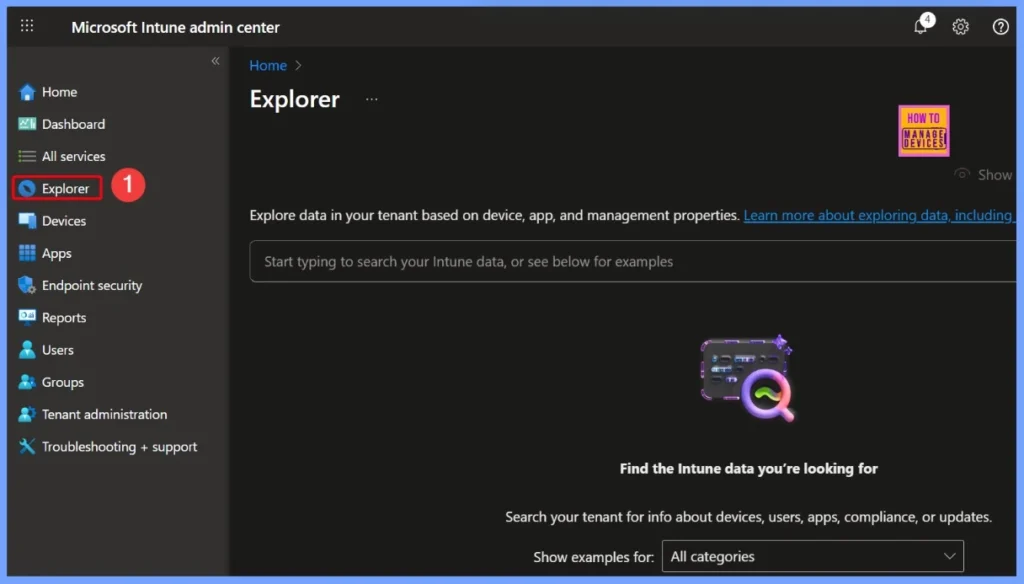
Sign in to the Intune admin center and navigate to Explorer from the left-hand menu. When Explorer opens, you’ll see a simple text box called the prompt input. Here, you can type your questions or commands in plain language, making it easy to explore Intune data and get the information you need without using complex queries.
- How to use Intune Explorer with Security Copilot to Access Devices Users Apps Compliance and Update Details
- How to use Intune Explorer with Security Copilot to Find Windows and MacOS Device Data across your Tenant
- How to View Managed App Types Details with Intune Explorer and Security Copilot
Device Configuration Settings
When you select Device Configuration as the category in Explorer, it filters the results to show only policies related to device settings. This helps IT admins quickly focus on configurations like security rules, app permissions, or network settings without having to search through all other data.
- Select Device Configuration as category
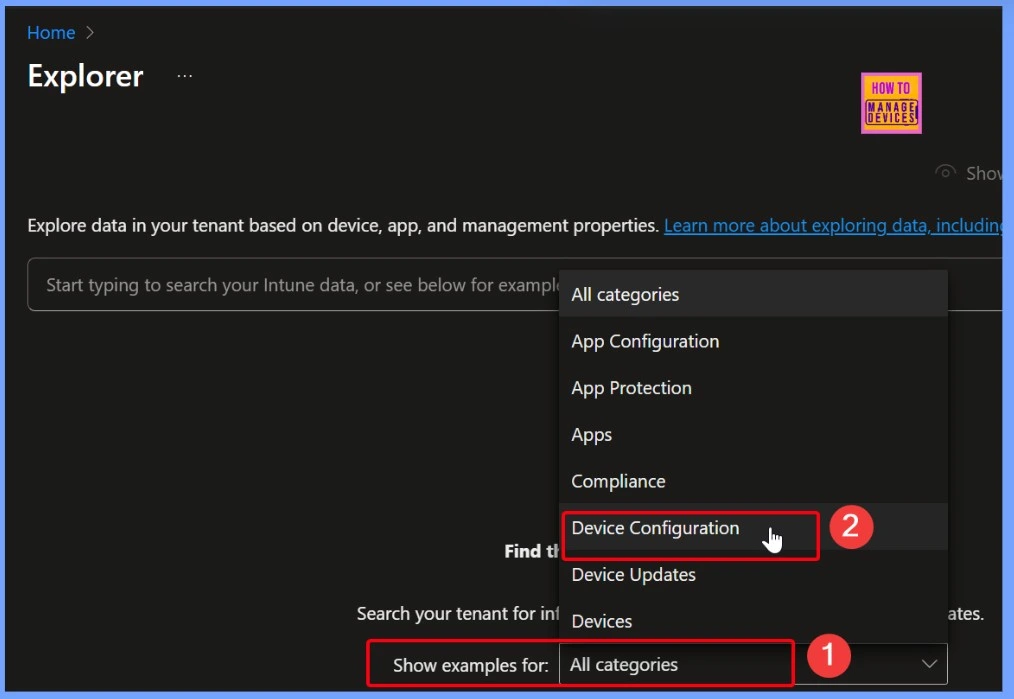
Quickly Retrieve Specific Device Configuration Policies in Intune Copilot Explorer
When you choose the option “Get device configuration policies that are of the type device configuration policy type name”, it lets IT admins quickly pull up all policies of a specific type. This is very useful because it saves time compared to searching manually and ensures admins see only the relevant policies they need.
- Select the “Get device configuration policies that are of the type device configuration policy type name” quey from Device configuration.
Read More – How to use Intune Explorer with Security Copilot to Access Devices Users Apps Compliance and Update Details
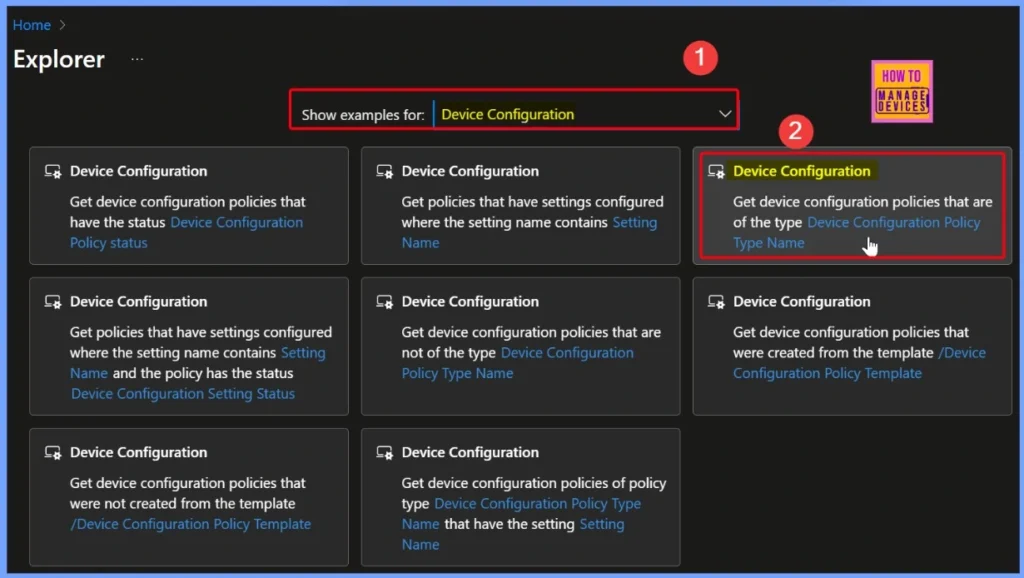
Get Device Configuration Policies that are of the Type Device Configuration Policy Type Name
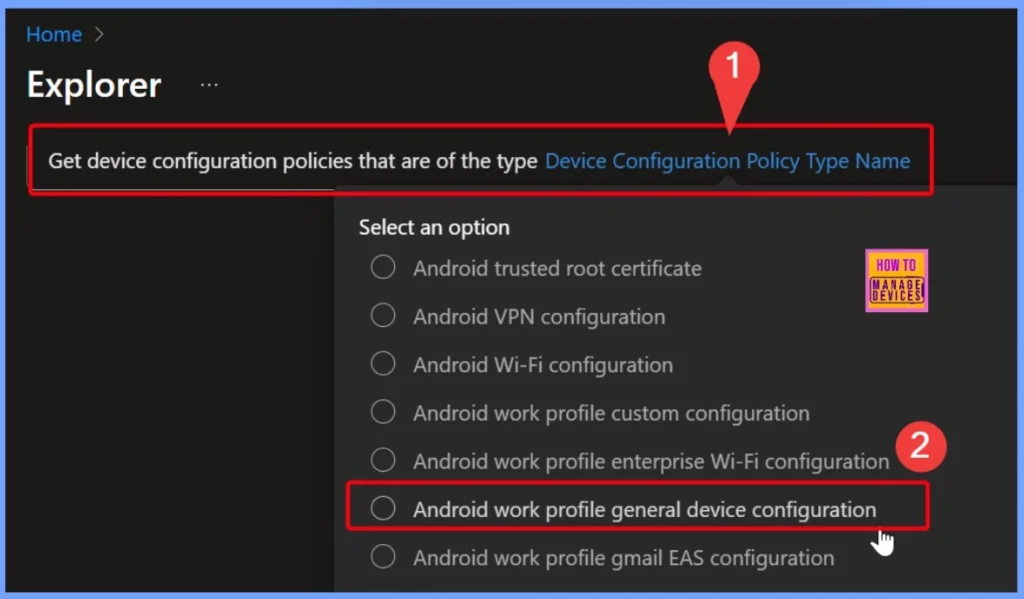
In the query “Get device configuration policies that are of the type device configuration policy type name”, you need to fill in the required field called “Device configuration policy type name“. Here, if you select Android work profile general device configuration, the query will show all policies related to Android Work Profile.
Retrieve and Analyze Intune Device Configuration Policies with Detailed Output
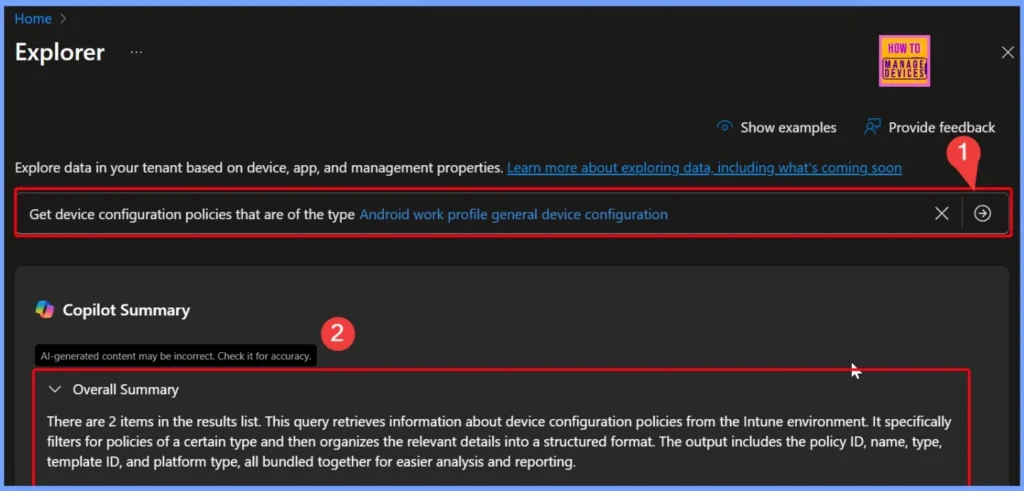
In the query “Get device configuration policies that are of the type device configuration policy type name”, you need to fill in the required field called device configuration policy type name. Here, if you select Android work profile general device configuration, the query will show all policies related to Android Work Profile.
| Copilot Result |
|---|
| There are 2 items in the results list. This query retrieves information about device configuration policies from the Intune environment. It specifically filters for policies of a certain type and then organizes the relevant details into a structured format. The output includes the policy ID, name, type, template ID, and platform type, all bundled together for easier analysis and reporting. |
- How to Get All Managed App Installation Results for User using Intune Explorer with Security Copilot
- How to Get Device Enrollment Details by User in Intune Explorer with Security Copilot
Queries to Track App Deployment and Compliance in Intune
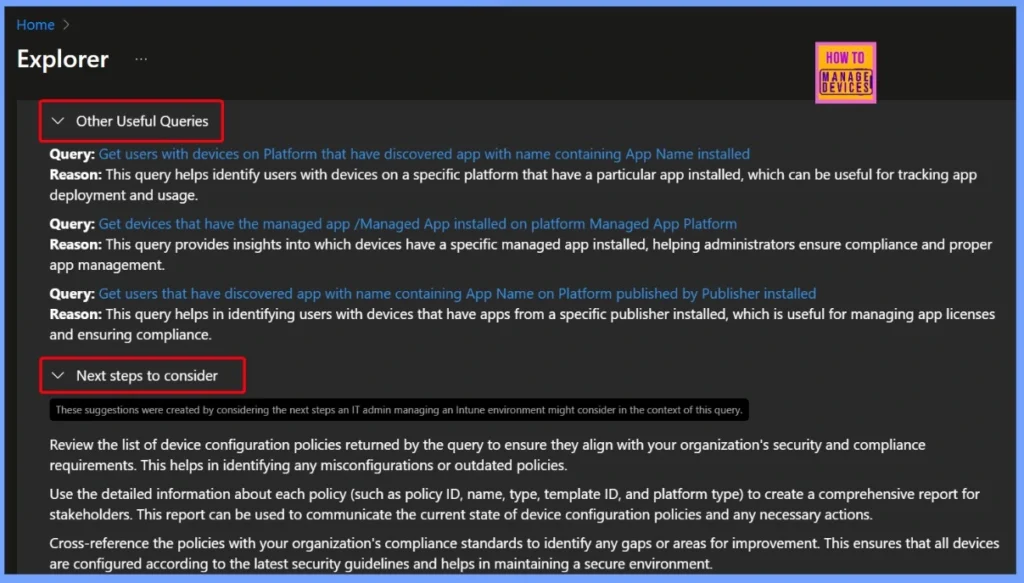
These queries help IT admins track and manage apps across devices more effectively. For example, the query to get users with devices on a specific platform that have an app installed is useful for checking app deployment and usage.
The query to get devices with a specific managed app installed helps confirm whether the app is properly deployed and compliant. Similarly, the query to get users with apps from a specific publisher installed makes it easier to manage licenses and ensure compliance.
- Together, these queries give organizations better visibility into app usage, improve compliance, and simplify overall app management.
| Next steps to consider |
|---|
| These suggestions were created by considering the next steps an IT admin managing an Intune environment might consider in the context of this query. Review the list of device configuration policies returned by the query to ensure they align with your organization’s security and compliance requirements. This helps in identifying any misconfigurations or outdated policies. |
| Use the detailed information about each policy (such as policy ID, name, type, template ID, and platform type) to create a comprehensive report for stakeholders. This report can be used to communicate the current state of device configuration policies and any necessary actions. |
| Cross-reference the policies with your organization’s compliance standards to identify any gaps or areas for improvement. This ensures that all devices are configured according to the latest security guidelines and helps in maintaining a secure environment. |
End Results
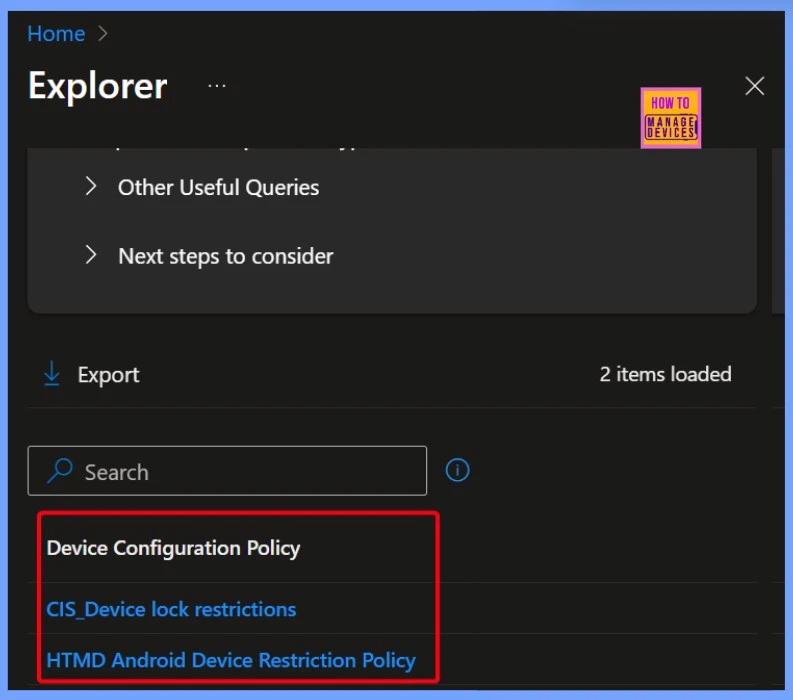
In the results of How to Get Android Work Profile Device Configuration Policies with Intune Explorer and Security Copilot, two device configuration policies are displayed. These are CIS Device Lock Restrictions and HTMD Android Device Restriction Policy.
This allows IT admins to clearly see which policies are already in place, making it easier to review, manage, and ensure that the right security and restriction settings are applied to Android Work Profile devices.
| Device Configuration Policy |
|---|
| CIS Device lock restrictions |
| HTMD Android Device Restriction Policy |
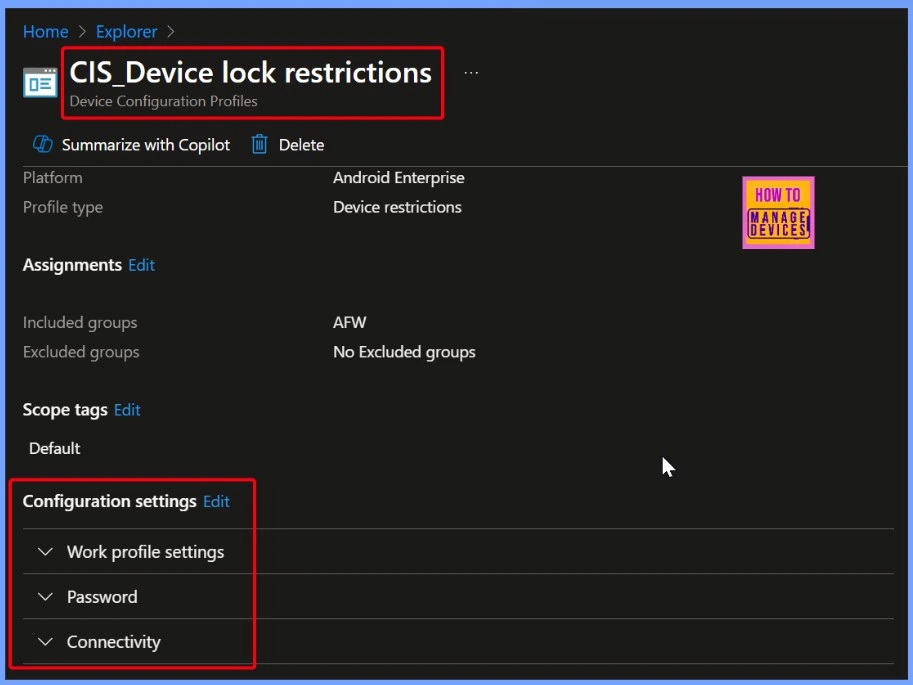
CIS Device Lock Restrictions – Work Profile Settings for Security and Connectivity
The CIS Device Lock Restrictions policy includes settings for the work profile, such as password rules and connectivity options. IT admins can control how passwords are set up for security and also manage connection settings to keep work data safe and compliant.
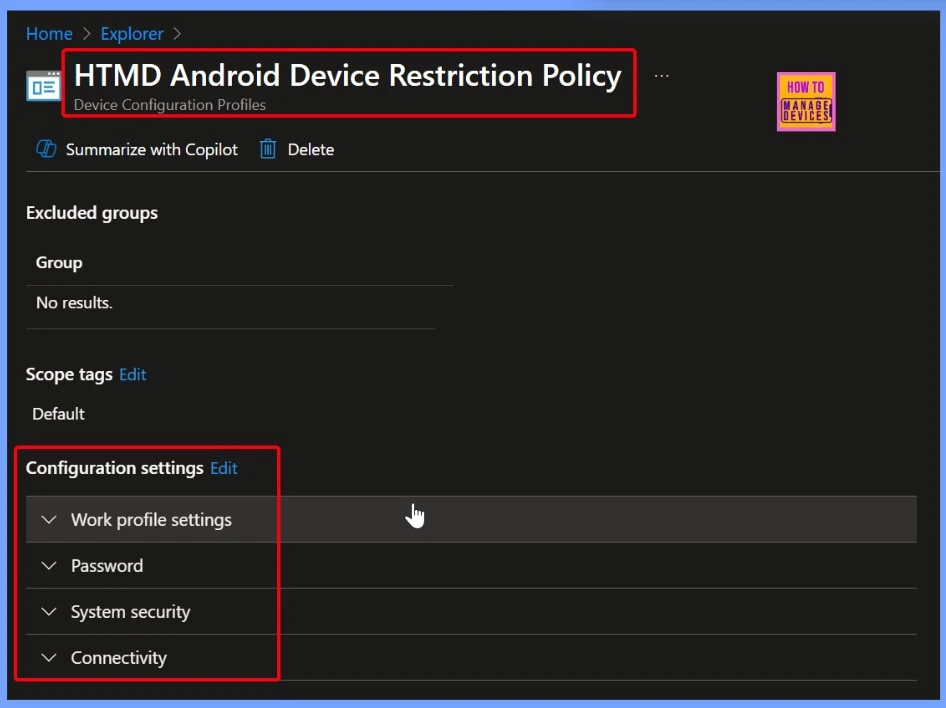
HTMD Android Device Restriction Policy – Secure Work Profile with Password, Security, and Connectivity Settings
The HTMD Android Device Restriction Policy is another device configuration profile result that includes work profile settings such as password requirements, system security controls, and connectivity options. These settings help IT admins enforce stronger security, manage system-level protections, and ensure safe connections for work-related data and apps.
Need Further Assistance or Have Technical Questions?
Join the LinkedIn Page and Telegram group to get the latest step-by-step guides and news updates. Join our Meetup Page to participate in User group meetings. Also, join the WhatsApp Community to get the latest news on Microsoft Technologies. We are there on Reddit as well.
Author
Anoop C Nair has been Microsoft MVP for 10 consecutive years from 2015 onwards. He is a Workplace Solution Architect with more than 22+ years of experience in Workplace technologies. He is a Blogger, Speaker, and Local User Group Community leader. His primary focus is on Device Management technologies like SCCM and Intune. He writes about technologies like Intune, SCCM, Windows, Cloud PC, Windows, Entra, Microsoft Security, Career, etc.


Discussion