






Microsoft Adds Anti-Spoofing Update to Intune for On-Premises Comanaged Devices
Microsoft Adds Anti-Spoofing Update to Intune for On-Premises Comanaged Devices! In October 2024, Microsoft updated Intune, its device management tool, to improve security. This update helps prevent identity spoofing in on-premises systems. The update supports strong mapping to enhance the security of certificates that authenticate devices and users.
Spoofing, where hackers use fake digital credentials to gain access to systems, has been a growing concern. To combat this, Microsoft released a security update in May 2022 (KB5014754) that requires all certificates to include a Security Identifier (SID).
This extra layer of security shows the certificate to a specific user or device, making it much more difficult for attackers to find credentials. By ensuring that each certificate includes a unique Security Identifier (SID), organizations can better verify the authenticity of users and devices attempting to access their systems.
In this post, you will find all the details about Microsoft’s recent addition of an anti-spoofing update to Intune for on-premises devices. This update enhances security by introducing support for strong mapping, requiring all digital certificates to include a unique Security Identifier (SID).

Table of Contents
What is Spoofing?
Spoofing is a cyber-attack where a malicious actor creates fake digital credentials or impersonates a legitimate user or device to gain unauthorized access to systems, networks, or sensitive information.
What Does “Strong Mapping” Mean?
Strong mapping refers to the requirement that all certificates, specifically Simple Certificate Enrollment Protocol (SCEP) certificates, must include a Security Identifier (SID).
When will these Changes be Enforced?
The strong mapping requirement is scheduled to be enforced in February 2025. After this date, SCEP certificates without the required SID will not be accepted for authentication against KDCs.
What Devices are Supported by this Update?
This update’s initial release supports Windows, iOS/iPadOS, and macOS devices. Support for Android devices is expected to follow in the next month.
On-Premises Comanaged Devices by SCCM and Intune
Microsoft Adds Anti-Spoofing Update to Intune for On-Premises Devices
This month, Microsoft is introducing support for adding a Security Identifier (SID) to SCEP profiles in Intune. The SID will be included in certificates as part of the Subject Alternative Name (SAN) value. This update initially works for Windows, iOS/iPadOS, and macOS devices, with Android support expected next month.
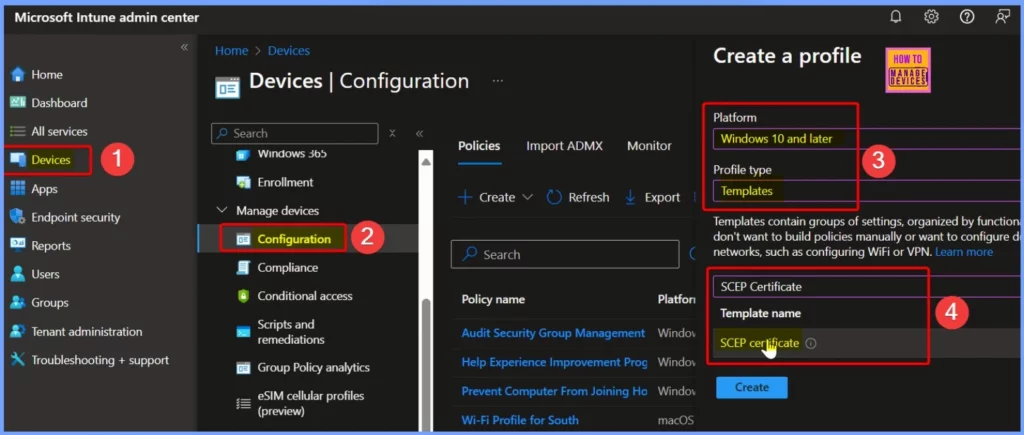
The new SID variables will appear as Uniform Resource Identifier (URI) values in the SAN field of a SCEP certificate configuration policy. The table summarizes the steps to create a new SCEP Certificate policy in the Microsoft Intune Admin Center.
| Sr | Steps |
|---|---|
| 1 | Sign in to the Microsoft Intune Admin Center using your administrator credentials. |
| 2 | Navigate to Devices > Configuration > Create > New Policy |
| 3 | On the Create a Profile page, provide the following information |
| 4 | Platform: Windows 10 and later |
| 5 | Profile Type: Templates |
| 6 | Template Name: SCEP Certificate |
- Easy Automated Patching Actionable Insights And Just-in-Time Access In Intune With Right Click Tools
- Enhanced App Deployment in Intune with Direct App Links from Enterprise App Catalog
- Integrating Dell Management Portal in Intune Admin Center Coming Soon
- Intune Device Firmware Configuration Interface DFCI now Supports VAIO Devices Running Windows 10 and 11
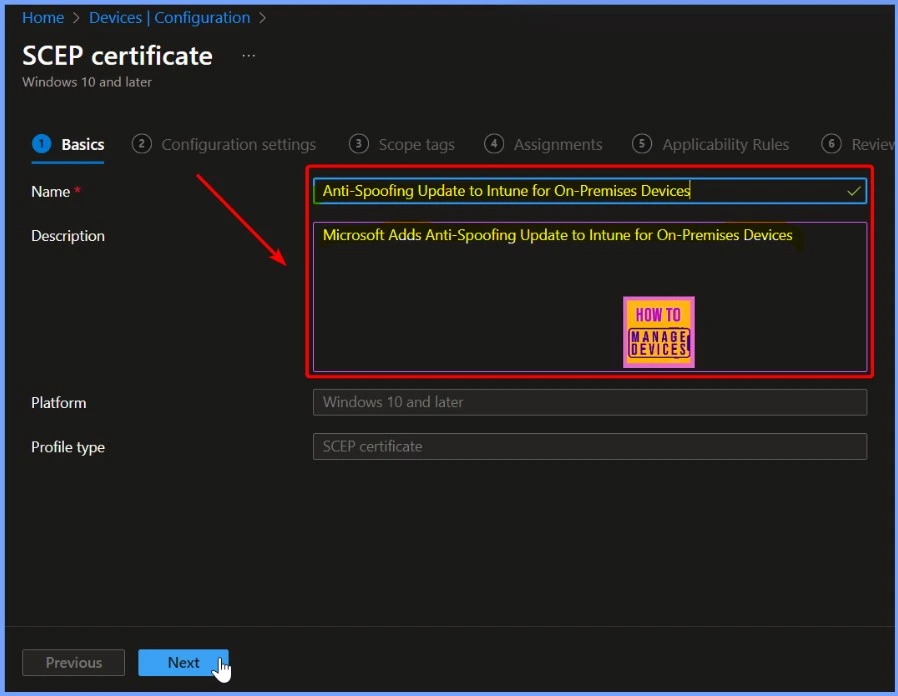
On the Basic tab, enter the policy name as Anti-Spoofing Update to Intune for On-Premises Devices. You can also provide a description (optional) stating Microsoft Adds Anti-Spoofing Update to Intune for On-Premises Devices. Once you have filled in this information, select Next to proceed to the next step.
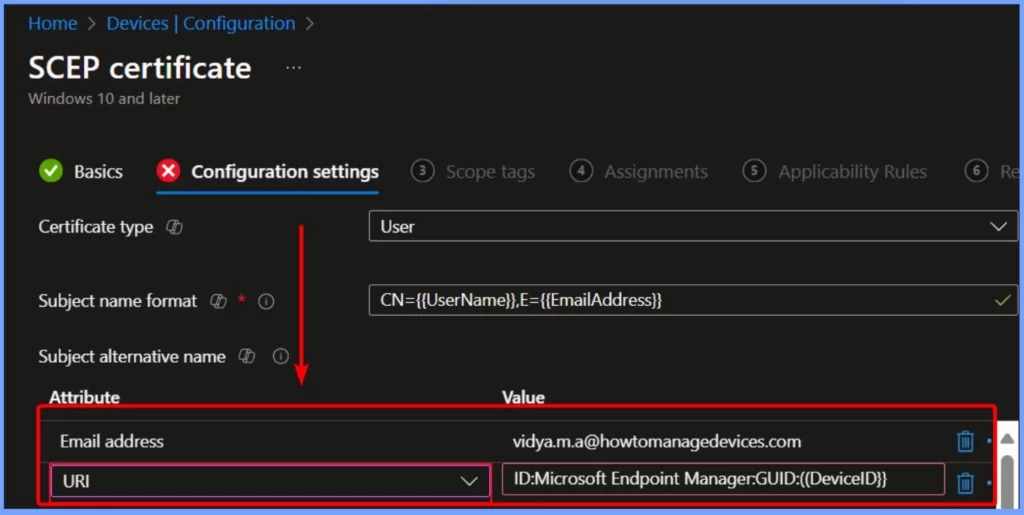
On the Configuration settings tab, the new SID variables will be displayed as Uniform Resource Identifier (URI) values in the Subject Alternative Name field of the SCEP certificate configuration policy in Intune. Since this process involves many details, testing everything carefully before using it widely across your organization is essential.
Join the LinkedIn Page and Telegram group to get the latest step-by-step guides and news updates. Join our Meetup Page to participate in User group meetings. Also, Join the WhatsApp Community to get the latest news on Microsoft Technologies. We are there on Reddit as well.
Author
Anoop C Nair has been Microsoft MVP from 2015 onwards for 10 consecutive years! He is a Workplace Solution Architect with more than 22+ years of experience in Workplace technologies. He is also a Blogger, Speaker, and Local User Group Community leader. His primary focus is on Device Management technologies like SCCM and Intune. He writes about technologies like Intune, SCCM, Windows, Cloud PC, Windows, Entra, Microsoft Security, Career, etc.


Discussion