






Windows 11 Disk Cleanup Shows Incorrect Space Available for Cleanup Known Issue and Fix
Windows 11 Disk Cleanup Shows Incorrect Space Available for Cleanup Known Issue and Fix. This is the new challenge in Windows 11 2024 Update, or version 24H2. The latest update shows that disk cleanup may show the wrong space available for cleanup.
The Windows 11 2024 Update, or version 24H2, the latest feature update for Windows 11, was released on October 1, 2024. This update improves performance and security and adds new features for users.
The update includes key features, like personal data encryption, more robust security with Windows Hello using passkeys, and Windows Studio Effects to protect data and identity.
The latest Windows 11 2024 update improves connectivity with Wi-Fi 7, supports efficiency with new quick settings, and improves availability with advanced assistive hearing device support.

Table of Contents
What is the Disk Clean Up?
Windows 11 Disk Cleanup Shows Incorrect Space Available for Cleanup Known Issue and Fix
After rolling out, Windows 11 2024 showed some known issues, such as Disk Cleanup showing incorrectly reported space available for cleanup, Fingerprint sensors experiencing problems after a device is locked, Easy-Anti-cheat that stops responding and receives a blue screen, and Compatibility issues with Intel Smart Sound Technology drivers and Alphabet 8 not working, etc.
| Known Issues of the Windows 11, Version 24H2 Rollout |
|---|
| Some ASUS devices might fail to install Windows 11, version 24H2 |
| The Voicemeeter app might unexpectedly close, causing a blue screen exception error |
| Camera use might cause some applications to become unresponsive |
| Safe Exam Browser application might fail to open |
| Some devices using Easy Anti-Cheat stop responding and receive a blue screen |
| Fingerprint sensors might experience problems after a device is locked |
| Wallpaper customization applications might not work as expected |
| Disk Cleanup might incorrectly report space available for cleanup |
| Compatibility issues with Intel Smart Sound Technology drivers |
| Asphalt 8 might periodically stop responding |
The following image shows the known issues and the Windows 11, version 24H2 rollout status.
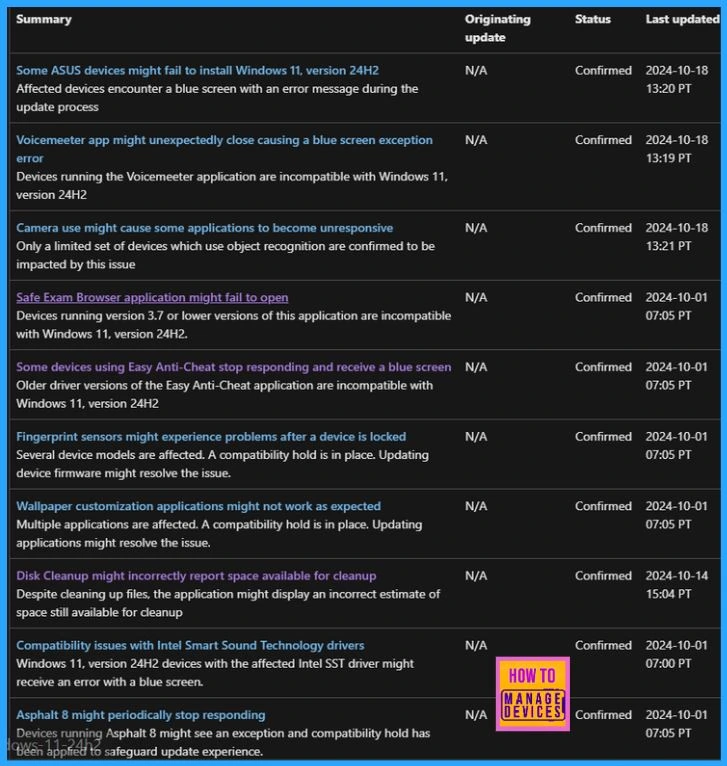
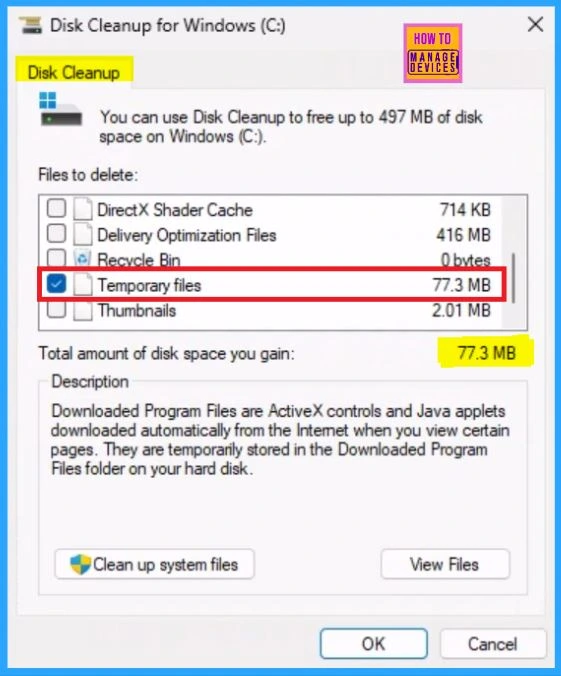
In this post, I will discuss disk cleanup. The image below shows the incorrect space available for cleanup, which is a known issue.
- Top 83 Windows 11 Desktop Admin Interview Questions
- Clear Windows Update Cache | 5 Easy Methods
- 2 Methods To View Reserved Storage Size In Windows
How to Disk Cleanup in Windows
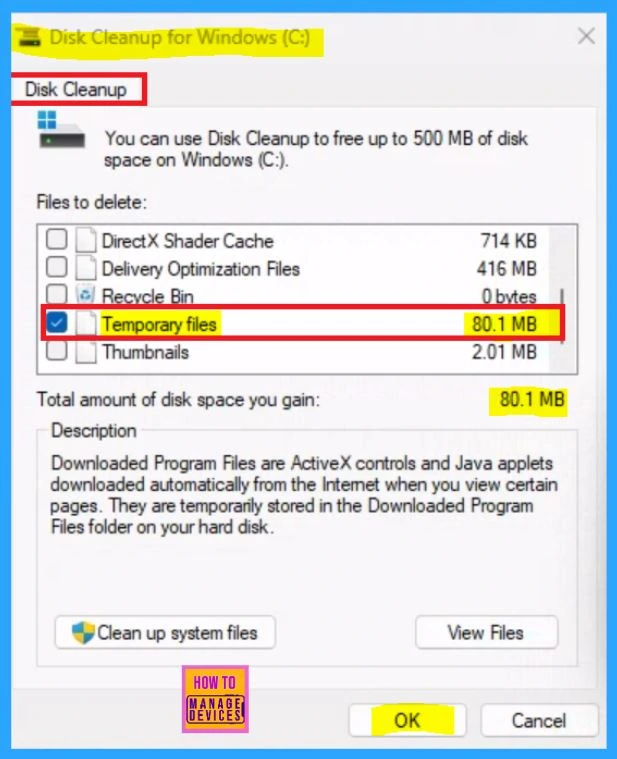
First, open the search box on the taskbar, type Disk Cleanup and select it.
- Select the drive you want to clean up, and then select OK.
- Under Files to delete, select the file types to Delete. To get a description of the file type, select it. (Here, I selected Temporary Files for your ready reference.)
- Hit OK.
If you need to free up more space, you can also delete system files:
- In Disk Cleanup, select Clean up system files.
- Select the file types to delete. To get a description of the file type, select it.
- Select OK
Disk Cleanup shows 80.1MB of files cleaned up correctly in the first run.
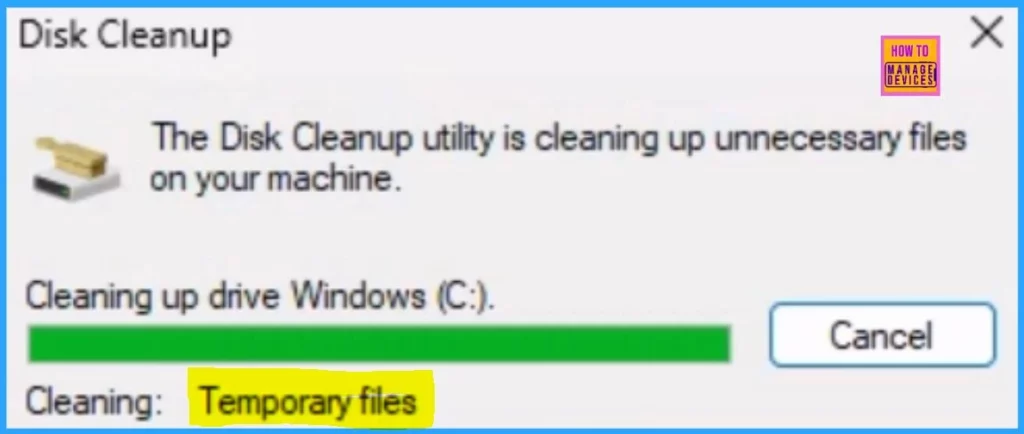
After the initial run, Disk Cleanup shows 77.3MB of space still available for cleanup in the Windows Update Cleanup category, which is wrong.
FIX or Resolution
As per Microsoft, this is a reporting error. The first time you select Windows Update Cleanup, the Disk Cleanup is run correctly, and some files in that category are cleaned. At that time, the related disk space will be freed as assumed. However, after the initial run, this tool may show inaccurate space still available for cleanup in the Windows Updated Cleanup category.
Note: Microsoft is working on a resolution and will provide more information when available.
Resources
Join the LinkedIn Page and Telegram group to get the latest step-by-step guides and news updates. Join our Meetup Page to participate in User group meetings. Also, Join the WhatsApp Community to get the latest news on Microsoft Technologies. We are there on Reddit as well.
Author
Anoop C Nair has been Microsoft MVP for 10 consecutive years from 2015 onwards. He is a Workplace Solution Architect with more than 22+ years of experience in Workplace technologies. He is a Blogger, Speaker, and Local User Group Community leader. His primary focus is on Device Management technologies like SCCM and Intune. He writes about technologies like Intune, SCCM, Windows, Cloud PC, Windows, Entra, Microsoft Security, Career, etc.




Discussion