





Apple Deprecates Legacy MDM Updates as Intune Shifts to Declarative Device Management
Key Takeaways
- Apple deprecated legacy MDM software update commands in iOS 26, iPadOS 26, and macOS 26.
- Microsoft Intune will soon stop supporting legacy Apple software update policies.
- Organizations must use Declarative Device Management (DDM) to manage Apple software updates.
- DDM improves device autonomy, reliability, and reporting for update management.
In this post we are discussing the Apple Deprecates Legacy MDM Updates as Intune Shifts to Declarative Device Management. Apple has introduced changes to how software updates are managed on its devices, affecting organizations that use device management tools. With the release of iOS 26, iPadOS 26, and macOS 26, Apple has officially deprecated legacy mobile device management (MDM) software update commands and payloads.
Table of Contents
Table of Contents
Apple Deprecates Legacy MDM Updates as Intune Shifts to Declarative Device Management
This change also impacts organizations using Microsoft Intune to manage Apple devices. Because Apple is removing support for older update mechanisms, Intune will soon stop supporting the creation of legacy software update policies for Apple devices.
- New Setting in Intune to Stop Automatic MDM Enrollment when Users Add a Work or School Account on Windows Devices
- MDM Lifecycle Management with Microsoft Intune From Enrollment to Retirement
- Intune Supported Enrollment Methods for Windows iOS Android MacOS Linux ChromeOS
Why Apple Is Deprecating MDM Update Policies
Apple is moving from the older method of managing software updates through traditional MDM commands. In the legacy system, the management server had to send update commands to devices and keep checking their status. This process could sometimes cause delays or in consistencies when updates were applied.
- With the release of iOS 26, iPadOS 26, and macOS 26, Apple is removing these legacy update methods.
- Instead, organizations are encouraged to use Declarative Device Management (DDM).
| Applies to |
|---|
| iOS/iPadOS |
| macOS |
Deprecated iOS/iPadOS Updates in Intune
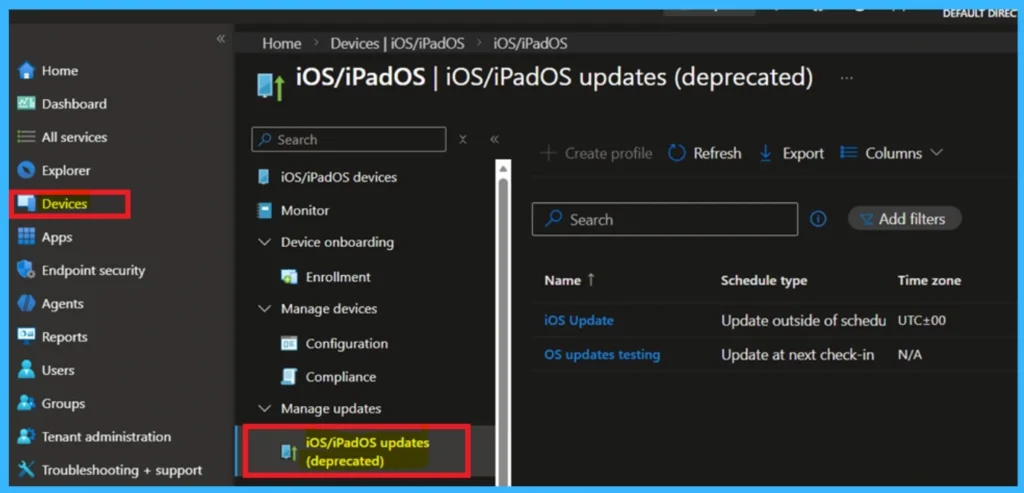
The below screenshot shows the iOS/iPadOS updates (deprecated) section in the Microsoft Intune admin center. This page was previously used by administrators to create and manage software update policies for iOS and iPadOS devices. To check this, go to the Devices> iOS/iPadOS.

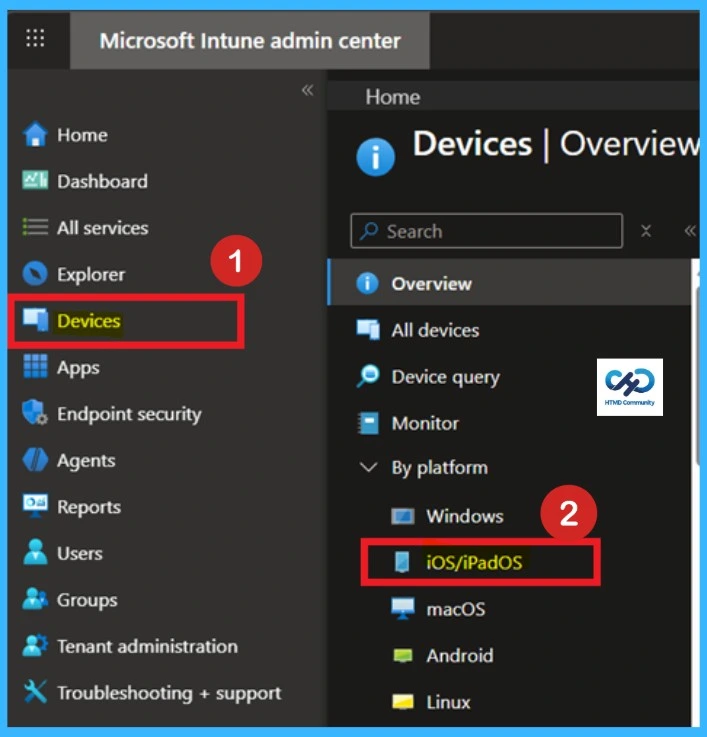
When you click on the iOS/iPadOS then open the update policies for the iOS/iPadOS. Apple deprecating legacy mobile device management update commands in upcoming OS versions, these update policies are now marked as deprecated in Intune. Organizations will need to move to Declarative Device Management (DDM) to continue managing software updates on Apple devices.
Declarative Device Management
Apple is removing support for legacy update commands, Microsoft Intune will also stop supporting the creation of legacy iOS/iPadOS and macOS update policies. Organizations that manage Apple devices using Intune will need to configure update policies using the DDM model. This change will make sure that devices can still receive and install updates even after Apple removes support for the older management method.
Deprecated macOS Updates in Intune
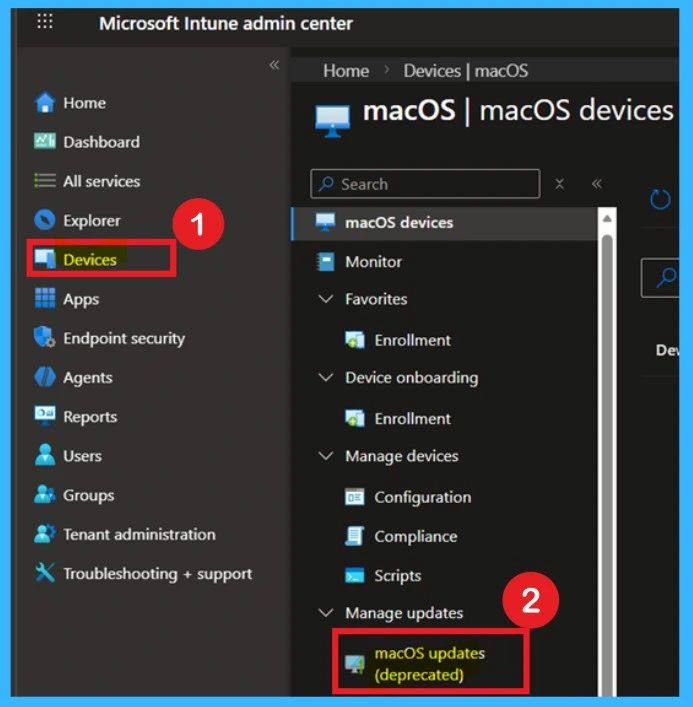
In the below you can see that the Deprecated macOS Updates in Intune. This update was earlier used by administrators to configure and manage update policies for macOS devices. To get this page you have to go to Devices> macOS >Open the update policies for the macOS.
Need Further Assistance or Have Technical Questions?
Join the LinkedIn Page and Telegram group to get the latest step-by-step guides and news updates. Join our Meetup Page to participate in User group meetings. Also, join the WhatsApp Community and the WhatsApp channel to get the latest news on Microsoft Technologies. We are there on Reddit as well
Author
Anoop C Nair has been Microsoft MVP for 10 consecutive years from 2015 onwards. He is a Workplace Solution Architect with more than 22+ years of experience in Workplace technologies. He is a Blogger, Speaker, and Local User Group Community leader. His primary focus is on Device Management technologies like SCCM and Intune. He writes about technologies like Intune, SCCM, Windows, Cloud PC, Windows, Entra, Microsoft Security, Career, etc.


Discussion