






Automate Intune Firewall Policy Reports using Graph API and Get exportJobs FirewallStatus UPN Details
This post will explain generating an Intune Firewall Policy report using Microsoft Graph API. This method helps automate Intune Firewall Policy Reports using Graph API. Details This document aims to provide insights into developing the code to automate the Microsoft Intune Firewall Policy report through Microsoft Graph API.
Microsoft Graph is an API that lets you access data, intelligence, and insights from Microsoft 365 and other Microsoft Cloud services through a single endpoint. This includes Microsoft 365, Windows, and Enterprise Mobility + Security data.
The Microsoft Graph API is designed to perform the same range of Intune operations as those available through the portal. Using Microsoft Graph, developers can build intelligent applications that leverage the power of Microsoft 365 and other Microsoft services to enhance productivity and collaboration.
All reports transitioned to the Intune reporting infrastructure can be seamlessly exported via a single top-level export API. Microsoft Intune offers a wide range of reports within the admin center, which can be exported using Graph APIs. Microsoft Graph, a RESTful web API, facilitates access to Microsoft Cloud service resources.

Table of Contents
Know More About Intune Firewall Policy Reports
Firewall Policy Reports in Intune provide administrators with a detailed view of the traffic allowed or blocked by the organization’s firewall policies. These reports can be used to monitor and analyze network traffic, identify potential security risks, and troubleshoot issues related to firewall configuration.

By reviewing Firewall Policy Reports in Intune, you can ensure their firewall policies protect the network and data. They can also use the reports to adjust their policies to align with security goals and compliance requirements. This report provides a high-level view of the firewall status for Windows 10 or 11 managed devices with Intune.
The report is available from the Reports node in the Microsoft Intune portal. You can navigate to Reports > Firewall > MDM Firewall status for Windows 10 and later. After clicking on Generate Report, the report will be generated. Intune will take a few seconds to create a firewall status report for all your Windows devices.
| Available Properties |
|---|
| DeviceName |
| FirewallStatus |
| Managed by |
| Device ID |
| OS |
| User name |
| Microsoft Entra ID |
| UPN |
- 4 New Intune Windows Firewall Logging Configuration Policies
- Ways to Allow an App through Windows Defender Firewall
- Check Firewall Policy Reports from Intune
Use Graph Explorer to try Microsoft Graph APIs
I will use Graph Explorer, a handy browser-based tool for running your Graph calls. However, it does not support commands in batch and is a single-line command executor. API calls will be made using Graph Explorer. When you go to Graph Explorer, you will get a webpage like the one below.
NOTE! You may need to log in to Graph Explorer using your credentials if it's your first time. 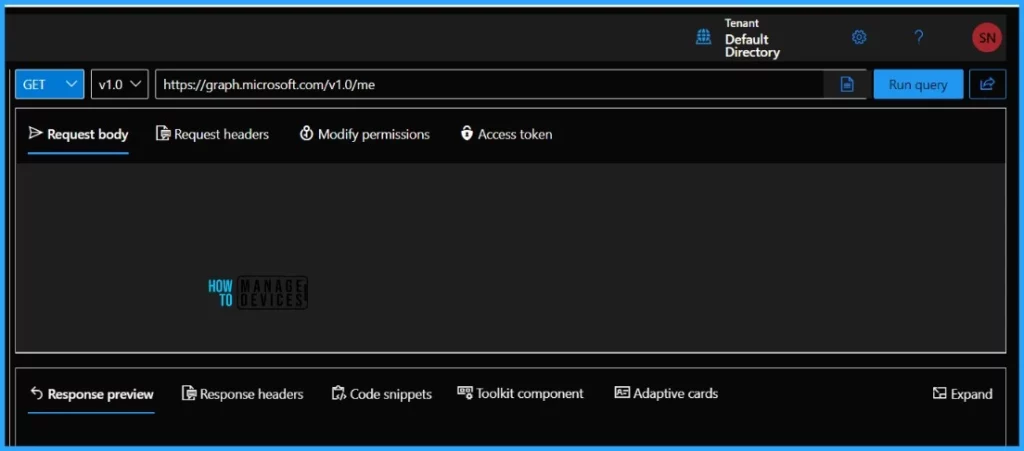
Generate Intune Firewall Policy Report using Microsoft Graph API
Let’s automate the Microsoft Intune Firewall Policy Reports using Graph API. You can use the Microsoft Graph API endpoint below to export reports in Microsoft Intune. Your request must use the POST HTTP method.
| HTTP Methods | Description |
|---|---|
| GET | GET method is to retrieve data from the server simply |
| POST | The POST HTTP request method sends data to the server for processing. |
| PUT | The PUT method completely replaces a resource identified with a given URL. |
| DELETE | The DELETE method removes or deletes a resource from a server. |
https://graph.microsoft.com/beta/deviceManagement/reports/exportJobs
You must provide a reportName parameter as part of the request body based on the report you would like to export using Microsoft Graph API. Use FirewallStatus as reportName in this example. Microsoft has documented the possible values for the reportName. The following table contains the possible output when calling the FirewallStatus report. Thanks to Microsoft for the table.
| Available Properties |
|---|
| DeviceName |
| FirewallStatus |
| FirewallStatus_loc |
| _ManagedBy |
| UPN |
- Sign in to the Graph Explorer and paste the Microsoft Graph API endpoint.
NOTE! The tenant must have an active Intune license to use the Microsoft Graph API for Intune. The Microsoft Graph API controls access to resources via permissions. You must specify the permissions you need to access Intune resources. To execute the task, you must supply the request body below. Use the JSON body below, and Click on Run query.
{
    "reportName": "FirewallStatus",
    "format": "csv"
}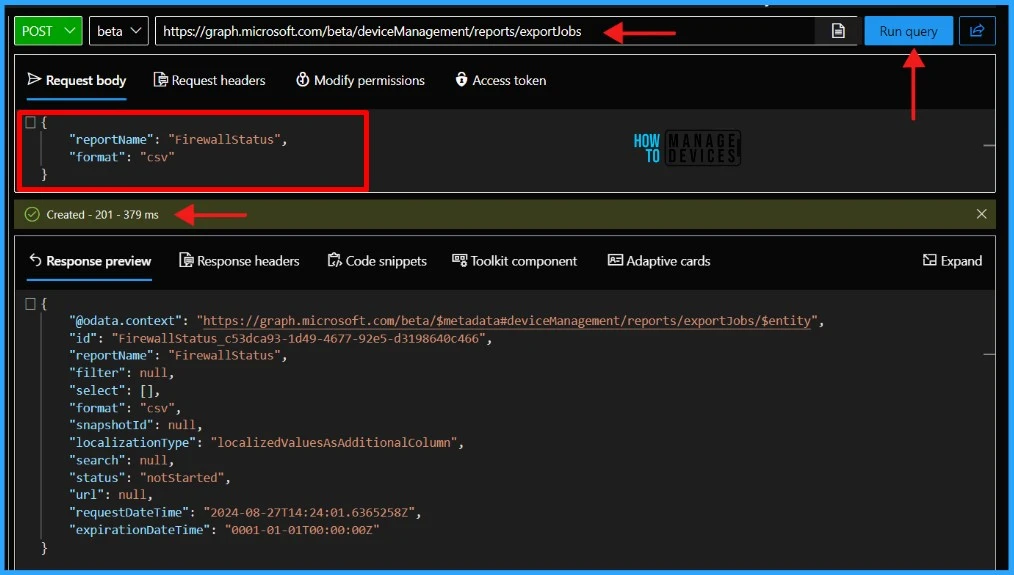
Well, once you click the Run Query button, the graph will return a response message. The requested data or the result of the operation is included in the response message.
- Intune Firewall Proxy Requirements Modern Windows 10 Deployment
- Intune Windows 10 MDM Firewall Status Report | Endpoint Manager
{
    "@odata.context": "https://graph.microsoft.com/beta/$metadata#deviceManagement/reports/exportJobs/$entity",
    "id": "FirewallStatus_c53dca93-1d49-4677-92e5-d3198640c466",
    "reportName": "FirewallStatus",
    "filter": null,
    "select": [],
    "format": "csv",
    "snapshotId": null,
    "localizationType": "localizedValuesAsAdditionalColumn",
    "search": null,
    "status": "notStarted",
    "url": null,
    "requestDateTime": "2024-08-27T14:24:01.6365258Z",
    "expirationDateTime": "0001-01-01T00:00:00Z"
}
You must note the “id” value before proceeding. To retrieve the status of the export, it is recommended to query the “id" field using a GET request. I will be using the below endpoint to generate the report.
- How to Retrieve PowerShell Scripts from Intune using Microsoft Graph
- Explore Kusto Query Language (KQL) and Intune Device Query
- Best Guide to Restart Intune Devices Remotely using Microsoft Graph API and PowerShell
https://graph.microsoft.com/beta/deviceManagement/reports/exportJobs(‘FirewallStatus_c53dca93-1d49-4677-92e5-d3198640c466’)
Paste the above endpoint URL and click on Run query. The id must be enclosed within single quotes (‘id’). The graph will return a response message once you click the Run query button.
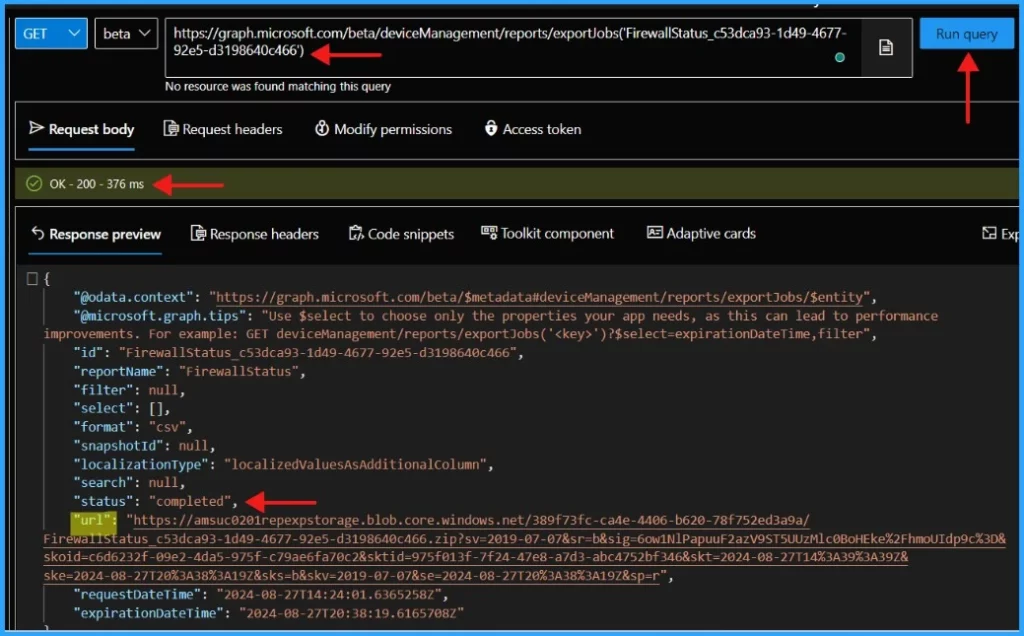
You will need to call this Microsoft Graph API endpoint repeatedly until you receive a response containing the status: completed attribute that looks like the example provided.
{
    "@odata.context": "https://graph.microsoft.com/beta/$metadata#deviceManagement/reports/exportJobs/$entity",
    "@microsoft.graph.tips": "Use $select to choose only the properties your app needs, as this can lead to performance improvements. For example: GET deviceManagement/reports/exportJobs('<key>')?$select=expirationDateTime,filter",
    "id": "FirewallStatus_c53dca93-1d49-4677-92e5-d3198640c466",
    "reportName": "FirewallStatus",
    "filter": null,
    "select": [],
    "format": "csv",
    "snapshotId": null,
    "localizationType": "localizedValuesAsAdditionalColumn",
    "search": null,
    "status": "completed",
    "url": "https://amsuc0201repexpstorage.blob.core.windows.net/389f73fc-ca4e-4406-b620-78f752ed3a9a/FirewallStatus_c53dca93-1d49-4677-92e5-d3198640c466.zip?sv=2019-07-07&sr=b&sig=6ow1NlPapuuF2azV9ST5UUzMlc0BoHEke%2FhmoUIdp9c%3D&skoid=c6d6232f-09e2-4da5-975f-c79ae6fa70c2&sktid=975f013f-7f24-47e8-a7d3-abc4752bf346&skt=2024-08-27T14%3A39%3A39Z&ske=2024-08-27T20%3A38%3A19Z&sks=b&skv=2019-07-07&se=2024-08-27T20%3A38%3A19Z&sp=r",
    "requestDateTime": "2024-08-27T14:24:01.6365258Z",
    "expirationDateTime": "2024-08-27T20:38:19.6165708Z"
}
You will also get a url in the response. This URL should have the compressed CSV report. You can then directly download the compressed CSV from the url field.
- Intune Device Compliance Reports | Endpoint Manager
- Managing Windows Bitlocker Compliance Policy Using Intune | MS Graph | Grace Period

This article will be a valuable resource for you and your organization. Thank you for being so patient in reading this post. I look forward to seeing you in the next post. Keep supporting the HTMD Community.
We are on WhatsApp now. To get the latest step-by-step guides, news, and updates, Join our Channel. Click here. HTMD WhatsApp.
Author
About the Author – Sujin Nelladath has over 10 years of experience in SCCM device management and Automation solutions. He writes and shares his experiences with Microsoft device management technologies, Azure, and PowerShell automation.


Discussion