





Microsoft Expands Windows Autopatch with Quick Machine Recovery Controls
Key Takeaways
- Microsoft has introduced Quick Machine Recovery controls in Windows Autopatch
- IT admins can now manage recovery fixes with full control
- The feature supports automatic and manual remediation options
- Integrated reporting and alerts improve visibility and response time
- Part of a larger effort to enhance Windows resiliency and reliability
In this post w are discussing Microsoft Expands Windows Autopatch with Quick Machine Recovery Controls. Microsoft has introduced new capabilities in Windows Autopatch to strengthen device recovery and update management for enterprises. The latest update focuses on Quick Machine Recovery (QMR), a feature designed to handle large-scale system failures more efficiently. This enhancement aims to give IT administrators greater control during critical incidents while ensuring faster device remediation.
Table of Contents
Table of Contents
What is Windows Autopatch?
Microsoft Expands Windows Autopatch with Quick Machine Recovery Controls
With the increasing complexity of updates across operating systems, applications, and security layers, organizations are more exposed to disruptions. The new recovery controls are designed to address these risks by enabling automated and controlled responses to system failures.
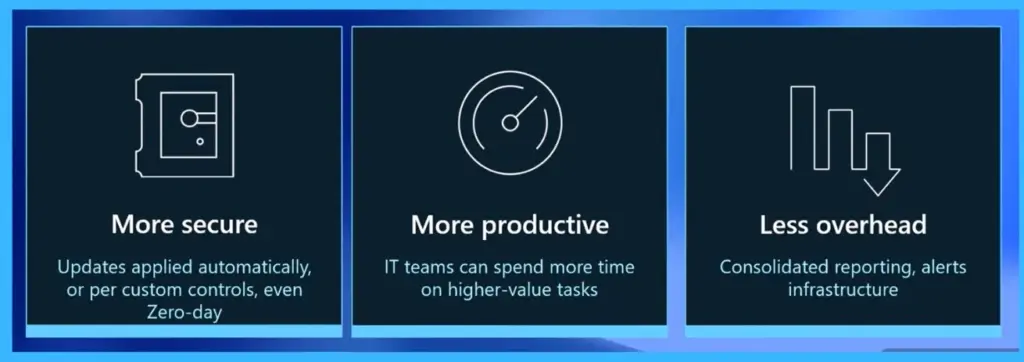
| More secure | More secure | Less overhead |
|---|---|---|
| Updates applied automatically, or per custom controls, even Zero-day | IT teams can spend more time on higher-value tasks | Consolidated reporting, alerts infrastructure |
- Automate the Process of Removing Primary User from Intune Device using Microsoft Graph API
- Best way to Deploy Shell Scripts using Intune
- Run Remediation Script on-demand for Windows Devices using Intune
Approval of Quick Machine Recovery (QMR) Fixes
Windows Autopatch enables IT admins to approve and manage Quick Machine Recovery (QMR) fixes during critical incidents through the Microsoft Intune admin center. Admins can either set fixes to auto-approve for immediate deployment or choose to manually review and approve them based on their organization’s needs. Using the Manage quality updates section, they can approve, pause, or resume deployments and control how fixes are rolled out across different device groups or policies.
- The interface also provides clear approval statuses like approved automatically or needs review, helping admins quickly take action.
- Additionally, actions can be applied at a single policy level or in bulk, allowing for gradual, ring-based rollout, where fixes can be tested on smaller groups before being deployed widely across all devices.
| Details | Info |
|---|---|
| Prevention | Reducing the chances of system failures |
| Management | Handling incidents effectively |
| Recovery | Restoring systems quickly after failures |
QMR Reporting in Windows Autopatch
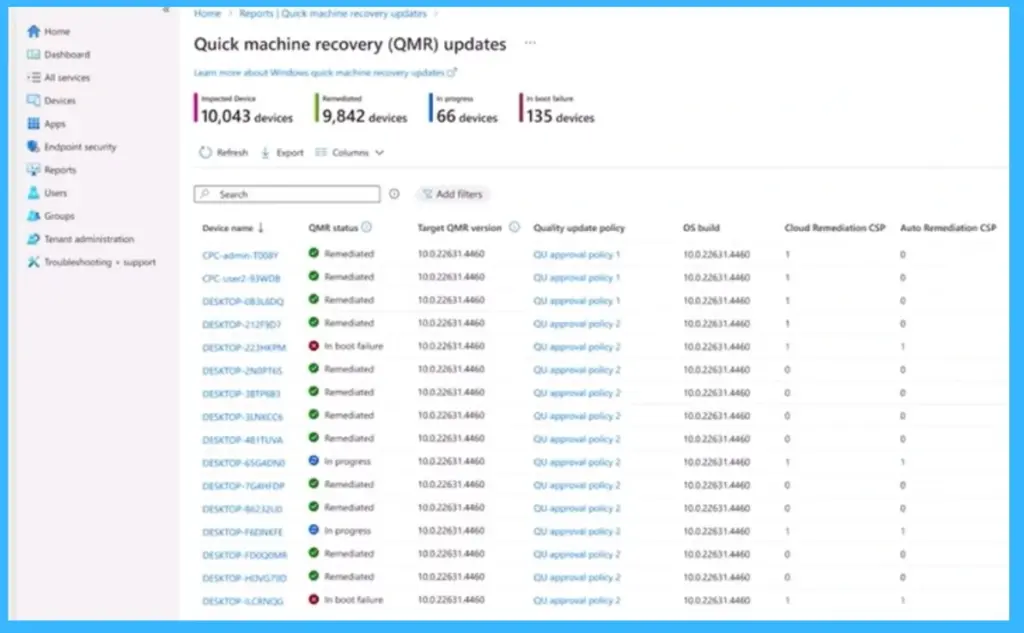
This image highlights the reporting capabilities for Quick Machine Recovery (QMR) in Windows Autopatch, available through the Microsoft Intune admin center. It allows IT admins to monitor the remediation status of devices after a QMR fix has been deployed, providing both tenant-level insights (such as total impacted, remediated, in-progress, and failed devices) and device-level details for deeper analysis.

The report includes key information like QMR status, targeted fix version, associated update policies, and OS build, helping admins understand how effectively the recovery fix is being applied. This visibility enables faster decision-making, easier tracking of impacted devices, and better control over the recovery process during large-scale incidents.
Need Further Assistance or Have Technical Questions?
Join the LinkedIn Page and Telegram group to get the latest step-by-step guides and news updates. Join our Meetup Page to participate in User group meetings. Also, join the WhatsApp Community and the Whatsapp channel to get the latest news on Microsoft Technologies. We are there on Reddit as well.
Author
Anoop C Nair is a Workplace Technology solution architect with 25+ years of experience. Microsoft Certified Trainer. Microsoft MVP from 2015 onwards for consecutive 11+ years! He is a blogger, Speaker, and Founder of HTMD Community and HTMD Conference. His main focus is on Device Management technologies like Intune, Windows, and Cloud PC. He writes about technologies like Intune, SCCM, Windows, Cloud PC, Entra, and Microsoft Security.


Discussion