






AVD Windows 10 Multi-Session Patching with SCCM Product Selection
Let’s understand what AVD Windows 10 Multi-Session Patching with SCCM looks like. We have received a question about it in the HTMD Forum. I never considered this product selection option from the Software Update Point component properties.
Windows 10 Enterprise Multi-Session Support is available from the ConfigMgr 1906 version onwards. Windows 10 multi-session support is only for Azure Virtual Desktop (AVD) solution. AVD Windows 10 multi-session is similar to a terminal server.
The Windows 10 multi-session Operating system (OS) reports the ProductType as 3, the same value as Windows Server. Hence, we need to consider WSUS/SUP production selection slightly differently.
For Windows 11 multi-session patching, do you need to test by enabling Microsoft Server Operating System 21H2? Enable Patching For Server 2022 Using SCCM. I have not tried this myself. Let me know in the comments.

Table of Contents
Pre Requisites AVD Windows 10 Multi-Session Patching
The following are the high-level prerequisites that should be in place before you start working on AVD multi-session patching support.
Let’s understand how to install WSUS for ConfigMgr and install the SUP role. Also, learn how to Create Deploy New Software Update Patch Package using SCCM | ConfigMgr.
- ConfigMgr Infrastructure and Healthy clients (WUA & SCCM).
- Appropriate access rights are required to enable new products under Software Update Point properties.
- Group policy settings for software updates for Windows clients.
- Fixed AVD Azure Virtual Desktop Patching Issue while Using SCCM WSUS for Patching
- AVD Windows Multi-Session Intune Hybrid Azure AD Support
- Intune Support For Multi-Session Windows Server OS Version | AVD Workloads.
How to Enable AVD Windows 10 Multi-Session Patching
Let’s learn how to enable SCCM patching for AVD Windows 10 multi-session VMs.
- Launch ConfigMgr console
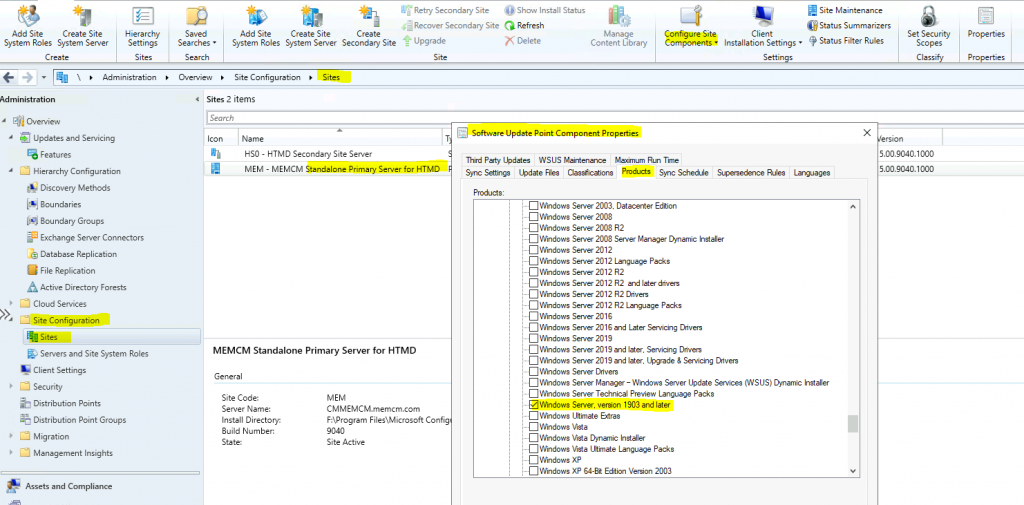
- Navigate to \Administration\Overview\Site Configuration\Sites.
- Select the standalone primary server or CAS.
- Click on Configure Site Components from the ribbon menu.
- Select the Software Update Point component.
- Click on the Products tab from the Software Update component properties.
- Scroll down and select Windows Server, version 1903, and later (make sure there is a checkmark near the product name).
- Click OK.
You may wonder why you enable server operating systems from the products list. We already know that Microsoft treats Windows Enterprise multi-session as a replacement for RDSH servers. Hence, we must allow server OS to be a product for AVD multi-session patching with SCCM.
Initiate Sync to Enable Windows 10 Multi-Session Patching using SCCM
Once the product is enabled, you must initiate WSUS sync from the Software Library workspace in the SCCM console. Let’s understand how to initiate a manual WSUS sync from the console.
- Navigate to \Software Library\Overview\Software Updates\All Software Updates.
- Right-click on the All Software Updates node.
- Click on Synchronize Software Updates to start the manual WSUS sync.
- Click on the Yes button to continue with scanning.
AVD Multi-Session Patch Deployment
Once the sync is completed, you can see the AVD Windows 10 or Windows 11 multi-session VMs patches. You can follow the standard process of creating software update groups and packages and deploying the patch packages to AVD device collections.
Patch Software Update Deployment Process Guide | ConfigMgr—How to Create and Deploy New Software Update Patch Package using SCCM | ConfigMgr.
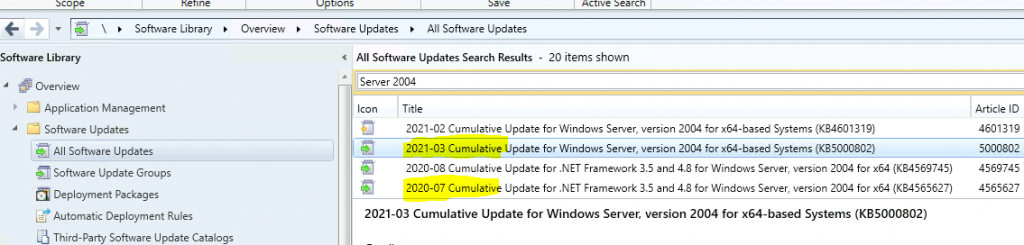
The following is one of the patches you must consider if your Windows 10 multi-session version is 2004. The trick is to select the patches for the server version. Hopefully, the required update column in the SCCM console against AVD multi-session devices will give you hints.
Resources
We are on WhatsApp now. To get the latest step-by-step guides, news, and updates, Join our Channel. Click here – HTMD WhatsApp.
Author
Anoop C Nair has been Microsoft MVP for 10 consecutive years from 2015 onwards. He is a Workplace Solution Architect with more than 22+ years of experience in Workplace technologies. He is a Blogger, Speaker, and Local User Group Community leader. His primary focus is on Device Management technologies like SCCM and Intune. He writes about technologies like Intune, SCCM, Windows, Cloud PC, Windows, Entra, Microsoft Security, Career, etc.




Can you please provide a screenshot of the wvd software update, as an example so i know what to search for before creating the SUG.
Thanks!
StaffGood ask. Screenshot added. Does that make sense?
Very interesting, Does this work with win10 feature updates as well?
Thanks Anoop, another helpful article. Do you know if Windows 11 Enterprise Multi Session updates are available through SCCM yet? I have 2203 installed, and there’s nothing obvious – I already have Windows Server 1903 and later selected (which works for my Windows 10 WVDs), but the Windows 11 ones don’t update.
StaffWindows 11 multi-session patching, do you need to test by enabling Microsoft Server Operating System 21H2? I have not tried this myself. https://www.anoopcnair.com/enable-patching-for-server-2022-using-sccm/