






Fix Azure AD PRT Primary Refresh Token Issue with Windows 10 21H2 or KB5006738
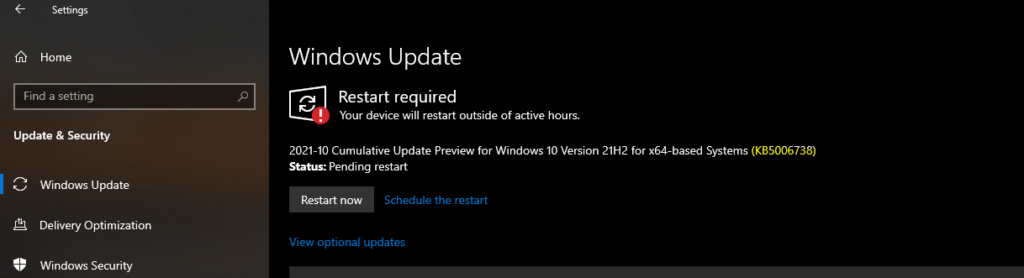
Let’s discuss the Fix Azure AD PRT Primary Refresh Token issue with Windows 10 21H2 or KB5006738. Microsoft released Windows 10 Build 19044.1320 (21H2). This KB5006738 update comes with a fix for Primary Refresh Token (PRT) and Internet Printing Protocol (IPP).
I have faced issues with Windows 10 client and Azure AD PRT token for Azure Virtual Desktop and Cloud PC enrollment. The community has built customized solutions to work around the bad user experience with Primary Refresh Token issues.
You can see the issues with the Windows Autopilot Hybrid Azure AD Join scenario and Azure Virtual Desktop End-User Experience Journey with Intune Management. The end-users won’t get any policies (User-based policies) from Microsoft Intune after the first log in until they log off and login back in.
This caused a lot of issues with the Enrollment Status Page failing during Autopilot, and AVD enrollment scenarios when you use Hybrid Azure AD joined scenario. I have discussed this in a Twitter thread a few weeks back.

Fix to Azure AD PRT Issue is Backported to Previous versions of Windows 10?
I get the question of whether the Fix to Azure AD PRT Issue is Back Ported to Previous versions of Windows 10? The answer is YES. This fix is backported to all the previous versions of Windows 10 listed down.
- Windows 10 20H1
- Windows 10 20H2
- Windows 10 21H1
- And later
How to Confirm the Windows 10 Versions Updates with Azure AD PRT Fix?
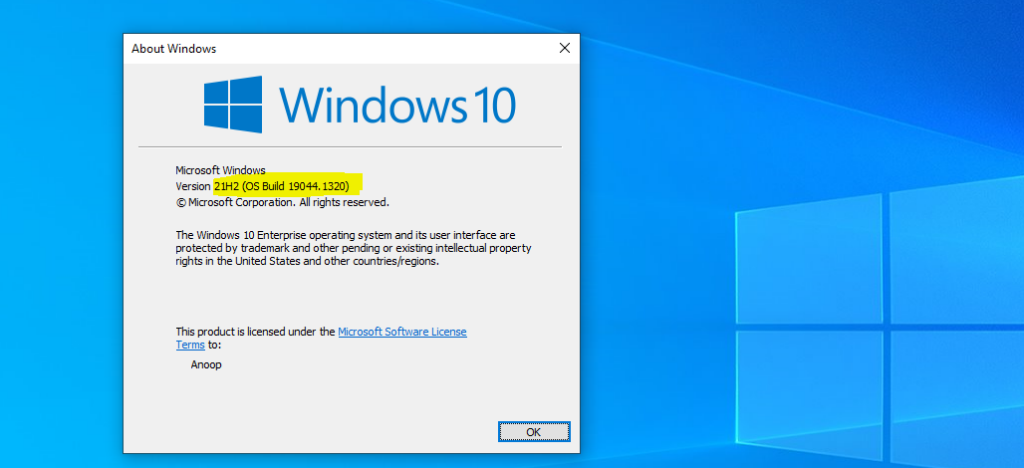
Well, you will need to confirm this by running Winver.exe from Start Menu – the RUN command box. You will need to have particular build and Rev numbers for each version of Windows 10 in the backported scenario.
You can refer to the post Windows 10 Version Numbers Build Numbers Major Minor Build Rev to know more about Windows 10 version, build, and revision numbers.
- Windows 10 21H2 version should have – 19044.1319 or later
- Windows 10 21H1 version should have – 19043.1319 or later
- Windows 10 20H2 version should have – 19042.1319 or later
- Windows 10 20H1 (2004) version should have – 19041.1319 or later
Azure Virtual Desktop and Windows 365 User Policy Issue
Are you facing issues with Intune-managed AVD or Windows 365 Cloud PCs during the enrollment phase? Is it causing a delay in completing the enrollment? You are not alone. There is a known issue with user policy deployment, and this is because of an issue with Windows 10 client and Azure AD Primary Refresh Token (PRT).
As I mentioned before, Microsoft fixed this issue with Windows 10 21H2 version, and this fix is backported with the November LCU patch KB5006738.
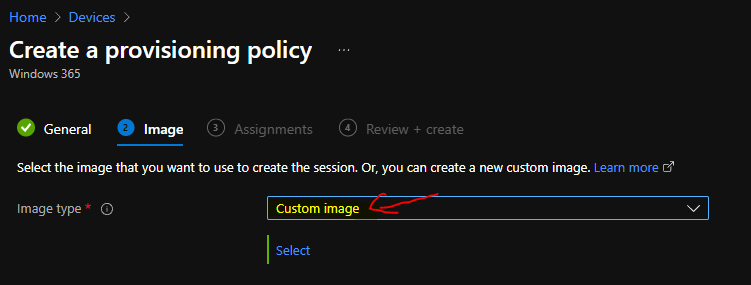
For AVD and Windows 365 provisioning, you will need to make sure that you create and use a custom image to include this patch (November Cumulative Update KB5006738) to fix the user-based policy deployment issue for Hybrid Azure AD joined devices.
Another option is to start using the Windows 10 21H2 version of the image once it’s available in Azure Image Gallery for Azure Virtual Desktop. For Windows 365, you will need to wait for Windows 10 21H2 image availability in the MEM admin center portal.
I don’t know how frequently Microsoft updates the Azure Gallery images with the latest Cumulative Updates. You will need to wait for the Azure image gallery image update with Nov LCU to fix the issue for previous versions of Windows 10, as I mentioned above.
Windows Autopilot Azure AD PRT Primary Refresh Token
Windows Autopilot Hybrid Azure AD join scenario also faces the same issue with user-based policies and Enrollment status page failures because of Windows 10 client issue with Azure AD primary refresh token (PRT).
This issue with Window Autopilot will also get resolved with Windows 10 21H2 version or the November LCU patch KB5006738.
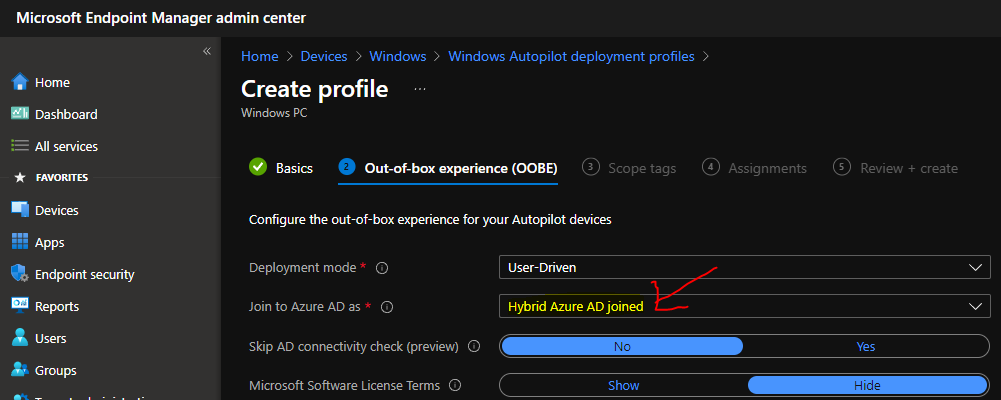
Now, it’s up to each organization to make arrangements to use either custom image to bring their Windows Autopilot devices to the latest patching level with Nov LCU. I don’t recommend using the Windows Autopilot Hybrid Azure AD scenario, and the best option is Azure AD joined scenario.
List of Fixes with KB5006738
The following are the other fixes available with the KB5006738 (November Cumulative Update). I think there are a lot of fixes that can help to make your life easy as a device management admin.
- Fixed a known issue that might prevent the successful installation of printers using the Internet Printing Protocol (IPP).
- Fixed an issue that prevents you from accessing the pre-provisioning page during the out-of-box experience (OOBE). This issue occurs when the credentials page for signing in to Azure Active Directory appears, and you press the Windows key five times.
Added a feature that facilitates certain cross-browser data transfers.
Fixed an issue with Assigned Access kiosks that are configured with Microsoft Edge as a kiosk application. These kiosks might sometimes fail to restart Microsoft Edge if users close the browser window.
Fixed an issue in which the use of App-V intermittently causes black screens to appear when signing in on the credentials page.
Fixed an issue that might prevent subtitles from displaying for certain video apps and streaming video sites.
Fixed an issue that prevents Windows 10 virtual private network (VPN) users from connecting to Windows Server 2019 Routing and Remote Access service (RRAS) servers.
Fixed an issue that prevents Software-Defined Networking (SDN) virtual machines from working when you configure the Generic Routing Encapsulation (GRE) VPN bandwidth limitation.
Fixed a Primary Refresh Token (PRT) update issue that occurs when VPN users sign in using Windows Hello for Business when the VPN connection is offline. Users receive unexpected authentication prompts for online resources that are configured for user sign-in frequency (SIF) in Azure Active Directory-Conditional Access.
Fixed an issue that causes Windows to go into BitLocker recovery after a servicing update.
Fixed an issue that might cause Kerberos.dll to stop working within the Local Security Authority Subsystem Service (LSASS). This occurs when LSASS processes simultaneous Service for User (S4U) user-to-user (U2U) requests for the same client user.
Fixed an issue in Code Integrity that might cause a memory leak.
Enhanced Microsoft Defender for Endpoint’s ability to identify and intercept ransomware and advanced attacks.
Fixed an issue in the OOBE that might cause Windows AutoPilot provisioning to fail.
Fixed an issue that prevents Kana input mode users from inserting a question mark (?) using the Shift-0 key combination.
Fixed an issue that sometimes causes the lock screen to appear black if you enable slideshow.
Fixed a reliability issue with LogonUI.exe, which affects the rendering of the network status text on the credentials screen.
Fixed an issue that causes Server Message Block (SMB) Query Directory Requests to fail when the buffer size is large.
Fixed a memory leak issue in lsass.exe on domain controllers in the forest root domain when you have multiple forests and multiple domains in each forest. The SID-Name mapping functions leak memory when a request comes from another domain in the forest and crosses forest boundaries.
Fixed an issue with the virtual machine (VM) Load Balancing feature, which ignores a site’s fault domain.
Author
Anoop is Microsoft MVP! He is a Solution Architect in enterprise client management with over 17 years of experience (calculation done in 2018). He is Blogger, Speaker, and Local User Group HTMD Community leader. His main focus is on Device Management technologies like SCCM 2012, Current Branch, and Intune. He writes about ConfigMgr, Windows 11, Windows 10, Azure AD, Microsoft Intune, Windows 365, AVD, etc…..…



Discussion