






Endpoint Analytics Intune Data Collection Policy Issue Workaround
Let’s check the issue with the Endpoint Analytics Intune Data Collection Policy. I had seen one issue that I couldn’t edit the Intune data collection policy when I tried to open it from Endpoint analytics. I hope this will be fixed soon. You will learn more about the difference between Policy type 108 and 109 from this post!
I’ll also share a workaround for the issue with the data collection policy. I think this is just a hyperlink issue. I have raised a ticket with Microsoft and still waiting for the resolution or fix. I don’t believe this is a critical issue because you will have an easy workaround for this issue.
I have explained the configuration and other details of Intune data collection policy in the Endpoint Analytics configuration post for Cloud PCs. This policy helps to collect the relevant data for endpoint analytics reports. I still have an outstanding issue (explained in the above post) with some of the endpoint analytics reports with Cloud PCs.
- Configure Update Compliance Patch Management Reports Using Intune And Log Analytics
- Intune Logs Event IDs IME Logs Details
Issue with Endpoint Analytics Intune Data Collection Policy
Endpoint analytics Intune data collection policy helps to Collect user experience data from Intune-managed Windows PCs. You will need to go through the following steps to reproduce the issue.

- Login to Endpoint.Microsoft.com with appropriate permission.
- Navigate to Reports -> Endpoint Analytics tab.
- From the General page of Settings tab.
Now, you will need to click on the link called Intune Data Collection Policy. This will take you to Intune configuration profiles and open the particular data collection policy.
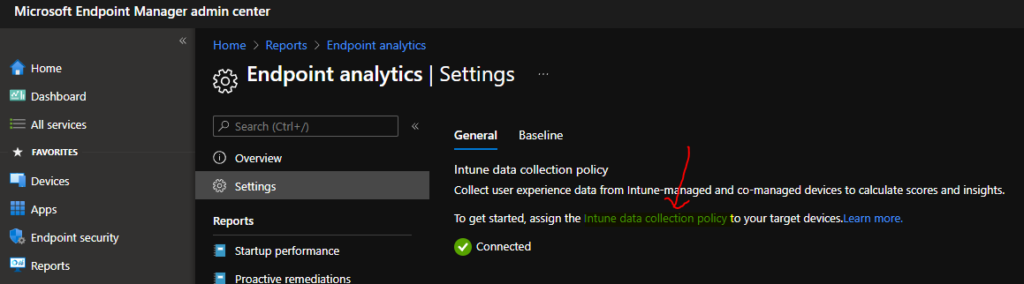
The URL of the Intune data collection policy link is the following one – https://endpoint.microsoft.com/#blade/Microsoft_Intune_DeviceSettings/ConfigurationMenuBlade/properties/configurationId/b87e3df8-ad74-427d-ac66-bb88523a5203/policyJourneyState/0/policyType/108
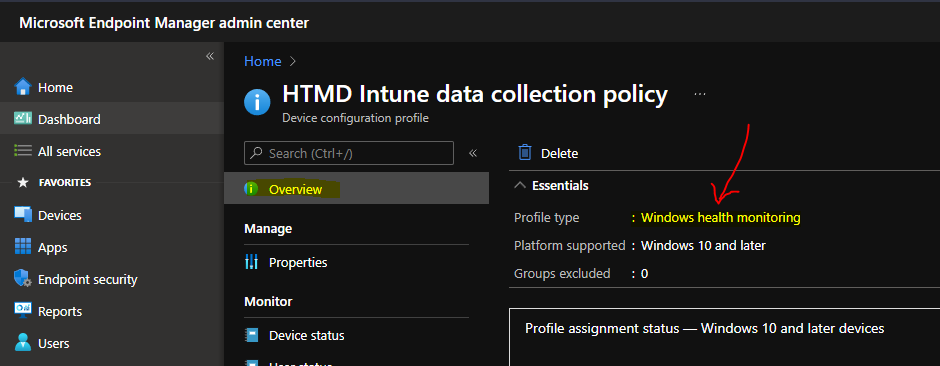
The overview page shows the correct profile type and its Windows Health Monitoring. All good until this post!
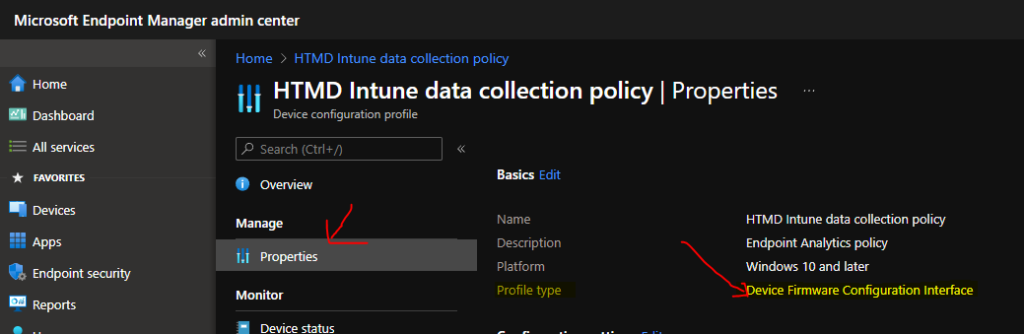
Now, when I go to the properties tab of this policy, things will get weird! I don’t know what the reason is for the same.
Well, the profile type of the same policy is automatically changed to Device Firmware Configuration Interface.
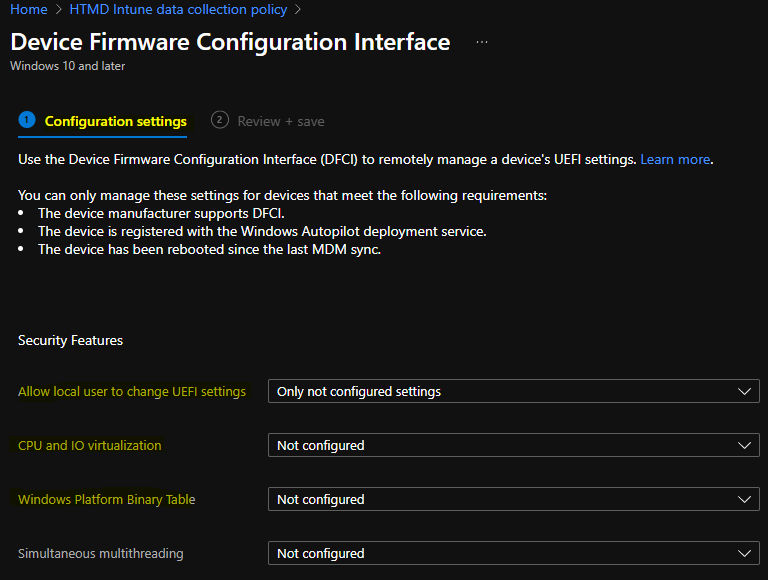
And that is not all. When you try to edit the policy to change some configuration of Windows Health Policy, to your surprise, you will get only get the following options. All the following options are related to the Device Firmware Configuration Interface (DFCI) profile type.
So this is the problem with the Endpoint Analytics Intune data collection policy link from the settings page.
Workaround to Edit Endpoint Analytics Intune Data Collection Policy
There is an easy workaround to Edit Endpoint Analytics Intune Data Collection Policy. You will need to copy the name of the Intune data collection policy (you know how to get it from the above section).
Navigate to Devices – Windows – Configuration Profiles and search with the policy name.
The link to open the Windows Health Monitoring policy is given below https://endpoint.microsoft.com/#blade/Microsoft_Intune_DeviceSettings/ConfigurationMenuBlade/properties/configurationId/b87e3df8-ad74-427d-ac66-bb88523a5203/policyType/109/policyJourneyState/0
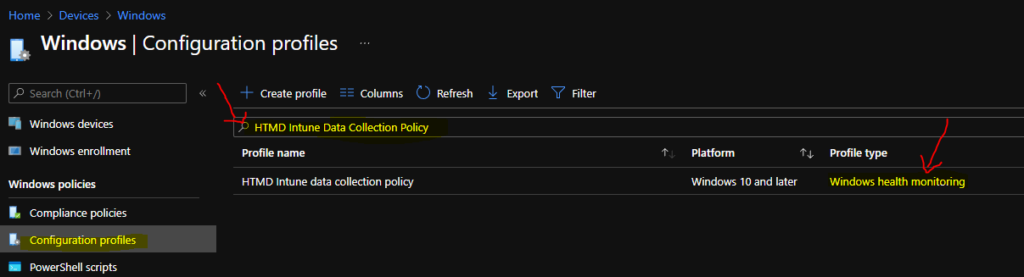
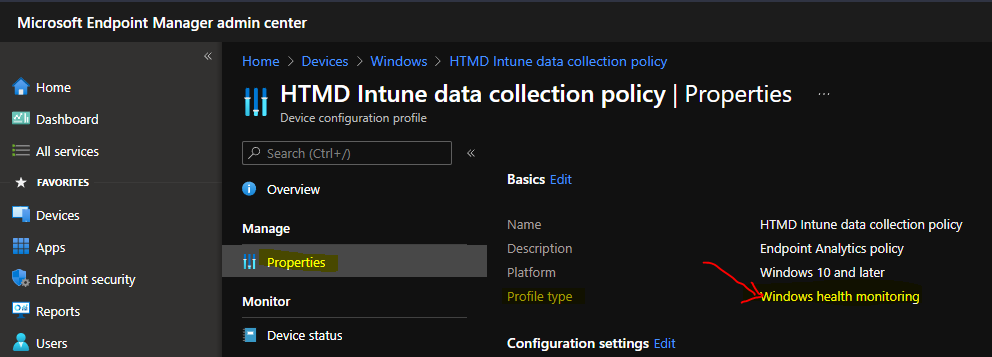
Click on the policy and go to Properties to check whether the Profile Type is Windows Health Monitoring or not.
Now you will be able to edit the Configuration Settings and change the Windows Health Monitoring-related policies. I have explained end to end policy configuration process in the previous blog post. Cloud PC Monitoring Health Performance Using Endpoint Analytics Intune.
- Health monitoring = Enable
- Scope = Endpoint analytics, Windows updates
NOTE! – Policy type 109 refers to Windows health monitoring policy, whereas Policy type 8 refers to Device Firmware Configuration Interface.
Author
Anoop is Microsoft MVP! He is a Solution Architect in enterprise client management with over 17 years of experience (calculation done in 2018). He is Blogger, Speaker, and Local User Group HTMD Community leader. His main focus is on Device Management technologies like SCCM 2012, Current Branch, and Intune. He writes about ConfigMgr, Windows 11, Windows 10, Azure AD, Microsoft Intune, Windows 365, AVD, etc…..…


hehe, just came around and saw your post.
20.09.2023, the hyperlink is (at least in our tenant) still broken 😀