






How to Remove SCCM Client from Provisioning Mode | ConfigMgr
Hello, everyone. In this post, I will show you how to remove SCCM client from provisioning mode.
The client will be in Provisioning mode during operating system deployment (OSD). This applies to upgrading the OS Task Sequence(TS) in place. When the client is provisioning, it doesn’t process policy from the server side.
Provisioning mode behavior helps the task sequence run without additional deployments. The client should automatically exit provisioning mode once the task sequence is completed.
Updated on 19th April 2021 – I have received feedback from the community that using the commands instead of registry values is better. The PowerShell option was already given in the blog post. I appreciate the comments and involvement with the HTMD community.

Table of Contents
Introduction
This issue occurs when performing an in-place upgrade to Windows 10. If the upgrade activity fails, the ConfigMgr client will fall into provisioning mode (not always).
If the ConfigMgr client is in provisioning mode, client-side communications can not reach the SCCM servers. However, in my experience, the client can receive the new policies.
The client will be inactive in the SCCM console. To manually remove the ConfigMgr client from provisioning mode, follow the below steps.
- Changing Registry Value
- PowerShell Command
Issue
When I was going through the console, I realized that some of the ConfigMgr (a.k.a. SCCM) had a problem.
- Verify the client activity status in the ConfigMgr console. If the client is inactive, you need to perform further troubleshooting.
- Communication 37 means that 37 policies were sent from the server side, but the client did not respond.
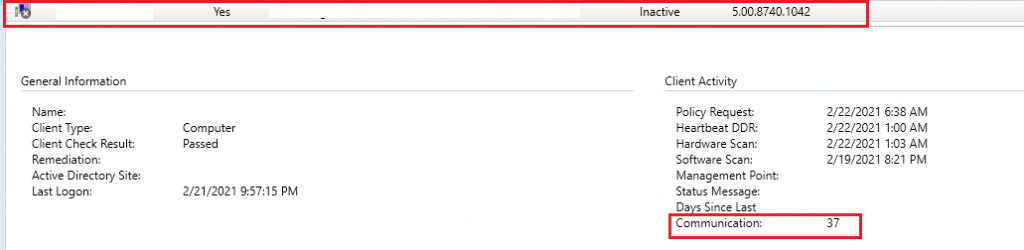
- Verify the client-side log CcmNotificationAgent.log to see if the ConfigMgr client is provisioning.

CRL Checking is Enabled.
Faild to read 'security Token' from registry.
CCMGetCertificateContextWrapperEx - function called while in provisioning mode.
CCMGetCurrentSigningCertificateContext failed when get client certificate context. 8000ffff
Fix – Remove SCCM Client from Provisioning Mode
You can use the following two methods to fix the provisioning mode issue.
| Two Methods To Fix the Provisioning Mode Issues |
|---|
| Changing Registry Value |
| PowerShell Command |
NOTE! – If the task sequence unexpectedly fails, the client can be left in provisioning mode. In this scenario, you must troubleshoot further and understand why the client is in provisioning mode.
Changing Registry Value
This method changes the registry value to remove the ConfigMgr client from provisioning mode.
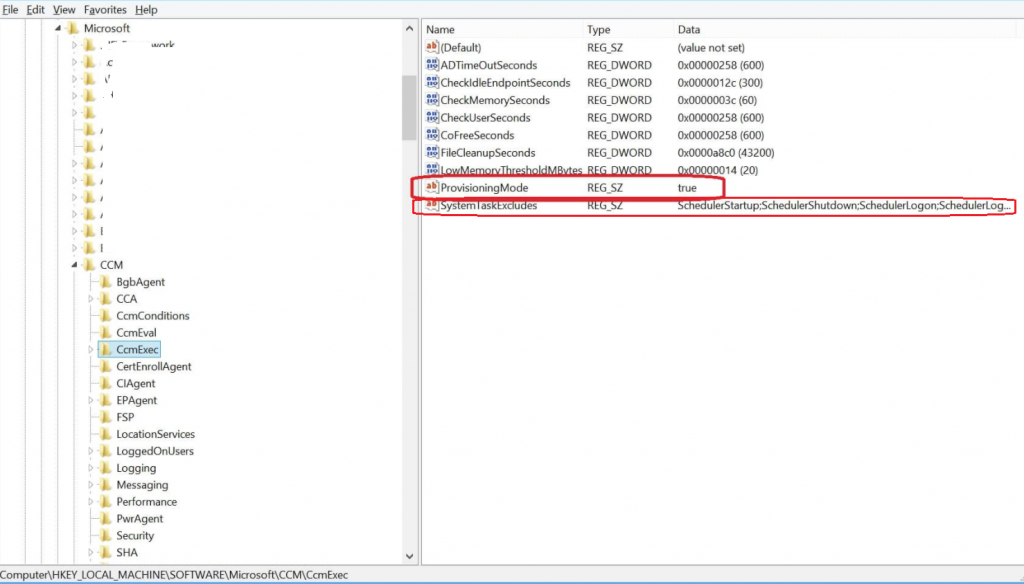
- If the value of ProvisioningMode in the following registry key, HKLMSoftwareMicrosoftCCMCcmExec, is True, then the client is in provisioning mode.
- Remove the client from provisioning mode and modify the value of ProvisioningMode to False in the following registry key: HKLMSoftwareMicrosoftCCMCcmExec. Also, remove the value inside SystemTaskExcludes.
NOTE! – We recommend you create a backup before editing the registry.
PowerShell Command
The following PowerShell command helps us Remove the SCCM Client from Provisioning Mode. The command line below invokes the WMI method and modifies the value.
Invoke-WmiMethod -Namespace root\CCM -Class SMS_Client -Name SetClientProvisioningMode -ArgumentList $false
Resources
We are on WhatsApp now. To get the latest step-by-step guides, news, and updates, Join our Channel. Click here – HTMD WhatsApp.
Author
Debabrata Pati has more than 8+ years of experience in IT. Skilled in MEMCM, Azure, and Powershell. More than Six (6) years of experience in MEMCM (SCCM) administration, OSD, and Troubleshooting for the environment with more than 100K client devices.




Microsoft Premier support told us DO NOT do this by editing the registry. Always activate the invoke WMI method to remove it from provisioning. The Registry is just a surface view of what is going on and there are components of the client that will not reset correctly if you just alter the registry.
100% – Do not change the registry values! Only use the command lines.
https://garytown.com/configmgr-client-provisioning-mode
Use the following command instead
New-ItemProperty -path “HKLM:\SOFTWARE\Microsoft\CCM\CcmExec” -Name “ProvisioningMode” -Type string -force -value “false”
([wmiclass]’ROOT\ccm:SMS_Client’).SetClientProvisioningMode(0)