






Block Webshell and Suspicious Executable Creation on Servers using Intune ASR Rules
Let’s discuss how to Block Webshell and Suspicious Executable Creation on Servers using Intune ASR Rules. A webshell is a small program or script that a hacker can put on a server. Once it’s there, the hacker can control the server remotely.
Once a webshell is in place, attackers can execute commands, manipulate files, steal sensitive data, and even deploy ransomware. Servers hosting web applications are prime targets for webshell attacks because they are often exposed to the internet and may have vulnerabilities that attackers can exploit.
One of our posts highlights Application Control for Business, a powerful Windows security solution that blocks unwanted apps and malware. By using IT policy rules combined with Microsoft’s AI-based app reputation technology, it ensures only trusted applications run on devices. This proactive approach prevents unauthorized software, reduces security risks, and helps organizations maintain a safer, compliant computing environment.
This post explains how to block webshells and suspicious executable creation on servers using Intune ASR (Attack Surface Reduction) rules. By implementing these rules, organizations can prevent attackers from running malicious scripts, installing unauthorized programs, or gaining persistent access to servers.

Table of Contents
Block Webshell and Suspicious Executable Creation on Servers using Intune ASR Rules
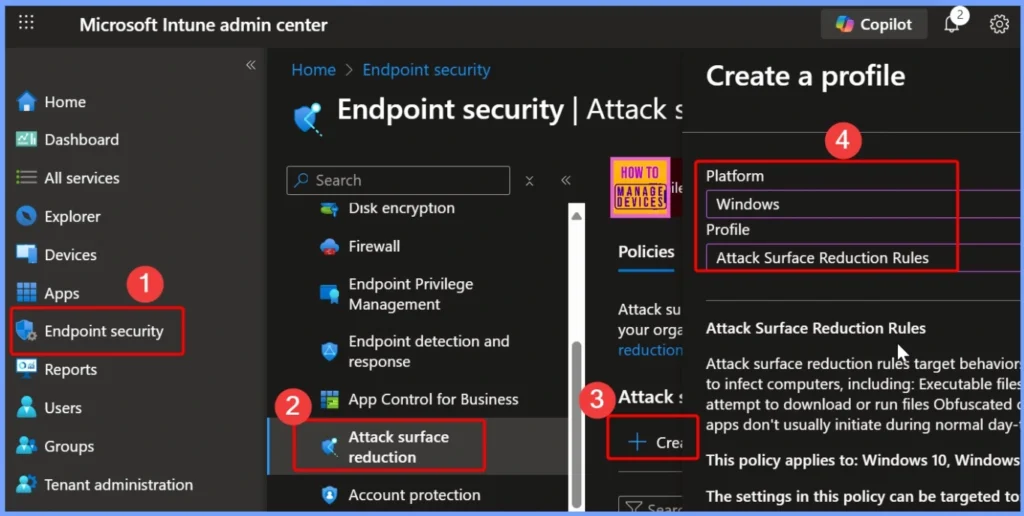
To block webshells and suspicious executable creation on servers using Intune ASR rules, first sign in to the Microsoft Intune Admin Portal with your credentials. Then navigate to Endpoint security > Attack surface reduction > Create Policy to begin configuring the necessary security settings.
- Benefits for Server Security
- Reduces the risk of server compromise
- Prevents attackers from uploading webshells even if vulnerabilities exist
- Protects sensitive data from unauthorized access
- Maintains service availability and uptime
- Limits lateral movement within the network
- Acts as a proactive defense layer alongside firewalls, endpoint protection, and intrusion detection systems
- Block Executable Files with Prevalence Age or Trusted List Criteria using Intune ASR Rules
- Configure Attack Surface Reduction ASR Rules in Intune
- Unable to Join Teams Meetings Using Links from Outlook Because of ASR Rules
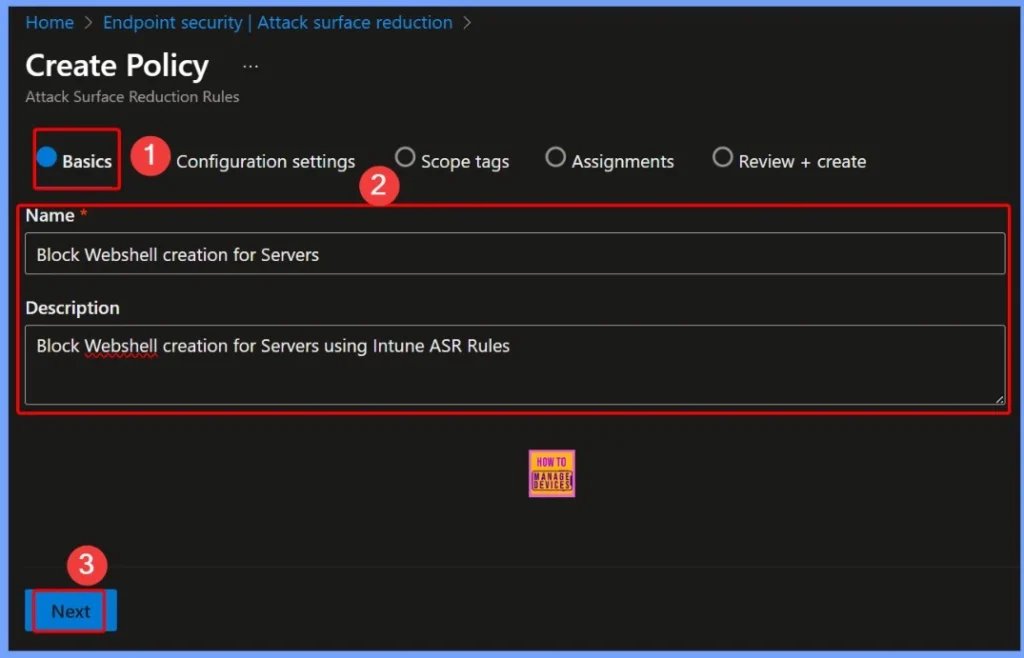
Basic Settings of the ASR Policy
In the basic settings of the ASR policy, you need to provide key details such as: Name: Block Webshell Creation for Servers, Description: Block Webshell creation for servers using Intune ASR rules. These details help identify the policy and clarify its purpose for securing your servers against malicious webshells.
| Policy Name | Description |
|---|---|
| Block Webshell Creation for Servers | Block Webshell Creation for Servers using Intune ASR Rule |
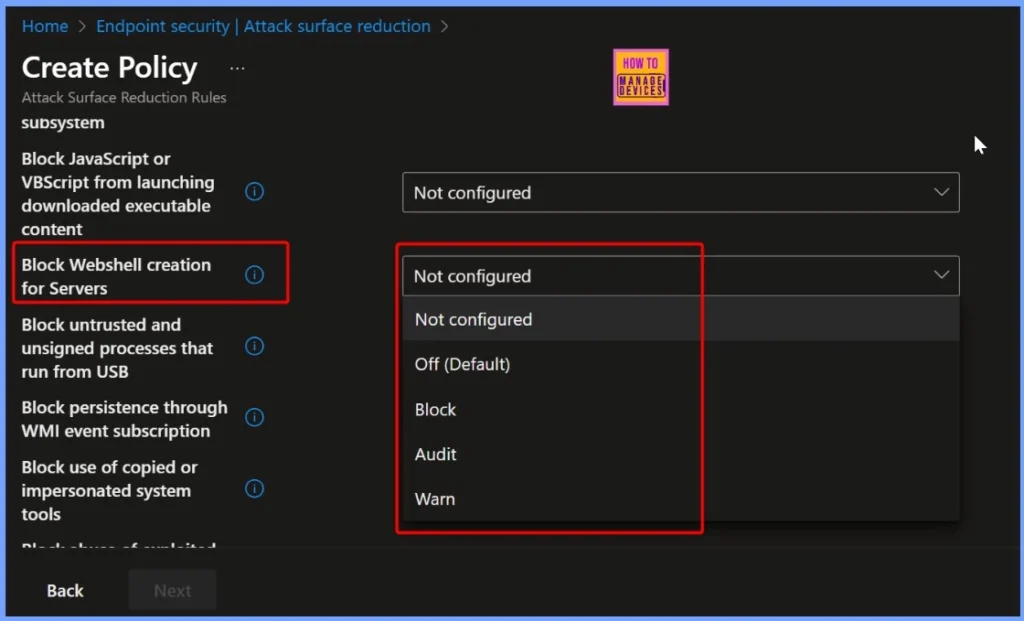
Default Setting for Blocking Webshell Creation
By default, the Block Webshell Creation for Servers setting in Intune ASR rules is Not Configured. This means the protection is not active until an administrator explicitly enables and applies the policy, ensuring servers remain unprotected from webshell threats until the rule is configured.
| Block Webshell Creation for Servers |
|---|
| Not Configured |
| Off (Default) |
| Block |
| Audit |
| Warn |
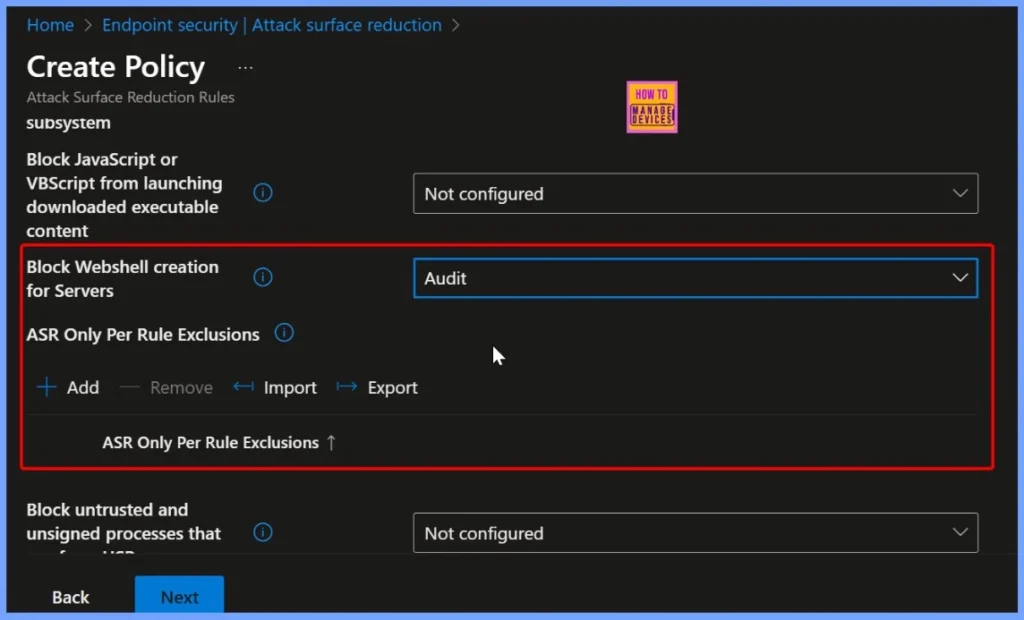
Webshell Creation Protection Enabled
The Block Webshell Creation for Servers setting is now enabled, actively preventing the creation of webshells on your servers. With this protection in place, servers are safeguarded against malicious scripts that could allow attackers to gain unauthorized access or control.
| Block Webshell Creation for Servers |
|---|
| Audit |
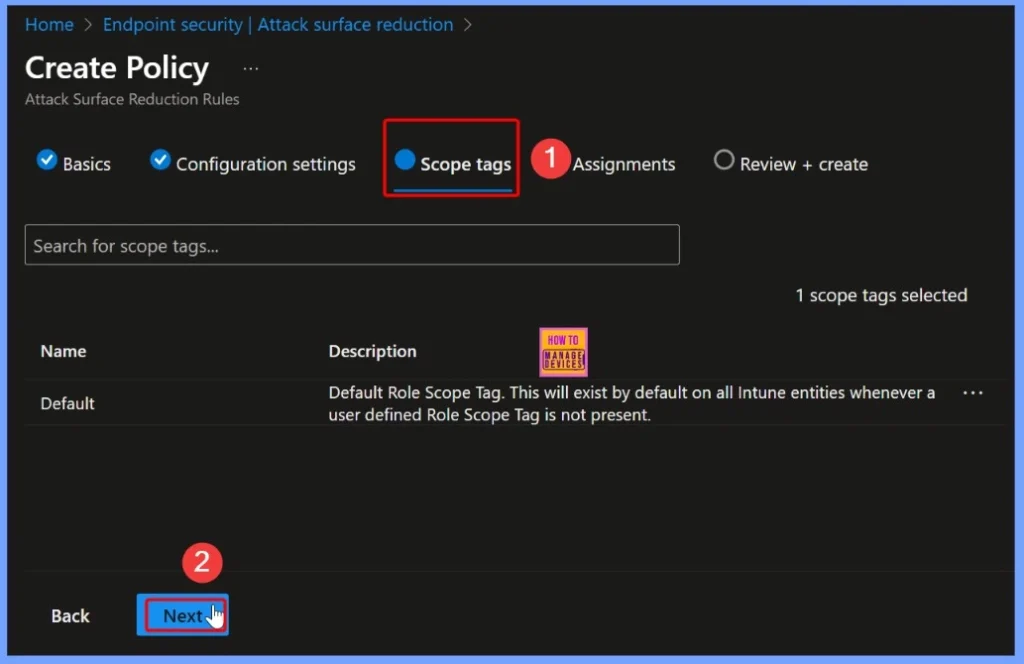
Webshell Creation Protection Enabled – Scope Tag
After enabling Webshell Creation Protection, you can assign a scope tag to define which groups or devices the policy applies to. Scope tags help IT administrators manage and target security policies efficiently across different teams or organizational units, ensuring that only the intended servers receive the webshell protection.
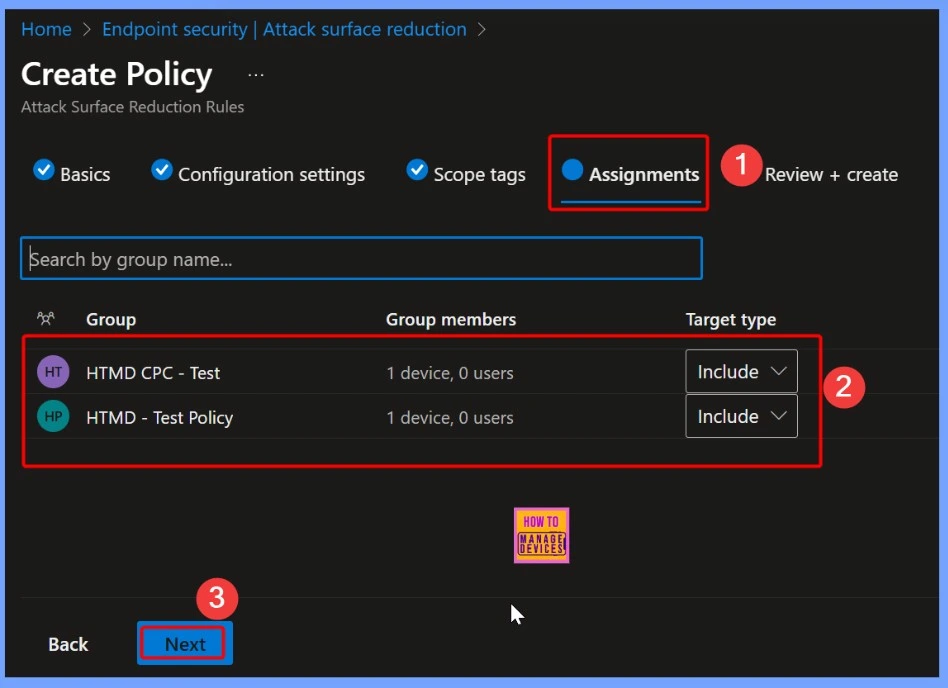
Understanding the Assignment Tab in Intune
The Assignment tab in Intune is where administrators specify which users, devices, or groups a policy should apply to. By configuring assignments, you can target the security settings, apps, or configurations to the right endpoints, ensuring that only the intended devices or users receive the policy.
- What is Microsoft Defender XDR?
- Microsoft Defender ASR Rules to Block Rebooting Machine in Safe Mode
- MDE Microsoft Defender for Endpoint Telemetry Issues
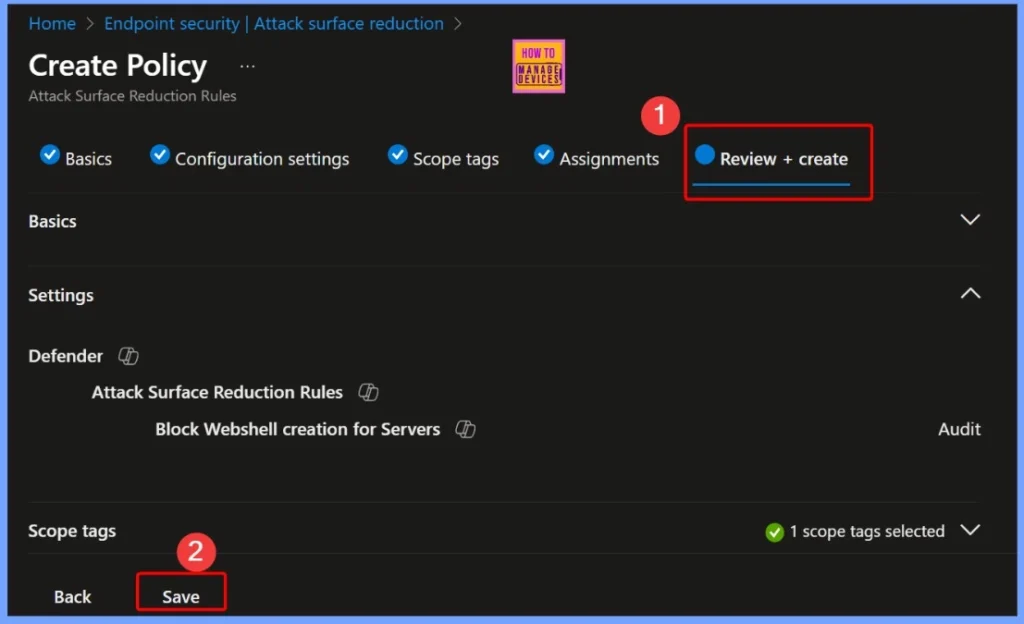
Verify All Policy Settings Before Deployment
The Review + Create step in Intune allows administrators to verify all policy settings before deployment. Here, you can double-check the configuration, scope tags, and assignments to ensure everything is correct. Once reviewed, you can click Create to deploy the policy, activating protections like webshell blocking or other security measures on the targeted devices.
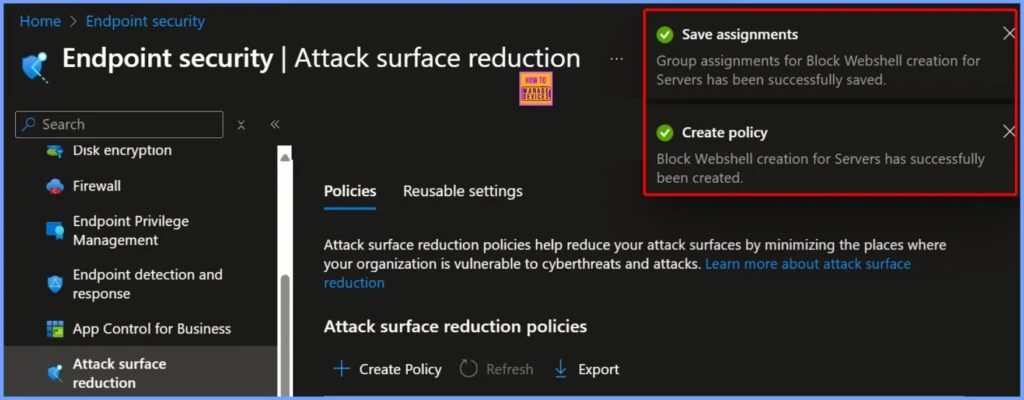
Policy Assignment and Creation Notification
After configuring the assignments, a notification confirms that group assignments for Block Webshell Creation for Servers have been successfully saved. Following this, another notification indicates that the policy has been successfully created, confirming that the webshell protection is now active and applied to the targeted servers.
Device and User Check-in Status – Successful Deployment Status
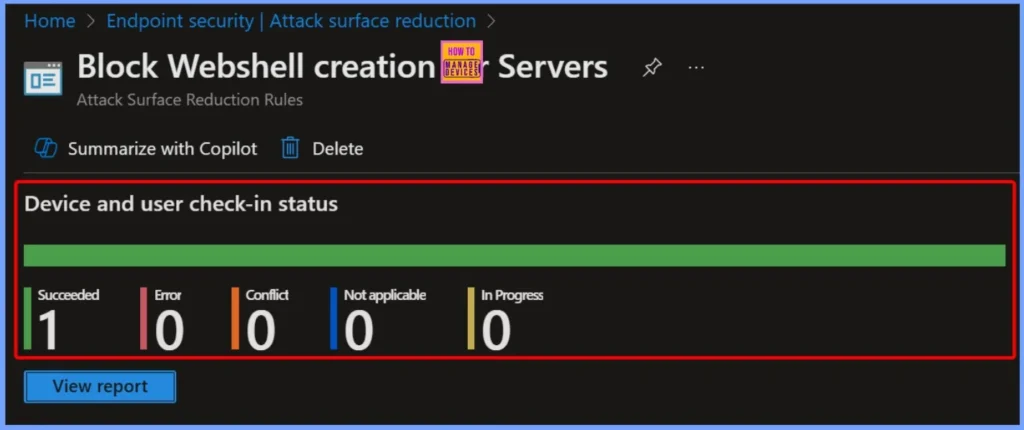
The Block Webshell Creation for Servers policy under Attack Surface Reduction rules shows a successful deployment status. According to the latest device and user check-in report, 1 device succeeded, with 0 conflicts, 0 not applicable, and 0 in progress, indicating that the webshell protection is effectively applied and operational.
Client Side Verification
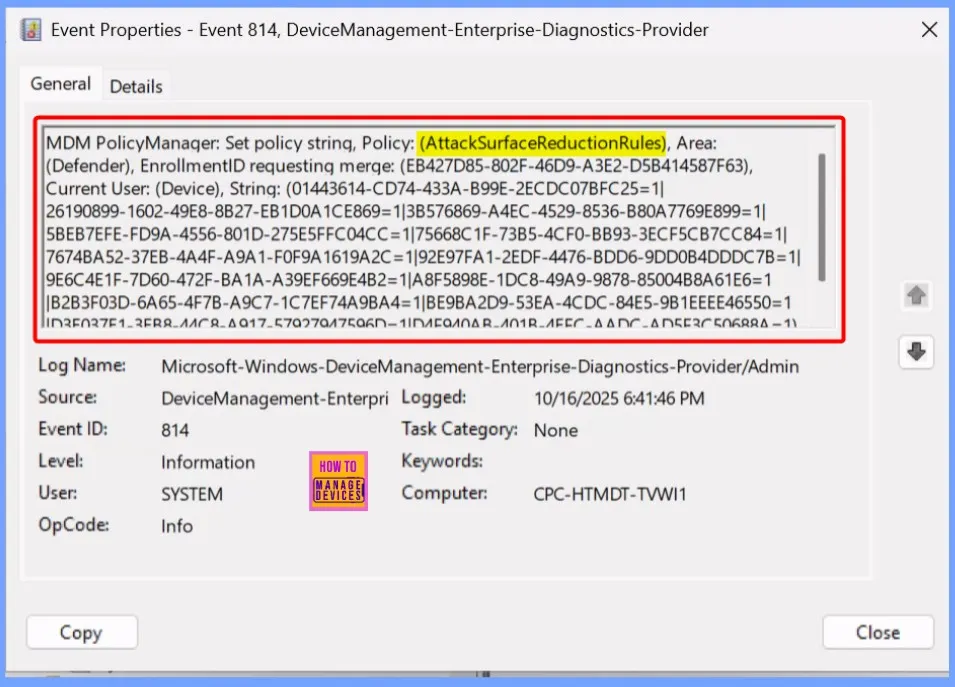
The rule “Block Webshell Creation for Servers” helps you to prevent the creation or execution of suspicious scripts on servers. It monitors file system activities and identifies patterns commonly associated with webshells, such as the creation of files with executable extensions in web directories or scripts containing obfuscated code.
To confirm this, check the Event log path – Applications and Services Logs – Microsoft – Windows – Devicemanagement-Enterprise-Diagnostics-Provider – Admin.
Need Further Assistance or Have Technical Questions?
Join the LinkedIn Page and Telegram group to get the latest step-by-step guides and news updates. Join our Meetup Page to participate in User group meetings. Also, Join the WhatsApp Community to get the latest news on Microsoft Technologies. We are there on Reddit as well
Author
Anoop C Nair has been Microsoft MVP from 2015 onwards for 10 consecutive years! He is a Workplace Solution Architect with more than 22+ years of experience in Workplace technologies. He is also a Blogger, Speaker, and Local User Group Community leader. His primary focus is on Device Management technologies like SCCM and Intune. He writes about technologies like Intune, SCCM, Windows, Cloud PC, Windows, Entra, Microsoft Security, Career, etc


Discussion