






Bug Fix OOB Update for Domain Controllers to fix Sign in and Kerberos authentication Issue
Microsoft released a bug fix OOB update for Domain controllers to fix sign-in and Kerberos authentication Issues. Sign-in & Kerberos issues have impacted many environments after the 8th Nov Cumulative updates. There are registry fixes already available as a workaround from Microsoft for this issue.
Microsoft released Out-of-band (OOB) security updates on 17th November 2022 (PT) for installation on all the Domain Controllers (DCs) in affected environments. This OOB update helps to fix the known issues that might cause sign-in failures or other Kerberos authentication issues.
With this release of the OOB update, there is no longer the need for registry workarounds. You can remove the workarounds for this issue and apply this OOB update. Since this is an out-of-band update, you must follow certain steps to import this to SCCM/WSUS.
This OOB update is applicable only for Domain Controllers (DCs). There is no need to install this update on the member servers and Windows 11 or Windows 10 devices. The following are the applicable operating systems for this OOB update:

- Windows Server 2022
- Windows Server 2019
- Windows Server 2016
- Windows Server 2012 R2
- Windows Server 2012
- Windows Server 2008 R2 SP1
- Windows Server 2008 SP2
Impact: sign in and Kerberos authentication Issue after Nov 2022 Updates
Microsoft released the November security patches to fix vulnerabilities explained in the following CVEs – CVE-2022-38023 and CVE-2022-37967. More details on the Kerberos issues are presented. Potential Impact with Kerberos Protocol Changes | November Patches. The signing error that you see with this issue is:
An authentication Error has occurred. The encryption type requested is not supported by the KDC.
Remote Computer: EPFC0156
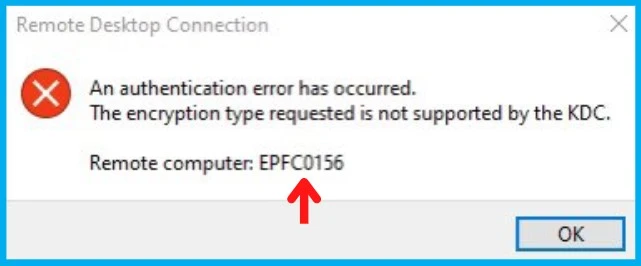
Sign in and Kerberos authentication Issue Domain Controllers. Some scenarios which might be affected:
- Domain user sign-in might fail. This also might affect Active Directory Federation Services (AD FS) authentication.
- Group Managed Service Accounts (gMSA) used for services such as Internet Information Services (IIS Web Server) might fail to authenticate.
- Remote Desktop connections using domain users might fail to connect.
- You might be unable to access shared folders on workstations and file shares on servers.
- Printing that requires domain user authentication might fail.
The OOB update fixes a known issue that might affect Windows servers with the Domain Controller (DC) role. They might have Kerberos authentication issues if both of the following are true:
- Installed November 8, 2022, or later update on the DC
- Configured the SupportedEncrytionType key to remove the RC4 cipher at a domain level or on individual accounts
You might receive Microsoft-Windows-Kerberos-Key-Distribution-Center Event ID 14 errors. These appear in the System section of the Event Log on your DC. The affected events include the text, “the missing key has an ID of 1”.
List of KBs and Download Links – Bug Fix OOB Update / Patches
Let’s find out the list of KBs for this bug fix for the sign-in and Kerberos authentication Issue. You can also have an entire list of direct download links to these OOB patches from the below table.
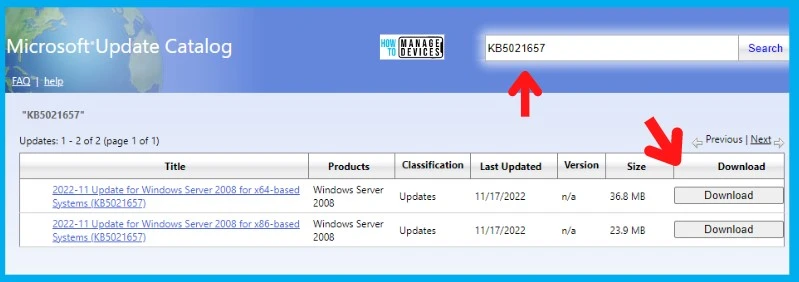
This issue impacts different KBs for different operating systems. As mentioned above, this OOB update applies only to Domain Controllers (DCs). You can download the KBs from the Microsoft Update Catalog website (https://www.catalog.update.microsoft.com/).
| OOB KB | OS | Download Link | KB Article |
|---|---|---|---|
| KB5021656 | Windows Server 2022 | 21H2 22H2 | November 17, 2022—KB5021656 (OS Build 20348.1251) Out-of-band – Microsoft Support |
| KB5021655 | Windows Server 2019 | 2022-11 CU | November 17, 2022—KB5021655 (OS Build 17763.3653) Out-of-band – Microsoft Support |
| KB5021654 | Windows Server 2016 | 2022-11 OOB Update | November 17, 2022—KB5021654 (OS Build 14393.5502) Out-of-band – Microsoft Support |
| KB5021653 | Windows Server 2012 R2 | 2022-11 OOB Update | KB5021653: Out-of-band update for Windows Server 2012 R2: November 17, 2022 – Microsoft Support |
| KB5021652 | Windows Server 2012 | 2022-11 OOB Update | KB5021652: Out-of-band update for Windows Server 2012: November 17, 2022 – Microsoft Support |
| KB5021651 | Windows Server 2008 R2 SP | 2022-11 OOB Update | KB5021651: Out-of-band update for Windows Server 2008 R2: November 18, 2022 – Microsoft Support |
| KB5021657 | Windows Server 2008 SP2 | x64 x86 | KB5021657: Out-of-band update for Windows Server 2008 SP2: November 17, 2022 – Microsoft Support |
Import OOB updates from the Microsoft Update Catalog to WSUS
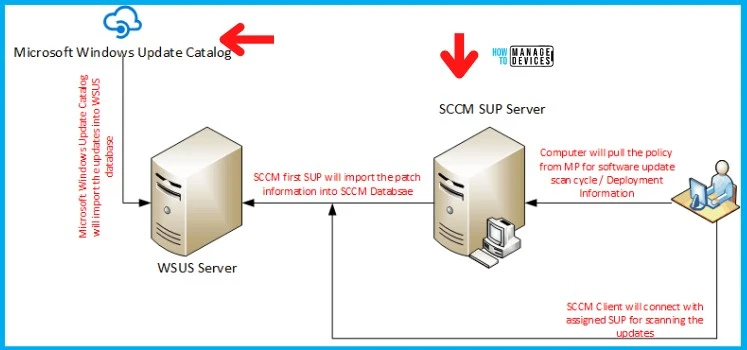
You can use the following guide to import OOB updates from the Microsoft Update Catalog to WSUS/SCCM. The top-level SUP uses WSUS to get information about software updates from Microsoft into SCCM.
Implementation Guide -> How To Import OOB updates into WSUS Manually
Author
Anoop C Nair is Microsoft MVP! He is a Device Management Admin with more than 20 years of IT experience (calculation done in 2021). He is Blogger, Speaker, and Local User Group HTMD Community leader. His main focus is on Device Management technologies like SCCM 2012, Current Branch, and Intune. He writes about ConfigMgr, Windows 11, Windows 10, Azure AD, Microsoft Intune, Windows 365, AVD, etc.




How do you fix this issue