






Bug Fix Windows 10 Desktop or Taskbar disappearing or unresponsive using KIR
Microsoft fixed the bug of Windows 10 Desktop or Taskbar disappearing or unresponsive using KIR (Known Issue Rollback). This Windows 10 issue impacts the devices with Cumulative Update KB5016688 or later.
You might experience an error in which the desktop or taskbar might momentarily disappear, or your device might become unresponsive after installing Cumulative Update KB5016688 or later updates. This issue impacts the latest November Cumulative Update KB5019959.
Microsoft generates a Known Issue Rollback (KIR) if there is an issue with a nonsecurity update with a critical regression or similar issue. When Microsoft decides to roll back a bug fix in an update because of a known issue, Microsoft Team announces the availability of KIR. It makes a configuration change in the cloud.
This process is automatic for the Windows Devices connected to Windows Update or Windows Update for Business (WUfB) are notified of this change, which takes effect with the next reboot. But if the Windows updates are managed via WSUS (SCCM), you need to download the KIR ADMX file, as explained in the below section.

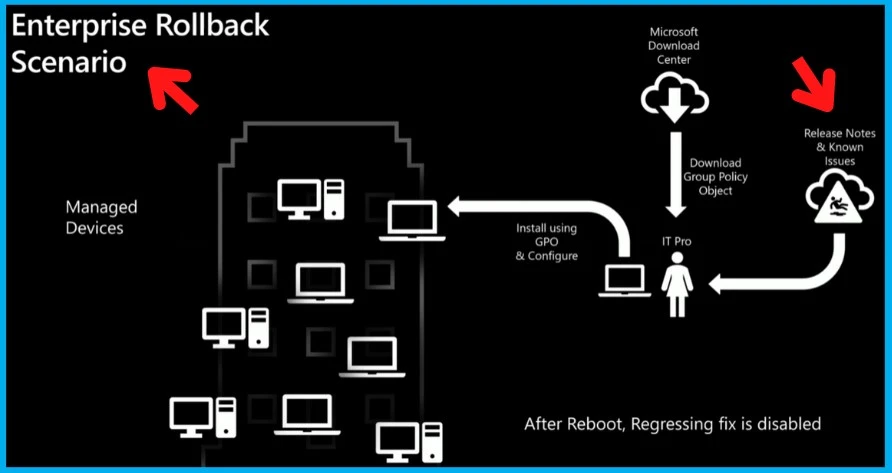
Download KIR for Windows 10 Desktop or Taskbar disappearing or unresponsive
First, download the KIR for Windows 10 Desktop or Taskbar disappearing or unresponsive bug fix. Microsoft provides the download information in the document’s Windows 10 known issues section. You can download the MSI file from the following link.
- Download – KB5016688 220820_03051 Known Issue Rollback – Windows 10 20H2, 21H1 and 21H2 KB5016688 220820_03051 Known Issue Rollback
The KB5016688_220820_0305_1_KnownIssueRollback.admx will be available once you install the downloaded MSI file to rollback the component that is the root cause for the desktop or taskbar momentarily disappear, or your device might become unresponsive fix.
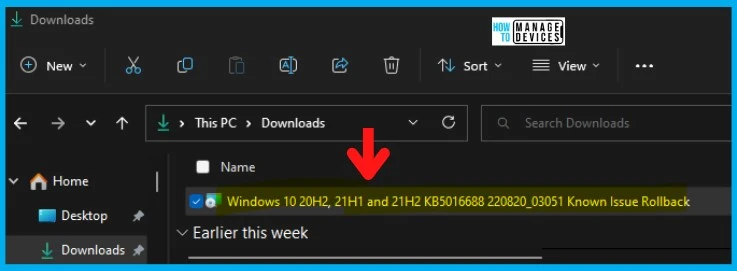
How to get to KB5016688_220820_0305_1_KnownIssueRollback.admx
Let’s find out how to get to KB5016688_220820_0305_1_KnownIssueRollback.admx file. You can try installing the MSI file “Windows 10 20H2, 21H1 and 21H2 KB5016688 220820_03051 Known Issue Rollback.MSI.”
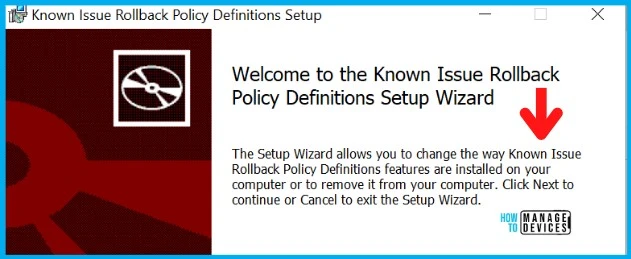
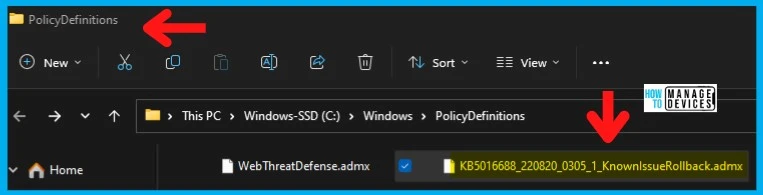
Once the MSI is installed, you can find the KB5016688_220820_0305_1_KnownIssueRollback.admx in the following folder.
- C:\Windows\PolicyDefinitions
- Or %systemroot%\PolicyDefinitions
Create Group Policies for Bug Fix Windows 10 Desktop or Taskbar disappearing
Let’s find out how to create Bug Fix Windows 10 Desktop or Taskbar disappearing or unresponsive. If you have implemented the Group Policy Central Store, you must copy the .admx and .adml files to the Central Store.
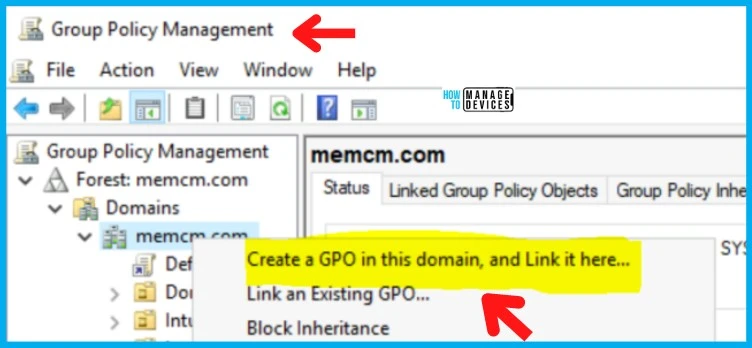
- Open Group Policy Management Console and select Forest: DomainName > Domains.
- Right-click your domain name, select Create a GPO in this domain and link it here.
- You can give a descriptive name to the GPO and click OK.
Create WMI Filter for Bug Fix Windows 10 Desktop or Taskbar disappearing
It’s time to create WMI filters for Bug Fix Windows 10 Desktop or Taskbar fading issues. You must open Group Policy Management Console (GPMC.MSC), select Forest: DomainName > Domains, and follow the steps below.
- Right-click WMI Filters, and then select New.
- Enter a name for your new WMI filter – “Bug Fix Windows 10 Desktop or Taskbar disappearing or unresponsive using KIR.”
- Enter a description of your WMI filter
- Select Add button
- In Query, enter the following WMI query strings:
The following queries cover different Windows 10 build versions. You can create the query depending on the Windows 10 OS versions that you have in your enterprise environment.
SELECT version, producttype from Win32_OperatingSystem WHERE Version = "10.0.19044"
SELECT version, producttype from Win32_OperatingSystem WHERE Version = "10.0.19043"
SELECT version, producttype from Win32_OperatingSystem WHERE Version = "10.0.19042"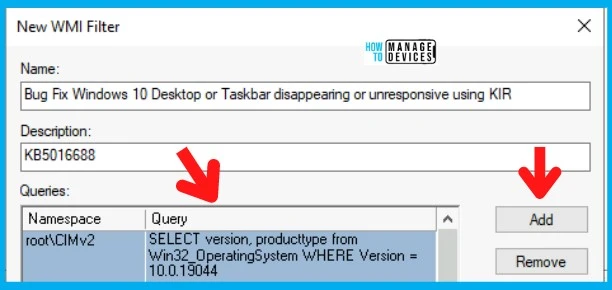
You can refer to the detailed post on how to complete the end-to-end KIR process. More Details -> Fix Windows Issue Deploy Known Issue Rollback Kir Using Group Policy.
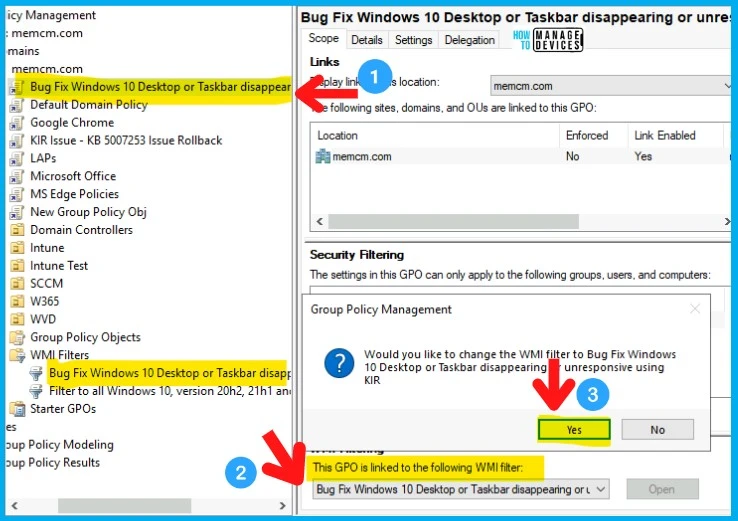
- How to Link Group Policy with WMI Filtering
- Configure the GPO for Rollback KIR Using Group Policy
Author
Anoop C Nair is Microsoft MVP! He is a Device Management Admin with more than 20 years of IT experience (calculation done in 2021). He is Blogger, Speaker, and Local User Group HTMD Community leader. His main focus is on Device Management technologies like SCCM 2012, Current Branch, and Intune. He writes about ConfigMgr, Windows 11, Windows 10, Azure AD, Microsoft Intune, Windows 365, AVD, etc.



I have been reporting missing taskbar to MS on Feedback hub for about a year, they finally noticed LOL, there are hundreds of likes that ppl have the same issue. They have made some changes, so my screens does not blink anymore when taskbar disappear, but still present till these days, especially when I woke up PC from sleep taskbar disappear, or hide behind the program which is maximized, only help is to restart explorer.exe. I hope they fix this for good. Btw I am running W11. Hope the fix works for 11 too.